

JavaScript Tools
JavaScript Tools gives you 27 browser-based utilities to format, inspect, encode, and test developer data instantly without any server uploads or.
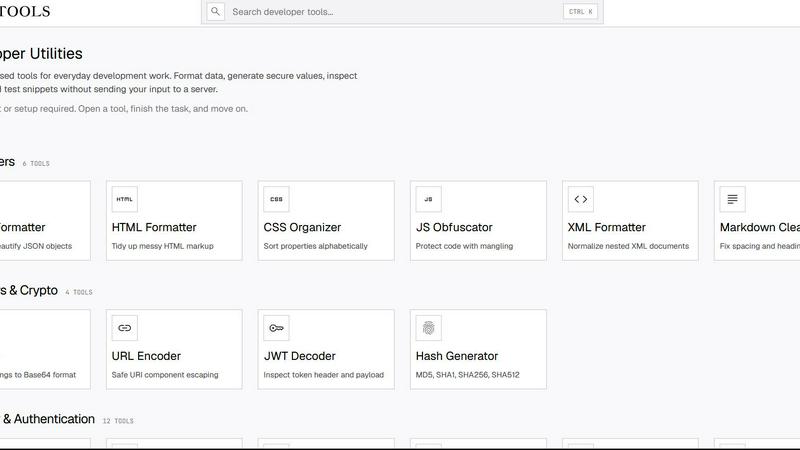
About JavaScript Tools
JSTools.Space is a comprehensive, browser-based developer utility platform that brings together over 80 specialized tools designed to streamline everyday development workflows. This all-in-one toolkit serves developers, engineers, and IT professionals who need quick, reliable access to essential utilities without the overhead of installing software, creating accounts, or worrying about data privacy. The platform covers an extensive range of categories including formatters for JSON, HTML, CSS, XML, SQL, and Markdown; text manipulation tools like diff checkers, case converters, and slug generators; security and authentication utilities such as password generators, JWT decoders, API key creators, and hash generators; encoding and decoding tools for Base64, URLs, and various file formats; and specialized Markdown tools for converting documents to PDF, Word, Google Docs, Slack, Notion, Jira, and Confluence. What sets JavaScript Tools apart is its commitment to local processing: the vast majority of operations run entirely within the user's browser, meaning no data is ever uploaded to external servers, no accounts are required, and no setup is necessary. Users simply open a tool, complete their task, and move on to the next challenge. This approach ensures maximum privacy, speed, and convenience for developers who value their time and data security. Whether you are formatting a messy JSON response, generating a cryptographically secure password, decoding a JWT token, or converting Markdown to a formatted Word document, JSTools.Space provides a focused, no-friction solution that fits seamlessly into any development workflow.
Features of JavaScript Tools
Comprehensive Formatting Suite
The platform offers an extensive collection of formatters that cover all major markup and programming languages. Developers can beautify or minify JSON objects, tidy up messy HTML markup, normalize nested XML documents, format readable SQL queries, and parse and beautify CSS stylesheets. Each formatter is designed to handle complex, nested structures and provides clear, visually organized output that is immediately usable. The tools operate with intelligent indentation, syntax highlighting, and error detection, ensuring that even malformed input is processed gracefully with helpful feedback. This feature alone saves developers countless hours of manual formatting and debugging.
Robust Security and Authentication Toolkit
JavaScript Tools provides a complete suite of security-focused utilities that generate and manage cryptographic credentials and tokens. Users can create strong random passwords, memorable passphrases, prefix-safe API keys, HMAC-ready JWT secrets, and random strings with custom alphabets. The platform also includes specialized generators for TOTP secrets, session IDs, CSRF tokens, OAuth state parameters, nonces, and UUID v4 identifiers. For hashing and encryption, the toolkit supports Argon2, Bcrypt, SHA-1 through SHA-512, MurmurHash, and AES-256-GCM encryption and decryption. All operations are performed locally, ensuring that sensitive credentials never leave the browser.
Advanced Encoding and Decoding Capabilities
The Base64 toolset is exceptionally comprehensive, offering 19 distinct encoding and decoding utilities. Users can convert Base64 to and from ASCII, audio, images, PDFs, videos, text, hex, files, and URLs. This feature is invaluable for developers working with data transmission, file uploads, multimedia processing, and API integrations. Each converter provides immediate previews where applicable, such as displaying decoded images or playing audio files directly in the browser. The tools support both encoding and decoding directions, making them suitable for a wide range of data transformation tasks without requiring external libraries or command-line tools.
Seamless Markdown and Document Conversion
JavaScript Tools excels at Markdown processing with 15 specialized tools that go far beyond basic editing. Users can write Markdown with a live rendered preview, generate aligned tables visually, clean up spacing and heading rhythm, and convert Markdown to ASCII, Word documents, PDFs, Google Docs, HTML, Slack messages, Notion documents, Jira wiki markup, and Confluence markup. The platform also includes a Markdown linter for finding structure and spacing issues, a table of contents generator, and a tool for converting Google Docs to clean Markdown. This feature effectively turns JSTools.Space into a complete document preparation and conversion platform for technical writers and developers.
Use Cases of JavaScript Tools
API Development and Testing
When building or testing RESTful APIs, developers frequently need to format JSON responses, decode JWT tokens from authentication headers, generate secure API keys, and create random UUIDs for resource identification. JavaScript Tools provides all these utilities in one place, allowing developers to quickly inspect and manipulate API payloads without leaving their browser. The JWT decoder reveals header and payload contents instantly, while the JSON formatter makes large response bodies readable. The API key generator creates properly prefixed credentials ready for integration, and the UUID v4 tool produces unique identifiers for testing endpoints. This integrated workflow dramatically accelerates API development cycles.
Data Privacy and Security Compliance
For developers working with sensitive data or building applications that must comply with regulations like GDPR, HIPAA, or SOC 2, JavaScript Tools offers a privacy-first solution. Since all encoding, decoding, hashing, and encryption operations run locally in the browser, no sensitive data is ever transmitted to external servers. This makes the platform ideal for processing confidential information such as passwords, encryption keys, authentication tokens, and personal data. The AES encryption and decryption tools allow developers to test encryption flows securely, while the hash generators enable safe password hashing verification without exposing plaintext credentials to third-party services.
Content Management and Technical Writing
Technical writers, documentation specialists, and content managers benefit enormously from the Markdown conversion tools. A writer can draft documentation in Markdown, then instantly export it as a formatted Word document for client review, a PDF for distribution, HTML for web publishing, or formatted text for Slack, Notion, Jira, or Confluence. The Markdown linter ensures consistent formatting across large documentation sets, while the table generator creates clean, aligned tables for specifications or data sheets. The ability to convert Google Docs to Markdown also streamlines the process of bringing existing content into Markdown-based workflows, making this toolset essential for modern documentation pipelines.
Code Quality and Debugging Workflows
During code reviews and debugging sessions, developers frequently need to compare file versions, validate CSS syntax, obfuscate JavaScript, or clean up whitespace and duplicate lines. JavaScript Tools provides a text diff checker that highlights added and removed lines, a CSS checker that validates syntax and finds issues, and a JavaScript obfuscator for protecting code during distribution. The whitespace cleaner and duplicate line remover help maintain clean codebases, while the case converter handles naming convention transformations between camelCase, snake_case, kebab-case, and other formats. These utilities support a disciplined approach to code quality without requiring additional IDE plugins or command-line tools.
Frequently Asked Questions
Do I need to create an account or sign up to use JavaScript Tools?
No account or sign-up is required. JavaScript Tools is designed to be completely frictionless. You simply open any tool in your browser, complete your task, and move on. There are no user accounts, no login processes, and no personal information collection. This approach ensures both privacy and convenience, allowing you to start working immediately without any barriers to entry.
Are my files and data sent to any server when I use these tools?
The vast majority of operations on JSTools.Space run entirely locally within your browser. Your data, files, and inputs are processed on your own device and are never uploaded to any external server. This local processing ensures maximum privacy and security, particularly important when working with sensitive information like passwords, API keys, authentication tokens, or confidential documents. Some tools that require file downloads or conversions may temporarily process data in memory, but it is not stored or transmitted.
What file formats and data types are supported for encoding and decoding?
The platform supports an exceptionally wide range of formats for Base64 encoding and decoding. You can work with plain text, ASCII strings, audio files, images in various formats, PDF documents, video files, hexadecimal data, CSS snippets, HTML markup, and URLs. The encoding tools accept file uploads or direct text input, while decoding tools provide previews where applicable, such as displaying images, playing audio, or rendering PDFs directly in the browser. This comprehensive support covers virtually all common data encoding needs.
Can I use JavaScript Tools for production-level security credential generation?
Yes, the security and authentication tools are designed to produce cryptographically strong credentials suitable for production use. The password generator, API key generator, and JWT secret generator all use browser-based cryptographic random number generators to ensure unpredictability. The hash generators support industry-standard algorithms including Argon2, Bcrypt, SHA-256, SHA-512, and MurmurHash. However, for critical production systems, it is always recommended to verify generated credentials against your specific security requirements and to use dedicated security libraries for credential handling in your application code.
Similar to JavaScript Tools

Kody Tools
Free collection of online developer utilities, code formatters, and digital converters designed to streamline your daily workflow.


laya.tools
A free directory of 950+ projects built on Laya, the open-source decision model. Updated daily.

Forms Plugin
The #1 Native Form Builder Plugin for Framer - No Code, No Embeds, No External Platforms.


