

Systune
A Mac cleaner, security audit and macOS tuner in one app that shows every file before it removes anything
About Systune
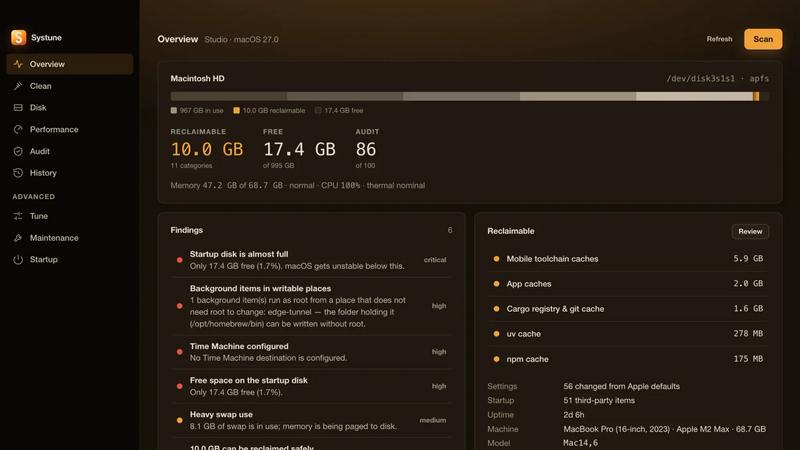
Systune is a Mac app that finds reclaimable disk space, audits 92 security and privacy settings, and puts 300 macOS preferences under your control. It also ships with a command line tool and a full-screen terminal interface, all driven by the same Rust engine.
The cleaner covers 103 categories, each with a risk level and a plain description of what it holds. Every removal is listed, sized and confirmed before anything happens through a test strip that states exactly what a commit will do, path by path. Items can be sent to the Trash instead of deleted, every settings change is snapshotted so it can be undone, and protected locations such as your keychain, iCloud Drive, Photos, Mail and Messages data are refused regardless of category.
Systune is aimed at Mac users who want to understand what is using their disk and what their system is doing, without handing data to a subscription service. It is a one-time purchase with no subscription, no telemetry and no analytics, and it works offline. The app requires macOS 14 or later and runs on Apple silicon and Intel. It is not yet released; the first 100 people on the waitlist receive a free lifetime license, with codes sent at release.
Similar to Systune

ButterShare
Realtime peer-to-peer file transfer in the browser. Send files directly between devices, no account and no upload to a server.

Emailyy
Free email tools for signatures, subject lines, HTML previews, word counts, and email headers. Browser-based, simple to use, and no signup required.

Todowing
Chrome extension that nests Todoist sub-tasks inline in Today, Upcoming, Filters and Labels. Free tier, or $19.99 once for everything.

Uniclip
Clip pages, take full-page screenshots and batch-capture list data to Notion, Feishu, Obsidian, Markdown, CSV or JSON.

TroveKey
Search tabs, Chrome bookmarks and history, run browser commands, and save webpages and social posts locally—no account.

Foreman
See every app and what it's using in plain English, and end or slow down the one that's hogging your Mac.

Typebar
Every key you press lights up on an on-screen keyboard, and each shortcut is named as you press it.
