
Alternatives to FreeTextUtils
Explore the best alternatives and competitors to FreeTextUtils.
Explore 20 alternatives to FreeTextUtils. Compare features, pricing, and find the best fit for your needs.

Kody Tools
Free collection of online developer utilities, code formatters, and digital converters designed to streamline your daily workflow.

layahost
Jev-compatible typed decisions API: moderation, routing, intent and scoring for any text, hosted in the EU.

laya.tools
A free directory of 950+ projects built on Laya, the open-source decision model. Updated daily.

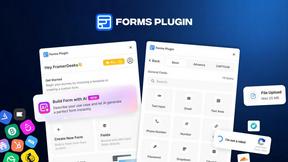
Forms Plugin
The #1 Native Form Builder Plugin for Framer - No Code, No Embeds, No External Platforms.

AkraLabs
Where modern software products get discovered, launched, and distributed. Explore verified AI tools, SaaS startups, and developer software.






PerPageFax
PerPageFax lets you send a fax online from any browser for a flat $0.50 per page — no account, no subscription, no fax machine.


calculate.at
calculate.at is a free online calculator hub — 290+ tools for finance, health, math, and conversions, no signup needed.
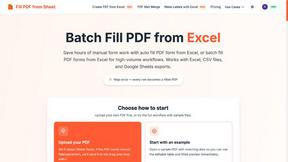
Fill PDF from Sheet
Fill PDF from Sheet automates the process of populating PDF forms from data in Excel, CSV, or Google Sheets.


AppBanana
10,000+ Apps Approved, Yours Next With 10,000+ successful apps, we know exactly what Google wants, and how to get yours approved.

Glanced
Follow news, blogs, newsletters, and podcasts in a free RSS reader, with AI summaries, top stories, full-text search, saved searches, and a catalog.


About FreeTextUtils Alternatives
FreeTextUtils occupies a distinct space in the landscape of online productivity tools, functioning as a comprehensive, browser-based suite designed for text manipulation and analysis. It belongs to the broader category of utility toolkits that serve writers, developers, and students, offering over 50 distinct functions ranging from word counting and reading time estimation to URL encoding and duplicate removal. Users commonly seek alternatives to such platforms when their needs evolve beyond the basic set of tools, perhaps requiring deeper integration with specific workflows like content management systems, advanced batch processing capabilities, or a more modern interface that supports real-time collaboration. Others may look for alternatives due to concerns about feature limitations, such as the absence of grammar checking or API access, while some users might prefer desktop-native applications that offer more robust offline performance or operating system-level shortcuts. When evaluating a replacement for a tool like FreeTextUtils, it is essential to prioritize the specific tasks you perform most frequently and consider how a new platform aligns with your privacy expectations and technical environment. Look for solutions that clearly state their data handling policies, especially if you are working with sensitive academic or proprietary text, and verify whether the tools operate entirely on the client side to avoid server-side processing. Additionally, assess the breadth of the toolset—some alternatives may offer a smaller but more curated selection of utilities with higher polish, while others might provide scripting or automation features that allow you to chain multiple text operations together. The ideal alternative will balance ease of use with the depth of functionality you require, all while maintaining a frictionless experience that does not demand signups, installations, or hidden subscriptions.
FAQs about FreeTextUtils Alternatives
What is FreeTextUtils?
FreeTextUtils is a free online toolkit that provides over 50 text manipulation and analysis tools, including a word counter, case converter, password generator, URL encoder, and duplicate remover. It is designed to run entirely in the browser without any signup, installation, or data collection, making it a convenient and privacy-focused resource for quick text tasks.
Who is FreeTextUtils for?
FreeTextUtils is built for a broad audience including writers, students, developers, and web designers who need fast, reliable text processing without the overhead of creating an account or installing software. It is particularly useful for academic work where data privacy is a concern, as well as for professionals who require quick utilities like reading time calculators and text cleaners during their daily workflow.
Is FreeTextUtils free?
Yes, FreeTextUtils is completely free to use with no hidden costs or subscription fees. Users can access all 50+ tools immediately without any signup, and the service does not collect or store any user data, ensuring that the entire experience remains cost-free and private.
What are the main features of FreeTextUtils?
The main features include a word counter, case converter, reading time calculator, text cleaning tools, a password generator, URL encoder, and a duplicate remover, among 45 other utilities. All tools run in the browser, work offline after the initial page load, and process data entirely on the user's device to maintain privacy and speed.