

SlabCalc
SlabCalc provides a free suite of 34 concrete calculators and AI tools for crack diagnosis and quote analysis, delivering instant project answers.
About SlabCalc
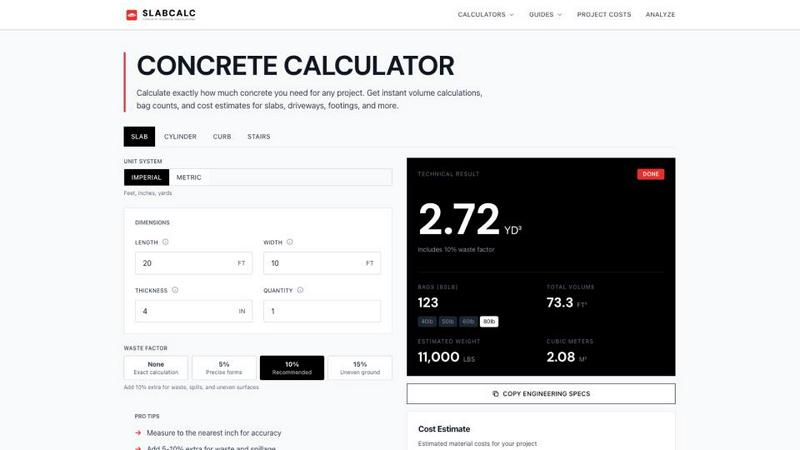
SlabCalc is a comprehensive, free, and no-signup platform that serves as a complete resource for concrete planning and estimation, designed for contractors, builders, DIY homeowners, and construction professionals. At its core, the platform features a suite of 34 specialized calculators that cover virtually every concrete project type imaginable, including slabs, driveways, patios, footings, foundations, walls, CMU block, columns, curbs, stairs, sonotubes, rebar, gravel, garage floors, basement floors, and more. Each calculator delivers instant, precise results including volume in cubic yards and cubic meters, pre-mix bag counts for 40, 50, 60, and 80-pound bags, total weight, and a detailed cost estimate, all with an adjustable waste factor and a seamless imperial/metric toggle. Beyond the calculators, SlabCalc distinguishes itself with innovative AI-powered tools: a Concrete Crack Analyzer that diagnoses damage from a photo, providing failure mode, severity rating from one to five, and actionable advice on whether a DIY fix or professional engineer is needed, and a Quote Analyzer that dissects a contractor’s bid into labor, materials, and site prep components while flagging potential red flags. The platform is further enriched with cost-by-city pricing pages, expert guides, a concrete glossary, a Chrome extension, and embeddable widgets, making it a one-stop, all-encompassing platform for anyone involved in concrete work, from initial planning through to execution and cost management.
Features of SlabCalc
34 Specialized Project Calculators
SlabCalc includes 34 distinct calculators tailored to specific concrete project types, such as slabs, cylinders, curbs, stairs, columns, walls, footings, circles, and tubes. Each calculator is pre-configured with relevant defaults and tips, allowing users to input dimensions like length, width, thickness, and quantity to instantly receive volume in cubic yards and cubic meters, bag counts for all standard bag sizes, total weight, and a cost estimate. The adjustable waste factor, ranging from none to 15 percent, ensures accuracy for varying ground conditions, while the imperial/metric toggle accommodates users worldwide.
AI-Powered Concrete Crack Analyzer
This innovative tool allows users to upload a photo of a concrete crack, which the AI then analyzes to determine the failure mode, assign a severity level on a scale from one to five, and provide clear, actionable advice on whether the issue can be handled with a DIY approach or requires the expertise of a structural engineer. This feature transforms a smartphone snapshot into a professional diagnostic assessment, saving time and potentially preventing costly structural problems by guiding users to the appropriate level of intervention.
AI-Powered Quote Analyzer
The Quote Analyzer is a game-changing tool for anyone receiving bids from contractors. Users can input or upload a contractor’s quote, and the AI breaks down the costs into clear categories including labor, materials, and site preparation. It then analyzes the bid for common red flags, such as inflated material costs, missing scope items, or unrealistic labor estimates, empowering users with the knowledge to negotiate fair pricing and avoid overpaying for their concrete project.
Comprehensive Cost and Educational Resources
SlabCalc provides a wealth of additional resources to support users beyond the calculators. This includes cost-by-city pricing pages that offer localized material and labor rates, expert guides covering topics like how to calculate concrete volume and the 10 percent waste rule, and a concrete glossary for understanding industry terminology. A Chrome extension and embeddable widgets make these tools accessible directly from a browser or other websites, while the engineering specs copy feature allows for easy documentation.
Use Cases of SlabCalc
Homeowner Planning a Patio or Driveway
A homeowner planning to pour a new concrete patio or driveway can use SlabCalc’s slab and driveway calculators to determine the exact amount of concrete needed. They can input the length, width, and thickness, and instantly get the number of 80-pound bags required, the total weight, and a cost estimate for both bagged and ready-mix concrete. The waste factor adjustment helps account for uneven ground, and the cost-by-city pages provide localized pricing to set a realistic budget before contacting contractors.
Contractor Estimating a Commercial Foundation
A contractor bidding on a commercial foundation project can leverage the footings, walls, and column calculators to quickly generate precise material volumes for the entire job. The Quote Analyzer can then be used to review and refine their own bid, ensuring all labor, materials, and site prep costs are accurately accounted for and free of errors. The ability to copy engineering specs and use the Chrome extension streamlines the workflow from estimation to project documentation.
DIYer Diagnosing a Crack in a Basement Floor
A DIY homeowner who discovers a crack in their basement floor can use the Concrete Crack Analyzer to take a photo and receive an immediate AI-driven diagnosis. The tool will identify whether the crack is a harmless shrinkage crack (DIY fix) or a sign of a structural issue (require an engineer). This prevents unnecessary worry or expense for minor issues while providing clear guidance for serious problems, all without needing to schedule an expensive professional inspection.
Builder Comparing Material Costs Across Projects
A builder managing multiple projects can use SlabCalc’s cost estimate feature to compare the cost of bagged concrete versus ready-mix for each job. For a small project under one cubic yard, the calculator might recommend bagged concrete, while for a larger garage floor, it will show the cost savings of ready-mix. The waste factor and unit system toggles allow for precise calculations across different project scales and locations, helping the builder optimize their material purchasing and budget allocation.
Frequently Asked Questions
How do I calculate the volume of concrete needed for a rectangular slab?
To calculate the volume of a rectangular slab, use the formula: Length (in feet) multiplied by Width (in feet) multiplied by Thickness (in feet) divided by 27 equals Cubic Yards. First, convert the thickness from inches to feet by dividing by 12. For example, a 10-foot by 10-foot slab that is 4 inches thick would be calculated as 10 times 10 times 0.333 divided by 27, which equals 1.23 cubic yards. SlabCalc automates this entire process for any shape.
Should I use bagged concrete or ready-mix for my project?
The choice between bagged concrete and ready-mix depends primarily on the volume needed. For projects under one cubic yard, bagged concrete is practical and readily available at hardware stores, requiring no truck coordination. For projects over one cubic yard, ordering ready-mix from a concrete plant is typically faster, cheaper per unit, and results in a more consistent mix. SlabCalc’s cost estimate feature provides a side-by-side comparison for both options.
What is the 10 percent waste rule and why is it important?
The 10 percent waste rule recommends ordering 10 percent more concrete than your calculated volume to account for subgrade irregularities, spills, slight over-excavation, and other unforeseen issues. Running short during a pour is expensive because the truck must return, and a cold joint in a finished slab is difficult to repair cleanly. SlabCalc includes an adjustable waste factor, allowing you to add 5, 10, or 15 percent to your calculations based on ground conditions.
How does the AI Concrete Crack Analyzer work?
The AI Concrete Crack Analyzer works by allowing you to upload a photo of a concrete crack directly into the tool. The AI then analyzes the image to determine the failure mode, such as shrinkage or settlement, and assigns a severity level from one to five. Based on this analysis, it provides specific advice on whether the crack can be fixed with a DIY approach or if it requires consultation with a structural engineer, giving you an instant, professional-level diagnostic.
Pricing of SlabCalc
SlabCalc is completely free to use with no signup required. Users can access all 34 calculators, the AI-powered Concrete Crack Analyzer and Quote Analyzer, cost-by-city pricing pages, expert guides, the concrete glossary, and all other features without any cost or account creation. There are no subscription tiers, paid plans, or hidden fees, making it an accessible resource for contractors, builders, and DIYers alike.
Explore more in this category:
Similar to SlabCalc

QRBliss
Free QR code generator with AI Brand Sync, 15 free dynamic codes, smart redirects, and zero tracking cookies. No signup to start.

Remove Text
Remove text from images online with AI

Image to Layers AI
Turn any image into editable transparent PNG/PSD layers with AI

Ideogram AI 4.5
AI image generation and editing with sharp typography, native 2K output, and precise localized edits with minimal visual drift.

metalfontgenerator
A sleek online tool for creating bold 3D metal lettering with customizable finishes, depth, perspective, lighting, and spacing.

GetYouTubeTranscript
Free YouTube transcripts on the web, a Chrome extension, and an API + MCP server so AI assistants can read YouTube.

Presentation Intelligence
AI-native presentation and visual content platform that turns prompts, documents, images, videos, and data into polished, shareable decks.
