

QRBliss
Make a branded QR code with automatic palette and contrast checks, then export it for a menu, sign, or campaign.
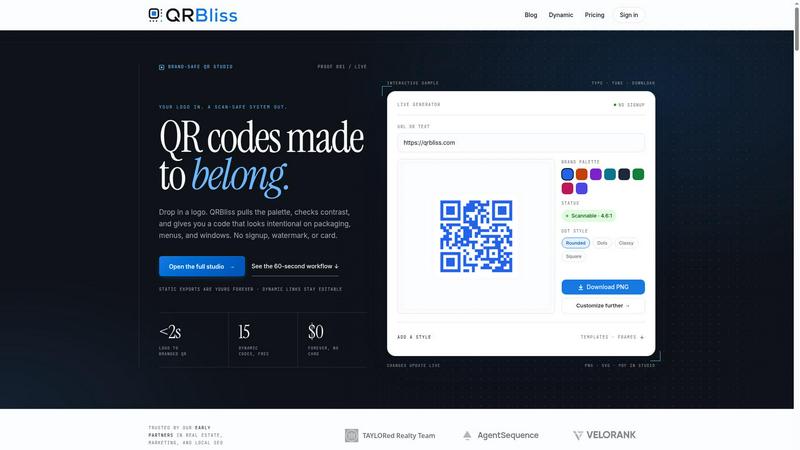
About QRBliss
QRBliss focuses on making QR codes that match a brand without manually tuning color and shape settings. Its Brand Sync feature extracts colors from a logo and checks contrast, while the studio offers PNG, SVG, and PDF exports. For a small business testing the tool, static codes can be created without signup and are described as permanent. The free plan also includes 15 dynamic codes, which keep their destination editable and support smart redirects. This distinction matters for a printed menu or yard sign: a dynamic code can stay in circulation while the page it opens changes. The free plan is generous for a limited set of campaigns, but users needing unlimited dynamic codes, passwords, schedules, scan limits, or full analytics history will need to compare the Pro tier.
Features of QRBliss
- Logo-based palette extraction with contrast checks
- Editable dynamic destinations and smart redirects
- 15 dynamic codes on the free plan
- PNG, SVG, and PDF exports; no QR watermark
Use Cases of QRBliss
- Keep printed menus current through an editable destination
- Add a branded link to a shop window or package
- Connect property signs to listings or virtual tours
- Create QR links for event details and schedules
Frequently Asked Questions
Does creating a QR code require signup?
The page says there is no signup to start; static codes do not require an account.
What is the difference between static and dynamic codes?
Static codes have destinations that do not change. Dynamic codes let you edit the destination after printing.
Are exports watermarked?
The page says QR exports are watermark-free.
Pricing of QRBliss
Free plan at $0 with 15 dynamic codes; paid Pro and Business subscriptions are listed.
Similar to QRBliss

Layerling
Layerling is an online CAD editor for printable parts, pairing prompt-generated electronics cases with manual design for custom shapes.

PosterSize
PosterSize is a poster format reference and AI design generator for creators planning print, social, and presentation graphics.

iWhiteScreen
Use a browser display as an adjustable white light, blank background or color field for practical screen checks and small projects.

Beautyface
Beautyface edits photos from written prompts and creates AI portraits with templates for professional, personal, seasonal, and creative uses.

AppScreenshots
Turn real app captures into store listing screenshots with device frames, headline layouts and export presets for major platforms.

RemoveObjectFromPhoto
Brush away unwanted photo objects, people, or text in a browser and review the AI-generated background before downloading.

Adobe Alternatives
Explore open-source creative software through an independent directory that notes each selected project's workflow, platforms and development status.

QwenImage AI
Explore Qwen Image 2.1 generation and editing in a prompt studio with practical guidance on transparent images and reference-led changes.