

Picture Enhancer
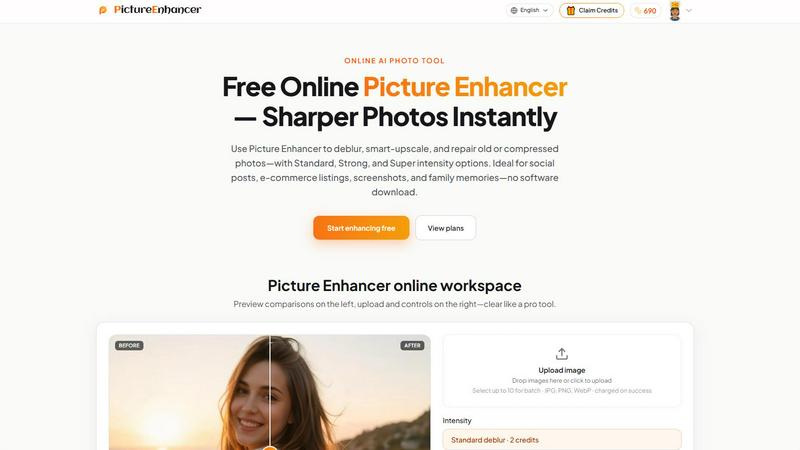
Picture Enhancer is a free online AI tool that deblurs, upscales, and restores photos in your browser with no software install.
About Picture Enhancer
Picture Enhancer is a comprehensive, free online AI photo enhancement tool designed for creators, sellers, and everyday users who need sharper, clearer images quickly and without technical complexity. This powerful platform transforms blurry, low-resolution, or damaged photographs into high-quality visuals through three core modes: deblurring, smart upscaling, and photo restoration. The tool supports common image formats including JPG, PNG, and WebP, making it accessible for a wide range of digital content needs. What sets Picture Enhancer apart is its tiered intensity system offering Standard, Strong, and Super levels, allowing users to precisely control the degree of enhancement applied to their images. The workspace provides a professional before-and-after preview slider, enabling users to inspect quality changes before downloading watermark-free results. Picture Enhancer serves a diverse audience from social media content creators and e-commerce sellers to families preserving old photographs and professionals needing crisp screenshots. The platform prioritizes user privacy with private processing that only uses uploaded images to complete enhancement requests, and delivers results in seconds. With a generous free tier offering three lifetime guest tries per IP address with no signup required, and a flexible credit system for signed-in users, Picture Enhancer democratizes access to professional-grade AI photo enhancement technology. Credits are charged only on successful enhancements, ensuring users pay only for results that meet their expectations. The platform is ideal for social posts, e-commerce listings, screenshots, and family memories, all without requiring any software download or installation.
Features of Picture Enhancer
AI Deblur Mode
Picture Enhancer's AI deblur mode intelligently rebuilds edges and texture from common image quality issues including camera shake, soft focus, and mild motion blur. This feature utilizes advanced artificial intelligence algorithms to analyze the original image and reconstruct lost detail, making faces, text, and important visual elements readable again. Users can choose from Standard, Strong, or Super deblur intensity levels depending on the severity of the blur, with higher intensities applying more aggressive correction for heavily blurred images. The result is significantly sharper photographs that maintain natural appearance without introducing artificial artifacts.
Smart Upscale Technology
The smart upscale feature enables users to enlarge images by 2x or 4x while adding genuine detail rather than simply stretching pixels. This technology is particularly valuable when working with small source files that need to be used for social media covers, product hero shots, or print previews. Unlike traditional interpolation methods that produce blurry, pixelated results, Picture Enhancer's AI analyzes the image content and generates new pixels that match the surrounding context, creating smooth, detailed enlargements. The upscaling process preserves important visual elements like text edges, facial features, and product details.
Old Photo and Damage Restoration
Picture Enhancer's restoration mode is specifically designed to reduce scratches, fade, and compression artifacts from aged or damaged photographs. The AI analyzes the image to identify and intelligently repair imperfections while preserving the original character and emotional content of the photo. Strong and Super restore intensity levels handle heavier damage commonly found on scanned family prints, including creases, spots, and discoloration. This feature makes it possible to breathe new life into treasured family memories, historical images, and vintage photographs that have deteriorated over time.
Tiered Intensity System with Preview
The three-tier intensity system (Standard, Strong, Super) gives users granular control over the enhancement process, allowing them to match the correction level to the specific needs of each image. Standard intensity provides gentle correction for minor imperfections, Strong handles moderate issues, and Super applies maximum enhancement for severely degraded images. The integrated before-and-after slider preview allows users to compare the original and enhanced versions side by side, dragging the slider to inspect specific areas of the image before committing to download. This ensures complete satisfaction with the final result.
Use Cases of Picture Enhancer
Social Media Content Creation
Social media managers, influencers, and content creators use Picture Enhancer to improve the quality of images destined for platforms like Instagram, Facebook, Twitter, and LinkedIn. The deblur and upscale features transform casually captured photos into polished, professional-looking content that stands out in crowded feeds. Portraits become cleaner with reduced blur on faces and clothing, while product shots gain the clarity needed to drive engagement and clicks. The quick processing time and watermark-free downloads make it easy to maintain a consistent posting schedule without sacrificing image quality.
E-commerce Product Photography
Online sellers and e-commerce professionals rely on Picture Enhancer to optimize product images for listings on platforms like Amazon, eBay, Etsy, and Shopify. The smart upscale feature is particularly valuable for enlarging small product photos while maintaining detail, ensuring customers can see textures, colors, and fine features clearly. The deblur mode tames compression noise that often degrades images during upload and processing, while restoration capabilities can salvage older product photos that have accumulated artifacts over time. Sharper, more detailed product images directly correlate with higher conversion rates and reduced return rates.
Screenshot and UI Documentation
Technical writers, support professionals, and educators use Picture Enhancer to sharpen text edges in screenshots for tutorials, support documentation, and knowledge base articles. The deblur mode ensures that UI elements, menu items, and instructional text remain crisp and readable even when captured from low-resolution displays or compressed for web delivery. This makes documentation more professional and easier for readers to follow, reducing support tickets and improving user understanding. The ability to upscale small UI captures also enables their use in larger format presentations and training materials.
Family Photo Preservation
Families and individuals use Picture Enhancer to restore and improve old scanned photographs, preserving precious memories for future generations. The restoration mode effectively reduces scratches, fade, and compression artifacts that accumulate over decades of storage and handling, while the deblur feature can improve slightly out-of-focus images from film cameras. Strong and Super restore intensity levels handle the heavier damage often found on vintage prints, making it possible to share restored family photos at gatherings, in digital albums, or as printed keepsakes without the original imperfections.
Frequently Asked Questions
What is Picture Enhancer?
Picture Enhancer is a free online AI-powered photo enhancement tool that allows users to deblur, upscale, and restore images without downloading any software. It supports JPG, PNG, and WebP formats and offers three intensity levels (Standard, Strong, Super) for each enhancement mode. The tool processes images securely and privately, delivering watermark-free results in seconds. It is designed for creators, sellers, and everyday users who need to improve image quality for social media, e-commerce, documentation, or personal use.
Can I try Picture Enhancer without signing in?
Yes, guests can try Picture Enhancer completely free with three lifetime tries per IP address. No account creation or signup is required for these trial enhancements. Each guest enhancement processes one image at a time and includes access to all three modes (deblur, upscale, restore) with Standard and Strong intensity levels. After using the three free tries, users must sign in to continue using the service with credits, or they can create an account immediately to receive starter credits.
How does billing work after sign-in?
After signing in, users receive starter credits for new accounts. Credits are charged only on successful enhancements, meaning users never pay for failed or unsatisfactory results. Standard intensity costs 2 credits per enhancement, Strong costs 4 credits, and Super costs 6 credits. Paid users unlock access to Super intensity tiers and batch enhancement capabilities (up to 10 images at once). Monthly subscription plans grant credits each billing cycle, while permanent credit packs never expire, offering flexibility for occasional or frequent users.
Which modes does Picture Enhancer support?
Picture Enhancer supports three core enhancement modes: Deblur, which rebuilds edges and texture from camera shake and soft focus; Upscale, which enlarges images 2x or 4x while adding detail; and Restore, which reduces scratches, fade, and compression artifacts from old or damaged photos. Each mode offers Standard, Strong, and Super intensity levels, with Super tiers available exclusively to paid users. Users can select the appropriate mode and intensity based on their specific image quality needs.
Similar to Picture Enhancer

ImageGenerator
Create and edit AI images online with multiple models, text-to-image, image-to-image, background removal, and upscaling.

ColorBestie
AI color previews and marker color suggestions for coloring pages.

nanobanana 21
AI image studio powered by Nano Banana 2.1 for high-quality images, accurate details, readable text, and consistent characters.

AIPetGen
AIPetGen turns a photo of your dog, cat, or other pet, or a written description, into a new picture or a short animation.

Remove Text
Remove text from images online with AI

Image to Layers AI
Turn any image into editable transparent PNG/PSD layers with AI

Ideogram AI 4.5
AI image generation and editing with sharp typography, native 2K output, and precise localized edits with minimal visual drift.

EditTextPhoto
AI-powered image text editor to edit, replace, fix, or translate text in images while preserving the original font, color, size, and style.