

ComicsMaker
ComicsMaker transforms your written prompts into structured comic strips, manga panels, and storyboards, letting you plan beats, add dialogue, and.
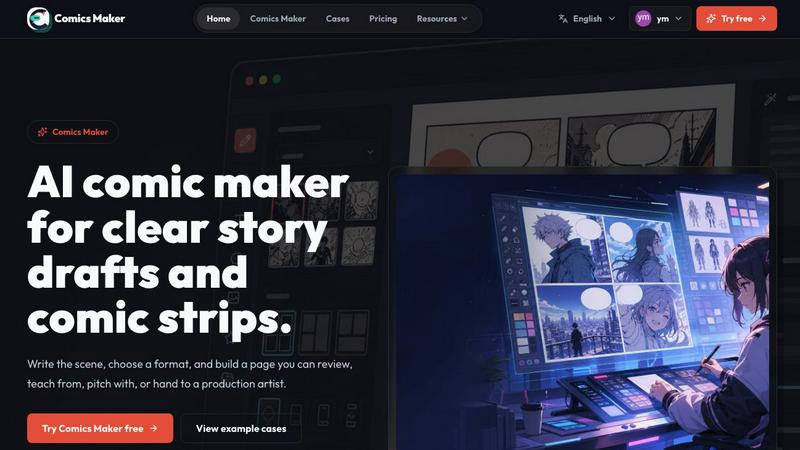
About ComicsMaker
ComicsMaker is an innovative AI comic maker and comic strip generator designed to bridge the gap between a fleeting creative idea and a structured, editable visual narrative. It is built for a diverse audience that includes creators, educators, marketers, and teams who require compelling visual stories with speed and clarity. At its core, ComicsMaker transforms simple text prompts into fully realized comic panels, manga-style drafts, storyboards, and social-ready comic pages. The platform provides users with granular control over layout, tone, reading flow, and style direction, ensuring that the final output aligns with the creator's original vision. Unlike many tools that force users to start from a blank, intimidating canvas, ComicsMaker offers a guided workspace that helps users move from an initial concept to a structured comic draft efficiently. The tool is not just about generating images; it is about planning the narrative beats, generating the visual panels, adding dialogue, and arranging the entire page within a browser-based environment. This makes it an essential asset for drafting AI comic strips, prompt-to-panel scenes, character moments, explainer comics, classroom visuals, product storyboards, and campaign concepts. By focusing on the entire workflow from ideation to a reviewable draft, ComicsMaker empowers users to check story clarity, panel order, and visual direction before committing to a longer production process, effectively saving time and resources while unlocking the power of visual storytelling.
Features of ComicsMaker
Scene-Based Planning and Beat Structuring
ComicsMaker revolutionizes the comic creation process by starting with a single, well-defined scene. Users can input the character, setting, visible action, and a key change that drives the narrative forward. The platform then helps plan the narrative beats, breaking down a raw idea into a coherent sequence of panels. This feature ensures that every comic has a solid structural foundation, allowing users to focus on the story's rhythm and pacing before generating any visuals. By defining the scene in plain language and then shaping it into a structured panel plan, users can maintain narrative clarity and ensure each panel has a single, clear job.
Flexible Layout and Pacing Controls
The platform offers a clean, intuitive middle panel for making critical layout decisions. Users can choose from a variety of page formats, including single-panel, three-panel strips, 2x2 grids, and vertical flow layouts. The studio keeps essential information like panel count, pacing, shot type, and reading order visible at all times, preventing users from investing effort in polish before the structure is sound. This feature provides simple controls for size, tone, and production notes, ensuring that the visual pacing matches the intended narrative flow. The result is a flexible canvas that can adapt to any storytelling need, from a quick social media strip to a more complex storyboard.
Consistent Style Direction and Visual Lock
Maintaining a cohesive visual identity across multiple panels is a common challenge in comic creation. ComicsMaker addresses this by allowing users to lock the visual direction before generating any images. Users can apply style notes, character details, and reference language to ensure every panel belongs to the same world. This feature enables creators to reuse character and environment notes across different scenes, guaranteeing consistency. The platform also exports drafts with these notes intact, making it easy for an artist or teammate to understand and continue the work. This ensures that the look remains consistent enough to build upon, whether for a single comic or a longer series.
Editable Dialogue and Panel Arrangement
ComicsMaker goes beyond simple image generation by providing a complete workspace for adding dialogue and arranging the page. After the panels are generated, users can add captions, speech bubbles, and dialogue directly within their browser. The arrangement tools allow for fine-tuning the layout, ensuring that the reading flow is intuitive and the visual balance is pleasing. This feature transforms a generated draft into an editable project file, where every element can be revised and refined. By keeping captions and dialogue close to the panel plan, the tool streamlines the revision process, making it easy to check story clarity and adjust the narrative before finalizing the visual output.
Use Cases of ComicsMaker
Explainer Comics and Educational Visuals
Educators and trainers can leverage ComicsMaker to create explainer comics that simplify complex topics. By breaking down a lesson into a sequence of visual panels, teachers can present information in a more engaging and accessible format. For example, a science teacher can use the tool to illustrate a chemical reaction, with each panel showing a step in the process. The ability to control layout and tone allows for the creation of age-appropriate content, while the dialogue features enable the addition of clear, concise labels and instructions. This transforms abstract concepts into concrete, memorable visual stories that enhance student comprehension and retention.
Marketing and Social Media Campaign Concepts
Marketers and social media managers can use ComicsMaker to rapidly prototype campaign concepts and create shareable visual content. The tool is ideal for generating product storyboards, campaign narratives, and social-ready comic pages that capture attention in crowded feeds. A brand can quickly draft a comic strip that tells a story about a product's benefits or a customer's journey, using the platform's style controls to maintain brand consistency. The ability to export drafts as project data allows for easy handoff to graphic designers or approval from stakeholders, speeding up the creative development cycle for social media posts and advertising campaigns.
Storyboarding for Animation and Video Production
Filmmakers, animators, and video producers can use ComicsMaker as a rapid storyboarding tool to visualize scenes before production. The platform's panel planning and beat structuring features are perfectly suited for breaking down a script into a visual sequence. Users can describe the action, camera angle, and mood for each shot, and the AI generates a corresponding storyboard panel. This allows directors to experiment with different pacing and shot compositions without the cost and time of traditional storyboarding. The resulting storyboard serves as a clear, visual blueprint that can be shared with the entire production team.
Creative Writing and Character Development
Writers and artists can use ComicsMaker to explore character moments and develop visual narratives for their creative projects. The tool is excellent for drafting manga-style scenes, testing character designs in different settings, or exploring a story's emotional beats. A writer can input a character's name, a setting, and a key emotional change, and then generate a series of panels that visualize that moment. This helps in understanding a character's visual presence and how they interact with their environment. The ability to lock style notes ensures that character designs remain consistent across multiple drafts, making it a powerful tool for world-building and narrative exploration.
Frequently Asked Questions
Is ComicsMaker free to use?
Yes, ComicsMaker offers a free plan that includes 10 starter credits for testing the image generation feature. This allows new users to explore the platform's capabilities and create their first comic drafts without any financial commitment. For users who need more credits for regular workflow, paid plans are available that increase monthly credits while maintaining the same core workflow and features.
Can I control the style and layout of my comic?
Absolutely. ComicsMaker provides extensive control over the visual direction of your comic. You can specify style notes, character details, and reference language to ensure consistency. The platform also offers multiple layout options, including single panel, three-panel strips, 2x2 grids, and vertical flow. You can control the tone, mood, and reading order of your panels, ensuring the final output matches your creative vision.
What file formats or exports does ComicsMaker support?
ComicsMaker is designed to support a complete workflow from ideation to a reviewable draft. While the primary output is a visual comic page viewable in the browser, the platform also supports project export. The paid plans include JSON project export, which allows users to save and share the entire project data, including prompts, notes, and panel structures. This makes it easy to hand off projects to teammates or continue working on them later.
Who is ComicsMaker designed for?
ComicsMaker is built for a wide range of users, including creators, educators, marketers, and teams. It is ideal for anyone who needs to create visual stories quickly, such as teachers making classroom visuals, marketers developing social media campaigns, writers exploring character moments, and teams producing brand comics or product storyboards. The tool is designed to be accessible for beginners while offering the depth and control needed by professionals.
Pricing of ComicsMaker
ComicsMaker offers a tiered pricing structure to accommodate different user needs and usage levels. The free plan is available at $0 per month and includes 10 starter credits, perfect for testing the platform and creating initial drafts. The Creator plan is priced at $15 per month and is designed for individuals making comic strips, lessons, and social campaigns every week, providing increased monthly credits. The Studio plan costs $39 per month and is built for teams producing brand comics, campaigns, and classroom content, offering the highest volume of monthly credits. All plans share the same core workflow and editor features, with the main difference being the number of monthly credits available for image generation.
Explore more in this category:
Similar to ComicsMaker

nanobanana 21
AI image studio powered by Nano Banana 2.1 for high-quality images, accurate details, readable text, and consistent characters.

AIPetGen
AIPetGen turns a photo of your dog, cat, or other pet, or a written description, into a new picture or a short animation.

Hotel Lobby AI Video Generator
Turn two photos into a Hotel Lobby dance video in the orange A COLORS SHOW booth

Remove Text
Remove text from images online with AI

TryH3 - MiniMax H3 Video Generator
Try MiniMax Hailuo H3 video generation in the browser

Image to Layers AI
Turn any image into editable transparent PNG/PSD layers with AI

Ideogram AI 4.5
AI image generation and editing with sharp typography, native 2K output, and precise localized edits with minimal visual drift.

EditTextPhoto
AI-powered image text editor to edit, replace, fix, or translate text in images while preserving the original font, color, size, and style.