

UPCgen
UPCgen is the most trusted free barcode generator for Amazon FBA and Shopify, instantly creating valid UPC and EAN codes for over 50 platforms.
About UPCgen
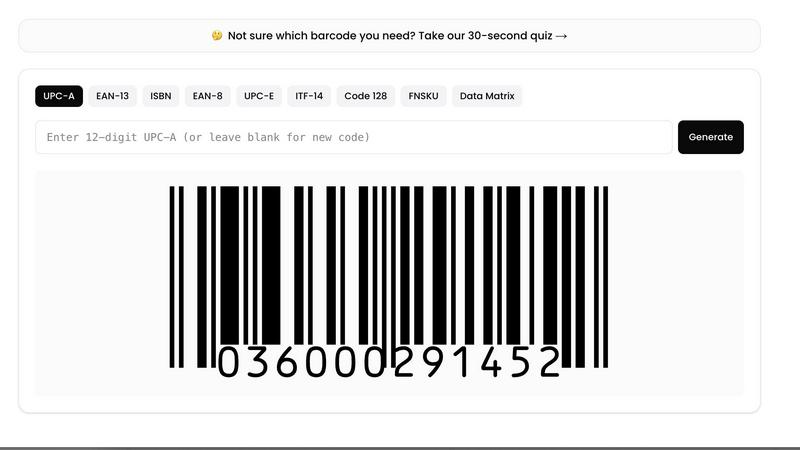
UPCgen is a purpose-built, web-based barcode generator designed to eliminate the complexity and confusion that plagues most barcode creation tools on the market today. At its core, UPCgen provides a clean, single-page interface where users can instantly generate valid, GS1-standard barcodes across a comprehensive range of symbologies, including UPC-A, UPC-E, EAN-13, EAN-8, ISBN, ITF-14, Code 128, FNSKU, and Data Matrix. The platform serves a diverse global audience, from Amazon FBA sellers printing FNSKU labels for inventory shipments to Shopify and Etsy merchants adding GTINs to product listings, self-publishers generating ISBN barcodes for book covers, warehouse operators labeling outer cases with ITF-14 codes, and pharma professionals producing Data Matrix codes for DSCSA and FMD compliance. What sets UPCgen apart is its unwavering commitment to honesty and validity: every code generated includes a mathematically correct check digit that passes GS1 validation, and the platform transparently communicates when users require a genuine, registered GS1 number for commercial retail distribution. Unlike bloated software packages or confusing tools with endless checkbox options, UPCgen offers a streamlined experience with bulk generation capabilities supporting up to 10,000 codes at once, multiple export formats including CSV, PNG sheets, PDF, SVG, and EPS, and a free tier that allows anonymous generation of one code every 24 hours without requiring sign-up. For those needing higher volumes, registration unlocks five codes daily at no cost, while subscription plans accommodate professional and enterprise needs, including API access for developers integrating barcode generation into their own stacks. UPCgen also provides platform-specific step-by-step guides for adding barcodes to Amazon, Shopify, Etsy, eBay, Walmart, and Amazon KDP listings, alongside dedicated generators for each barcode type and a 30-second quiz to help users identify the correct symbology for their products.
Features of UPCgen
Valid and GS1-Compliant Barcode Generation
Every barcode generated by UPCgen undergoes automatic check digit calculation and validation against GS1 standards, ensuring the resulting code is structurally sound and mathematically correct. This eliminates the common pitfall of generating codes that fail scanner tests or are rejected by retail platforms. The system supports the full range of standard barcode types, including UPC-A, UPC-E, EAN-13, EAN-8, ISBN, ITF-14, Code 128, FNSKU, and Data Matrix, each with its own validation rules applied automatically. For users who need genuine, registered numbers for commercial sale through major retailers, UPCgen provides clear guidance on when a GS1-issued prefix is required, maintaining transparency and preventing the use of unregistered codes that could collide with existing products in the global supply chain.
Bulk Generation and Multi-Format Export
UPCgen empowers users to generate anywhere from a single barcode to 10,000 codes in a single operation, making it equally suitable for a solo entrepreneur labeling a handful of products and a warehouse preparing thousands of inventory items for shipment. The bulk generation process is streamlined and intuitive, avoiding the checkbox overload found in competing tools. Once generated, codes can be exported in a variety of professional-grade formats including CSV for spreadsheet integration, PNG sheets for easy printing, PDF for document inclusion, SVG for scalable vector graphics, and EPS for high-resolution print production. This flexibility ensures compatibility with everything from home label printers to commercial printing presses, and supports downstream workflows such as inventory management, order fulfillment, and retail listing.
Anonymous and Free Tier Access
UPCgen respects user privacy by offering anonymous barcode generation without requiring any account creation or personal information. The free tier allows users to generate one valid barcode every 24 hours with no strings attached, providing an accessible entry point for testing the platform or handling occasional needs. For users who require more frequent generation, a free registration unlocks five codes per day, while paid subscription plans remove daily limits entirely. This tiered approach ensures that casual users, small businesses, and large enterprises each find a cost-effective solution that matches their usage patterns, without forcing anyone into a premature commitment or exposing their data unnecessarily.
Platform-Specific Guides and Dedicated Generators
Recognizing that barcode requirements vary significantly across ecommerce and retail platforms, UPCgen provides dedicated step-by-step guides for adding barcodes to Amazon, Shopify, Etsy, eBay, Walmart, and Amazon KDP listings. These guides cover platform-specific formatting rules, upload procedures, and common pitfalls, reducing the learning curve for sellers new to barcode integration. Additionally, the platform offers individual dedicated generators for each barcode symbology, allowing users to jump directly to the type they need without navigating through unrelated options. A 30-second quiz further assists users in identifying the correct barcode type for their product and sales channel, minimizing errors and ensuring compliance from the start.
Use Cases of UPCgen
Amazon FBA Sellers Printing FNSKU Labels
Amazon FBA sellers rely on UPCgen to generate FNSKU barcodes that are essential for tracking inventory within Amazon fulfillment centers. These barcodes must be printed on labels applied to each unit before shipment, and any errors in barcode generation can lead to receiving delays, misrouted inventory, or listing suppression. UPCgen ensures that every FNSKU code passes Amazon's scanning requirements, supports bulk generation for large inventory batches, and provides high-resolution export formats suitable for thermal label printers. The platform's Amazon-specific guide walks sellers through the exact steps to link generated barcodes to their listings, making the entire process from code creation to warehouse receipt seamless and reliable.
Shopify and Etsy Merchants Adding GTINs to Listings
Shopify and Etsy sellers use UPCgen to generate GTINs (Global Trade Item Numbers) in formats like UPC-A and EAN-13, which are required for product listings on these platforms to improve search visibility and meet marketplace requirements. Without valid GTINs, products may be suppressed in search results or flagged for non-compliance. UPCgen provides the correct barcode symbology for each seller's target market, calculates valid check digits automatically, and offers export options that integrate directly with Shopify's CSV import templates. The platform's guides for both Shopify and Etsy detail how to add these barcodes to product pages, ensuring sellers maintain active, compliant listings that rank well in marketplace search algorithms.
Warehouses and 3PLs Labeling Outer Cases with ITF-14
Third-party logistics providers and warehouse operators use UPCgen to generate ITF-14 barcodes, which are the standard for labeling outer shipping cases and pallets in the supply chain. These codes encode the GTIN of the product along with packaging level information, enabling automated scanning and tracking throughout the distribution network. UPCgen's bulk generation capability is critical for warehouses processing thousands of cases daily, while the ITF-14 dedicated generator ensures the correct structure and check digit for logistics scanning equipment. The platform's export to PDF and EPS formats allows for professional label sheets that withstand warehouse handling and scanning, reducing errors in receiving, picking, and shipping operations.
Self-Publishers Generating ISBN Barcodes for Books
Self-publishers on platforms like Amazon KDP use UPCgen to generate ISBN barcodes that must appear on book covers for retail distribution. These barcodes encode the International Standard Book Number and are required by bookstores, libraries, and online retailers to identify and track titles. UPCgen simplifies this process by providing a dedicated ISBN generator that automatically formats the barcode with the correct structure for book publishing standards. The platform's Amazon KDP guide explains how to position the barcode on cover files and meet KDP's specific requirements, helping independent authors avoid common rejection reasons and get their books into distribution faster.
Frequently Asked Questions
How does UPCgen ensure the barcodes I generate are valid and will scan correctly?
UPCgen automatically calculates and validates the check digit for every barcode generated, ensuring the code meets GS1 standards for structural integrity. The platform supports the full range of standard symbologies, each with its own validation rules applied during generation. However, it is important to understand that while the barcode itself is mathematically valid, using it for commercial retail distribution requires a genuine GS1-issued company prefix. UPCgen is transparent about this distinction: the codes generated are perfect for internal inventory tracking, FNSKU labels, and testing, but if you plan to sell through major retailers like Amazon, Walmart, or Target, you should use a registered GS1 prefix to avoid collisions with existing products. The platform provides clear guidance on when registration is necessary, helping you make informed decisions about your barcode strategy.
Can I use UPCgen to generate barcodes for products I sell on Amazon or Shopify?
Yes, UPCgen is specifically designed to support sellers on Amazon, Shopify, Etsy, eBay, Walmart, and Amazon KDP. The platform generates barcodes in formats accepted by these marketplaces, including UPC-A, EAN-13, and FNSKU, with valid check digits that pass platform scanning requirements. For each platform, UPCgen provides a dedicated step-by-step guide explaining how to add the generated barcode to your product listings, including specific formatting rules and upload procedures. However, for Amazon and Walmart in particular, the GTIN must be a genuine GS1-issued number for products sold commercially. UPCgen helps you generate the barcode image and structure, but you should obtain a registered prefix from GS1 or an authorized reseller if you need a globally unique GTIN for retail distribution.
What export formats does UPCgen support, and which should I choose for my labels?
UPCgen supports multiple export formats to accommodate different printing and integration needs: CSV for spreadsheet-based inventory management, PNG sheets for quick home printing, PDF for professional document inclusion, SVG for scalable vector graphics suitable for design software, and EPS for high-resolution commercial printing. For thermal label printers commonly used in warehouse and FBA operations, PNG sheets or PDF are typically the best choices as they maintain the resolution needed for small barcode labels. For book covers or product packaging that will be printed commercially, EPS or SVG formats provide the highest quality and scalability. CSV export is ideal when you need to import barcode data into inventory management systems or create label templates programmatically.
Is there a free version of UPCgen, and what are the limitations?
Yes, UPCgen offers a generous free tier that allows users to generate one valid barcode every 24 hours without any account registration or personal information. This is ideal for testing the platform or handling occasional barcode needs. For users who require more frequent generation, a free registration unlocks the ability to generate up to five codes per day at no cost. Both free tiers provide access to all barcode symbologies and export formats, with no feature limitations beyond the daily generation cap. For professional users who need higher volumes, paid subscription plans remove daily limits and provide additional benefits such as API access for developers integrating barcode generation into their own applications.
Similar to UPCgen

ButterShare
Realtime peer-to-peer file transfer in the browser. Send files directly between devices, no account and no upload to a server.

Emailyy
Free email tools for signatures, subject lines, HTML previews, word counts, and email headers. Browser-based, simple to use, and no signup required.

Todowing
Chrome extension that nests Todoist sub-tasks inline in Today, Upcoming, Filters and Labels. Free tier, or $19.99 once for everything.

Uniclip
Clip pages, take full-page screenshots and batch-capture list data to Notion, Feishu, Obsidian, Markdown, CSV or JSON.

TroveKey
Search tabs, Chrome bookmarks and history, run browser commands, and save webpages and social posts locally—no account.

Foreman
See every app and what it's using in plain English, and end or slow down the one that's hogging your Mac.

Typebar
Every key you press lights up on an on-screen keyboard, and each shortcut is named as you press it.
