

ProcessSpy
ProcessSpy is a powerful Mac process monitor that delivers in-depth insights and advanced filtering for seamless system management.
About ProcessSpy
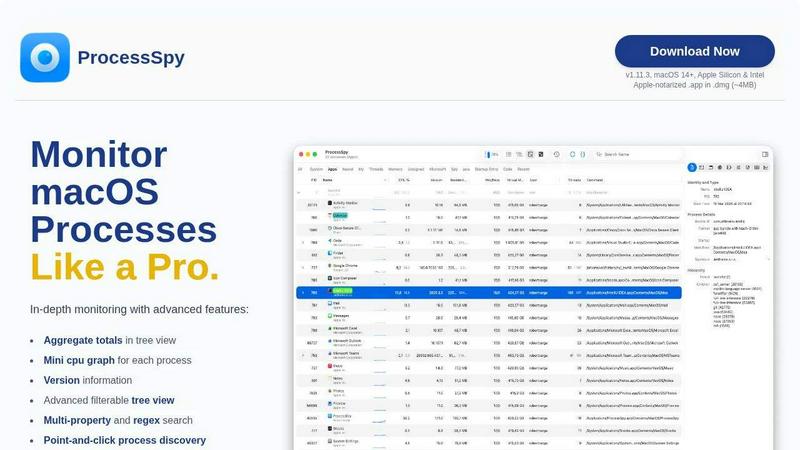
ProcessSpy is an advanced process monitoring tool specifically designed for macOS, providing users with a powerful alternative to traditional task management applications like Activity Monitor. It offers a comprehensive view of system processes, allowing users to visualize process trees, inspect open files, and view environment variables, all while delivering a fast and responsive experience. With its unique features, ProcessSpy aims to cater to developers and power users who require detailed insights into their system's performance. By utilizing native APIs and UI elements, ProcessSpy ensures seamless integration with macOS, enhancing productivity and simplifying the troubleshooting of complex issues. This tool is particularly useful for developers managing multiple applications, enabling them to identify processes quickly, access vital information, and maintain optimal system performance. With the ability to export data and apply advanced filters, ProcessSpy transcends basic monitoring, making it an essential tool for any macOS user looking to gain deeper insights into their system.
Features of ProcessSpy
Advanced Tree View
ProcessSpy features an advanced tree view that provides users with a detailed hierarchical representation of processes. This view not only allows for real-time filtering and searching but also displays aggregate totals for CPU, Memory, and Threads, making it easier to monitor system performance at a glance.
Javascript Filters
The tool incorporates an innovative filtering system that utilizes Javascript, empowering users to create complex filters with multiple conditions. This feature gives users the flexibility to tailor their process searches precisely, enhancing their ability to pinpoint specific processes or behaviors.
Advanced Process Info
For users seeking deeper insights, ProcessSpy offers an advanced process information feature available through a paid license. With just one click, users can access critical details such as entitlements, Info.plist, and bundle IDs, facilitating a thorough understanding of each process's functionality and permissions.
Multi-Property and Regex Search
The quick-search functionality in ProcessSpy supports both multi-property and regex searches, allowing users to conduct intricate queries. For instance, users can search for processes that contain "java" in their name and include "-Xmx" in their command line, making it much easier to manage complex environments with similar process names.
Use Cases of ProcessSpy
Development Troubleshooting
Developers can utilize ProcessSpy to troubleshoot issues within their applications. By examining detailed process information, including command-line arguments and environment variables, developers can identify what might be causing performance bottlenecks or errors, thus speeding up the debugging process.
Resource Monitoring
System administrators and power users can leverage ProcessSpy for real-time resource monitoring. With its ability to display aggregate CPU, Memory, and Threads usage, users can quickly assess which processes are consuming excessive resources and take action to optimize system performance.
Application Management
ProcessSpy is an invaluable tool for managing multiple applications, particularly when dealing with various Java applications that may run under different JDK versions. Users can easily distinguish between similar processes, view their respective paths, and manage them effectively, ensuring a smoother workflow.
Historical Data Analysis
For users needing to analyze historical performance data, ProcessSpy allows the recording of CPU, Memory, and Threads history. This feature enables users to track application behavior over time, export the data to CSV, and make informed decisions regarding application performance and resource allocation.
Frequently Asked Questions
Is ProcessSpy safe to install on my Mac?
Yes, ProcessSpy is Apple-notarized and distributed as a signed .app within a .dmg file. This ensures that it is verified and safe to use on both Intel and Apple Silicon Macs, providing users with peace of mind.
Does ProcessSpy support older versions of macOS?
ProcessSpy is designed to operate on macOS 14 and newer versions. Users running older systems may not be able to take advantage of the latest features and updates available in this tool.
What is the license model?
The license for ProcessSpy is valid for one user across unlimited devices. It includes lifetime updates and new features, providing users with long-term access to the tool's capabilities without additional costs.
How does ProcessSpy compare to Activity Monitor?
ProcessSpy offers several advantages over Activity Monitor, including the ability to view full command-line information, aggregate values in hierarchy mode, and advanced filtering options. It provides a more nuanced understanding of system processes, making it ideal for users who require in-depth process management.
Similar to ProcessSpy


Egmatic
No-code 2D game editor: visual node logic, drag-and-drop scenes, live preview. Exports to Windows, macOS, Linux, Android, iOS, Web.

Product Launch Checklist
A free launch checklist for SaaS, apps, AI tools and more. Every step says why it matters and when you can skip it.


laya.tools
A free directory of 950+ projects built on Laya, the open-source decision model. Updated daily.

Forms Plugin
The #1 Native Form Builder Plugin for Framer - No Code, No Embeds, No External Platforms.

