

Phishly
Phishly uses AI to detect phishing emails instantly, enhancing your Gmail security with a simple Chrome extension.
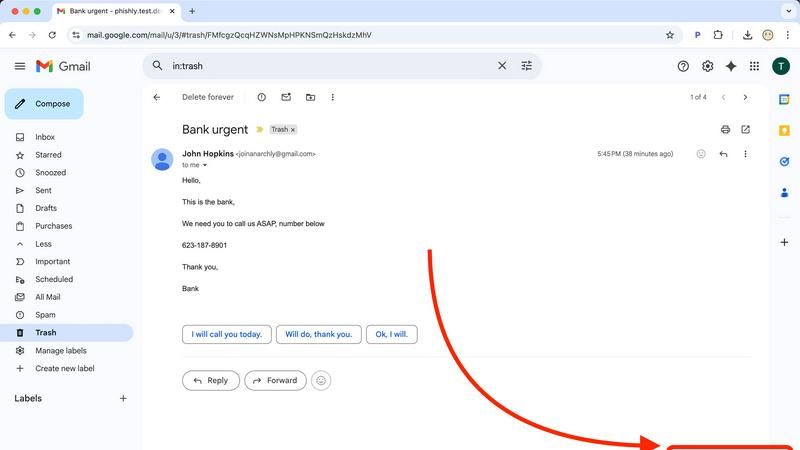
About Phishly
Phishly is a cutting-edge AI-powered phishing detection platform designed to enhance email security for individuals and small businesses. Available as a convenient Chrome extension for Gmail and as a web tool, Phishly empowers users to effortlessly scan their emails for potential phishing threats. By simply clicking "Scan with Phishly" on any email in Gmail or pasting suspicious email content directly on the website, users receive immediate analysis of the email’s legitimacy. The platform utilizes advanced AI algorithms to identify various phishing indicators such as suspicious domains, alarming language, spoofed sender addresses, and common social engineering tactics. Each analysis results in a clear risk assessment categorized as Safe, Medium Risk, or High Risk, accompanied by detailed explanations to help users understand the risks involved. Phishly stands out by offering a straightforward solution that requires no technical expertise, making it accessible for everyone. Furthermore, user privacy is a priority, as Phishly only analyzes emails that users explicitly choose to scan. This approach ensures that individuals and small businesses can enjoy robust phishing protection without the complexities often associated with enterprise-level solutions.
Features of Phishly
AI-Powered Scanning
Phishly employs state-of-the-art AI technology to thoroughly scan emails for phishing indicators. This feature analyzes various elements, such as the email's source and language, to detect potential threats effectively.
Instant Risk Assessment
Upon scanning, Phishly provides users with an immediate risk assessment, categorizing emails as Safe, Medium Risk, or High Risk. This feature helps users quickly gauge the legitimacy of their emails and act accordingly.
User-Friendly Interface
Designed with simplicity in mind, Phishly features an intuitive interface that requires no technical knowledge. Users can effortlessly navigate the tool and perform scans, making it ideal for individuals and small businesses alike.
Privacy-Focused Analysis
Phishly ensures user privacy by analyzing only the specific emails that users choose to scan. This commitment to privacy means that sensitive information remains secure and confidential throughout the scanning process.
Use Cases of Phishly
Personal Email Security
Individuals can use Phishly to safeguard their personal email accounts from phishing attacks. By scanning suspicious emails, users can protect themselves from potential scams and identity theft.
Small Business Protection
Small businesses can benefit from Phishly by integrating it into their email practices. Employees can utilize the tool to verify the legitimacy of emails, reducing the risk of falling victim to phishing schemes.
Educational Use
Educators and students can use Phishly as a teaching tool to understand phishing threats better. By analyzing real emails, users can learn how to identify red flags and avoid malicious attacks.
Remote Work Security
With the rise of remote work, Phishly serves as a valuable resource for remote employees. It enables them to scan emails from various sources, ensuring that they can work securely and confidently from any location.
Frequently Asked Questions
How does Phishly detect phishing emails?
Phishly utilizes advanced AI algorithms to analyze various elements of an email, including the sender's address, language used, and domain reputation, to identify potential phishing threats.
Is Phishly free to use?
Yes, Phishly is free to use, allowing individuals and small businesses to protect themselves against phishing attacks without any financial burden.
Do I need technical skills to use Phishly?
No, Phishly is designed to be user-friendly and accessible for everyone. No technical knowledge is required to perform scans or interpret the results.
How does Phishly protect my privacy?
Phishly prioritizes user privacy by only analyzing the emails that users explicitly choose to scan. This means that no personal information is collected or analyzed without user consent.
Similar to Phishly


PerPageFax
PerPageFax lets you send a fax online from any browser for a flat $0.50 per page — no account, no subscription, no fax machine.

OctoWatch DLP
Track staff & time. Free trial. Cloud/on-prem.

calculate.at
calculate.at is a free online calculator hub — 290+ tools for finance, health, math, and conversions, no signup needed.

Fill PDF from Sheet
Fill PDF from Sheet automates the process of populating PDF forms from data in Excel, CSV, or Google Sheets.

linkwise.link
AI finds your lost links. Summarizes & tags URLs.

Glanced
Follow news, blogs, newsletters, and podcasts in a free RSS reader, with AI summaries, top stories, full-text search, saved searches, and a catalog.