

Opal
Opal is a visual workspace that streamlines your projects and notes, ensuring you find everything instantly without the hassle of searching.
About Opal
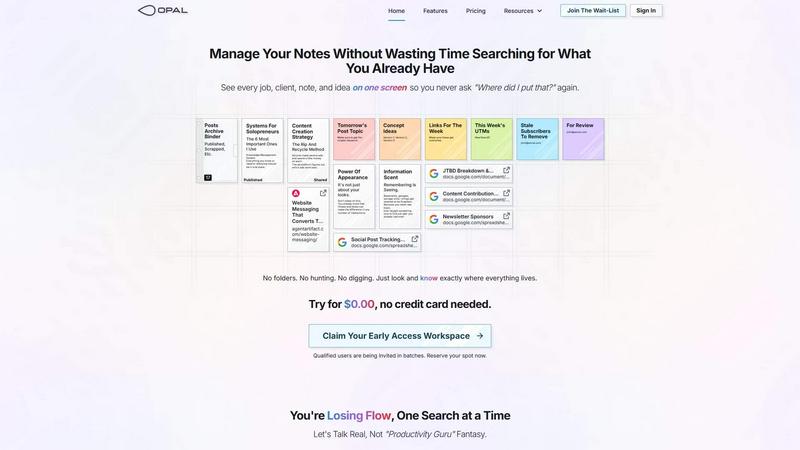
Opal is a cutting-edge visual knowledge and project management workspace tailored for individuals who think spatially. Designed to combat the frustrations of traditional note-taking and project management tools, Opal offers a unique, infinite digital canvas where users can intuitively drag and drop notes, documents, files, and links. This method of organization allows users to visualize their information as they would on a physical desk, making it easier to remember not just what they have, but also where to find it. With its user-centric approach, Opal is perfect for solopreneurs, consultants, agency owners, and writers—anyone whose work relies on the seamless management of details, conversations, and commitments. By keeping all active projects, client information, and creative ideas visible and accessible, Opal empowers users to maintain their flow, minimize distractions, and focus on producing their best work without the constant struggle of searching for misplaced notes.
Features of Opal
Infinite Digital Canvas
Opal provides an expansive digital workspace that allows users to organize their notes, files, and documents freely. This feature eliminates the constraints of traditional folder systems, enabling a more fluid and personalized approach to information management.
Visual Organization
With Opal, users can visually arrange their notes and projects in a way that makes sense to them. This spatial memory technique enhances recall, allowing users to locate information quickly and efficiently without unnecessary searching.
Real-Time Collaboration
Opal supports collaborative work by allowing multiple users to access and edit the same workspace simultaneously. This feature is essential for teams and consultants who need to share ideas and updates in real-time, fostering enhanced communication and productivity.
Integrated Workflows
Opal seamlessly integrates various tools and resources, allowing users to connect their workflows without the hassle of switching between applications. This integration capability streamlines processes, making it easier to manage tasks and projects in one unified environment.
Use Cases of Opal
Freelance Project Management
Freelancers can use Opal to manage multiple clients and projects simultaneously. By visualizing all their work in one space, they can keep track of deadlines, client details, and project statuses without the chaos of scattered notes.
Creative Brainstorming
Writers and creatives can leverage Opal's infinite canvas to brainstorm ideas and organize their thoughts visually. This approach helps in developing concepts and storylines without losing sight of critical details.
Client Consultations
Consultants can utilize Opal to prepare for client meetings by organizing notes, proposals, and previous communications all in one place. This ensures they have all relevant information at their fingertips, enhancing the quality of consultations.
Team Collaboration
Small teams can benefit from Opal by using it as a central hub for project management, brainstorming sessions, and strategic planning. The visual organization fosters collaboration and keeps everyone aligned on goals and tasks.
Frequently Asked Questions
What makes Opal different from other project management tools?
Opal stands out because it combines the benefits of visual organization with a flexible workspace that mimics a physical desk. Unlike traditional tools that require filing and nesting, Opal allows users to place information intuitively, making retrieval easier.
Can I collaborate with others in Opal?
Yes, Opal supports real-time collaboration, enabling multiple users to access and edit the same workspace simultaneously. This feature is ideal for teams and freelancers who work closely with clients or colleagues.
Is there a learning curve to using Opal?
Opal is designed to be user-friendly, with an intuitive interface that requires minimal training. Users can quickly adapt to the visual organization style and start managing their projects effectively without a steep learning curve.
Is my data secure in Opal?
Opal prioritizes user data security and employs robust measures to protect your information. Regular updates and compliance with industry standards ensure that your data remains safe and secure within the platform.
Similar to Opal

AI Email Filter
AI Email Filter sorts incoming mail into folders using plain-language prompts you write. Works with any IMAP mailbox; bring your own LLM if you want.

Egmatic
No-code 2D game editor: visual node logic, drag-and-drop scenes, live preview. Exports to Windows, macOS, Linux, Android, iOS, Web.

Product Launch Checklist
A free launch checklist for SaaS, apps, AI tools and more. Every step says why it matters and when you can skip it.

Kody Tools
Free collection of online developer utilities, code formatters, and digital converters designed to streamline your daily workflow.

Forms Plugin
The #1 Native Form Builder Plugin for Framer - No Code, No Embeds, No External Platforms.


