

MeetingMind
MeetingMind automatically records, transcribes, and summarizes your Zoom meetings into private notes.
About MeetingMind
MeetingMind is a sophisticated, AI-powered meeting assistant designed exclusively for macOS, fundamentally transforming how professionals capture, comprehend, and utilize meeting content. It operates as an intelligent, menu-bar resident application that automatically detects and records Zoom meetings without requiring manual intervention. At its core, MeetingMind captures both microphone and system audio with adaptive gain, converting this audio into real-time, speaker-attributed transcripts. These transcripts are then intelligently processed to generate concise AI summaries, identify key action items, and highlight crucial discussion points, all formatted in clean, usable markdown. The tool is engineered for a broad spectrum of users, including busy executives, remote teams, educators, consultants, and freelancers who depend on efficient collaboration and accurate meeting records. Its paramount value proposition lies in its powerful combination of seamless automation, intelligent analysis, and an uncompromising commitment to user privacy, as all processing occurs locally on the user's device. By ensuring no detail is ever missed and providing immediate, searchable insights, MeetingMind empowers users to fully engage in conversations while it handles the meticulous task of documentation and analysis.
Features of MeetingMind
Automatic Zoom Detection & Recording
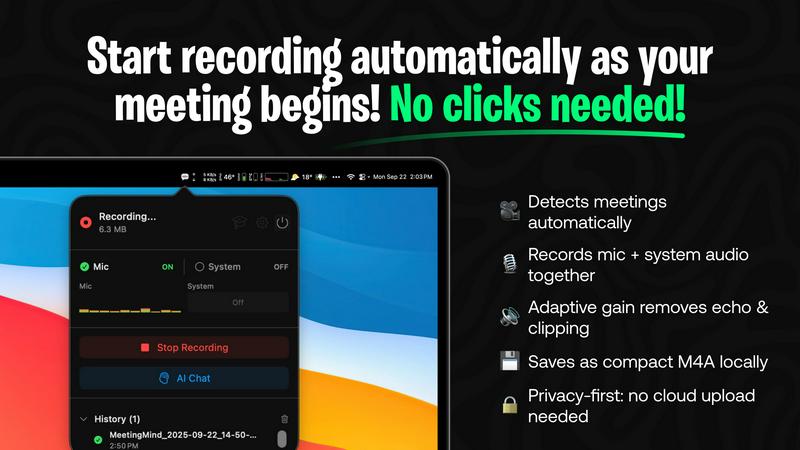
MeetingMind eliminates the need for manual start/stop commands by intelligently detecting when you join a Zoom meeting and automatically initiating the recording process. This hands-free operation ensures you never forget to record an important session, allowing you to focus entirely on the discussion. It seamlessly captures the meeting in the background, providing a reliable and effortless recording experience from start to finish.
Dual Audio Capture with Adaptive Gain
The application expertly records both microphone audio (participants' voices) and system audio (sound from your computer, like presentation audio or shared videos) simultaneously. Its adaptive gain technology intelligently balances audio levels to ensure crystal-clear playback, preventing one source from overpowering another. This results in a comprehensive and high-fidelity audio record of the entire meeting environment.
AI-Powered Summaries & Insights
MeetingMind leverages advanced AI to transform raw transcripts into actionable intelligence. Users can choose between a local AI model via Ollama for maximum privacy or a cloud-based option via OpenRouter for enhanced power. The AI automatically generates concise summaries, extracts clear action items, and identifies key discussion points, saving hours of manual note-review and providing immediate clarity on meeting outcomes.
100% Local Processing & Privacy
A cornerstone feature of MeetingMind is its staunch commitment to data security and privacy. All audio processing, transcription, and AI analysis are performed locally on your Mac. Your sensitive meeting conversations, transcripts, and summaries never leave your device or are sent to external servers, giving you complete peace of mind and ensuring compliance with stringent data protection standards.
Use Cases of MeetingMind
Remote Team Collaboration & Stand-ups
For distributed teams conducting daily stand-ups, project syncs, or brainstorming sessions over Zoom, MeetingMind is indispensable. It automatically records and transcribes every meeting, ensuring remote members have equal access to discussions. The AI-generated summaries and action items provide a single source of truth, improving accountability and ensuring follow-through, which is critical for maintaining project momentum across time zones.
Client Consultations & Professional Services
Consultants, lawyers, therapists, and freelancers can use MeetingMind to meticulously document client meetings. The automatic recording ensures no client requirement, feedback, or agreed-upon action is forgotten. The professional markdown transcripts and summaries serve as accurate records for deliverables, billing, and ongoing strategy, enhancing service quality and protecting both the professional and the client.
Educational Lectures & Student Meetings
Educators and students can leverage MeetingMind to capture online lectures, tutoring sessions, or study group meetings. The tool allows learners to be fully present during the session without frantic note-taking. Later, they can review the searchable transcript, use the AI to highlight key concepts, and export structured notes in markdown for study guides, making knowledge retention and review significantly more efficient.
Executive Briefings & Board Meetings
For executives and administrators, capturing the nuanced details of high-stakes strategy sessions, board meetings, and investor briefings is critical. MeetingMind provides a discreet, automatic record of these conversations. The AI's ability to distill complex discussions into clear summaries and action items supports faster decision-making and provides an invaluable audit trail for strategic decisions and corporate governance.
Frequently Asked Questions
How does MeetingMind ensure meeting privacy?
MeetingMind is built with privacy as its foundational principle. Unlike many cloud-based services, all audio processing, speech-to-text transcription, and AI analysis occur directly on your Mac's hardware. Your meeting data is never uploaded to external servers or third parties. This local-first architecture ensures that sensitive business discussions, personal conversations, and confidential information remain completely secure and under your control.
What is included in the free version?
The free tier of MeetingMind is robust and designed for daily utility. It includes 60 minutes of total recording time per day, which is perfect for short meetings like daily stand-ups. It features automatic Zoom detection, live transcription, AI-powered summaries and insights, and all local processing. This "forever free" plan allows users to fully experience the core functionality of the app before deciding to upgrade.
What are the benefits of the one-time Unlimited purchase?
The Unlimited version is a one-time purchase that removes the daily 60-minute recording limit, granting users unrestricted recording time. It includes all features from the free version—automatic detection, AI summaries, local processing—with no subscriptions or recurring fees. Purchasers also receive lifetime updates, making it a cost-effective, long-term solution for professionals with frequent or lengthy meetings.
Do I need to inform participants I am recording?
Yes, absolutely. MeetingMind is a powerful recording tool, but it is your responsibility to use it ethically and legally. You must always inform all participants that the meeting is being recorded and obtain their consent before starting. Compliance with local, state, and international laws regarding the recording of conversations (which often require two-party or all-party consent) is mandatory. The tool includes a recording disclosure reminder for this purpose.
Pricing of MeetingMind
MeetingMind offers a simple, transparent pricing model with two tiers. The Free plan provides 60 minutes of recording per day, automatic Zoom detection, live transcription, AI summaries, and local processing at no cost forever. For users requiring more capacity, the Unlimited plan is available as a one-time purchase through the Mac App Store. This plan removes all daily time limits, includes everything in the Free version, and comes with lifetime updates and no subscription fees, representing a significant long-term value for power users.
Explore more in this category:
Similar to MeetingMind

AI Email Filter
AI Email Filter sorts incoming mail into folders using plain-language prompts you write. Works with any IMAP mailbox; bring your own LLM if you want.

GetYouTubeTranscript
Free YouTube transcripts on the web, a Chrome extension, and an API + MCP server so AI assistants can read YouTube.

Egmatic
No-code 2D game editor: visual node logic, drag-and-drop scenes, live preview. Exports to Windows, macOS, Linux, Android, iOS, Web.

Product Launch Checklist
A free launch checklist for SaaS, apps, AI tools and more. Every step says why it matters and when you can skip it.

Kody Tools
Free collection of online developer utilities, code formatters, and digital converters designed to streamline your daily workflow.


Forms Plugin
The #1 Native Form Builder Plugin for Framer - No Code, No Embeds, No External Platforms.