

JustPDF
JustPDF is a privacy-first toolkit offering 17 essential browser-based tools to edit, convert, and manage your PDFs completely offline.
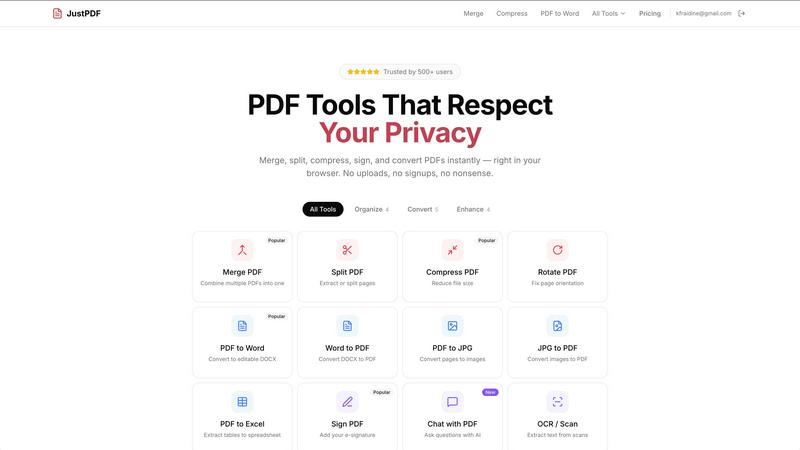
About JustPDF
JustPDF represents a fundamental shift in how users interact with and process PDF documents online. It is a comprehensive suite of 17 professional-grade PDF tools that operates with a core, uncompromising principle: complete user privacy and security. Unlike conventional online services such as Smallpdf or iLovePDF, which require uploading files to remote servers, JustPDF leverages advanced JavaScript and WebAssembly technology to perform all processing directly within the user's web browser. This means documents are never transmitted over the internet, a fact users can independently verify by monitoring the Network tab in their browser's developer tools. The platform caters to a wide audience, including students, professionals, legal entities, healthcare workers, and any individual concerned with data sovereignty. Its primary value proposition is delivering powerful, desktop-application-level functionality—from merging and compressing to advanced AI-driven chat and OCR—through a convenient web interface, without ever sacrificing the confidentiality of the user's files. With a generous free tier and FERPA-compliant operations, JustPDF establishes itself as the ethical and technically superior choice for modern PDF manipulation.
Features of JustPDF
100% Browser-Based Processing
The cornerstone feature of JustPDF is its entirely local processing engine. Every tool, whether it's compressing a large file or converting a PDF to Word, is executed directly on the user's device using WebAssembly. This architecture ensures that sensitive documents—be they legal contracts, academic transcripts, or personal identification—never leave the safety of the local machine. Users enjoy the convenience of a web app with the privacy and security of a fully offline desktop application, eliminating the risks associated with cloud uploads and data breaches.
Comprehensive PDF Tool Suite
JustPDF offers a robust collection of 17 specialized tools covering virtually every PDF need. This includes essential organizational functions like Merge, Split, Compress, and Rotate, as well as advanced conversion capabilities such as PDF to Word, Excel, and JPG. It also supports modern file formats with WebP and HEIC to PDF converters, provides security tools for Unlocking and Flattening PDFs, and incorporates innovative AI features like Chat with PDF and OCR/Scan functionality, all within a single, cohesive platform.
No-Account Free Tier & Offline Use
Democratizing access to premium tools, JustPDF allows users to perform up to three operations per day completely free of charge, without requiring any account registration or sign-in. This frictionless access is complemented by the platform's ability to work offline after the initial page load. Users can process their PDFs anywhere, regardless of internet connectivity, making it an invaluable tool for travel, remote work, or situations with unreliable network access.
FERPA-Compliant Security
Recognizing the critical need for data protection in sensitive sectors, JustPDF is explicitly designed to be FERPA-compliant. This makes it a trusted solution for educational institutions, teachers, and students who handle confidential academic records. The guarantee of local processing aligns perfectly with strict regulatory requirements, ensuring that student information remains private and secure, which is a significant differentiator from cloud-based alternatives.
Use Cases of JustPDF
Academic and Research Work
Students, researchers, and administrative staff can safely compile research papers, merge lecture notes, compress submission files, and convert scanned articles into editable text using the OCR tool. The FERPA-compliant nature of JustPDF makes it ideal for handling transcripts, application materials, and graded assignments without violating student privacy policies, providing peace of mind for entire educational communities.
Legal and Contract Management
Legal professionals frequently handle highly confidential contracts, court filings, and client documents. JustPDF allows them to merge exhibits, split large case files, flatten forms for finalization, add secure e-signatures, and convert documents to editable formats for revision—all while maintaining attorney-client privilege by ensuring the files never leave their computer, thus upholding the highest standards of confidentiality.
Business and Office Administration
Office workers can streamline daily document workflows by compressing PDFs for email, converting reports from PDF to Excel for data analysis, creating PDFs from image collections (JPG, WebP, HEIC), and applying professional e-signatures to agreements. The ability to process files offline and without account hurdles enables efficient productivity from any location, including during commutes or in client offices.
Personal Document Organization
Individuals managing personal records, such as tax documents, insurance forms, travel itineraries, and photo archives, can use JustPDF to organize their digital life. They can securely merge related documents, rotate scanned pages, unlock PDFs for printing, convert photos to PDF portfolios, and even use the AI chat feature to quickly find information within a lengthy manual or contract, all while keeping their personal data entirely private.
Frequently Asked Questions
How can I be sure my files are not uploaded?
You can verify this directly through your web browser. Open the Developer Tools (usually F12), navigate to the "Network" tab, and then use any JustPDF tool. You will observe no network activity related to your PDF file being uploaded. All processing happens locally via JavaScript and WebAssembly, with only the interface resources loading from the internet.
What does "works offline" mean?
Once you load the JustPDF website in your browser, the core application and tool engines are cached. This means you can close your internet connection and still use all the PDF tools. Your files are processed entirely on your device without needing to communicate with any external server, enabling true offline functionality for document handling.
What is the difference between the free and Pro plans?
The free plan allows for 3 tool operations per day with no account required. The Pro plan, starting at $4 per month, offers unlimited access to all 17 tools. Both plans operate on the same 100% browser-based, private processing principle; the Pro plan simply removes the daily usage limit for power users and professionals.
Is JustPDF suitable for handling sensitive or legally protected documents?
Yes, absolutely. The local processing model makes JustPDF uniquely suited for sensitive data. It is explicitly FERPA-compliant for educational records and is equally appropriate for legal, medical, and business documents where confidentiality is paramount. Since files never leave your device, you retain full control and eliminate third-party data transmission risks.
Pricing of JustPDF
JustPDF operates on a freemium model designed for maximum accessibility. Users can access all 17 tools for free, with a limit of 3 operations per day, without any need to create an account. For users requiring unlimited access, the Pro subscription is available starting at $4 per month. This subscription removes the daily operation cap, providing unrestricted use of the entire suite, including advanced features like AI Chat with PDF and OCR, while maintaining the same commitment to 100% browser-based, private file processing.
Similar to JustPDF

AI Email Filter
AI Email Filter sorts incoming mail into folders using plain-language prompts you write. Works with any IMAP mailbox; bring your own LLM if you want.

Egmatic
No-code 2D game editor: visual node logic, drag-and-drop scenes, live preview. Exports to Windows, macOS, Linux, Android, iOS, Web.

Product Launch Checklist
A free launch checklist for SaaS, apps, AI tools and more. Every step says why it matters and when you can skip it.

Kody Tools
Free collection of online developer utilities, code formatters, and digital converters designed to streamline your daily workflow.

Forms Plugin
The #1 Native Form Builder Plugin for Framer - No Code, No Embeds, No External Platforms.


