

EditTextImage
EditTextImage instantly edits text in any image online while preserving font, color, lighting, and perspective without Photoshop or font installs.
About EditTextImage
EditTextImage is an innovative online AI tool that revolutionizes the way you modify text within images, eliminating the need for complex software like Photoshop, expensive subscriptions, or any design expertise whatsoever. At its core, this powerful platform allows you to upload any image file, whether it is a finished poster, a product screenshot, a document scan, or a social media graphic, and seamlessly replace existing text with new text while preserving every visual detail of the original. The artificial intelligence engine samples the typography directly from the pixels of the image, meaning it captures the exact font, color, size, drop shadow, perspective, and background texture without requiring you to have the original font files installed on your computer. This capability is transformative for professionals and individuals alike who frequently encounter the frustrating scenario of needing to change a single word, date, or headline on a finished image but have lost the source design file. Whether you are a marketer running A/B tests on ad creatives, a localization specialist adapting app screenshots for multiple languages, an e-commerce manager updating product labels, or simply someone fixing a typo on a party invitation, EditTextImage delivers pixel-perfect results in approximately ten seconds at a high 2K resolution. The platform is accessible through any web browser, requires no credit card to start with one free edit, and operates on a straightforward pay-per-use model rather than a recurring subscription, making it an incredibly cost-effective and efficient solution for anyone who works with images.
Features of EditTextImage
AI Powered Typography Sampling
The core intelligence of EditTextImage lies in its ability to analyze the pixels of your uploaded image to understand and replicate the exact typography used. Unlike traditional image editors that require you to manually select a matching font from a library, this tool automatically samples the typeface, including its weight, kerning, and stylistic nuances, directly from the image data. This means that even if the original text uses a rare, paid, or custom hand-lettered font that you do not have installed on your system, the AI can faithfully reproduce it in the replacement text. This feature eliminates the guesswork and time consumption associated with font identification, ensuring that the new text blends perfectly with the surrounding design elements.
Pixel Perfect Layout Preservation
When you edit text in an image using EditTextImage, the tool does more than just swap characters; it meticulously preserves the entire layout and visual context of the original text. The AI understands the spatial relationship between the text and its background, ensuring that the replacement text is placed with exact precision, maintaining the original alignment, spacing, and perspective. Furthermore, any visual effects applied to the original text, such as drop shadows, gradients, outlines, or lighting reflections, are intelligently recreated for the new text. This holistic approach to preservation means the final output looks as though the text was originally written that way, with no awkward gaps, smeared backgrounds, or misaligned elements.
Rapid Processing and High Resolution Output
Speed and quality are paramount in professional workflows, and EditTextImage delivers on both fronts. The entire process, from uploading an image to receiving the edited result, averages around ten seconds, making it one of the fastest tools available for this specific task. Despite the rapid processing time, the output quality does not suffer. The tool generates edited images at a sharp 2K resolution, ensuring that the final product is suitable for high-quality printing, digital display, or further editing. This combination of speed and high fidelity makes EditTextImage an ideal solution for last-minute corrections, bulk editing tasks, or any scenario where time is a critical factor.
Simple Three Step Workflow
Accessibility is a key design principle of EditTextImage, reflected in its incredibly intuitive and streamlined user interface. The entire process of editing text in an image is broken down into just three simple steps that require no prior training or design skills. First, you upload your image file in PNG, JPEG, or WebP format, up to 10 MB in size. Second, you type the original text you want to replace and the new replacement text into the provided fields. Third, you click the generate button to let the AI work its magic. This frictionless workflow removes all technical barriers, empowering anyone to make professional-quality text edits in seconds.
Use Cases of EditTextImage
Document Corrections and Updates
A common and frustrating scenario is needing to correct a typo, update a date, or change a figure on an important document when you only have a scanned PDF or a screenshot. With EditTextImage, you can directly edit the text within the image of the document without needing the original Word or InDesign file. This is invaluable for updating invoice numbers, fixing errors in contracts, correcting dates on certificates, or modifying information on official forms. The tool ensures that the correction looks completely natural and professional, preserving the document's original formatting and font, which is crucial for maintaining credibility and avoiding the appearance of tampering.
Marketing and Advertising Creative Optimization
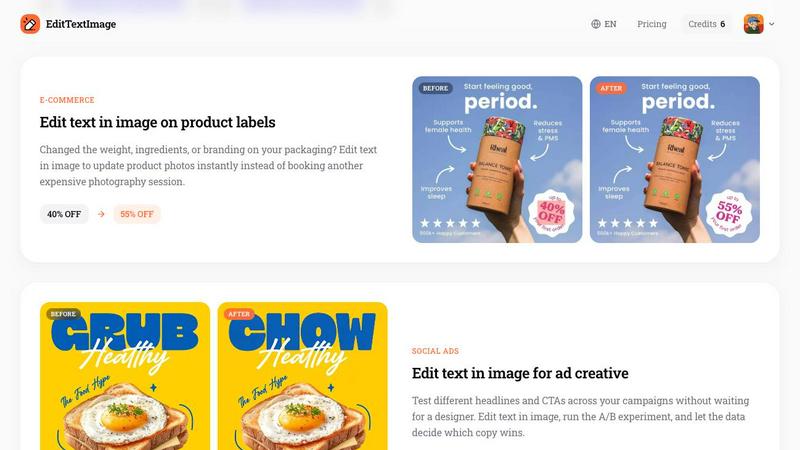
Marketers and advertisers constantly need to test different headlines, calls to action, and promotional copy to optimize campaign performance. EditTextImage enables rapid A/B testing by allowing you to swap text on existing ad creatives, social media graphics, and banner images without waiting for a designer to recreate the files. You can quickly generate multiple versions of an ad with different value propositions or urgency triggers and deploy them to see which resonates best with your audience. This agility accelerates the optimization cycle, reduces dependency on design resources, and allows data-driven decisions to be implemented almost instantly.
Product and E-commerce Image Management
For e-commerce businesses, product packaging and labels often need updates due to changes in ingredients, weight, pricing, or branding. Organizing a new professional photoshoot for every minor text change is expensive and time-consuming. EditTextImage offers a cost-effective alternative by allowing you to edit the text directly on existing product photos. You can update discount percentages on sale tags, change product names or descriptions on packaging, or modify expiration dates on labels. The tool preserves the lighting, shadows, and texture of the original image, ensuring the edited product photo remains realistic and consistent with your catalog.
Localization and App Screenshot Adaptation
App developers and marketers targeting global audiences face the challenge of creating localized screenshots for app store listings in multiple languages. Rebuilding every UI mockup for each language is a significant drain on resources. EditTextImage streamlines this process by enabling you to edit the text directly on your existing app screenshots. You can quickly swap English text for French, German, Japanese, or any other language, and the AI will adapt the typography to fit the new characters while maintaining the original UI layout and design aesthetic. This capability dramatically reduces the time and cost associated with app store optimization for international markets.
Frequently Asked Questions
What types of image files can I upload to EditTextImage?
EditTextImage supports the most common image formats used for digital graphics and documents. You can upload files in PNG, JPEG, and WebP formats. To ensure optimal processing speed and quality, there is a maximum file size limit of 10 MB. If your image is larger than this, you may need to compress it or reduce its dimensions before uploading. The tool is designed to handle a wide variety of image types, from simple screenshots to complex posters with layered designs.
Do I need to have the original font installed on my computer?
No, you do not need to have the original font installed. This is one of the most powerful and convenient features of EditTextImage. The AI technology samples the typography directly from the pixels of the uploaded image. It analyzes the shape, weight, spacing, and style of the characters to recreate the font for the replacement text. This means you can edit text that uses paid, rare, or custom hand-lettered fonts without needing to purchase or locate the font files.
Is my first edit really free and do I need to provide a credit card?
Yes, your very first edit is completely free, and you do not need to provide a credit card or any payment information to use it. You can simply sign in with your Google account to receive one free credit. This allows you to test the tool's capabilities and see the quality of the results before making any financial commitment. After using your free credit, you can purchase a credit pack to continue editing images.
What are the acceptable use guidelines for EditTextImage?
EditTextImage has strict acceptable use policies to ensure the tool is used ethically and legally. You must confirm that you own or are licensed to edit the image you upload. The tool is explicitly not to be used for deceptive purposes, such as creating fake visa or immigration submissions, falsifying refund or transaction proofs, or altering email or chat screenshots to change sender information, content, or timestamps. Additionally, the platform prohibits the processing of IDs, passports, visa support letters, official seals, bank statements, or tampered receipts. Violations of these policies can result in account termination without a refund, and request logs may be preserved and shared with law enforcement.
Pricing of EditTextImage
EditTextImage operates on a simple, no-subscription pricing model designed for flexibility and affordability. You start with one free credit to edit a single image, which requires no credit card to activate. After using your free credit, you can purchase a one-time credit pack for $9.90, which provides you with 30 edits. These credits never expire, meaning you can use them at your own pace without any recurring charges. Commercial use of the edited images is included in this price. This pay-as-you-go structure makes it a cost-effective alternative to expensive monthly subscriptions for tools like Photoshop or Canva, especially for users who only need to make occasional text edits.
Similar to EditTextImage


Lockimate - AI Live Wallpapers
Turn any photo into a real Apple Live Photo that animates when you wake your iPhone. Restyle it and choose the motion — customizable.

Vismuse
Create polished AI images and videos from prompts or references for social posts, ads, flyers, album covers, and campaigns.

StopScroll
AI YouTube thumbnail maker that generates multiple thumbnail concepts from a URL, title, or prompt.

NodeStory
One-click UGC videos, product photo sets, and reusable AI workflows, with 30+ image and video models in one studio.

IsThisAIImage
Free AI image checker: upload a photo for AI-generated and deepfake scores, a clear verdict, and optional generator hints.

HubVanta AI
HubVanta AI helps creators generate images and videos with advanced AI tools for visual content workflows.

Picture Enhancer
Picture Enhancer is a free online AI tool that deblurs, upscales, and restores photos in your browser with no software install.