

Easymotion - AI Motion Graphic Generator
Easymotion transforms static images, data, and maps into professional animated videos for any platform, replacing hours of complex editing work with.
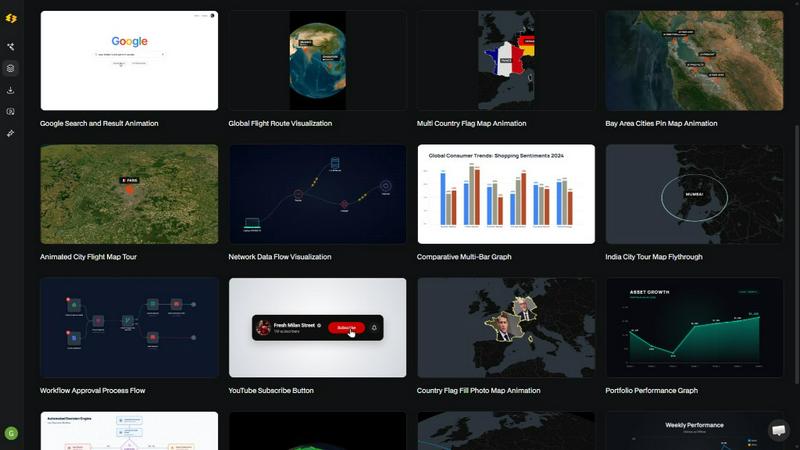
About Easymotion - AI Motion Graphic Generator
Easymotion is an innovative AI-powered motion graphics generator and map animation platform designed for content creators, video editors, marketing professionals, founders, and data storytellers. The core mission of Easymotion is to transform the way professionals produce animated video content by eliminating the need for complex timeline editing software like Adobe After Effects. Instead of spending hours wrestling with keyframes, layers, and rendering settings, users can simply describe their vision in plain English and let the artificial intelligence handle the heavy lifting. The platform supports a remarkably broad range of animation types, including SaaS product promos, dynamic flowcharts, animated data charts, user interface explainers, interactive quizzes, and compelling geographic storytelling visuals through its specialized map animation capabilities. Users can initiate projects from a simple text prompt, or they can upload static images, spreadsheets in CSV or XLSX format, and PDF documents to be instantly converted into fully animated, ready-to-edit scenes. After the initial generation, refinement is handled through conversational chat commands, allowing users to adjust colors, pacing, labels, layout, and visual style without touching a single traditional editing tool. The platform also features a premium template library filled with proven motion graphics layouts that can be customized for specific brand guidelines, campaign requirements, or client deliverables. When the animation is complete, export options include MP4 and MOV formats, with the critical ability to export videos with transparent alpha channels for seamless integration into professional editing workflows. Easymotion supports all major aspect ratios, including 16:9 for YouTube and landscape content, 9:16 for TikTok and Instagram Reels, 1:1 for square social media posts, and 4:5 for feed-friendly vertical formats. Built entirely for browser-based use, Easymotion empowers professionals to create high-quality motion graphics, map animations, and reusable video assets in under five minutes per video, making it an indispensable tool for anyone who needs to produce polished animated content at scale.
Features of Easymotion - AI Motion Graphic Generator
AI-Powered Chat-Based Animation Creation
The cornerstone of Easymotion is its revolutionary chat-based interface that allows users to create professional motion graphics simply by typing what they want. Instead of navigating complex timelines, layers, and keyframe editors, users describe their desired animation in natural language, such as "Design a social media promo video for my coffee shop," and the AI instantly generates a fully animated scene. This feature dramatically reduces the learning curve for newcomers while accelerating workflows for experienced editors. The AI understands context, visual hierarchy, and motion principles, producing animations that look polished and intentional. Users can then continue the conversation to refine every aspect of the video, from color schemes and typography to animation timing and camera movements, all through simple chat commands.
Image to Animation Conversion
Easymotion empowers users to upload static images and transform them into dynamic, motion-filled videos with minimal effort. Whether it is a product photo, a brand logo, an infographic, or a screenshot of a user interface, the AI analyzes the visual elements and intelligently applies motion effects that bring the image to life. This could involve subtle parallax movements, zooming into key details, adding floating particles, or creating smooth transitions between different elements. The feature is particularly valuable for marketers and social media managers who need to repurpose existing static assets into engaging video content without starting from scratch. The AI preserves image quality and brand integrity while adding professional-grade animation that captures viewer attention.
Map Animation Generator
Easymotion includes a specialized map animation engine that allows users to create stunning geographic storytelling visuals with unprecedented speed and ease. Users can generate flight route animations between cities, location pin drops with custom labels, flag fill highlights for countries or regions, and full globe fly-through sequences that zoom from a global perspective down to a specific street level. This feature is ideal for travel content creators, logistics companies, news organizations, and educational platforms that need to visualize geographic data. The AI handles all the complex map rendering, camera movements, and transition effects automatically. Users can customize map styles, colors, and markers through chat commands, making it simple to create branded map animations for YouTube videos, social media posts, presentations, and client deliverables.
Data to Animated Visualization
Easymotion revolutionizes data storytelling by allowing users to upload spreadsheets in CSV or XLSX format and instantly convert boring rows of numbers into beautiful, animated charts and graphs. The AI automatically detects data types, selects appropriate visualization formats such as bar charts, line graphs, pie charts, or area charts, and applies smooth animation effects that reveal data points sequentially or simultaneously. Users can customize chart colors, labels, axes, and animation timing through simple chat commands. This feature is a game-changer for data analysts, researchers, business intelligence professionals, and content creators who need to present complex information in an engaging, easy-to-understand visual format. Animated data visualizations have been proven to generate up to five times more engagement on social media compared to static charts.
Use Cases of Easymotion - AI Motion Graphic Generator
Social Media Content Creation for Marketers
Marketing professionals can leverage Easymotion to rapidly produce high-quality video content for platforms like TikTok, Instagram Reels, YouTube Shorts, and LinkedIn. Instead of waiting days for a designer or spending hours in complex editing software, marketers can generate promotional videos, product teasers, brand stories, and campaign announcements in under five minutes. The platform supports all major aspect ratios, ensuring content is optimized for each social channel. Marketers can iterate on videos quickly based on performance data, test different messaging and visual styles, and maintain brand consistency across all content. The ability to export with transparent backgrounds also allows for easy integration into larger video campaigns or editing workflows. This speed and flexibility enable marketing teams to ship campaigns the same day they are conceived.
Video Production for YouTubers and Content Creators
YouTubers and content creators can dramatically accelerate their video production workflow using Easymotion. Creating motion graphics for intro sequences, end screens, channel trailers, milestone celebration videos, and educational explainers traditionally requires significant time investment in After Effects or similar software. Easymotion allows creators to produce these elements in minutes by simply describing what they need. For example, a travel vlogger can generate animated flight route maps showing their journey, a tech reviewer can create animated UI explainers for app walkthroughs, and a data-focused channel can produce animated charts for market analysis videos. The time saved on motion graphics allows creators to focus on scripting, filming, and engaging with their audience, ultimately helping them post more frequently and grow their channel faster.
Client Deliverables for Video Editors and Agencies
Freelance video editors and production agencies can use Easymotion to work three times faster on client projects. Motion graphics often consume the majority of a project timeline, especially when clients request revisions to colors, text, or animation style. With Easymotion, editors can generate initial motion graphics in minutes, present them to clients for feedback, and make revisions through simple chat commands without rebuilding entire sequences from scratch. The platform supports transparent video export with alpha channels, allowing seamless integration into professional editing software like Premiere Pro, Final Cut Pro, or DaVinci Resolve. This capability is invaluable for creating lower thirds, animated logos, map overlays, data visualizations, and social media ads. Agencies can take on more projects, deliver faster turnaround times, and maintain higher profit margins by reducing the hours spent on manual animation work.
Data Storytelling for Business Professionals
Business analysts, consultants, educators, and startup founders can use Easymotion to transform static data reports into compelling animated presentations that capture audience attention. Instead of presenting boring spreadsheets or static charts during board meetings, investor pitches, or educational sessions, professionals can upload their data and generate animated visualizations that reveal insights gradually. This storytelling approach helps audiences understand complex information more easily and remember key takeaways longer. For example, a startup founder can create an animated growth chart for an investor pitch, a teacher can illustrate historical population trends with animated map overlays, or a marketing manager can present campaign performance data with dynamic bar chart races. The ability to export in high-quality video formats also means these animations can be shared on social media, embedded in websites, or included in email newsletters to drive engagement.
Frequently Asked Questions
What types of videos can I create with Easymotion?
Easymotion supports an extensive range of video types, making it a versatile tool for virtually any motion graphics need. You can create SaaS product promotional videos, animated flowcharts and process diagrams, dynamic data visualizations from spreadsheets, user interface explainers, interactive quiz animations, and comprehensive geographic storytelling visuals including flight route maps, location pin animations, and country flag highlights. The platform also excels at social media content creation for all major platforms, supporting aspect ratios for YouTube, TikTok, Instagram Reels, and LinkedIn. Additionally, users can generate intro sequences, end screens, milestone celebration videos, travel reels, and brand promotional content. The template library provides pre-built layouts for maps, charts, interfaces, and social media content that can be customized for any purpose.
How does the AI motion graphics generation process work?
The process is designed to be intuitive and efficient, consisting of three simple steps. First, you describe the animation you want in plain English using the chat interface. For example, you could type "Create a flight route animation from New York to London with a glowing path and city pins." The AI processes your request and generates a fully animated scene with proper keyframes, motion curves, and visual effects. Second, you can refine the result using additional chat commands to adjust colors, timing, map styles, text labels, layout, or any other visual element. The AI understands context and can make precise changes based on your instructions. Finally, when you are satisfied with the animation, you export your completed video as an MP4 file or with a transparent background (alpha channel) for use in professional editing software. The entire process typically takes less than five minutes.
Is Easymotion suitable for beginners with no animation experience?
Yes, Easymotion is specifically designed to be accessible to users of all skill levels, including complete beginners with no prior animation or design experience. The chat-based interface eliminates the need to learn complex software like After Effects, understand keyframe animation, or master motion design principles. The AI handles all the technical aspects of animation, including timing, easing curves, transitions, and rendering. Beginners can start by using the template library, which provides pre-designed motion graphics layouts that can be customized with simple text changes. The platform also offers step-by-step tutorials on creating animated travel route maps, bar charts, flowcharts, and other common video types. For more advanced users, the chat interface allows for granular control over every aspect of the animation, making the platform scalable from simple projects to complex professional deliverables.
What export formats and aspect ratios are supported?
Easymotion provides flexible export options to accommodate various distribution channels and editing workflows. Videos can be exported as MP4 files, which are universally compatible with social media platforms, websites, and presentation software. Additionally, the platform supports MOV format with transparent backgrounds (alpha channel), allowing users to overlay their animations directly into professional editing software like Adobe Premiere Pro, Final Cut Pro, DaVinci Resolve, or After Effects without needing to key out backgrounds. In terms of aspect ratios, Easymotion supports 16:9 for YouTube videos, landscape content, and presentations; 9:16 for TikTok, Instagram Reels, and YouTube Shorts; 1:1 for square social media posts suitable for Instagram and LinkedIn; and 4:5 for feed-friendly vertical formats that maximize screen real estate on mobile devices. This comprehensive range ensures that users can create content optimized for any platform without additional cropping or resizing.
Explore more in this category:
Similar to Easymotion - AI Motion Graphic Generator

Qwen Image 2.1
Qwen Image 2.1 is an AI image-generation and editing studio for turning ideas into visuals. Create new images, refine references, explore transparent

ImageAgent
Create and edit AI images through conversation, using text or reference images and refining results in chat.

CloneWebsite
Clone any webpage pixel-perfect, export HTML/CSS/ZIP or React/Vue components.

GenX
All-in-one AI workspace to generate images, videos, and audio with multiple leading AI models.

Bloom
An adaptive AI tutor that turns topics or your materials into courses, lessons, and answers tailored to how you learn.

AppIconGenerator
Generate iOS and Android app icons from any image and export all platform sizes for free.

YIX
AI image and video generation, photo editing, restoration and free prompt tools in one browser studio.

Budgetpixel AI
Create AI images, videos, music, and designs in one workspace with multiple models, powerful editing tools, and API access.