

DocuExtractor
Transform receipts and invoices into structured data files effortlessly, eliminating manual entry with DocuExtractor.
About DocuExtractor
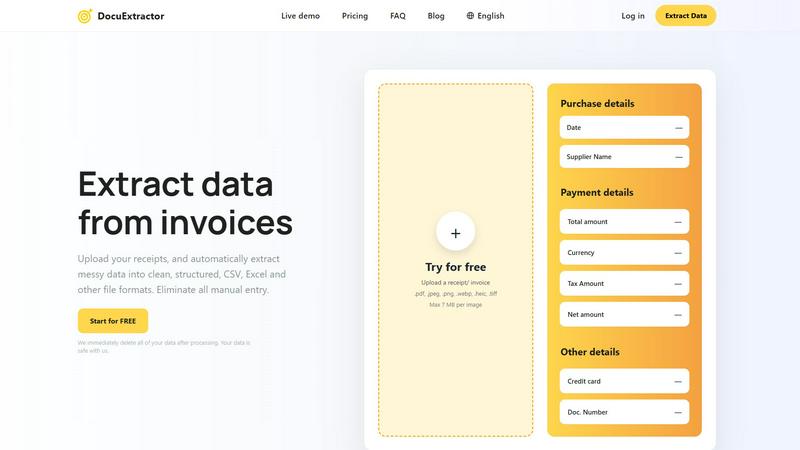
DocuExtractor is an innovative document conversion tool designed to simplify the cumbersome task of data extraction from various financial documents, including invoices, bank statements, and receipts. Utilizing advanced Optical Character Recognition (OCR) technology, DocuExtractor efficiently converts unstructured, messy data into organized formats like CSV and Excel. This software is ideal for accountants, bookkeepers, and businesses that handle significant volumes of financial paperwork, helping them save valuable time usually spent on manual data entry. By automating this process, DocuExtractor not only enhances productivity but also improves accuracy, allowing users to redirect their focus toward more strategic financial tasks. Furthermore, the platform emphasizes data security, ensuring that all uploaded documents are permanently deleted immediately after processing. This commitment to user privacy provides peace of mind, making DocuExtractor a reliable choice for professionals seeking efficiency in their document management.
Features of DocuExtractor
Advanced Optical Character Recognition (OCR)
DocuExtractor employs state-of-the-art OCR technology to accurately read and extract data from various document types. This feature ensures that even poorly formatted documents are processed with high precision, minimizing errors and manual corrections.
Batch Processing Capability
Users can upload multiple documents simultaneously, significantly reducing the time required for data extraction. This batch processing feature allows businesses to handle large volumes of paperwork efficiently, streamlining workflows and enhancing overall productivity.
Customizable Data Fields
The software provides users with the ability to define custom data fields for extraction, catering to specific needs. This flexibility ensures that all necessary information is captured accurately, allowing for tailored outputs that meet individual business requirements.
Multi-Format Export Options
DocuExtractor allows users to download their extracted data in various formats, including CSV and Excel. This versatility ensures that the data is readily usable across different accounting software and systems, facilitating seamless integration into existing workflows.
Use Cases of DocuExtractor
Streamlining Accounting Processes
Accountants can utilize DocuExtractor to automate the extraction of key data from financial documents, reducing the time spent on manual data entry. This enables them to focus on more strategic analysis and decision-making tasks.
Enhanced Data Management for Bookkeepers
Bookkeepers can benefit from DocuExtractor by quickly converting invoices and receipts into structured formats, ensuring accurate record-keeping. This efficiency leads to improved financial oversight and better client service.
Efficient Handling of Expense Reports
Businesses can use DocuExtractor to simplify the process of managing employee expense reports. By extracting data from receipts and invoices, companies can streamline reimbursement processes and maintain accurate financial records.
Rapid Document Processing for Enterprises
Large organizations with high document volumes can leverage DocuExtractor to manage and process financial documents at scale. The tool's speed and accuracy facilitate timely reporting and compliance, making it essential for enterprise-level operations.
Frequently Asked Questions
How secure is my data when using DocuExtractor?
DocuExtractor prioritizes user privacy and data security by immediately deleting all uploaded documents after processing. This ensures that your sensitive information remains confidential and protected from unauthorized access.
What types of documents can I upload for extraction?
You can upload a variety of financial documents, including receipts, invoices, bank statements, and other PDF or image files. Supported formats include .pdf, .jpeg, .png, .webp, .heic, and .tiff, with a maximum file size of 7 MB per image.
Is there a limit to the number of documents I can process?
DocuExtractor allows for batch processing, meaning you can upload multiple documents at once. This feature is especially useful for users managing large volumes of financial paperwork, enhancing efficiency and productivity.
What kind of support can I expect from DocuExtractor?
DocuExtractor provides expert customer support to assist users with any issues or questions they may have. The support team is dedicated to ensuring a smooth user experience, helping resolve problems quickly and effectively.
Explore more in this category:
Similar to DocuExtractor


IZIPAY
IZIPAY is a virtual and physical crypto card service that lets users top up with digital assets and pay online like with a regular card.


PerPageFax
PerPageFax lets you send a fax online from any browser for a flat $0.50 per page — no account, no subscription, no fax machine.

SnapPChart
SnapPChart grades a trading chart screenshot A+ to F, with an entry, stop, targets, and risk/reward. Works on stocks, forex, crypto, futures.

Venduris
Venduris is a renewal intelligence platform that gives mid-size companies control over SaaS & AI contract renewals before leverage disappears.