

AssetCenter
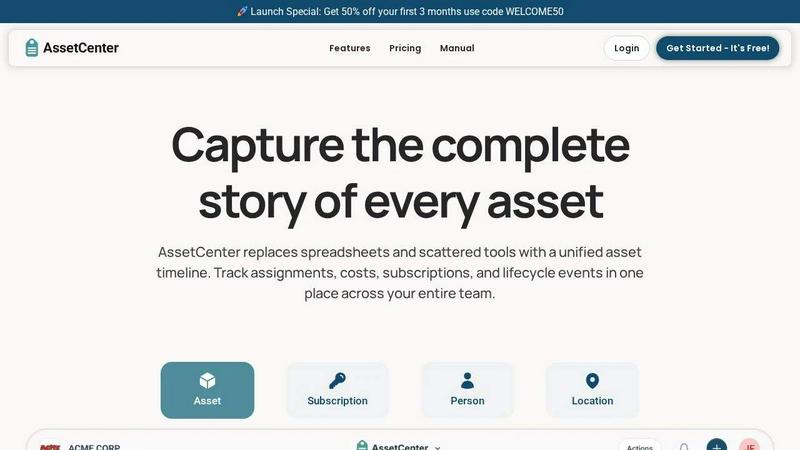
AssetCenter provides comprehensive visibility into every asset's lifecycle from acquisition to retirement with a unified timeline for tracking costs.
About AssetCenter
AssetCenter is a modern, unified asset management platform designed to bring complete visibility and control to organizations of any size and industry. At its core, AssetCenter solves the pervasive problem of fragmented data by capturing the full story of every asset, subscription, person, and location on a single, intuitive timeline. Instead of relying on spreadsheets, disparate systems, or manual logs, users gain a chronological, single source of truth that tracks every event from acquisition through to decommission. This includes purchases, assignments, maintenance, transfers, notes, tasks, and retirement. The platform is built for flexibility, allowing teams to create unlimited, custom categories and fields that model their real-world workflows without rigid constraints. Whether an organization is tracking IT equipment, medical devices, construction machinery, vehicles, or software licenses, AssetCenter adapts to its specific needs. The value proposition is clear: by centralizing all asset data and lifecycle events, teams can make smarter decisions, reduce inefficiencies, maintain full accountability, and stay ahead of expirations and end-of-life cycles. AssetCenter is ideal for professionals in healthcare, construction, education, government, nonprofits, IT, agriculture, manufacturing, and entertainment who need a reliable, easy-to-implement system to stop guessing and start tracking with confidence.
Features of AssetCenter
Unified Timeline for All Events
Every asset, subscription, person, and location in AssetCenter features a dedicated timeline that provides a clear, chronological view of all events. This feature eliminates the need to search through multiple systems or emails to understand an asset's history. From the moment of acquisition, where purchase cost and vendor are recorded, through its lifecycle events like assignments, maintenance, repairs, firmware updates, and notes, to its final decommission, every action is logged in one place. This single pane of glass ensures that any team member can instantly see where a resource is currently assigned, who is responsible for it, and what events have occurred, fostering complete transparency and traceability.
Customizable Categories and Timeline Events
AssetCenter empowers organizations to tailor the platform to their exact operational needs without requiring any coding or complex configuration. Users can create unlimited, industry-specific categories for assets and subscriptions, whether they are tracking vehicles, machinery, software licenses, or office equipment. Furthermore, the timeline itself is fully customizable. While AssetCenter includes prebuilt events for the three main stages of an asset's life (Acquisition, Lifecycle, and Decommission), users can modify these or create entirely new events. This means a construction company can log an "oil change," an IT department can log a "firmware update," and a healthcare facility can log a "calibration check," ensuring the system mirrors real-world workflows.
Comprehensive Dashboard and Visibility
The dashboard in AssetCenter serves as the central command center, bringing together critical data from across the entire organization. It provides instant visibility into total costs, upcoming expirations, and assets approaching end-of-life. Users can monitor recent activity across all resources, including assets, subscriptions, people, and locations, without needing to navigate between multiple pages. This holistic view helps teams identify inefficiencies, track spending trends, and proactively manage their inventory. By surfacing key metrics and recent changes at a glance, the dashboard empowers managers to make informed, data-driven decisions and maintain operational control.
Bulk Import and Rapid Onboarding
Getting started with AssetCenter is designed to be fast and efficient, even for organizations with large inventories. The platform offers bulk import templates in Excel format, which users can download, fill in with their existing data for assets, subscriptions, people, and locations, and then upload directly into the application. This feature dramatically reduces the time and effort required for initial setup and data migration. Combined with the ability to create custom categories on the fly, organizations can move from a free trial to a fully operational system in minutes, allowing them to immediately begin tracking and managing their resources without a lengthy implementation process.
Use Cases of AssetCenter
IT Asset Management for Software and Hardware
IT departments can use AssetCenter to manage the entire lifecycle of their technology stack, from laptops and servers to software licenses and cloud subscriptions. The unified timeline allows technicians to track assignments to employees, log maintenance or repairs, record firmware updates, and monitor software license expirations. The dashboard provides a clear view of total IT costs and helps identify underutilized assets or upcoming renewals. This ensures compliance, reduces security risks from outdated equipment, and optimizes budget allocation by providing a single source of truth for all IT resources.
Equipment Tracking in Construction and Manufacturing
For industries that rely on heavy machinery, tools, and vehicles, AssetCenter provides a robust solution for tracking equipment location, maintenance history, and lifecycle costs. A construction firm can log every event for a bulldozer, from its initial purchase and assignment to a job site, through routine oil changes and repairs, to its eventual decommission. Custom categories allow for tracking specific attributes like engine hours or safety inspection dates. This level of detail helps prevent costly downtime, ensures compliance with safety regulations, and provides accurate data for calculating total cost of ownership.
Healthcare Asset and Device Management
Hospitals and clinics can leverage AssetCenter to manage critical medical devices, equipment, and even facility assets. The platform can track infusion pumps, ventilators, or wheelchairs, logging their assignment to specific departments or patient rooms, maintenance and calibration events, and decommissioning. The timeline ensures a complete audit trail for regulatory compliance. Custom events can be created for specific procedures like sterilization cycles or software updates on diagnostic machines. This centralized visibility helps healthcare administrators reduce equipment loss, ensure devices are always available and in working order, and manage budgets more effectively.
Subscription and License Management for All Industries
Any organization with recurring software subscriptions, service contracts, or memberships can use AssetCenter to prevent lapses and control costs. Users can log each subscription, track its cost, assign it to a department or individual, and set it on a timeline. The dashboard provides a clear view of upcoming renewals and total subscription spend, preventing surprise charges or service interruptions. This use case is particularly valuable for IT, marketing, and finance teams who need to manage a growing portfolio of SaaS tools and ensure that every paid license is being actively used.
Frequently Asked Questions
How does the unified timeline work for different types of resources?
The unified timeline is a core feature that applies to every resource type in AssetCenter: assets, subscriptions, people, and locations. For an asset like a laptop, the timeline captures events such as purchase, assignment to an employee, maintenance logs, and decommission. For a subscription, it tracks the start date, renewal events, and cancellations. For a person, it can log their onboarding, equipment assignments, and role changes. Each timeline is a chronological feed that provides a complete history, accessible with a single click, ensuring you never lose track of any resource's story.
Can I customize AssetCenter to fit my specific industry or workflow?
Yes, flexibility is a cornerstone of AssetCenter. You can create unlimited custom categories that are specific to your industry, such as "Vehicles," "Medical Devices," or "Software Licenses." Within each category, you can add custom fields to capture the exact data you need. Furthermore, the timeline events themselves are fully customizable. You can use the prebuilt events for Acquisition, Lifecycle, and Decommission, or you can create your own events like "Oil Change," "Firmware Update," "Calibration," or "Safety Inspection" to perfectly match your organization's operational processes.
Is there a free trial and how do I get started?
Yes, AssetCenter offers a free trial that requires no credit card and includes 25 assets with no time limit. This allows you to explore the entire platform and see how it fits your needs. To get started, simply visit the AssetCenter website and click "Start Your Free Trial." You can then create your free account, set up custom categories, and use the bulk import Excel templates to quickly upload your existing data. The platform is designed to be intuitive, and a user manual is available to guide you through the process.
What happens to my data if I decide not to continue after the free trial?
If you decide not to continue with a paid plan after your free trial, you can simply cancel your account. AssetCenter allows you to export your data at any time, ensuring you maintain ownership of your information. The free trial itself is designed to give you full access to the platform's features without any risk. If you choose to upgrade, you can do so at any time to unlock additional asset capacity and features, and your data will seamlessly carry over.
Explore more in this category:
Similar to AssetCenter

AI Email Filter
AI Email Filter sorts incoming mail into folders using plain-language prompts you write. Works with any IMAP mailbox; bring your own LLM if you want.

Egmatic
No-code 2D game editor: visual node logic, drag-and-drop scenes, live preview. Exports to Windows, macOS, Linux, Android, iOS, Web.

Product Launch Checklist
A free launch checklist for SaaS, apps, AI tools and more. Every step says why it matters and when you can skip it.

Kody Tools
Free collection of online developer utilities, code formatters, and digital converters designed to streamline your daily workflow.

Forms Plugin
The #1 Native Form Builder Plugin for Framer - No Code, No Embeds, No External Platforms.


