
MeetingMind vs Never Drop
Side-by-side comparison to help you choose the right tool.

MeetingMind
MeetingMind automatically records, transcribes, and summarizes your Zoom meetings into private notes.
Last updated: March 1, 2026

Never Drop
NeverDrop instantly captures event contacts and drafts personalized follow-ups to turn every handshake into a deal.
Last updated: February 28, 2026
Visual Comparison
MeetingMind
Never Drop

Feature Comparison
MeetingMind
Automatic Zoom Detection & Recording
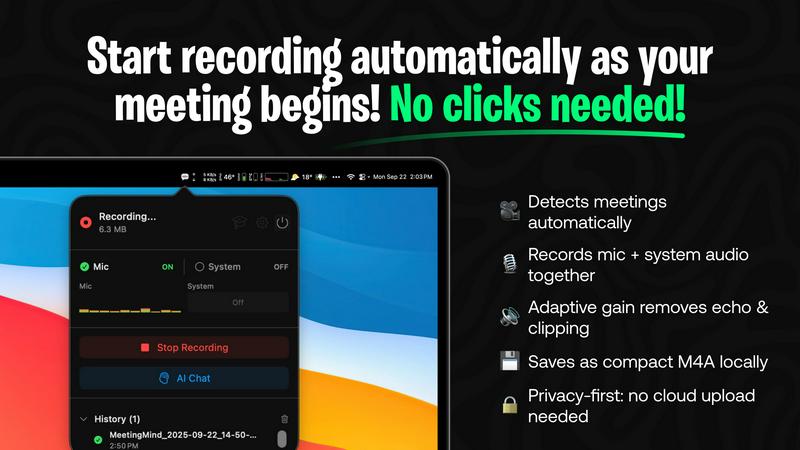
MeetingMind eliminates the need for manual start/stop commands by intelligently detecting when you join a Zoom meeting and automatically initiating the recording process. This hands-free operation ensures you never forget to record an important session, allowing you to focus entirely on the discussion. It seamlessly captures the meeting in the background, providing a reliable and effortless recording experience from start to finish.
Dual Audio Capture with Adaptive Gain
The application expertly records both microphone audio (participants' voices) and system audio (sound from your computer, like presentation audio or shared videos) simultaneously. Its adaptive gain technology intelligently balances audio levels to ensure crystal-clear playback, preventing one source from overpowering another. This results in a comprehensive and high-fidelity audio record of the entire meeting environment.
AI-Powered Summaries & Insights
MeetingMind leverages advanced AI to transform raw transcripts into actionable intelligence. Users can choose between a local AI model via Ollama for maximum privacy or a cloud-based option via OpenRouter for enhanced power. The AI automatically generates concise summaries, extracts clear action items, and identifies key discussion points, saving hours of manual note-review and providing immediate clarity on meeting outcomes.
100% Local Processing & Privacy
A cornerstone feature of MeetingMind is its staunch commitment to data security and privacy. All audio processing, transcription, and AI analysis are performed locally on your Mac. Your sensitive meeting conversations, transcripts, and summaries never leave your device or are sent to external servers, giving you complete peace of mind and ensuring compliance with stringent data protection standards.
Never Drop
AI-Powered Business Card Scanning
Never Drop utilizes advanced Optical Character Recognition (OCR) technology to instantly extract every critical detail from a business card with a simple photo. This AI-driven process accurately captures names, companies, job titles, phone numbers, and email addresses in seconds, completely eliminating the tedious and error-prone task of manual data entry. It works with any card design, ensuring that contact information is digitized reliably the moment a connection is made.
Intelligent Contact Enrichment & Email Finding
Business cards often lack direct contact information or contain generic office emails. Never Drop solves this by automatically searching for and verifying the lead's professional work email address using their name and company details. This enrichment process builds a more complete and actionable contact profile, saving sales reps from time-consuming manual searches on LinkedIn or other platforms, and ensuring follow-ups reach the right person directly.
Context-Aware AI Follow-Up Drafting
This flagship feature sets Never Drop apart. Based on the voice notes or text context you record about your conversation, the app's AI generates a personalized follow-up email draft. It moves beyond generic templates by incorporating specific discussion points, tone, and intent from your interaction. This allows you to send a relevant, thoughtful message that resonates with the lead, all within two minutes of your meeting ending.
Seamless CRM Integration & Team Workspace
Never Drop ensures captured leads immediately enter your sales ecosystem by integrating directly with popular CRMs like HubSpot. Furthermore, it provides a centralized team workspace where managers can organize leads by event, reassign contacts between team members, and track overall activity from a unified dashboard. This fosters alignment, prevents duplication of effort, and ensures nothing is lost between scanning and the sales pipeline.
Use Cases
MeetingMind
Remote Team Collaboration & Stand-ups
For distributed teams conducting daily stand-ups, project syncs, or brainstorming sessions over Zoom, MeetingMind is indispensable. It automatically records and transcribes every meeting, ensuring remote members have equal access to discussions. The AI-generated summaries and action items provide a single source of truth, improving accountability and ensuring follow-through, which is critical for maintaining project momentum across time zones.
Client Consultations & Professional Services
Consultants, lawyers, therapists, and freelancers can use MeetingMind to meticulously document client meetings. The automatic recording ensures no client requirement, feedback, or agreed-upon action is forgotten. The professional markdown transcripts and summaries serve as accurate records for deliverables, billing, and ongoing strategy, enhancing service quality and protecting both the professional and the client.
Educational Lectures & Student Meetings
Educators and students can leverage MeetingMind to capture online lectures, tutoring sessions, or study group meetings. The tool allows learners to be fully present during the session without frantic note-taking. Later, they can review the searchable transcript, use the AI to highlight key concepts, and export structured notes in markdown for study guides, making knowledge retention and review significantly more efficient.
Executive Briefings & Board Meetings
For executives and administrators, capturing the nuanced details of high-stakes strategy sessions, board meetings, and investor briefings is critical. MeetingMind provides a discreet, automatic record of these conversations. The AI's ability to distill complex discussions into clear summaries and action items supports faster decision-making and provides an invaluable audit trail for strategic decisions and corporate governance.
Never Drop
High-Volume Trade Show & Conference Lead Capture
For sales teams attending bustling trade shows, Never Drop is indispensable. It allows representatives to quickly scan dozens of business cards on the go, add quick voice memos about each conversation, and have AI-drafted follow-ups ready before they even leave the booth. This incredible speed ensures they are the first to respond while the interaction is still fresh in the lead's mind, significantly boosting conversion rates.
Streamlining Post-Networking Event Follow-Ups
After a networking dinner or industry meetup, professionals often face a pile of cards with fading memories of each chat. Never Drop solves this by providing a structured process: scan cards as you receive them, dictate key points immediately, and schedule personalized follow-ups for the next morning. This transforms a chaotic post-event ritual into an efficient, effective sales activity.
Managing Team-Based Sales Operations at Events
For sales managers leading a team at a large conference, Never Drop provides oversight and organization. The team workspace allows for the centralized collection of all scanned leads, which can be categorized by event day or product interest. Managers can then review team activity, redistribute leads fairly, and ensure consistent, timely follow-up from the entire team, maximizing collective ROI.
Enhancing Solo Entrepreneur & Freelancer Outreach
Solo entrepreneurs, consultants, and freelancers who frequently network to grow their business benefit greatly from Never Drop's efficiency. It acts as a personal sales assistant, handling the administrative burden of lead capture and initial outreach. This allows the individual to focus on building relationships during the event while being confident that professional, personalized follow-up communication is handled seamlessly.
Overview
About MeetingMind
MeetingMind is a sophisticated, AI-powered meeting assistant designed exclusively for macOS, fundamentally transforming how professionals capture, comprehend, and utilize meeting content. It operates as an intelligent, menu-bar resident application that automatically detects and records Zoom meetings without requiring manual intervention. At its core, MeetingMind captures both microphone and system audio with adaptive gain, converting this audio into real-time, speaker-attributed transcripts. These transcripts are then intelligently processed to generate concise AI summaries, identify key action items, and highlight crucial discussion points, all formatted in clean, usable markdown. The tool is engineered for a broad spectrum of users, including busy executives, remote teams, educators, consultants, and freelancers who depend on efficient collaboration and accurate meeting records. Its paramount value proposition lies in its powerful combination of seamless automation, intelligent analysis, and an uncompromising commitment to user privacy, as all processing occurs locally on the user's device. By ensuring no detail is ever missed and providing immediate, searchable insights, MeetingMind empowers users to fully engage in conversations while it handles the meticulous task of documentation and analysis.
About Never Drop
In the high-stakes arena of sales and business development, the moments following a promising connection are critical. Never Drop is an innovative, AI-powered lead capture application engineered specifically for sales professionals and teams who operate in dynamic, fast-paced environments. Its core mission is to eliminate the all-too-common problem of leads slipping through the cracks after events like trade shows, conferences, and networking meetings. The platform transforms the traditional, error-prone process of collecting business cards and manually entering data into a seamless, intelligent workflow. By simply scanning a business card with a smartphone, users can instantly digitize contact details. The true power of Never Drop lies in its ability to capture the context of a conversation through voice notes or text, ensuring the human element of the interaction is preserved. This contextual data then fuels its advanced AI to generate personalized, relevant follow-up emails in under two minutes. With direct integrations into essential tools like HubSpot and Gmail, Never Drop ensures that enriched lead data flows directly into existing sales pipelines, making every handshake count and dramatically increasing the likelihood of conversion. It is more than a scanner; it is a comprehensive system designed to accelerate sales cycles and ensure no opportunity is ever forgotten.
Frequently Asked Questions
MeetingMind FAQ
How does MeetingMind ensure meeting privacy?
MeetingMind is built with privacy as its foundational principle. Unlike many cloud-based services, all audio processing, speech-to-text transcription, and AI analysis occur directly on your Mac's hardware. Your meeting data is never uploaded to external servers or third parties. This local-first architecture ensures that sensitive business discussions, personal conversations, and confidential information remain completely secure and under your control.
What is included in the free version?
The free tier of MeetingMind is robust and designed for daily utility. It includes 60 minutes of total recording time per day, which is perfect for short meetings like daily stand-ups. It features automatic Zoom detection, live transcription, AI-powered summaries and insights, and all local processing. This "forever free" plan allows users to fully experience the core functionality of the app before deciding to upgrade.
What are the benefits of the one-time Unlimited purchase?
The Unlimited version is a one-time purchase that removes the daily 60-minute recording limit, granting users unrestricted recording time. It includes all features from the free version—automatic detection, AI summaries, local processing—with no subscriptions or recurring fees. Purchasers also receive lifetime updates, making it a cost-effective, long-term solution for professionals with frequent or lengthy meetings.
Do I need to inform participants I am recording?
Yes, absolutely. MeetingMind is a powerful recording tool, but it is your responsibility to use it ethically and legally. You must always inform all participants that the meeting is being recorded and obtain their consent before starting. Compliance with local, state, and international laws regarding the recording of conversations (which often require two-party or all-party consent) is mandatory. The tool includes a recording disclosure reminder for this purpose.
Never Drop FAQ
What is Never Drop and how does it work?
Never Drop is a comprehensive lead-capture application designed for sales teams and professionals who attend events. The workflow is simple yet powerful: you use the mobile app to scan a business card, then enrich the captured data with voice or text notes about your conversation. The app's AI then uses this context to draft a personalized follow-up email within two minutes. It also enriches contacts with verified work emails and can sync all data directly to your connected CRM, creating a seamless bridge from handshake to pipeline.
How does the business card scanning feature work?
The scanning process is straightforward. Using the Never Drop mobile app, you simply take a photo of any business card. The app's AI-powered OCR (Optical Character Recognition) technology instantly analyzes the image and extracts key contact details such as name, company, job title, phone number, and email address. This happens in seconds with high accuracy, eliminating manual typing. You also have the option to manually enter details if preferred.
What types of events is Never Drop best suited for?
Never Drop is built for any in-person business scenario where connections are made and follow-up is crucial. This includes high-volume environments like trade shows and industry conferences, as well as networking events, seminars, business dinners, and client meetings. The app allows you to organize your scans by specific event, making it easy to track and manage leads from different sources.
Is my data secure with Never Drop?
Yes, data security is a top priority. Never Drop is developed by SCOPEO, a company based in France. All user data is hosted on servers within the European Union and is processed in full compliance with GDPR regulations. Data is encrypted both during transmission (in transit) and while stored on servers (at rest). Images of business cards are used solely for the purpose of contact extraction and are not shared with third parties. You can review the detailed commitments in the platform's Privacy Policy.
Alternatives
MeetingMind Alternatives
MeetingMind is an intelligent meeting assistant in the productivity and management category, designed to automatically record, transcribe, and summarize Zoom meetings into private, searchable notes. It represents a powerful solution for professionals seeking to capture every detail of their discussions without manual effort. Users may explore alternatives for various reasons, including budget constraints, specific feature requirements not covered by a single tool, or the need for compatibility with platforms beyond macOS and Zoom. The search for the right tool is often driven by a desire to balance advanced AI capabilities with stringent data privacy, or to find a solution that integrates seamlessly into a unique existing workflow. When evaluating alternatives, key considerations should include the core functionality of automatic recording and transcription, the quality of AI-generated summaries and action items, and the platform's approach to data security and privacy. The ideal tool should not only capture information accurately but also transform it into actionable, easily retrievable knowledge that enhances team collaboration and individual productivity.
Never Drop Alternatives
Never Drop is a specialized productivity and lead management application designed for sales professionals. It excels at capturing contact information from business cards and using AI to generate personalized follow-up communications, streamlining the process of converting networking interactions into tangible sales opportunities. Users often explore alternatives for various reasons, including budget constraints, the need for different feature sets, or compatibility with specific hardware or existing software ecosystems. Some may require more extensive CRM functionalities, while others might seek simpler, more cost-effective solutions for basic contact capture. When evaluating alternatives, it's crucial to assess your primary needs. Consider the core functionality you require, such as the accuracy of data capture, the depth of CRM integration, the quality of automation for follow-ups, and overall ease of use. The right tool should align with your team's workflow and scale effectively with your business growth.