
FilexHost vs securememo.app
Side-by-side comparison to help you choose the right tool.

FilexHost
FilexHost instantly creates shareable web pages from any file you upload.
Last updated: February 28, 2026
securememo.app
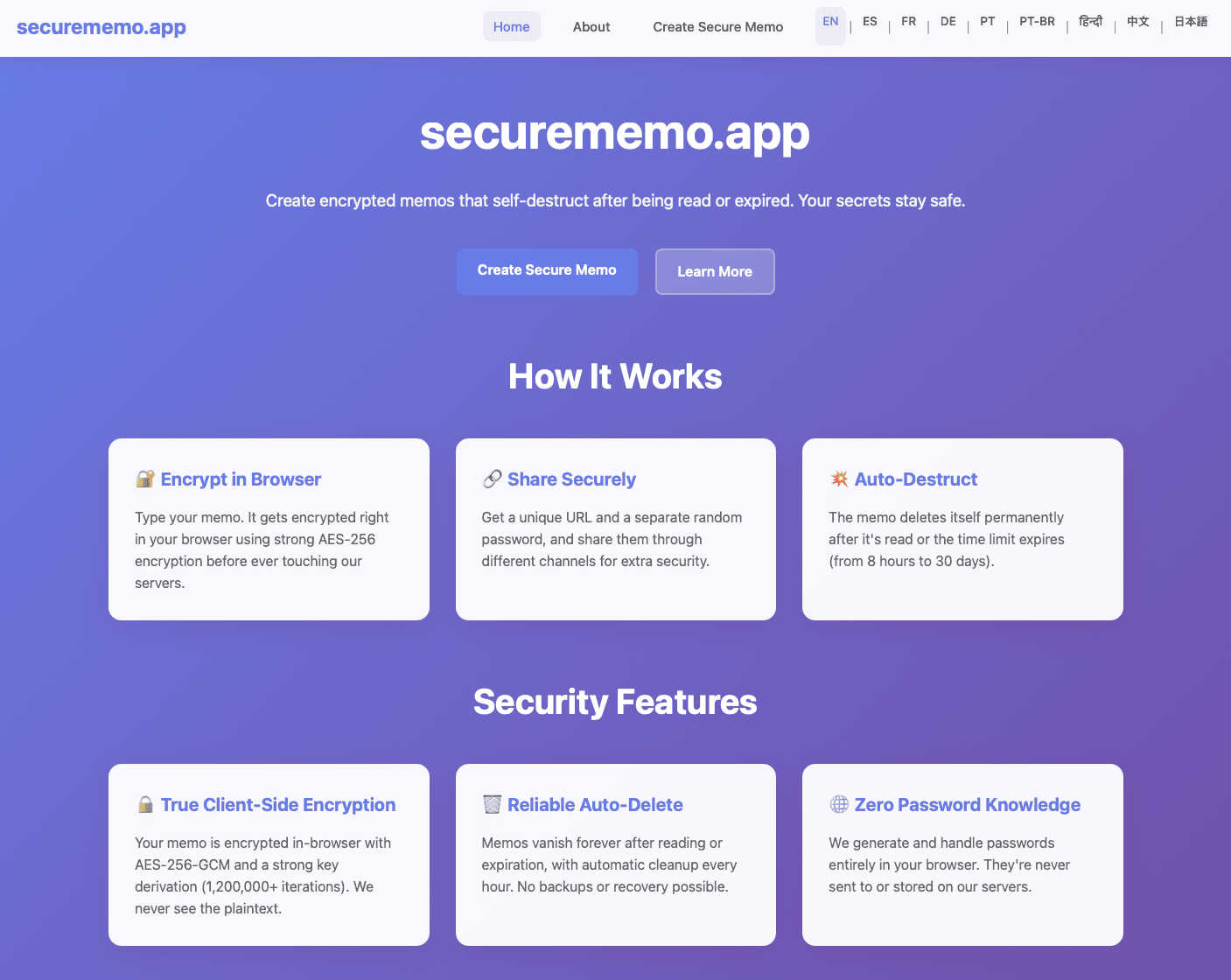
Securememo.app offers a privacy-focused memo service with client-side encryption, ensuring your notes remain truly se...
Visual Comparison
FilexHost

securememo.app
Feature Comparison
FilexHost
Universal File Support & Smart Rendering
FilexHost accepts an extensive range of file types including PDFs, images (JPG, PNG, WEBP, HEIC, TIFF), spreadsheets (XLSX, CSV), media (MP4, MP3), code files (JSON, HTML), and archives (ZIP). Its intelligent rendering engine automatically displays each file in the optimal format. HTML files become live, interactive websites; spreadsheets transform into searchable, in-browser tables; documents appear in clean readers; and media files play with lightweight built-in players. This eliminates the need for recipients to have specific software, ensuring the content is experienced exactly as intended.
Instant, Zero-Configuration Hosting
The platform generates instant subdomains (e.g., your-file.filex.host) with absolutely no setup required from the user. There is no command line, no Git, and no DNS configuration needed. This feature is powered by a global Content Delivery Network (CDN), ensuring that every hosted file is delivered with blazing fast speed and low latency to viewers anywhere in the world. Every link is also secured with free, automatic SSL encryption by default, guaranteeing safe and private connections for all file transfers.
Advanced Sharing Controls
Beyond simple links, FilexHost provides granular control over how content is shared and accessed. Users can set passwords to protect sensitive files, configure expiry dates from 24 hours to permanent hosting, and choose between view modes—such as a direct render or a dedicated download page. For archives, the platform even allows for selective file downloads from within a ZIP. These features offer professional-grade management for sharing confidential documents, time-sensitive materials, or curated asset packages.
Simple Drag-and-Drop Interface
The entire user experience is built around unparalleled simplicity. The core workflow involves dragging a file directly into the FilexHost web interface or using the upload button. The system handles all the backend complexity, from processing and optimization to hosting and link generation. This intuitive approach makes powerful file hosting accessible to everyone, regardless of their technical expertise, turning a process that typically requires IT knowledge into a matter of seconds.
securememo.app
Client-Side Encryption
Securememo.app utilizes client-side encryption to protect your notes before they leave your browser. This means that only you can access your data, as it is encrypted on your device, ensuring that even the service provider cannot read your content.
Self-Destructing Notes
The self-destructing notes feature allows users to create memos that automatically delete themselves after being viewed. This ensures that sensitive information does not linger longer than necessary, minimizing the risk of unauthorized access.
Unique Link and Password Generation
When sharing a memo, users can generate a unique link paired with a strong, randomly created password. This adds an extra layer of security, as the password is generated on your device and never transmitted to Securememo.app, maintaining complete confidentiality.
No Account Required
Securememo.app does not require users to create an account, prioritizing user anonymity and simplifying the process. This feature makes it incredibly easy for anyone to start using the service without the burden of remembering login credentials.
Use Cases
FilexHost
Professional Client Reporting & Deliverables
Professionals such as consultants, designers, and marketers can use FilexHost to deliver polished reports, presentations, and project deliverables. Instead of relying on bulky email attachments or confusing cloud storage links that require permissions, they can upload a PDF or PowerPoint file, get a clean link, and send it directly. The client sees a beautifully rendered document in their browser immediately, without any login hurdles, creating a seamless and professional impression.
Developer Prototyping & Demo Hosting
Developers and engineers can instantly host static websites, landing page prototypes, JSON mock APIs, or documentation for testing and client review. By simply uploading an HTML file or a ZIP archive of their project, they receive a live, public URL in seconds. This is ideal for rapid prototyping, sharing progress with stakeholders, or creating demo versions without the overhead of configuring a full web server or domain.
Digital Product Distribution
Creators, educators, and small businesses can distribute digital products like e-books, software, audio files, video courses, or asset packs. FilexHost allows them to set passwords for customer-only access, use expiry links for limited-time offers, or provide permanent download pages. The built-in viewers also let customers preview certain content (like image galleries or document samples) directly before downloading, enhancing the user experience.
Team Collaboration & Asset Sharing
Teams working on projects can use FilexHost as a quick and efficient hub for sharing large media files, design assets, data exports, or presentation decks. The ability to preview images, videos, and spreadsheets directly in the browser streamlines review processes. With features like ZIP preview and selective download, team members can quickly access the specific files they need from a large archive without having to download everything.
securememo.app
Sharing Sensitive Information
Individuals can use Securememo.app to share sensitive information, such as financial records or personal details, without the fear of interception. The self-destructing feature ensures that shared data is only accessible for a limited time.
Business Communication
Businesses can utilize Securememo.app to communicate confidential strategies or proprietary information among team members. The secure sharing of notes helps protect intellectual property from potential leaks.
Temporary Note Storage
For users who need a temporary storage solution for notes, Securememo.app provides a way to jot down ideas or reminders that are not meant to be stored long-term. This is especially useful for brainstorming sessions or project planning.
Secure Password Sharing
Users can securely share passwords and login information with colleagues or friends. By utilizing the unique link and password generation feature, they can ensure that access is tightly controlled and monitored.
Overview
About FilexHost
FilexHost is a revolutionary, universal file hosting and sharing platform designed to eliminate the traditional complexities of digital file distribution. It provides a seamless "Drop & Share" workflow that empowers individuals and professionals to instantly publish and share any file type with a global audience. The core value proposition lies in its remarkable simplicity and powerful, built-in rendering capabilities. Users can drag and drop a file—be it a document, spreadsheet, image, video, or even an entire static website—and within seconds receive a secure, shareable URL. Recipients require no logins, no special software, and no technical knowledge; they experience the content beautifully rendered directly in their web browser. FilexHost serves a broad spectrum of users, from professionals sharing client reports and developers hosting project demos to creators distributing digital products and teams collaborating on assets. By removing barriers like attachment limits, "request access" emails, and complex server configurations, FilexHost redefines friction-free file delivery, prioritizing an elegant and immediate viewer experience above all else.
About securememo.app
Securememo.app is a cutting-edge memo service designed with a strong emphasis on privacy and security for individuals and organizations seeking to protect their sensitive information. By enabling users to create and share encrypted, self-destructing notes directly from any web browser, Securememo.app prioritizes confidentiality in an increasingly digital world. The platform employs client-side encryption, ensuring that all data is encrypted within the user's browser before it ever reaches the servers, making it completely inaccessible to unauthorized parties. Ideal for anyone needing to share private information—such as passwords, personal notes, or confidential work-related data—Securememo.app offers a seamless experience without the need for user accounts, enhancing anonymity and ease of use. With support for over 20 languages, it caters to a diverse global audience, allowing users to communicate securely in their preferred language. This combination of advanced security features and user-friendly design establishes Securememo.app as a vital tool for anyone concerned about data privacy.
Frequently Asked Questions
FilexHost FAQ
What is FilexHost?
FilexHost is a universal file hosting and sharing service that allows you to instantly upload any file type and generate a secure, shareable web link. It stands out by automatically rendering files in an optimal, interactive format within the browser—such as turning HTML into a live website or a spreadsheet into a viewable table—so recipients can view content without needing specific software or logins.
Is it really free?
Yes, FilexHost offers a fully functional free plan designed for quick sharing and testing. This plan includes hosting for up to 1,000 files, with a maximum file size of 25MB and total storage of 1GB. Files expire after 7 days, and the experience includes ads and a watermark. For permanent, high-traffic, and professional use, a Pro plan with enhanced limits and features is available.
What file types are supported?
FilexHost supports a vast array of file types, organized for optimal viewing. This includes documents (PDF, TXT), data files (XLSX, CSV, JSON), images (JPG, PNG, WEBP, HEIC, TIFF), media (MP4, MP3), archives (ZIP), and code/text files (HTML, JSON). The platform's smart rendering engine detects the file type and presents it with an appropriate, built-in viewer for the best possible experience.
How do I update my hosted file or site?
To update a file or static website hosted on FilexHost, you simply need to upload the new version of the file. The platform will generate a new, unique URL for the updated upload. For managing and overwriting existing content seamlessly, especially for projects where the link must remain constant, users typically utilize the Pro plan features or would look forward to future updates like custom domain integration for more direct control.
securememo.app FAQ
How does Securememo.app ensure the privacy of my notes?
Securememo.app ensures privacy through client-side encryption, meaning your notes are encrypted on your device before they reach the servers, making them inaccessible to anyone but you.
Can I recover my notes after they self-destruct?
No, once a note self-destructs, it cannot be recovered. This feature is designed to enhance security by ensuring that sensitive information does not remain available after it has been viewed.
Is there a limit to how many notes I can create?
Securememo.app does not impose specific limits on the number of notes you can create. Users can generate as many notes as necessary, provided they adhere to the service's privacy and security guidelines.
Can I share notes with multiple users?
Yes, you can share notes with multiple users by generating unique links and passwords for each recipient. This feature allows you to control who has access to your sensitive information.