
Decode This Text vs DocuExtractor
Side-by-side comparison to help you choose the right tool.

Decode This Text
Decode This Text provides quick, human-like insights to help you understand complex conversations in just 30 seconds.
Last updated: February 28, 2026

DocuExtractor
Transform receipts and invoices into structured data files effortlessly, eliminating manual entry with DocuExtractor.
Last updated: February 28, 2026
Visual Comparison
Decode This Text

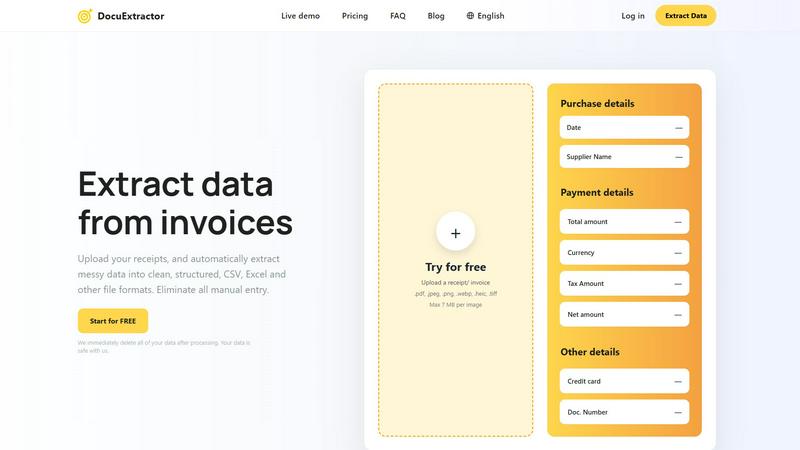
DocuExtractor
Feature Comparison
Decode This Text
Comprehensive Analysis
Decode This Text offers users a detailed breakdown of messages, analyzing the emotional tone, intent, and nuances behind the words. This feature ensures that users understand not just what was said, but what was meant, allowing for more effective communication.
Fast and User-Friendly Interface
With a quick response time, Decode This Text allows users to get insights in just 30 seconds. The intuitive design makes it easy for anyone to navigate the tool, whether they are tech-savvy or not, ensuring a smooth experience for all users.
Anonymity and Privacy
Users can engage with Decode This Text with complete peace of mind, as the service guarantees 100% anonymity. No human reads the texts, ensuring that personal information remains confidential and secure throughout the analysis process.
Response Suggestions
Not only does Decode This Text decode messages, but it also offers users three potential response options tailored to the situation. Whether the user prefers a calm, direct, or assertive reply, this feature enhances their ability to respond with confidence and clarity.
DocuExtractor
Advanced Optical Character Recognition (OCR)
DocuExtractor employs state-of-the-art OCR technology to accurately read and extract data from various document types. This feature ensures that even poorly formatted documents are processed with high precision, minimizing errors and manual corrections.
Batch Processing Capability
Users can upload multiple documents simultaneously, significantly reducing the time required for data extraction. This batch processing feature allows businesses to handle large volumes of paperwork efficiently, streamlining workflows and enhancing overall productivity.
Customizable Data Fields
The software provides users with the ability to define custom data fields for extraction, catering to specific needs. This flexibility ensures that all necessary information is captured accurately, allowing for tailored outputs that meet individual business requirements.
Multi-Format Export Options
DocuExtractor allows users to download their extracted data in various formats, including CSV and Excel. This versatility ensures that the data is readily usable across different accounting software and systems, facilitating seamless integration into existing workflows.
Use Cases
Decode This Text
Decoding Ambiguous Friendships
Imagine receiving a text from a friend that feels distant or cold. Decode This Text can help you interpret the emotional undertones and suggest how to approach the conversation, allowing you to navigate friendships with greater understanding.
Understanding Professional Communication
In a professional setting, a one-word email from a boss can leave you feeling anxious. Decode This Text analyzes such messages, helping you discern whether the tone is supportive or critical, and guides you in crafting an appropriate response.
Clarifying Family Dynamics
Family communications can often be fraught with emotion. If a family member sends a vague message, Decode This Text can help you untangle the emotional layers, allowing for more meaningful and clear family interactions.
Gaining Insight on Romantic Relationships
In the complexities of dating, texts can often be misinterpreted. Decode This Text provides clarity on partner communication, helping you understand intentions and emotional cues, which is essential for building healthy relationships.
DocuExtractor
Streamlining Accounting Processes
Accountants can utilize DocuExtractor to automate the extraction of key data from financial documents, reducing the time spent on manual data entry. This enables them to focus on more strategic analysis and decision-making tasks.
Enhanced Data Management for Bookkeepers
Bookkeepers can benefit from DocuExtractor by quickly converting invoices and receipts into structured formats, ensuring accurate record-keeping. This efficiency leads to improved financial oversight and better client service.
Efficient Handling of Expense Reports
Businesses can use DocuExtractor to simplify the process of managing employee expense reports. By extracting data from receipts and invoices, companies can streamline reimbursement processes and maintain accurate financial records.
Rapid Document Processing for Enterprises
Large organizations with high document volumes can leverage DocuExtractor to manage and process financial documents at scale. The tool's speed and accuracy facilitate timely reporting and compliance, making it essential for enterprise-level operations.
Overview
About Decode This Text
Decode This Text is an innovative communication tool designed to help users uncover the underlying meanings behind ambiguous messages that often lead to confusion or misinterpretations. Whether you receive a cryptic email from your boss, a vague text from a friend, or an unclear message from a client, Decode This Text provides clarity and insight into the true intentions behind those words. The tool is particularly valuable for individuals seeking to improve their communication skills, enhance personal and professional relationships, and eliminate misunderstandings. By simply pasting the conversation or describing the context, users can receive a comprehensive analysis of emotional tone, intentions, and the best response strategies. With its user-friendly interface and rapid response time, Decode This Text empowers users to engage confidently in their interactions, reducing the stress of second-guessing every word or phrase.
About DocuExtractor
DocuExtractor is an innovative document conversion tool designed to simplify the cumbersome task of data extraction from various financial documents, including invoices, bank statements, and receipts. Utilizing advanced Optical Character Recognition (OCR) technology, DocuExtractor efficiently converts unstructured, messy data into organized formats like CSV and Excel. This software is ideal for accountants, bookkeepers, and businesses that handle significant volumes of financial paperwork, helping them save valuable time usually spent on manual data entry. By automating this process, DocuExtractor not only enhances productivity but also improves accuracy, allowing users to redirect their focus toward more strategic financial tasks. Furthermore, the platform emphasizes data security, ensuring that all uploaded documents are permanently deleted immediately after processing. This commitment to user privacy provides peace of mind, making DocuExtractor a reliable choice for professionals seeking efficiency in their document management.
Frequently Asked Questions
Decode This Text FAQ
How does Decode This Text ensure the accuracy of its analyses?
Decode This Text utilizes advanced algorithms to analyze the content, tone, and context of messages. This technology is designed to interpret language patterns accurately, providing insights that feel human-like and nuanced.
Is my information safe when using Decode This Text?
Absolutely. Decode This Text prioritizes user privacy, ensuring that all communications are processed anonymously without human intervention. Your data remains confidential and secure.
Can I use Decode This Text for any type of message?
Yes, Decode This Text is versatile and can be used for personal, professional, and social messages. Whether it's a text, email, or a chat conversation, the tool is designed to help you understand various forms of communication.
What if I don’t know how to describe the context of a message?
No problem! You can paste the conversation directly or upload screenshots of your chats. Decode This Text is equipped to analyze both text and visual inputs, making it easy to get the clarity you need without extensive descriptions.
DocuExtractor FAQ
How secure is my data when using DocuExtractor?
DocuExtractor prioritizes user privacy and data security by immediately deleting all uploaded documents after processing. This ensures that your sensitive information remains confidential and protected from unauthorized access.
What types of documents can I upload for extraction?
You can upload a variety of financial documents, including receipts, invoices, bank statements, and other PDF or image files. Supported formats include .pdf, .jpeg, .png, .webp, .heic, and .tiff, with a maximum file size of 7 MB per image.
Is there a limit to the number of documents I can process?
DocuExtractor allows for batch processing, meaning you can upload multiple documents at once. This feature is especially useful for users managing large volumes of financial paperwork, enhancing efficiency and productivity.
What kind of support can I expect from DocuExtractor?
DocuExtractor provides expert customer support to assist users with any issues or questions they may have. The support team is dedicated to ensuring a smooth user experience, helping resolve problems quickly and effectively.
Alternatives
Decode This Text Alternatives
Decode This Text is an innovative tool designed to help users understand and interpret complex communications, making it a valuable asset in the Productivity & Management category. With its ability to provide quick, human-like analyses, it caters to individuals facing the challenge of deciphering cryptic messages, whether they come from work, personal relationships, or client interactions. Users often seek alternatives to Decode This Text for various reasons, including pricing considerations, specific feature requirements, or compatibility with different platforms. When searching for an alternative, it is essential to evaluate factors such as ease of use, response time, and the quality of analysis provided, ensuring that the chosen tool effectively meets your communication needs without adding to the confusion.
DocuExtractor Alternatives
DocuExtractor is a sophisticated document conversion software that specializes in transforming unstructured financial documents such as receipts and invoices into structured data files. It falls under the category of productivity and management tools, primarily designed for accountants, bookkeepers, and businesses that handle large volumes of financial documentation. Users often seek alternatives due to various reasons, including pricing, differing feature sets, or specific platform requirements that might not be met by DocuExtractor. When searching for an alternative to DocuExtractor, it's essential to consider factors such as the accuracy of data extraction, ease of use, and the ability to handle multiple document formats. Additionally, evaluating the level of customer support and data security measures can help ensure that the chosen solution meets both functional and compliance needs.