
Cosy vs Mailopoly
Side-by-side comparison to help you choose the right tool.

Cosy automates Slack community onboarding, member connections, and content management to save time.
Last updated: February 28, 2026

Mailopoly
Mailopoly is your AI email assistant that organizes your inbox, extracts key info, and drafts replies effortlessly.
Last updated: February 28, 2026
Visual Comparison
Cosy
Mailopoly

Feature Comparison
Cosy
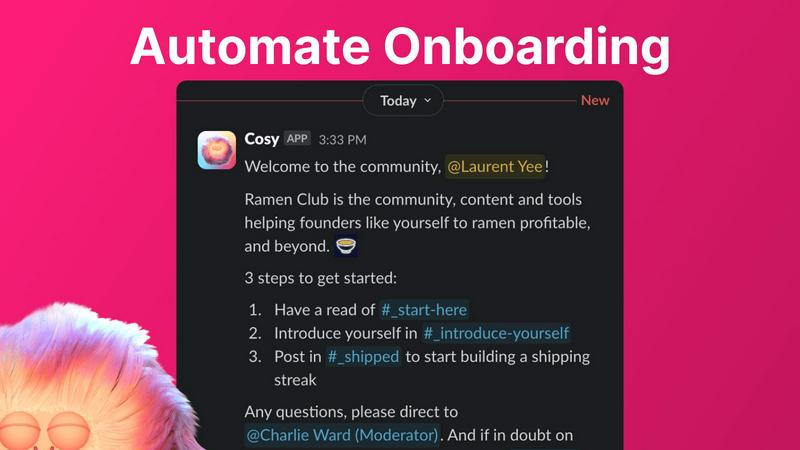
Automated Onboarding Sequences
Cosy allows community managers to create and automate up to ten distinct welcome DM sequences for new members, eliminating the need for manual greetings. These sequences can be triggered immediately upon joining or on a customizable delay, and can be sent from the community leader, a team member, or the Cosy bot itself. Messages are fully customizable with member names, links, and emojis, ensuring a personal touch. This feature guarantees that every new member, regardless of when they join, receives a warm welcome and crucial information, saving administrators countless hours while ensuring no one is overlooked.
Automated Member Introductions
To foster deeper connections, Cosy automatically introduces opted-in community members to each other via direct messages on a regular cadence. Administrators can customize the frequency (every 1-4 weeks), the day, and the time. Introductions happen in a three-person DM involving the two members and the Cosy bot, with a customizable intro message template. The system intelligently pairs members randomly to enhance serendipity while avoiding recent matches, mimicking tools like Donut but within Slack, to automatically grow engagement and help members build their networks.
Slack-Native Member Directory
Cosy provides a simple, searchable directory of all community members that operates entirely within Slack. Leaders can create custom profiles with up to ten fields, including text entry and multiple-choice options. Members can be prompted to fill out their profiles via a notification from the Cosy bot, either manually by an admin or automatically 24 hours after joining. Members can then search for keywords and filter profiles using the Cosy app or a /member-directory slash command, making it easy to find and connect with the right people without ever leaving the workspace.
Content Highlights & Moderation Tools
This feature helps surface the most valuable conversations and maintain community health. With simple slash commands, admins can instantly retrieve the top 10 most engaged posts in a specific channel (/most-engaged-messages) or across all public channels (/most-engaged-messages-all). Additionally, the /unreplied-messages command surfaces posts that have not received replies, allowing leaders to spark conversation. Cosy also includes instant moderation tools to flag abusive and spam messages, ensuring a safe and positive environment for all members.
Mailopoly
Intelligent Email Sorting
Mailopoly intelligently sorts through your emails to prioritize what is essential. It highlights important messages while quietly managing the noise, ensuring you are only notified about what truly matters, thus helping you maintain focus throughout your day.
AI-Powered Reply Drafting
Forget about the stress of writing emails. Mailopoly’s AI drafts replies in your voice, allowing you to respond effortlessly. With multiple suggestions available, you can choose the one that best fits your style, making communication seamless and efficient.
Integrated Task Management
Mailopoly includes a built-in task manager that keeps track of your personal finances, events, and shipments. It provides a comprehensive timeline of deliveries and tasks, ensuring you stay organized and on top of your responsibilities without the hassle of juggling multiple tools.
Instant Unsubscribe and Email Tracking
With Mailopoly, you can easily unsubscribe from unwanted senders with just one click. Additionally, the email tracking feature lets you see who opened your emails, where, and how many times, giving you insights into your communication effectiveness.
Use Cases
Cosy
For Professional Networks & Alumni Groups
Professional networks and alumni associations can use Cosy to automatically welcome new members, instantly making them feel part of the group. The automated introductions feature is perfect for facilitating networking and mentorship connections between members based on shared interests or industries. The searchable member directory allows members to easily find colleagues with specific skills or career backgrounds, turning the Slack community into a powerful professional resource and engagement hub.
For SaaS Customer & User Communities
Companies building customer communities on Slack can leverage Cosy to automate onboarding sequences that guide new users to key resources, support channels, and best practices. The content highlights feature allows community managers to quickly identify and amplify top user-generated content, feature requests, or success stories. Automated introductions can connect users with similar use cases or challenges, fostering peer-to-peer support and reducing the support team's burden.
For Online Course & Cohort-Based Communities
Educators and course creators running cohort-based programs can use Cosy to ensure every student receives a structured, timed welcome sequence as they join the dedicated Slack workspace. The member directory helps students and facilitators learn about each other's backgrounds and goals. Automated weekly introductions between cohort members encourage collaboration and peer learning, significantly enhancing the sense of community and improving course completion rates.
For Non-Profit & Volunteer Organizations
Non-profits can utilize Cosy to manage their volunteer communities efficiently. Automated onboarding can deliver essential information, guidelines, and upcoming event details to new volunteers. The member directory helps coordinators and volunteers find individuals with specific skills or availability. The ability to highlight engaging posts ensures important announcements and success stories gain visibility, while moderation tools help maintain a respectful and focused communication environment.
Mailopoly
Streamlining Work Communication
For professionals juggling numerous emails daily, Mailopoly can significantly reduce the time spent sifting through messages. By automatically extracting key details and prioritizing important communications, users can focus on their core tasks without distraction.
Managing Personal Finances
Mailopoly serves as a financial assistant by tracking invoices, payments, and budgeting tasks. Users can easily access critical information regarding their finances directly from their inbox, making financial management straightforward and stress-free.
Organizing Events and Appointments
Whether planning a social gathering or a business meeting, Mailopoly helps users keep track of invitations, RSVPs, and event details. The integrated features ensure that no important dates are overlooked, allowing for seamless event management.
Enhancing Productivity for Side Hustlers
For those managing side projects alongside their main job, Mailopoly simplifies email management across multiple accounts. It helps users stay organized by ensuring that important emails related to their side hustles are prioritized and easily accessible.
Overview
About Cosy
Cosy is an innovative, Slack-native platform engineered to transform standard Slack workspaces into vibrant, self-sustaining communities. It addresses the core challenges of modern community management by automating time-intensive tasks, fostering meaningful connections, and providing powerful tools for engagement and safety—all without requiring members or administrators to leave the familiar Slack environment. Designed for community leaders, managers, and organizations of all sizes, Cosy's primary value proposition lies in its ability to save significant manual effort—hours every week—while simultaneously elevating the quality of member interaction and community culture. By seamlessly integrating into existing Slack workflows, Cosy empowers leaders to automate personalized onboarding sequences, facilitate serendipitous member introductions, maintain a searchable member directory, and highlight valuable community content. This comprehensive approach ensures that communities are not just groups of people in a channel but are thriving ecosystems where members feel welcomed, connected, and engaged, ultimately driving higher retention and value for all participants.
About Mailopoly
Mailopoly is a revolutionary email client that redefines how you interact with your inbox. By utilizing advanced AI technology, Mailopoly automatically extracts essential information from your emails, allowing you to focus on what truly matters without the clutter of unnecessary notifications and an overflowing inbox. Designed for busy professionals, multi-taskers, and anyone who feels overwhelmed by email, Mailopoly transforms your inbox into a personal command center that prioritizes your day-to-day needs, managing everything from personal finances to event planning. With features like an integrated AI chatbot, automatic reply drafting, and an instant unsubscriber, Mailopoly not only streamlines your email management but also enhances your productivity, making it possible to run your life more efficiently and effectively.
Frequently Asked Questions
Cosy FAQ
How does Cosy handle data privacy and security?
Cosy is built as a native Slack app, operating within Slack's robust security and infrastructure. It only accesses data and performs actions based on the permissions granted during installation. Cosy adheres to Slack's API guidelines and best practices for data handling. User data for features like the member directory is stored securely and is only accessible within the confines of your specific Slack workspace as configured by the administrator.
Can I customize the messages sent for onboarding and introductions?
Absolutely. Cosy offers full customization for all automated messages. For onboarding sequences, you can write unique messages for each step, include the member's name using placeholders, add links to important resources, and use emojis. The introduction messages between members also use a customizable template that you can edit to match your community's tone and provide context for the connection.
What happens if a member does not want to be part of automated introductions?
Member participation in automated introductions is entirely opt-in. Community leaders can configure the feature, but individual members have control. The system only introduces members who have consented to participate. This ensures respect for member preferences and prevents unwanted DMs, maintaining a positive community experience.
Is there a limit to the number of members for the free plan?
Yes, the free plan of Cosy supports communities with up to 250 members. This allows smaller communities or those just starting out to benefit from core features without cost. For communities needing to support more than 250 members, paid plans with unlimited members are available, typically starting with a 30-day free trial.
Mailopoly FAQ
How does Mailopoly prioritize my emails?
Mailopoly uses advanced AI algorithms to analyze your email patterns and preferences, ensuring that only the most relevant messages are highlighted, while less important emails are quietly managed in the background.
Is there a limit to the number of email accounts I can connect?
No, Mailopoly allows you to connect multiple email accounts from various providers, including Gmail, Outlook, Yahoo, and any IMAP-enabled service, providing a unified experience in one application.
Can I customize how Mailopoly drafts my replies?
Absolutely. Mailopoly is designed to understand your unique voice and tone. You can review and edit the AI-generated replies before sending them, ensuring that all communications reflect your personal style.
Is my data secure with Mailopoly?
Yes, Mailopoly is designed with security in mind. It is SOC 2 certified and follows a privacy-first approach to ensure that your data is protected while you enjoy the benefits of its intelligent features.
Alternatives
Cosy Alternatives
Cosy is a productivity and community management tool designed to transform Slack into a more vibrant and connected platform. It automates essential tasks like member onboarding and introductions, helping leaders cultivate engagement without constant manual effort. Users often explore alternatives for various reasons, including budget constraints, the need for different feature sets, or a requirement to manage communities on platforms other than Slack. The search for the right tool is driven by the unique needs and scale of each community. When evaluating alternatives, consider the core automation capabilities for onboarding and engagement, the depth of member directory and discovery features, and the overall ease of use. The goal is to find a solution that not only saves time but also genuinely fosters the meaningful connections that define a thriving community.
Mailopoly Alternatives
Mailopoly is an innovative AI-powered email client that significantly enhances email management by instantly reducing inbox clutter and streamlining communication. As a tool in the productivity and management category, it offers advanced features such as an AI Personal Assistant, task management, and a unique email extraction capability that allows users to save time and focus on what truly matters. Users often seek alternatives to Mailopoly for various reasons, including pricing, specific feature sets, and compatibility with different platforms. When searching for an alternative, it's essential to consider factors such as the ease of use, integration capabilities, the breadth of features offered, and overall user experience to ensure the chosen solution meets personal or business needs effectively.