

SimpleDraw
SimpleDraw is a free online tool for creating precise scale drawings and floor plans with professional ease.
About SimpleDraw
SimpleDraw is a revolutionary, free online tool that democratizes the creation of precise and accurate scale drawings. It serves as a powerful yet intuitive platform designed to bridge the gap between complex, expensive CAD software and rudimentary pen-and-paper sketches. By focusing laser-sharp attention on ease of use, SimpleDraw offers a curated suite of powerful functionalities that empower a vast audience to produce professional-grade technical drawings without a steep learning curve. Its core value proposition is unparalleled accessibility; it requires no software downloads, installations, or user registration, functioning entirely within a modern web browser. This makes it an indispensable solution for homeowners planning DIY renovations, interior designers sketching initial concepts, real estate agents visualizing property layouts, students tackling design projects, and small business owners planning commercial spaces. By seamlessly combining the flexibility of digital editing with the rigorous precision of scale drafting, SimpleDraw transforms abstract measurements and ideas into clear, actionable, and professional visual plans. It effectively makes spatial design, planning, and visualization an approachable and empowering task for everyone, regardless of their technical background or budget.
Features of SimpleDraw
Dedicated Floor Plan Mode
SimpleDraw features a specialized Floor Plan Mode tailored for architectural visualization. This mode allows users to intuitively draw walls and add standardized doors and windows with single clicks, streamlining the creation of accurate room, apartment, and house layouts. A comprehensive library of interior fixtures for kitchens, bathrooms, living rooms, and bedrooms is available to populate plans. Real-time measurements update dynamically as you adjust elements, ensuring every dimension is precise and to scale, all within a completely free, browser-based environment.
Intelligent Smart Alignment System
The tool incorporates a sophisticated Smart Alignment System that assists users in placing points and lines with exact precision. As you move your mouse, the system intelligently snaps to logical points and aligns to axes, providing clear visual feedback. For ultimate control, you can zoom in for finer detail or use keyboard shortcuts to lock movements to strictly vertical or horizontal axes. This feature eliminates the frustration of freehand inaccuracy, making technical drawing feel intuitive and assured.
Flexible Zoom & Non-Destructive Editing
SimpleDraw provides complete creative control through flexible zoom capabilities and 100% non-destructive editing. You can zoom to any level of detail, with the tool's alignment precision adapting accordingly. Every element—lines, shapes, fixtures—can be modified, adjusted, moved, or deleted at any stage without damaging the rest of the drawing. Robust undo/redo functions and the ability to group, copy, and paste elements streamline the workflow, making iteration and experimentation effortless.
Comprehensive Measurement & Unit System
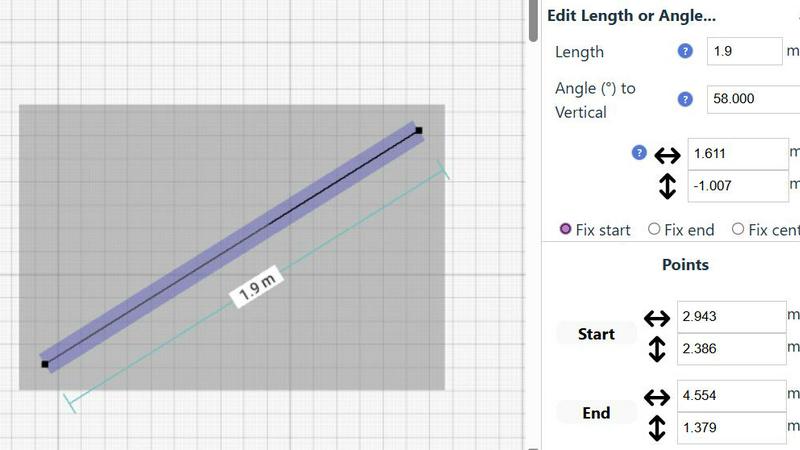
Accuracy is paramount, and SimpleDraw delivers with a comprehensive measurement system. Users have full control over which dimensions are displayed on their drawing. The tool supports both metric and standard US units (feet and inches), catering to a global audience. Contextual measurements appear dynamically as you work, and for ultimate precision, any element's position, length, or angle can be input directly via keyboard, ensuring the final plan matches your exact specifications.
Use Cases of SimpleDraw
Home Renovation & DIY Project Planning
Homeowners and DIY enthusiasts can use SimpleDraw to meticulously plan renovations, from kitchen and bathroom remodels to room additions. By creating accurate scale drawings, they can experiment with layouts, visualize where new fixtures and furniture will fit, and generate precise plans to guide their work or communicate with contractors, preventing costly measurement mistakes before any physical work begins.
Interior Design & Furniture Layout
Interior designers and individuals redecorating their spaces can leverage the tool to experiment with furniture arrangements and spatial design. You can draft room layouts, test different furniture configurations, and ensure that new pieces will fit perfectly and comply with traffic flow and design principles. This visual planning step saves time, money, and the physical effort of moving heavy items repeatedly.
Real Estate & Property Listing Visualization
Real estate agents, landlords, and property managers can create clear, professional floor plans for listings, rental advertisements, and sales brochures. Accurate scale drawings help potential buyers or tenants understand the flow and proportions of a space remotely, setting realistic expectations and enhancing the marketing appeal of any property, from studio apartments to large family homes.
Educational Projects & Small Business Planning
Students in design, architecture, or related fields can use SimpleDraw for academic projects and presentations without needing complex software licenses. Similarly, small business owners can plan retail layouts, office configurations, or restaurant seating charts. The tool provides a professional output suitable for presentations, planning permits, or guiding fit-out contractors, all at no cost.
Frequently Asked Questions
Is SimpleDraw really free to use?
Yes, SimpleDraw is completely free to use. There are no hidden fees, subscription tiers, or premium feature paywalls. The core platform, including the Floor Plan Mode, smart alignment tools, and comprehensive measurement system, is available at no cost without requiring any user registration or software download. It is funded and developed with the goal of making scale drawing accessible to everyone.
Do I need to download or install any software?
No installation or download is required. SimpleDraw is a fully web-based application that runs directly in your modern internet browser (like Chrome, Firefox, Safari, or Edge). You can start drawing immediately by visiting the website, with no need to install plugins or additional software, ensuring instant access from any device with an internet connection.
What kind of drawings can I create with SimpleDraw?
SimpleDraw is specifically optimized for creating accurate scale drawings and floor plans. This includes detailed layouts for kitchens, bathrooms, bedrooms, and entire houses or apartments. You can also create furniture plans, office layouts, and basic architectural sketches. It is designed for any project that requires precise measurements and a clear visual representation of space.
Can I save and share my drawings?
Yes, SimpleDraw allows you to save your work directly to your device's local storage. You can also export your drawings in common image formats to share with others via email, messaging apps, or to print for physical reference. The tool is designed for practical use, enabling you to return to your project later or collaborate by sharing visual plans easily.
Explore more in this category:
Similar to SimpleDraw

Lockimate - AI Live Wallpapers
Turn any photo into a real Apple Live Photo that animates when you wake your iPhone. Restyle it and choose the motion — customizable.

Magic Eraser
AI photo editor for removing objects and backgrounds, enhancing images, and creating visual content.


PNG to SVG
Free, private image conversion tools that run entirely in your browser.


StopScroll
AI YouTube thumbnail maker that generates multiple thumbnail concepts from a URL, title, or prompt.

IsThisAIImage
Free AI image checker: upload a photo for AI-generated and deepfake scores, a clear verdict, and optional generator hints.

Merge Two Photos
Merge two photos free in your browser: side by side, stacked, overlay, or AI. Download a clean PNG, no watermark.