

Imgezy
Imgezy is your intuitive AI photo editor that instantly enhances images, removes objects, and changes backgrounds.
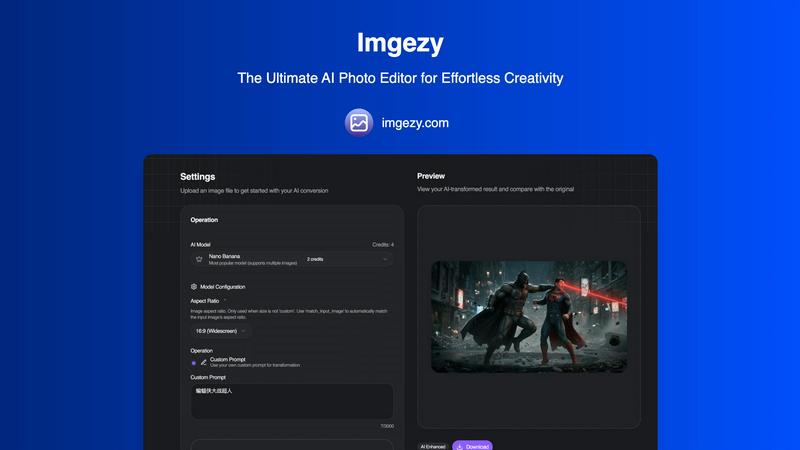
About Imgezy
Imgezy represents a paradigm shift in the world of digital image manipulation, positioning itself as the only AI photo editor you'll ever need. It is a revolutionary, AI-powered platform designed to democratize professional-grade photo editing by eliminating the steep learning curve traditionally associated with complex software like Photoshop. At its core, Imgezy operates on a simple, intuitive principle: users describe the changes they want in plain language, and its advanced artificial intelligence executes those commands with stunning accuracy and speed. This approach makes sophisticated editing tasks—such as flawlessly removing unwanted objects, instantly changing backgrounds, or enhancing overall image quality—accessible to everyone, from casual social media enthusiasts and bloggers to professional photographers, e-commerce store owners, and digital marketers. The main value proposition of Imgezy lies in its ability to deliver studio-quality results in a matter of seconds, not hours. It liberates users from tedious manual processes and technical complexities, allowing pure creativity to flow unimpeded. By combining powerful AI models with a consumer-friendly interface, Imgezy serves as a smart creative partner for a diverse global audience, empowering them to transform their visual content effortlessly and with professional finesse.
Features of Imgezy
Intelligent Object Removal
This flagship feature allows users to seamlessly erase any unwanted element from a photograph with pixel-perfect precision. Whether it's a photobombing tourist, distracting street signs, power lines, or minor blemishes, Imgezy's AI intelligently identifies the object, removes it completely, and then reconstructs the background in a believable and natural way. The technology analyzes the surrounding pixels and textures to fill the gap flawlessly, leaving no trace of the edit and preserving the integrity of the original image.
Instant Background Replacement
Transform the context and mood of any photo in an instant with Imgezy's background changer. Users can easily swap out dull or unsuitable backgrounds for anything they imagine, from a solid color studio backdrop to a tropical beach, a modern office, or a starry sky. The AI meticulously separates the foreground subject from the original background with high accuracy, even around complex edges like hair or fur, and places it into the new scene with realistic lighting and shadows for a cohesive, professional result.
AI-Powered Photo Enhancement
Beyond object removal and background changes, Imgezy acts as an all-in-one enhancement tool. Its AI can automatically analyze and improve various aspects of an image. This includes intelligently adjusting exposure, correcting colors, enhancing sharpness, and improving overall lighting conditions to make photos "pop." This feature is ideal for quickly rescuing underexposed shots, adding vibrancy to dull images, or giving a professional polish to any picture without manual slider adjustments.
Batch Processing & High-Quality Output
Designed for efficiency, Imgezy supports batch processing, enabling users to apply the same edit or enhancement to multiple images simultaneously. This is a massive time-saver for professionals handling large projects, such as e-commerce product catalogs or event photography. Furthermore, all edits are performed non-destructively, and users can download their final images in full, high resolution without any loss of quality, ensuring the output is ready for print, web, or commercial use.
Use Cases of Imgezy
E-commerce & Product Photography
Online retailers and small business owners can use Imgezy to create stunning, consistent product imagery at scale. Quickly remove distracting backgrounds and replace them with pure white or branded settings, erase price tags or mannequin stands, and enhance product colors to make items more appealing. This streamlines catalog creation, reduces photoshoot costs, and significantly improves conversion rates with professional-looking visuals.
Social Media Content Creation
Bloggers, influencers, and social media managers can elevate their visual content effortlessly. Imgezy is perfect for cleaning up travel photos by removing crowds, creating engaging graphics by isolating subjects, or designing cohesive Instagram themes with uniform backgrounds. It enables the creation of high-quality, eye-catching content quickly, which is essential for maintaining a strong and professional online presence.
Personal Photo Restoration & Enhancement
For personal use, Imgezy serves as a powerful tool for restoring and perfecting cherished memories. Users can remove unwanted ex-partners or strangers from group photos, erase scratches and dust from old scanned photographs, change the background of a portrait, or simply enhance family vacation pictures to make colors more vibrant and skies bluer, all without any technical expertise.
Professional Photography Workflow
Professional photographers can integrate Imgezy into their workflow to handle time-consuming repetitive tasks. Instead of spending hours in complex software on tedious edits like object removal or background clean-up for hundreds of wedding or real estate photos, they can delegate these tasks to Imgezy's AI. This frees up valuable time to focus on more creative aspects of their work and client interaction, increasing overall productivity.
Frequently Asked Questions
How does Imgezy's AI photo editor work?
Imgezy utilizes advanced deep learning and computer vision models. When you upload an image and provide a text prompt (like "remove the car" or "change background to a forest"), the AI analyzes the image to understand its content, identifies the elements to modify, and then generates a new, edited image that matches your description. The process happens on secure servers and is designed to be completed in just a few seconds.
Do I need any design or editing skills to use Imgezy?
No, absolutely not. Imgezy is specifically designed for users with zero technical or design experience. The entire interface is built around simplicity: you upload a photo, describe what you want in plain English, and the AI does the rest. There are no complex tools, layers, or technical settings to learn, making professional editing accessible to anyone.
What image formats does Imgezy support?
Imgezy supports all major image file formats, including JPG, PNG, and WebP. You can upload images from your computer, drag and drop them into the interface, and the downloaded result will be a high-quality image suitable for your intended use, whether digital or print.
Can I use images edited with Imgezy for commercial purposes?
Yes, but the licensing depends on your subscription plan. The Pro plan explicitly includes a commercial license, granting you the rights to use the AI-edited images in commercial projects, client work, and for monetization. Users on the Basic plan should review the license terms, as it is intended for personal use. Always check the specific terms of service for the latest licensing information.
Pricing of Imgezy
Imgezy offers straightforward subscription plans to suit different user needs. The Basic plan is priced at $9.99 USD per month (with savings for annual billing) and is perfect for personal use, providing 200 credits (approximately 100 images). It includes standard generation, image history, and standard quality downloads. The Pro plan, at $19.99 USD per month, is the most popular choice for power users and professionals. It offers 800 credits (approx. 400 images), includes everything in Basic, and adds a commercial license for using images in client work, priority customer support, and access to priority generation queues. Both plans offer flexibility with monthly or annual billing options and can be canceled at any time.
Similar to Imgezy

Lockimate - AI Live Wallpapers
Turn any photo into a real Apple Live Photo that animates when you wake your iPhone. Restyle it and choose the motion — customizable.

Magic Eraser
AI photo editor for removing objects and backgrounds, enhancing images, and creating visual content.

UGCad AI
AI UGC video ad Generator which Turn a URL, prompt, or template into a ready video ads

NodeStory
One-click UGC videos, product photo sets, and reusable AI workflows, with 30+ image and video models in one studio.

IsThisAIImage
Free AI image checker: upload a photo for AI-generated and deepfake scores, a clear verdict, and optional generator hints.


Blur & Unblur AI
Free online face blur and unblur tool with local browser processing.

Best Face Swap
Best Face Swap delivers precise AI face replacement for both photos and videos with dedicated workflows for free, NSFW, and multi-face editing.