
Vibrantsnap vs Zovo
Side-by-side comparison to help you choose the right tool.

Vibrantsnap
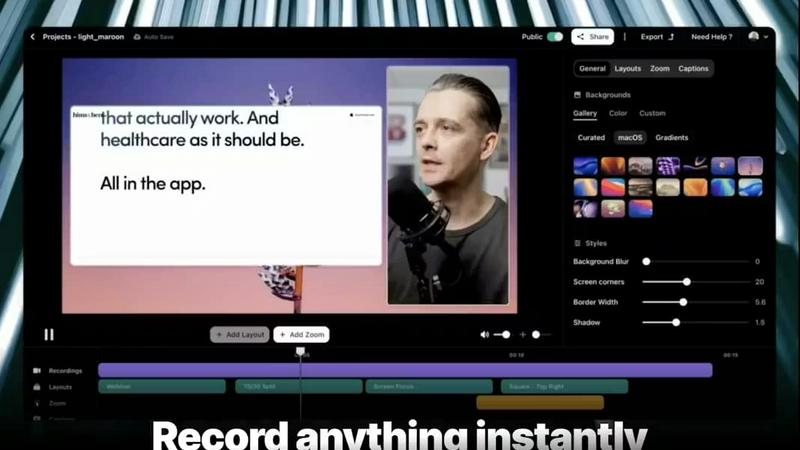
Transform screen recordings into polished, high-converting demo videos in minutes with Vibrantsnap's AI editing.
Last updated: February 28, 2026

Zovo is a privacy-first suite of Chrome extensions for developers and writers, all unlocked with one simple.
Last updated: February 28, 2026
Visual Comparison
Vibrantsnap
Zovo

Feature Comparison
Vibrantsnap
Built-in Video Analytics
Vibrantsnap comes equipped with robust video analytics that provide insights into viewer engagement. Users can see who watched their videos, how many times each video was viewed, and where viewer attention drops off. This data is invaluable for refining content strategy and optimizing user engagement, allowing creators to make informed decisions that drive growth.
Auto-Cut + Auto-Layout
With Vibrantsnap's Auto-Cut and Auto-Layout features, users can streamline their video production process significantly. Silences and filler words are automatically removed, and professional layouts are applied with just a couple of clicks. This ensures that videos are polished and ready to share in seconds, eliminating the need for complex editing skills and saving users precious time.
Magic Edit
The Magic Edit feature allows users to automatically clean their videos while enhancing audio quality with professional AI voiceovers. This ensures that every video not only looks great but also sounds crisp and clear, making it easier for viewers to focus on the message being conveyed. The combination of visual and auditory enhancements elevates the quality of the content significantly.
Call to Action Integration
Vibrantsnap makes it easy to add interactive call-to-action buttons to videos, such as "Book a call" or "Buy now." This feature encourages viewers to take immediate action after watching the video, helping to convert interest into tangible results. Users can also track clicks and engagement in real time, providing insights into the effectiveness of their calls to action.
Zovo
Privacy-First, Local-Only Architecture
Every extension in the Zovo suite is engineered with an uncompromising commitment to privacy. All processing occurs entirely on your local device; no data, browsing history, or personal content is ever transmitted to external servers. This architecture eliminates the risks of data breaches, corporate surveillance, and unauthorized monetization of your habits, ensuring complete confidentiality and security for all your activities within the browser.
Community-Driven Development Roadmap
Zovo operates on a transparent, user-centric development model. Members can submit feature requests directly to the developer, with every suggestion being read and considered. The community then votes on proposed features, directly shaping the product's roadmap. This ensures that development efforts are focused on building the tools and enhancements that users genuinely want and need, fostering a collaborative software environment.
Comprehensive and Integrated Tool Suite
The platform offers a wide array of over 16 specialized extensions that function seamlessly together. This includes flagship tools like BeLikeNative for AI-powered writing assistance in 80 languages, Tab Suspender Pro for memory management, Clipboard History Pro for productivity, and professional utilities for JSON formatting, regex testing, API debugging, and web scraping. This integration provides a one-stop solution for diverse browser-based tasks.
Transparent and Accessible Model
Zovo champions transparency through open-source code for many of its extensions, allowing users to verify its privacy claims. The business model is equally straightforward: all core features are free forever, with a one-time Pro upgrade unlocking advanced capabilities like cross-device sync, unlimited history, and custom themes. There are no hidden fees, bait-and-switch tactics, or mandatory accounts required to start using the tools.
Use Cases
Vibrantsnap
Product Demos
Founders can utilize Vibrantsnap to create engaging product demos that succinctly showcase features and benefits. By transforming lengthy presentations into quick, captivating videos, they can effectively communicate their value proposition to potential customers, leading to higher conversion rates.
Tutorials
Educators and trainers can leverage Vibrantsnap to produce professional tutorials that guide users through complex processes. With its automatic editing capabilities, creating instructional content that is both informative and visually appealing becomes effortless, enhancing the learning experience for viewers.
Marketing Campaigns
Marketing teams can harness the power of Vibrantsnap to generate promotional videos for campaigns. By integrating calls to action and utilizing analytics, they can track the performance of their videos, optimizing future marketing efforts based on viewer engagement data.
Customer Testimonials
Businesses can create compelling customer testimonial videos quickly and easily. By recording short interviews or feedback sessions and polishing them with Vibrantsnap, companies can build credibility and trust with potential clients, showcasing real-world satisfaction that can drive sales.
Zovo
For Developers and Technical Professionals
Developers can leverage Zovo's Regex Tester Pro, JSON Formatter Pro, and API Testing Lite to streamline their workflow directly within the browser. The local-only execution is crucial for handling sensitive API keys or proprietary data structures during debugging and development, providing powerful utilities without compromising security or requiring external web services.
For Writers, Researchers, and Students
Individuals who write and communicate extensively online benefit immensely from BeLikeNative, which offers one-keystroke rewrites to improve clarity and tone in 80 languages. Combined with tools like the Web Scraper Lite for gathering information and Session Manager Pro for organizing research tabs, Zovo becomes an indispensable suite for academic and content creation workflows.
For Productivity and Browser Power Users
Users seeking to optimize their daily browsing and computer efficiency will find tools like Tab Suspender Pro (to save memory), Clipboard History Pro (to manage copied items), and Form Filler Pro (to automate form entries) essential. These tools work in concert to reduce friction, save time, and manage digital workspace clutter effectively.
For Privacy-Conscious Individuals and Organizations
In an era of pervasive data collection, Zovo serves users and teams who prioritize data sovereignty. Its guarantee that no information leaves the device makes it ideal for handling confidential business data, personal communications, or any sensitive online activity, providing enterprise-grade privacy assurances without the corporate overhead.
Overview
About Vibrantsnap
Vibrantsnap is a cutting-edge video creation tool designed to help founders, marketers, and creators transform their screen recordings into engaging, polished videos that drive conversions. Recognizing that potential customers often struggle to quickly grasp the value of a product from lengthy text or static images, Vibrantsnap focuses on delivering concise, impactful video content. It is particularly beneficial for startups and small businesses seeking to enhance their online presence without the burden of complicated editing processes. With features that automate video editing and analytics, Vibrantsnap empowers users to create professional-grade videos in mere minutes, thereby increasing viewer engagement and boosting sales. By simplifying the video creation process, Vibrantsnap allows users to convert curiosity into action, making it a vital tool for anyone looking to elevate their product demonstrations or tutorials.
About Zovo
Zovo represents a paradigm shift in the browser extension ecosystem, offering a comprehensive suite of over 16 powerful tools built with a singular, user-first philosophy. It is the creation of a solo developer with a proven track record of over $400,000 earned through client work, bringing a level of craftsmanship and direct accountability rarely seen in software today. Zovo is designed for professionals, developers, writers, and power users who demand efficiency, privacy, and control from their digital tools without compromise. Its core value proposition is simple yet profound: a unified collection of premium-grade extensions for a single price, where user data is sacrosanct and never leaves the local device. This stands in stark contrast to the prevalent model of data harvesting and investor-driven feature roadmaps. At Zovo, the community directly influences development through voting, and new tools are shipped monthly, ensuring the suite continuously evolves to meet real user needs. From enhancing writing fluency with BeLikeNative to managing browser resources with Tab Suspender Pro, Zovo consolidates essential utilities into one privacy-by-design package, redefining what users should expect from their software.
Frequently Asked Questions
Vibrantsnap FAQ
How does Vibrantsnap improve video quality?
Vibrantsnap enhances video quality through features like Magic Edit, which automatically cleans videos, removes unwanted silences, and applies professional layouts. Additionally, AI voiceovers ensure that audio is clear and engaging, making the final product visually and audibly appealing.
Is there a learning curve associated with Vibrantsnap?
No, Vibrantsnap is designed to be user-friendly, with many features automated for ease of use. Users can start creating high-quality videos within minutes without the need for extensive training or video editing experience.
Can I track the performance of my videos?
Yes, Vibrantsnap provides built-in analytics that allow users to track viewer engagement, including how many times a video has been watched and where viewers lose interest. This data helps users refine their video content for better results.
What types of videos can I create with Vibrantsnap?
Vibrantsnap is versatile and allows users to create a variety of videos, including product demos, tutorials, marketing campaigns, and customer testimonials. Its features cater to the needs of diverse content creators, making it suitable for different industries and purposes.
Zovo FAQ
How does Zovo ensure my privacy?
Zovo ensures privacy through a "local-only" architecture. Every extension is designed to run completely on your device. No analytics, telemetry, browsing data, or the content you process (like text for rewriting or JSON data) is ever sent to an external server. You can further verify this as many extensions are open-source, allowing you to inspect the code yourself.
What is the difference between the free and Pro versions?
The free version offers full, unrestricted access to the core functionality of all available extensions forever, such as basic tab suspension, clipboard history, and formatting tools. The one-time Pro upgrade unlocks advanced "power user" features like Focus Mode, cross-device synchronization, unlimited history limits, advanced export options, custom themes, and access to all future extensions as they are released.
How does the community-driven roadmap work?
Users can submit feature ideas or requests directly. These requests are reviewed by the developer, and the most popular ones are prioritized for development. Members of the community then vote on which proposed features should be built next. This democratic process ensures the development effort aligns with what the user base values most.
Who is behind Zovo and what is their experience?
Zovo is built and maintained by a single developer named Michael Lip. He has over a decade of experience as a software developer and a proven freelance track record, having earned over $400,000 on platforms like Upwork with a 100% success rate. This background brings a high level of skill, direct accountability, and a user-focused approach to the project.
Alternatives
Vibrantsnap Alternatives
Vibrantsnap is a powerful screen recording tool designed to help users create polished product demos quickly and efficiently. It falls under the category of productivity and management software, aimed at enhancing user engagement through visually appealing video content. Many users seek alternatives to Vibrantsnap for various reasons, including pricing structures, specific feature requirements, or compatibility with different operating systems. As you explore options, consider factors such as ease of use, editing capabilities, and any additional features that can enhance your video creation process. When selecting an alternative, prioritize tools that offer a seamless user experience and robust analytics features. Look for options that allow you to create professional-looking videos without requiring extensive editing skills, as well as those that provide insights into viewer engagement. Ultimately, the right choice will balance functionality, affordability, and platform compatibility to meet your specific needs.
Zovo Alternatives
Zovo is a comprehensive suite of privacy-first Chrome extensions designed for developers, writers, and productivity-focused users. It bundles over twenty specialized tools, from JSON formatting and tab management to advanced writing aids, under a single subscription. This approach consolidates functionality that users might otherwise seek from multiple disparate sources. Users explore alternatives for various reasons. Some may seek a different pricing model, preferring one-time purchases over subscriptions or needing only a single tool from a bundled suite. Others might require specific features not yet in Zovo's roadmap, need extensions for a different browser like Firefox or Edge, or simply prefer tools from larger, more established development teams with different support structures. When evaluating alternatives, key considerations include the core value proposition. Assess whether you need an integrated suite or a collection of best-in-class single extensions. Prioritize your non-negotiable features, such as offline functionality or a specific browser compatibility. Crucially, scrutinize the privacy policy and data handling practices, as Zovo's standout commitment is that all data processing occurs locally on your device, a feature not universally offered.