
Postproxy vs SimpleDraw
Side-by-side comparison to help you choose the right tool.

Postproxy
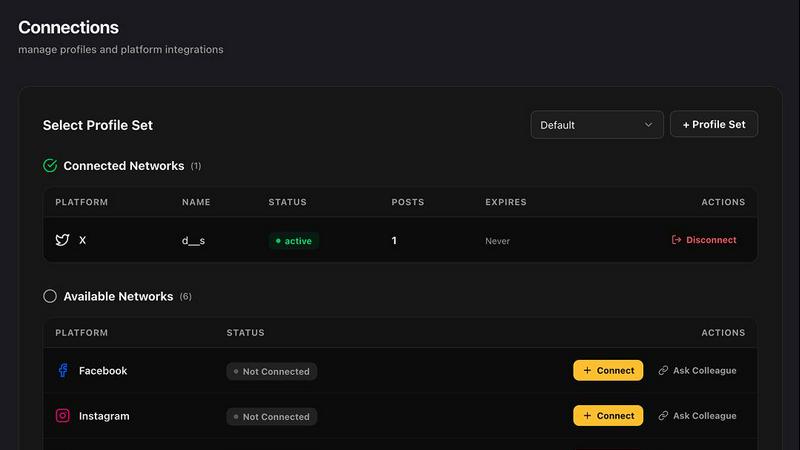
Postproxy simplifies social media publishing by unifying multiple networks into one seamless API solution.
Last updated: February 28, 2026

SimpleDraw
SimpleDraw is a free online tool for creating precise scale drawings and floor plans with professional ease.
Last updated: March 1, 2026
Visual Comparison
Postproxy
SimpleDraw
Feature Comparison
Postproxy
Unified API for Multiple Platforms
Postproxy provides a single API endpoint that simplifies the publishing process across various social media platforms. This eliminates the need for individual integrations, reducing complexity and streamlining workflows.
Automated Content Adaptation
The platform automatically transforms content to meet the unique requirements of each social media site. This includes handling format conversions, media limits, and compliance with platform-specific rules, ensuring that posts look their best everywhere.
Reliable Failure Handling
Postproxy is designed to manage operational failures gracefully. It incorporates automatic retries, rate limit handling, and clear state reporting, allowing users to understand what succeeded, what failed, and why—without manual intervention.
Scalable Publishing Infrastructure
Whether publishing ten posts or thousands, Postproxy maintains consistent logic throughout the process. This scalability ensures that as your needs grow, the solution remains robust and reliable, making it easier to handle increased content demands.
SimpleDraw
Dedicated Floor Plan Mode
SimpleDraw features a specialized Floor Plan Mode tailored for architectural visualization. This mode allows users to intuitively draw walls and add standardized doors and windows with single clicks, streamlining the creation of accurate room, apartment, and house layouts. A comprehensive library of interior fixtures for kitchens, bathrooms, living rooms, and bedrooms is available to populate plans. Real-time measurements update dynamically as you adjust elements, ensuring every dimension is precise and to scale, all within a completely free, browser-based environment.
Intelligent Smart Alignment System
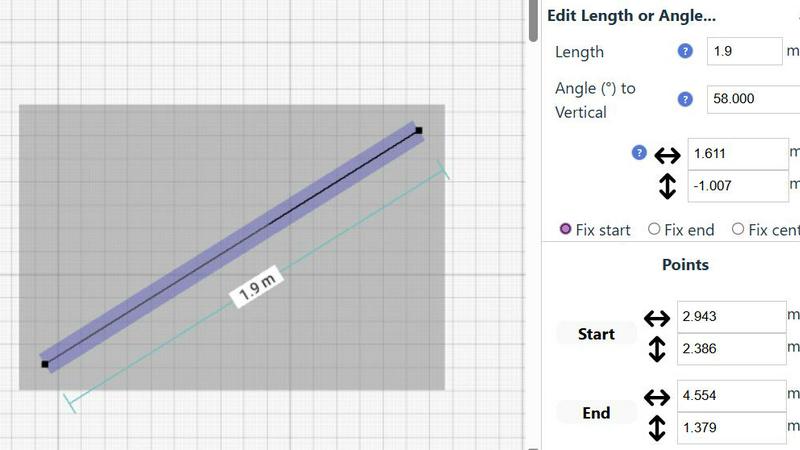
The tool incorporates a sophisticated Smart Alignment System that assists users in placing points and lines with exact precision. As you move your mouse, the system intelligently snaps to logical points and aligns to axes, providing clear visual feedback. For ultimate control, you can zoom in for finer detail or use keyboard shortcuts to lock movements to strictly vertical or horizontal axes. This feature eliminates the frustration of freehand inaccuracy, making technical drawing feel intuitive and assured.
Flexible Zoom & Non-Destructive Editing
SimpleDraw provides complete creative control through flexible zoom capabilities and 100% non-destructive editing. You can zoom to any level of detail, with the tool's alignment precision adapting accordingly. Every element—lines, shapes, fixtures—can be modified, adjusted, moved, or deleted at any stage without damaging the rest of the drawing. Robust undo/redo functions and the ability to group, copy, and paste elements streamline the workflow, making iteration and experimentation effortless.
Comprehensive Measurement & Unit System
Accuracy is paramount, and SimpleDraw delivers with a comprehensive measurement system. Users have full control over which dimensions are displayed on their drawing. The tool supports both metric and standard US units (feet and inches), catering to a global audience. Contextual measurements appear dynamically as you work, and for ultimate precision, any element's position, length, or angle can be input directly via keyboard, ensuring the final plan matches your exact specifications.
Use Cases
Postproxy
Social Media Management
Marketers can use Postproxy to manage social media accounts for multiple brands or clients from a single interface. This simplifies the process of publishing content and ensures consistency across various channels.
Automated Content Distribution
For businesses that generate content using AI or automated scripts, Postproxy allows for seamless distribution across platforms. This ensures that generated content reaches the intended audience without manual adjustments.
Event-Driven Publishing
With Postproxy, users can set up event-driven workflows that automatically publish content based on triggers, such as product launches or special promotions. This capability enhances responsiveness and engagement on social media.
Analytics and Reporting
Postproxy includes analytics features that provide insights into publishing performance. Users can track engagement metrics, identify trends, and optimize their content strategies based on real-time data, enhancing overall effectiveness.
SimpleDraw
Home Renovation & DIY Project Planning
Homeowners and DIY enthusiasts can use SimpleDraw to meticulously plan renovations, from kitchen and bathroom remodels to room additions. By creating accurate scale drawings, they can experiment with layouts, visualize where new fixtures and furniture will fit, and generate precise plans to guide their work or communicate with contractors, preventing costly measurement mistakes before any physical work begins.
Interior Design & Furniture Layout
Interior designers and individuals redecorating their spaces can leverage the tool to experiment with furniture arrangements and spatial design. You can draft room layouts, test different furniture configurations, and ensure that new pieces will fit perfectly and comply with traffic flow and design principles. This visual planning step saves time, money, and the physical effort of moving heavy items repeatedly.
Real Estate & Property Listing Visualization
Real estate agents, landlords, and property managers can create clear, professional floor plans for listings, rental advertisements, and sales brochures. Accurate scale drawings help potential buyers or tenants understand the flow and proportions of a space remotely, setting realistic expectations and enhancing the marketing appeal of any property, from studio apartments to large family homes.
Educational Projects & Small Business Planning
Students in design, architecture, or related fields can use SimpleDraw for academic projects and presentations without needing complex software licenses. Similarly, small business owners can plan retail layouts, office configurations, or restaurant seating charts. The tool provides a professional output suitable for presentations, planning permits, or guiding fit-out contractors, all at no cost.
Overview
About Postproxy
Postproxy is an innovative solution designed to streamline social media publishing across multiple platforms, including Instagram, Facebook, YouTube, LinkedIn, and X. By offering a unified API, Postproxy addresses the challenges and complexities that come with managing individual platform integrations. It automates crucial processes such as OAuth authentication, rate limiting, content adaptation, and analytics, effectively transforming chaotic platform-specific workflows into a cohesive and reliable publishing infrastructure. This tool is particularly beneficial for developers, marketers, and automators who utilize platforms like n8n, Zapier, or CI/CD systems. By empowering users to generate AI-driven content and publish at scale, Postproxy allows teams to focus on creative strategies rather than operational headaches, ensuring that their social media efforts are both efficient and effective. With a free plan available, Postproxy enables users to scale as they grow, making it an accessible solution for businesses of all sizes.
About SimpleDraw
SimpleDraw is a revolutionary, free online tool that democratizes the creation of precise and accurate scale drawings. It serves as a powerful yet intuitive platform designed to bridge the gap between complex, expensive CAD software and rudimentary pen-and-paper sketches. By focusing laser-sharp attention on ease of use, SimpleDraw offers a curated suite of powerful functionalities that empower a vast audience to produce professional-grade technical drawings without a steep learning curve. Its core value proposition is unparalleled accessibility; it requires no software downloads, installations, or user registration, functioning entirely within a modern web browser. This makes it an indispensable solution for homeowners planning DIY renovations, interior designers sketching initial concepts, real estate agents visualizing property layouts, students tackling design projects, and small business owners planning commercial spaces. By seamlessly combining the flexibility of digital editing with the rigorous precision of scale drafting, SimpleDraw transforms abstract measurements and ideas into clear, actionable, and professional visual plans. It effectively makes spatial design, planning, and visualization an approachable and empowering task for everyone, regardless of their technical background or budget.
Frequently Asked Questions
Postproxy FAQ
What social media platforms does Postproxy support?
Postproxy currently supports publishing to Instagram, Facebook, YouTube, LinkedIn, and X, allowing users to manage multiple accounts from a single API.
Is there a free version of Postproxy available?
Yes, Postproxy offers a free plan that allows users to get started without any upfront costs. This plan enables users to explore the features and scale as their needs grow.
How does Postproxy handle platform-specific failures?
Postproxy is designed to manage failures by implementing automatic retries, rate limit handling, and clear reporting of publish states. This ensures users are always informed about the status of their posts.
Can I integrate Postproxy with other automation tools?
Absolutely! Postproxy is built for use with automation tools like n8n and Zapier, making it easy to incorporate into existing workflows and enhance your publishing pipeline.
SimpleDraw FAQ
Is SimpleDraw really free to use?
Yes, SimpleDraw is completely free to use. There are no hidden fees, subscription tiers, or premium feature paywalls. The core platform, including the Floor Plan Mode, smart alignment tools, and comprehensive measurement system, is available at no cost without requiring any user registration or software download. It is funded and developed with the goal of making scale drawing accessible to everyone.
Do I need to download or install any software?
No installation or download is required. SimpleDraw is a fully web-based application that runs directly in your modern internet browser (like Chrome, Firefox, Safari, or Edge). You can start drawing immediately by visiting the website, with no need to install plugins or additional software, ensuring instant access from any device with an internet connection.
What kind of drawings can I create with SimpleDraw?
SimpleDraw is specifically optimized for creating accurate scale drawings and floor plans. This includes detailed layouts for kitchens, bathrooms, bedrooms, and entire houses or apartments. You can also create furniture plans, office layouts, and basic architectural sketches. It is designed for any project that requires precise measurements and a clear visual representation of space.
Can I save and share my drawings?
Yes, SimpleDraw allows you to save your work directly to your device's local storage. You can also export your drawings in common image formats to share with others via email, messaging apps, or to print for physical reference. The tool is designed for practical use, enabling you to return to your project later or collaborate by sharing visual plans easily.
Alternatives
Postproxy Alternatives
Postproxy is a powerful tool designed to streamline social media publishing through a unified API. By enabling users to publish content across multiple platforms—including Instagram, Facebook, YouTube, LinkedIn, and X—Postproxy simplifies the often chaotic process of managing various social media accounts. It is particularly popular among developers and automators who seek to enhance their workflows with tools like n8n, Zapier, and other CI/CD systems. Users commonly seek alternatives to Postproxy for various reasons, such as pricing structures, specific features that align better with their needs, or compatibility with particular platforms. When exploring alternatives, it is essential to consider factors such as ease of use, scalability, the breadth of supported social media channels, and the quality of customer support. Evaluating these elements can help ensure that the chosen solution meets both immediate and long-term publishing goals.
SimpleDraw Alternatives
SimpleDraw is a free, web-based application within the category of digital design and drafting tools. It specializes in creating accurate scale drawings and floor plans, positioning itself as an accessible middle ground between basic sketching and complex computer-aided design software. Its core mission is to make precise spatial visualization available to anyone with a web browser, without the barriers of cost or a steep learning curve. Users often explore alternatives to any software tool for a variety of reasons. Some may require more advanced features for professional engineering or architectural work, while others might need offline functionality or integration with specific project management ecosystems. Considerations like team collaboration capabilities, the need for 3D modeling, or a preference for a downloadable desktop application can also prompt a search for different solutions that align with specific project demands and workflows. When evaluating alternatives, it's crucial to assess your primary needs. Consider the complexity of your projects, your required level of precision, and whether you need specialized object libraries or rendering capabilities. Also, factor in your technical comfort, budget for potential subscriptions, and the importance of platform accessibility—whether you need mobile apps, cloud saving, or software that operates without an internet connection. The ideal tool balances necessary functionality with an interface that you can use efficiently.