
Nano Banana Pro vs SimpleDraw
Side-by-side comparison to help you choose the right tool.

Nano Banana Pro
Nano Banana Pro is a professional AI image generator that creates stunning, consistent 4K visuals for any creative.
Last updated: February 28, 2026

SimpleDraw
SimpleDraw is a free online tool for creating precise scale drawings and floor plans with professional ease.
Last updated: March 1, 2026
Visual Comparison
Nano Banana Pro

SimpleDraw
Feature Comparison
Nano Banana Pro
Unparalleled Character Consistency
Nano Banana Pro fundamentally solves one of the most significant hurdles in AI image generation: maintaining a character's identity across a series of images. Leveraging advanced multi-image understanding technology, it ensures that facial features, clothing details, and stylistic elements remain coherent and consistent. This feature is indispensable for creators working on comic series, storyboards, character design sheets, or any project requiring a stable visual narrative, eliminating the need for tedious manual corrections.
Nano Banana Edit: Advanced Image-to-Image Transformation
Moving beyond simple text prompts, Nano Banana Pro includes a powerful editing suite called Nano Banana Edit. This feature allows users to upload up to 10 existing images and use AI-guided prompts to reimagine and transform them. You can alter styles, add or remove elements, change settings, or apply artistic filters while intelligently preserving the core composition and key features of the original photo, offering a dynamic bridge between photography and generative AI art.
Superior Text Rendering and Clarity
Unlike many AI models that struggle with legible typography, Nano Banana Pro incorporates an advanced text engine designed to render crystal-clear, high-fidelity text within images. This capability opens doors for creating professional posters, logos, social media graphics with embedded quotes, promotional banners, and any visual material where readable text is not just an addition but a central, integral component of the design.
Versatile Format Support with 11 Aspect Ratios
To adapt seamlessly to any platform or project requirement, Nano Banana Pro offers extensive control over output dimensions. Users can select from 11 predefined aspect ratios, ranging from a standard 1:1 square and 16:9 widescreen to cinematic 21:9 ultrawide formats. This ensures perfect, ready-to-use assets for Instagram posts, YouTube thumbnails, website headers, presentation slides, and digital banners without the need for post-generation cropping or distortion.
SimpleDraw
Dedicated Floor Plan Mode
SimpleDraw features a specialized Floor Plan Mode tailored for architectural visualization. This mode allows users to intuitively draw walls and add standardized doors and windows with single clicks, streamlining the creation of accurate room, apartment, and house layouts. A comprehensive library of interior fixtures for kitchens, bathrooms, living rooms, and bedrooms is available to populate plans. Real-time measurements update dynamically as you adjust elements, ensuring every dimension is precise and to scale, all within a completely free, browser-based environment.
Intelligent Smart Alignment System
The tool incorporates a sophisticated Smart Alignment System that assists users in placing points and lines with exact precision. As you move your mouse, the system intelligently snaps to logical points and aligns to axes, providing clear visual feedback. For ultimate control, you can zoom in for finer detail or use keyboard shortcuts to lock movements to strictly vertical or horizontal axes. This feature eliminates the frustration of freehand inaccuracy, making technical drawing feel intuitive and assured.
Flexible Zoom & Non-Destructive Editing
SimpleDraw provides complete creative control through flexible zoom capabilities and 100% non-destructive editing. You can zoom to any level of detail, with the tool's alignment precision adapting accordingly. Every element—lines, shapes, fixtures—can be modified, adjusted, moved, or deleted at any stage without damaging the rest of the drawing. Robust undo/redo functions and the ability to group, copy, and paste elements streamline the workflow, making iteration and experimentation effortless.
Comprehensive Measurement & Unit System
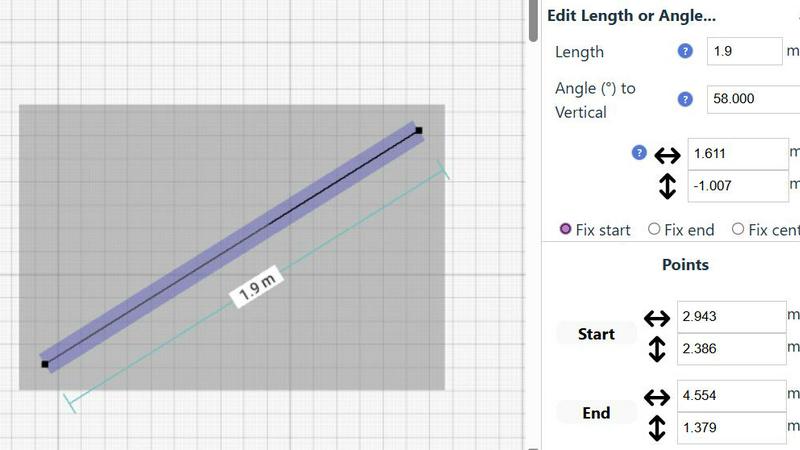
Accuracy is paramount, and SimpleDraw delivers with a comprehensive measurement system. Users have full control over which dimensions are displayed on their drawing. The tool supports both metric and standard US units (feet and inches), catering to a global audience. Contextual measurements appear dynamically as you work, and for ultimate precision, any element's position, length, or angle can be input directly via keyboard, ensuring the final plan matches your exact specifications.
Use Cases
Nano Banana Pro
Professional Marketing and Advertising Content Creation
Marketing teams and agencies can leverage Nano Banana Pro to rapidly generate high-quality, brand-consistent visual assets for campaigns. This includes creating unique product mockups, designing eye-catching social media ads, producing concept visuals for client pitches, and developing illustrative content for blogs and newsletters, all while maintaining a cohesive visual identity and significantly reducing production time and costs.
Concept Art and Storyboarding for Media Projects
Filmmakers, game developers, and authors can use the tool to visualize scenes, characters, and environments during pre-production. The character consistency feature is particularly valuable for creating sequential storyboard panels where characters must be recognizable across different shots and angles, allowing creative teams to explore and solidify their vision before committing to final production.
Digital Art and Character Design Series
Digital artists and illustrators can employ Nano Banana Pro as a powerful co-creation tool to generate initial concepts, explore different artistic styles, and build entire series of artwork featuring the same original character in various poses, outfits, and settings. This accelerates the creative workflow and provides a rich foundation for further refinement and detailed final artwork.
E-commerce and Product Visualization
Online retailers and product designers can create compelling, photorealistic images of products in idealized settings or different color variations. The image-to-image editing feature allows for the transformation of basic product photos into lifestyle shots or stylized visuals that enhance appeal, helping to showcase items in context and drive customer engagement and sales.
SimpleDraw
Home Renovation & DIY Project Planning
Homeowners and DIY enthusiasts can use SimpleDraw to meticulously plan renovations, from kitchen and bathroom remodels to room additions. By creating accurate scale drawings, they can experiment with layouts, visualize where new fixtures and furniture will fit, and generate precise plans to guide their work or communicate with contractors, preventing costly measurement mistakes before any physical work begins.
Interior Design & Furniture Layout
Interior designers and individuals redecorating their spaces can leverage the tool to experiment with furniture arrangements and spatial design. You can draft room layouts, test different furniture configurations, and ensure that new pieces will fit perfectly and comply with traffic flow and design principles. This visual planning step saves time, money, and the physical effort of moving heavy items repeatedly.
Real Estate & Property Listing Visualization
Real estate agents, landlords, and property managers can create clear, professional floor plans for listings, rental advertisements, and sales brochures. Accurate scale drawings help potential buyers or tenants understand the flow and proportions of a space remotely, setting realistic expectations and enhancing the marketing appeal of any property, from studio apartments to large family homes.
Educational Projects & Small Business Planning
Students in design, architecture, or related fields can use SimpleDraw for academic projects and presentations without needing complex software licenses. Similarly, small business owners can plan retail layouts, office configurations, or restaurant seating charts. The tool provides a professional output suitable for presentations, planning permits, or guiding fit-out contractors, all at no cost.
Overview
About Nano Banana Pro
Nano Banana Pro stands as a paradigm-shifting advancement in the field of AI-driven visual creation, engineered specifically for professionals who refuse to compromise on quality, speed, or creative control. It is a comprehensive, professional-grade image generation platform that transforms textual descriptions into stunning, high-fidelity 4K visuals. At its technological heart lies the powerful Gemini 3 Pro Image Preview model, which empowers the tool to deliver unprecedented detail and realism. The platform is meticulously designed for a broad spectrum of users, including digital artists, graphic designers, marketing teams, content creators, and developers who require rapid prototyping and visual asset production. Its core value proposition is a powerful trifecta: solving the pervasive industry challenge of maintaining perfect character consistency across multiple images, providing a versatile and robust suite of built-in editing tools for both text-to-image and image-to-image workflows, and achieving all this with a notable 15% increase in generation speed compared to standard models. With support for 11 distinct aspect ratios and superior text rendering capabilities, Nano Banana Pro is a versatile engine capable of fueling any project, from social media campaigns and concept art to professional storyboards, product mockups, and illustrative typography. Trusted by a community of over 10,000 creators, it represents not just a tool, but a reliable partner in turning abstract imagination into precise, beautiful, and consistent visual reality.
About SimpleDraw
SimpleDraw is a revolutionary, free online tool that democratizes the creation of precise and accurate scale drawings. It serves as a powerful yet intuitive platform designed to bridge the gap between complex, expensive CAD software and rudimentary pen-and-paper sketches. By focusing laser-sharp attention on ease of use, SimpleDraw offers a curated suite of powerful functionalities that empower a vast audience to produce professional-grade technical drawings without a steep learning curve. Its core value proposition is unparalleled accessibility; it requires no software downloads, installations, or user registration, functioning entirely within a modern web browser. This makes it an indispensable solution for homeowners planning DIY renovations, interior designers sketching initial concepts, real estate agents visualizing property layouts, students tackling design projects, and small business owners planning commercial spaces. By seamlessly combining the flexibility of digital editing with the rigorous precision of scale drafting, SimpleDraw transforms abstract measurements and ideas into clear, actionable, and professional visual plans. It effectively makes spatial design, planning, and visualization an approachable and empowering task for everyone, regardless of their technical background or budget.
Frequently Asked Questions
Nano Banana Pro FAQ
What makes Nano Banana Pro different from other AI image generators?
Nano Banana Pro distinguishes itself through a professional-grade focus on three key areas: flawless character consistency across multiple images, a dedicated and powerful image-to-image editing suite (Nano Banana Edit), and superior text rendering capabilities. Powered by the Gemini 3 Pro Image Preview model, it also operates with a 15% speed increase and delivers 4K-ready image quality, making it a comprehensive solution for serious creators.
How does the Character Consistency feature work?
The feature utilizes advanced multi-image understanding technology. When you generate a character, the AI model learns and encodes the specific features—such as face shape, eye color, hairstyle, and distinctive markings. In subsequent generations using similar prompts referencing that character, the model recalls and applies this learned "blueprint," ensuring visual continuity and coherence across your entire project.
Can I edit my own photos with Nano Banana Pro?
Absolutely. Through the Nano Banana Edit feature, you can upload your own photographs (up to 10 at a time) and use text prompts to guide the AI in transforming them. You can change the artistic style, add or remove objects, alter the background, apply color grades, or reimagine the scene entirely while the AI works to preserve the essential elements and composition of your original image.
What image formats and resolutions does it support?
Nano Banana Pro generates high-quality images suitable for upscaling to 4K resolution. The default and commonly used output format is PNG, which supports transparency and high detail. You have full control over the composition from the start, with a choice of 11 different aspect ratios to ensure the generated image is perfectly formatted for its intended use, from social media to wide-format printing.
SimpleDraw FAQ
Is SimpleDraw really free to use?
Yes, SimpleDraw is completely free to use. There are no hidden fees, subscription tiers, or premium feature paywalls. The core platform, including the Floor Plan Mode, smart alignment tools, and comprehensive measurement system, is available at no cost without requiring any user registration or software download. It is funded and developed with the goal of making scale drawing accessible to everyone.
Do I need to download or install any software?
No installation or download is required. SimpleDraw is a fully web-based application that runs directly in your modern internet browser (like Chrome, Firefox, Safari, or Edge). You can start drawing immediately by visiting the website, with no need to install plugins or additional software, ensuring instant access from any device with an internet connection.
What kind of drawings can I create with SimpleDraw?
SimpleDraw is specifically optimized for creating accurate scale drawings and floor plans. This includes detailed layouts for kitchens, bathrooms, bedrooms, and entire houses or apartments. You can also create furniture plans, office layouts, and basic architectural sketches. It is designed for any project that requires precise measurements and a clear visual representation of space.
Can I save and share my drawings?
Yes, SimpleDraw allows you to save your work directly to your device's local storage. You can also export your drawings in common image formats to share with others via email, messaging apps, or to print for physical reference. The tool is designed for practical use, enabling you to return to your project later or collaborate by sharing visual plans easily.
Alternatives
Nano Banana Pro Alternatives
Nano Banana Pro is a professional-grade AI image generator designed for creators who demand high-quality, consistent 4K visuals from text prompts. It falls into the category of advanced design and image creation tools, offering specialized features like character consistency and powerful editing capabilities. As a sophisticated platform, it caters to a specific segment of the market with particular needs. Users often explore alternatives for a variety of practical reasons. These can include budget considerations, as professional tools require investment, or a need for different feature sets that align with specific workflows. Some may seek platforms with different user interfaces, integration capabilities, or licensing models that better suit their individual or organizational requirements. When evaluating other options, it’s crucial to assess core competencies against your primary goals. Key considerations should include the quality and resolution of generated images, the tool’s ability to maintain consistency in characters or styles, and the depth of its editing suite. The ideal alternative will balance raw creative power with an intuitive workflow that fits seamlessly into your creative process.
SimpleDraw Alternatives
SimpleDraw is a free, web-based application within the category of digital design and drafting tools. It specializes in creating accurate scale drawings and floor plans, positioning itself as an accessible middle ground between basic sketching and complex computer-aided design software. Its core mission is to make precise spatial visualization available to anyone with a web browser, without the barriers of cost or a steep learning curve. Users often explore alternatives to any software tool for a variety of reasons. Some may require more advanced features for professional engineering or architectural work, while others might need offline functionality or integration with specific project management ecosystems. Considerations like team collaboration capabilities, the need for 3D modeling, or a preference for a downloadable desktop application can also prompt a search for different solutions that align with specific project demands and workflows. When evaluating alternatives, it's crucial to assess your primary needs. Consider the complexity of your projects, your required level of precision, and whether you need specialized object libraries or rendering capabilities. Also, factor in your technical comfort, budget for potential subscriptions, and the importance of platform accessibility—whether you need mobile apps, cloud saving, or software that operates without an internet connection. The ideal tool balances necessary functionality with an interface that you can use efficiently.