
Image3D AI vs SimpleDraw
Side-by-side comparison to help you choose the right tool.

Image3D AI
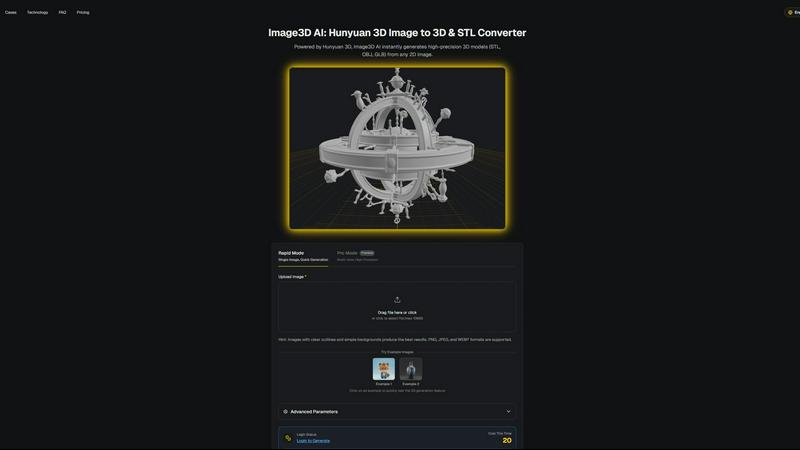
Image3D AI instantly transforms any 2D image into a high-quality 3D model for printing and game development.
Last updated: March 1, 2026

SimpleDraw
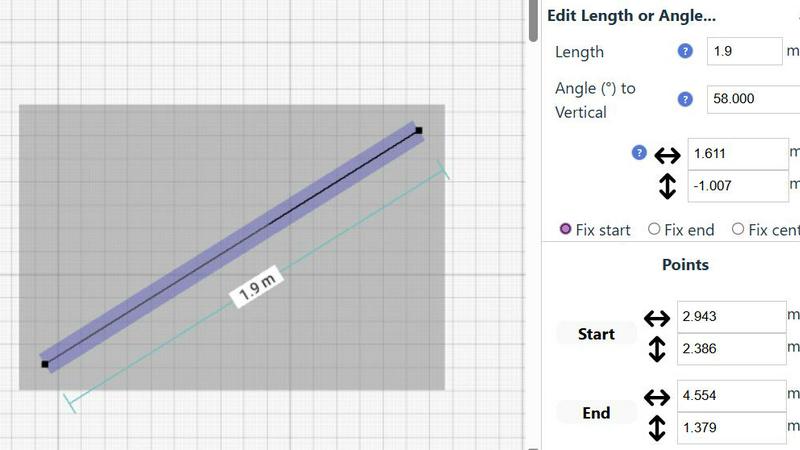
SimpleDraw is a free online tool for creating precise scale drawings and floor plans with professional ease.
Last updated: March 1, 2026
Visual Comparison
Image3D AI
SimpleDraw
Feature Comparison
Image3D AI
Powered by Hunyuan 3D Engine
Image3D AI is built upon the robust foundation of Tencent's Hunyuan 3D engine, a state-of-the-art AI technology specifically designed for 3D reconstruction. This engine enables the platform to perform advanced inference from a single 2D image, generating high-precision geometry and textures that rival manually crafted models. The integration of this professional technology into an accessible web interface is what sets the tool apart, delivering studio-quality results without requiring studio-level expertise or computational resources from the end-user.
Dual Generation Modes for Flexibility
The platform offers two distinct operational modes to cater to different project needs and quality requirements. Rapid Mode is optimized for speed and simplicity, generating a 3D model from a single uploaded image in approximately 60 seconds. For scenarios demanding the highest accuracy, such as product replication or detailed asset creation, Pro Mode utilizes multi-view images to perform a physically accurate 3D reconstruction, ensuring dimensional precision and superior detail from every angle.
Multi-Format Export for Any Workflow
Understanding that creators work across diverse software ecosystems, Image3D AI provides exports in all major industry-standard 3D file formats. Users can download their generated models as STL files for immediate 3D printing, OBJ files for editing in traditional 3D software like Blender or Maya, or GLB files for direct use in web applications, AR experiences, and modern game engines like Unity and Unreal Engine, complete with PBR material support.
Intuitive Interface with Guided Best Practices
The tool is designed for immediate usability, featuring a clean, drag-and-drop interface and offering free example images for instant testing without login. Beyond simplicity, it educates users through a comprehensive Best Practices Guide. This resource provides actionable tips on selecting optimal source images, understanding the strengths of each generation mode, and choosing the correct export format, significantly boosting the success rate and quality of conversions for both novices and professionals.
SimpleDraw
Dedicated Floor Plan Mode
SimpleDraw features a specialized Floor Plan Mode tailored for architectural visualization. This mode allows users to intuitively draw walls and add standardized doors and windows with single clicks, streamlining the creation of accurate room, apartment, and house layouts. A comprehensive library of interior fixtures for kitchens, bathrooms, living rooms, and bedrooms is available to populate plans. Real-time measurements update dynamically as you adjust elements, ensuring every dimension is precise and to scale, all within a completely free, browser-based environment.
Intelligent Smart Alignment System
The tool incorporates a sophisticated Smart Alignment System that assists users in placing points and lines with exact precision. As you move your mouse, the system intelligently snaps to logical points and aligns to axes, providing clear visual feedback. For ultimate control, you can zoom in for finer detail or use keyboard shortcuts to lock movements to strictly vertical or horizontal axes. This feature eliminates the frustration of freehand inaccuracy, making technical drawing feel intuitive and assured.
Flexible Zoom & Non-Destructive Editing
SimpleDraw provides complete creative control through flexible zoom capabilities and 100% non-destructive editing. You can zoom to any level of detail, with the tool's alignment precision adapting accordingly. Every element—lines, shapes, fixtures—can be modified, adjusted, moved, or deleted at any stage without damaging the rest of the drawing. Robust undo/redo functions and the ability to group, copy, and paste elements streamline the workflow, making iteration and experimentation effortless.
Comprehensive Measurement & Unit System
Accuracy is paramount, and SimpleDraw delivers with a comprehensive measurement system. Users have full control over which dimensions are displayed on their drawing. The tool supports both metric and standard US units (feet and inches), catering to a global audience. Contextual measurements appear dynamically as you work, and for ultimate precision, any element's position, length, or angle can be input directly via keyboard, ensuring the final plan matches your exact specifications.
Use Cases
Image3D AI
Game Development and Digital Content Creation
Game developers, animators, and VR/AR creators can rapidly prototype and produce game-ready 3D assets directly from concept art, sketches, or reference images. This accelerates the pre-production and asset creation pipeline, allowing small teams or indie developers to generate a wide variety of characters, props, and environmental assets with consistent quality, ready for texturing and import into engines like Unity or Unreal.
3D Printing and Prototyping
Hobbyists, engineers, and product designers can instantly convert sketches, diagrams, or photos of objects into printable STL files. This use case is invaluable for rapid prototyping, creating custom figurines, producing spare parts, or visualizing inventions in tangible form. The Geometry-focused generation mode ensures clean, manifold meshes that are optimized for reliable 3D printing without complex manual cleanup.
E-commerce and Product Visualization
Online retailers and marketers can transform flat product photographs into interactive 3D models and AR-ready assets. This enhances online shopping experiences by allowing customers to view products from every angle, inspect details, and even visualize items in their own space through augmented reality, leading to increased engagement, reduced return rates, and higher conversion rates.
Architecture, Design, and Education
Architects and interior designers can quickly generate basic 3D massing models from sketches or site photos for client presentations and early-stage design studies. Educators and students can also use the tool to create visual aids and models for STEM education, making abstract concepts tangible and fostering a hands-on understanding of spatial design and geometry without needing specialized 3D modeling skills.
SimpleDraw
Home Renovation & DIY Project Planning
Homeowners and DIY enthusiasts can use SimpleDraw to meticulously plan renovations, from kitchen and bathroom remodels to room additions. By creating accurate scale drawings, they can experiment with layouts, visualize where new fixtures and furniture will fit, and generate precise plans to guide their work or communicate with contractors, preventing costly measurement mistakes before any physical work begins.
Interior Design & Furniture Layout
Interior designers and individuals redecorating their spaces can leverage the tool to experiment with furniture arrangements and spatial design. You can draft room layouts, test different furniture configurations, and ensure that new pieces will fit perfectly and comply with traffic flow and design principles. This visual planning step saves time, money, and the physical effort of moving heavy items repeatedly.
Real Estate & Property Listing Visualization
Real estate agents, landlords, and property managers can create clear, professional floor plans for listings, rental advertisements, and sales brochures. Accurate scale drawings help potential buyers or tenants understand the flow and proportions of a space remotely, setting realistic expectations and enhancing the marketing appeal of any property, from studio apartments to large family homes.
Educational Projects & Small Business Planning
Students in design, architecture, or related fields can use SimpleDraw for academic projects and presentations without needing complex software licenses. Similarly, small business owners can plan retail layouts, office configurations, or restaurant seating charts. The tool provides a professional output suitable for presentations, planning permits, or guiding fit-out contractors, all at no cost.
Overview
About Image3D AI
Image3D AI represents a paradigm shift in the field of digital creation, democratizing the complex process of 3D modeling through the power of artificial intelligence. At its core, it is a sophisticated online platform that transforms ordinary 2D images into fully-realized, high-fidelity 3D models in a matter of seconds. This is made possible by leveraging Tencent's cutting-edge Hunyuan 3D engine, a professional-grade technology that interprets visual data to construct accurate volumetric representations. The tool is designed for a universal audience, eliminating the steep learning curve and significant time investment traditionally associated with 3D software. Whether you are a game developer needing rapid asset creation, a 3D printing enthusiast turning sketches into tangible objects, an e-commerce professional seeking interactive product displays, or an architect visualizing concepts, Image3D AI serves as your instant conduit from imagination to three-dimensional reality. Its primary value proposition is profound workflow acceleration and creative empowerment, allowing users to bypass technical barriers and focus purely on bringing their innovative ideas to life across various industries and applications.
About SimpleDraw
SimpleDraw is a revolutionary, free online tool that democratizes the creation of precise and accurate scale drawings. It serves as a powerful yet intuitive platform designed to bridge the gap between complex, expensive CAD software and rudimentary pen-and-paper sketches. By focusing laser-sharp attention on ease of use, SimpleDraw offers a curated suite of powerful functionalities that empower a vast audience to produce professional-grade technical drawings without a steep learning curve. Its core value proposition is unparalleled accessibility; it requires no software downloads, installations, or user registration, functioning entirely within a modern web browser. This makes it an indispensable solution for homeowners planning DIY renovations, interior designers sketching initial concepts, real estate agents visualizing property layouts, students tackling design projects, and small business owners planning commercial spaces. By seamlessly combining the flexibility of digital editing with the rigorous precision of scale drafting, SimpleDraw transforms abstract measurements and ideas into clear, actionable, and professional visual plans. It effectively makes spatial design, planning, and visualization an approachable and empowering task for everyone, regardless of their technical background or budget.
Frequently Asked Questions
Image3D AI FAQ
What types of images work best with Image3D AI?
For optimal results, use high-contrast images with clear, well-defined outlines and a simple, uncluttered background. The subject should be in focus with good lighting. Images with blur, complex backgrounds, or objects that are partially obscured will yield less accurate 3D reconstructions. For converting real-world objects, providing multiple views (front, side, top) in Pro Mode is highly recommended for the most physically accurate model.
What is the difference between Rapid Mode and Pro Mode?
Rapid Mode uses AI inference to generate a 3D model from a single image quickly, typically within about 60 seconds. It's ideal for logos, sketches, and concepts where speed is prioritized. Pro Mode is designed for high-precision outcomes; it requires uploading multiple images of an object from different angles (multi-view). This allows the AI to perform a more accurate, dimensionally faithful reconstruction, making it the preferred choice for product photography, engineering parts, or any application where geometric accuracy is critical.
Which file format should I download for my project?
The choice depends on your intended use. Download the .STL format if your goal is 3D printing, as it is the universal standard for slicer software. Choose the .OBJ format if you plan to further edit the model in 3D modeling software like Blender, 3ds Max, or ZBrush. Select the .GLB format for web applications, augmented reality (AR), or modern game engines, as it is a compact, single-file format that contains the model, textures, and materials.
Is there a free trial or any way to test the tool?
Yes, Image3D AI offers a completely free way to test its core functionality. The website provides several "Example Images" that users can click on to instantly trigger the 3D generation process without any login, account creation, or credit cost. This allows anyone to experience the conversion speed and quality firsthand before committing to uploading their own images or purchasing credits.
SimpleDraw FAQ
Is SimpleDraw really free to use?
Yes, SimpleDraw is completely free to use. There are no hidden fees, subscription tiers, or premium feature paywalls. The core platform, including the Floor Plan Mode, smart alignment tools, and comprehensive measurement system, is available at no cost without requiring any user registration or software download. It is funded and developed with the goal of making scale drawing accessible to everyone.
Do I need to download or install any software?
No installation or download is required. SimpleDraw is a fully web-based application that runs directly in your modern internet browser (like Chrome, Firefox, Safari, or Edge). You can start drawing immediately by visiting the website, with no need to install plugins or additional software, ensuring instant access from any device with an internet connection.
What kind of drawings can I create with SimpleDraw?
SimpleDraw is specifically optimized for creating accurate scale drawings and floor plans. This includes detailed layouts for kitchens, bathrooms, bedrooms, and entire houses or apartments. You can also create furniture plans, office layouts, and basic architectural sketches. It is designed for any project that requires precise measurements and a clear visual representation of space.
Can I save and share my drawings?
Yes, SimpleDraw allows you to save your work directly to your device's local storage. You can also export your drawings in common image formats to share with others via email, messaging apps, or to print for physical reference. The tool is designed for practical use, enabling you to return to your project later or collaborate by sharing visual plans easily.
Alternatives
Image3D AI Alternatives
Image3D AI is a specialized design tool that transforms 2D images into detailed 3D models, leveraging advanced AI to simplify a traditionally complex process. It caters to creators who need rapid asset generation for 3D printing, game development, and other digital projects, making professional-grade 3D modeling accessible to a wider audience. Users often explore alternatives for various practical reasons. These can include budget constraints, as pricing models differ significantly across the market. Others may seek specific technical features not offered, require integration with a particular software ecosystem, or need a solution that runs on a different platform or operating system. The search for the right tool is a natural part of finding the perfect fit for one's unique workflow and project demands. When evaluating alternatives, it's crucial to consider several key factors. Assess the core technology and the quality of the 3D output it produces. Examine the supported file formats for export to ensure compatibility with your intended use, whether for printing or digital rendering. Also, consider the user experience, the availability of different processing modes for speed versus detail, and the overall value proposition relative to the cost. The goal is to find a tool that aligns with your skill level, project requirements, and creative vision.
SimpleDraw Alternatives
SimpleDraw is a free, web-based application within the category of digital design and drafting tools. It specializes in creating accurate scale drawings and floor plans, positioning itself as an accessible middle ground between basic sketching and complex computer-aided design software. Its core mission is to make precise spatial visualization available to anyone with a web browser, without the barriers of cost or a steep learning curve. Users often explore alternatives to any software tool for a variety of reasons. Some may require more advanced features for professional engineering or architectural work, while others might need offline functionality or integration with specific project management ecosystems. Considerations like team collaboration capabilities, the need for 3D modeling, or a preference for a downloadable desktop application can also prompt a search for different solutions that align with specific project demands and workflows. When evaluating alternatives, it's crucial to assess your primary needs. Consider the complexity of your projects, your required level of precision, and whether you need specialized object libraries or rendering capabilities. Also, factor in your technical comfort, budget for potential subscriptions, and the importance of platform accessibility—whether you need mobile apps, cloud saving, or software that operates without an internet connection. The ideal tool balances necessary functionality with an interface that you can use efficiently.