
Never Drop vs Refbox
Side-by-side comparison to help you choose the right tool.

Never Drop
NeverDrop instantly captures event contacts and drafts personalized follow-ups to turn every handshake into a deal.
Last updated: February 28, 2026

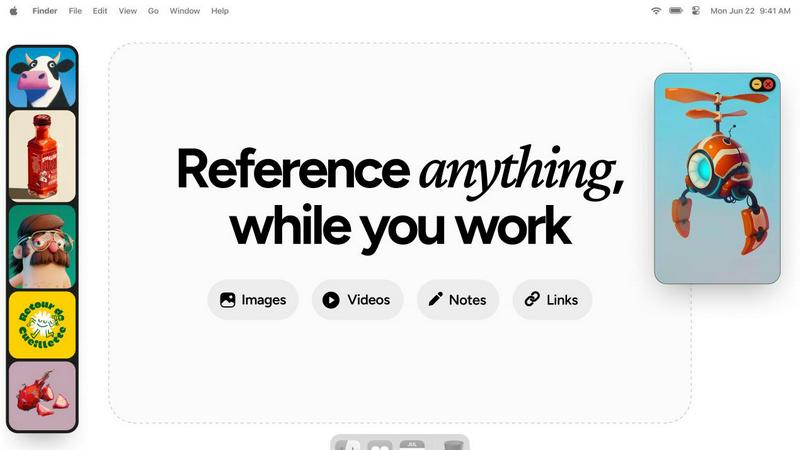
Refbox keeps your images, videos, and notes instantly accessible above your workspace for effortless reference.
Last updated: February 28, 2026
Visual Comparison
Never Drop

Refbox
Feature Comparison
Never Drop
AI-Powered Business Card Scanning
Never Drop utilizes advanced Optical Character Recognition (OCR) technology to instantly extract every critical detail from a business card with a simple photo. This AI-driven process accurately captures names, companies, job titles, phone numbers, and email addresses in seconds, completely eliminating the tedious and error-prone task of manual data entry. It works with any card design, ensuring that contact information is digitized reliably the moment a connection is made.
Intelligent Contact Enrichment & Email Finding
Business cards often lack direct contact information or contain generic office emails. Never Drop solves this by automatically searching for and verifying the lead's professional work email address using their name and company details. This enrichment process builds a more complete and actionable contact profile, saving sales reps from time-consuming manual searches on LinkedIn or other platforms, and ensuring follow-ups reach the right person directly.
Context-Aware AI Follow-Up Drafting
This flagship feature sets Never Drop apart. Based on the voice notes or text context you record about your conversation, the app's AI generates a personalized follow-up email draft. It moves beyond generic templates by incorporating specific discussion points, tone, and intent from your interaction. This allows you to send a relevant, thoughtful message that resonates with the lead, all within two minutes of your meeting ending.
Seamless CRM Integration & Team Workspace
Never Drop ensures captured leads immediately enter your sales ecosystem by integrating directly with popular CRMs like HubSpot. Furthermore, it provides a centralized team workspace where managers can organize leads by event, reassign contacts between team members, and track overall activity from a unified dashboard. This fosters alignment, prevents duplication of effort, and ensures nothing is lost between scanning and the sales pipeline.
Refbox
Always-on-Top Floating Frames
Refbox's signature feature is its ability to create persistent, floating windows for any reference media. These frames can be resized, repositioned, and set to stay on top of all other applications, ensuring your inspiration never gets buried. You can work directly behind locked frames or minimize them temporarily, giving you complete control over your screen real estate while keeping references just a click away, eliminating the need to alt-tab or dig through folders.
Infinite Canvas & Instant Collections
Organize your references on a limitless digital canvas where you can spatially arrange images, videos, and notes for any project. The app allows you to create and switch between different Collections instantly with a single click, enabling you to segregate references for multiple clients, projects, or artistic phases effortlessly. This visual organization system makes moodboarding and project planning both efficient and intuitively satisfying.
Advanced Media Handling & Tools
Refbox goes beyond simple image display with a suite of powerful, creative-centric tools. It features frame-by-frame GIF playback, pixel-perfect rendering for pixel art, and the ability to take website screenshots directly by pasting a link. You can crop images, view SVG files, use a built-in color picker on any media to copy hex codes, and save or copy assets directly to your clipboard for use in other applications.
Streamlined Navigation & Shortcuts
Designed for speed, Refbox offers extensive keyboard shortcuts and navigation aids to keep your hands on the keyboard and your mind in the flow. You can swiftly swap through references in a frame using arrow keys, auto-hide your entire Refbox panel until you need it, and execute all major functions via customizable hotkeys. These thoughtful interactions minimize friction and save valuable time during intensive creative sessions.
Use Cases
Never Drop
High-Volume Trade Show & Conference Lead Capture
For sales teams attending bustling trade shows, Never Drop is indispensable. It allows representatives to quickly scan dozens of business cards on the go, add quick voice memos about each conversation, and have AI-drafted follow-ups ready before they even leave the booth. This incredible speed ensures they are the first to respond while the interaction is still fresh in the lead's mind, significantly boosting conversion rates.
Streamlining Post-Networking Event Follow-Ups
After a networking dinner or industry meetup, professionals often face a pile of cards with fading memories of each chat. Never Drop solves this by providing a structured process: scan cards as you receive them, dictate key points immediately, and schedule personalized follow-ups for the next morning. This transforms a chaotic post-event ritual into an efficient, effective sales activity.
Managing Team-Based Sales Operations at Events
For sales managers leading a team at a large conference, Never Drop provides oversight and organization. The team workspace allows for the centralized collection of all scanned leads, which can be categorized by event day or product interest. Managers can then review team activity, redistribute leads fairly, and ensure consistent, timely follow-up from the entire team, maximizing collective ROI.
Enhancing Solo Entrepreneur & Freelancer Outreach
Solo entrepreneurs, consultants, and freelancers who frequently network to grow their business benefit greatly from Never Drop's efficiency. It acts as a personal sales assistant, handling the administrative burden of lead capture and initial outreach. This allows the individual to focus on building relationships during the event while being confident that professional, personalized follow-up communication is handled seamlessly.
Refbox
Digital Illustration & Concept Art
Illustrators and concept artists can pin multiple character sketches, environment photos, and color palettes in floating frames around their drawing software. This allows for constant visual comparison and inspiration without leaving the canvas, facilitating accurate anatomy drawing, consistent lighting studies, and cohesive color scheme development directly from reference.
UI/UX & Web Design
Designers can keep live website screenshots, style guides, component libraries, and competitor analysis notes visible while working in Figma or Sketch. This enables precise alignment, typography matching, and layout inspiration, ensuring design decisions are informed and consistent without constantly switching browser tabs or digging through design system documents.
3D Modeling & Animation
3D artists and animators can float reference images for character orthographics, texture inspiration, or motion study videos directly above software like Blender or Maya. Having multiple angle views and action sequences always visible drastically improves modeling accuracy, texture application, and animation fluidity, streamlining the entire 3D creation pipeline.
Photography & Photo Editing
Photographers can use Refbox to display shot lists, client moodboards, and editing technique tutorials right next to Lightroom or Photoshop. During editing, they can keep color grading references or specific retouching examples pinned for direct emulation, ensuring the final product aligns perfectly with the planned creative vision and technical requirements.
Overview
About Never Drop
In the high-stakes arena of sales and business development, the moments following a promising connection are critical. Never Drop is an innovative, AI-powered lead capture application engineered specifically for sales professionals and teams who operate in dynamic, fast-paced environments. Its core mission is to eliminate the all-too-common problem of leads slipping through the cracks after events like trade shows, conferences, and networking meetings. The platform transforms the traditional, error-prone process of collecting business cards and manually entering data into a seamless, intelligent workflow. By simply scanning a business card with a smartphone, users can instantly digitize contact details. The true power of Never Drop lies in its ability to capture the context of a conversation through voice notes or text, ensuring the human element of the interaction is preserved. This contextual data then fuels its advanced AI to generate personalized, relevant follow-up emails in under two minutes. With direct integrations into essential tools like HubSpot and Gmail, Never Drop ensures that enriched lead data flows directly into existing sales pipelines, making every handshake count and dramatically increasing the likelihood of conversion. It is more than a scanner; it is a comprehensive system designed to accelerate sales cycles and ensure no opportunity is ever forgotten.
About Refbox
Refbox is a revolutionary desktop application engineered to fundamentally transform the creative workflow by eliminating the disruptive context-switching inherent in traditional reference gathering. At its core, Refbox is a floating, always-on-top reference manager that allows creatives to pin essential media—including images, GIFs, videos, and rich-text notes—into resizable frames that hover persistently above any other application. This creates a seamless, layered workspace where inspiration and critical visual guides remain perpetually in view, directly alongside the primary creative tool, be it Photoshop, Blender, Figma, or a code editor. Designed for professionals who cannot afford fragmented focus, Refbox serves a wide spectrum of disciplines including graphic design, UI/UX design, 3D art, animation, illustration, photography, and motion graphics. Its value proposition is profound: it streamlines the creative process by providing instant, organized access to reference materials, thereby reducing cognitive load, accelerating execution, and fostering a state of deep, uninterrupted flow. By replacing a cluttered desktop or a browser full of tabs with a sleek, controllable, and infinite canvas of references, Refbox empowers artists and designers to work with greater speed, accuracy, and creative continuity.
Frequently Asked Questions
Never Drop FAQ
What is Never Drop and how does it work?
Never Drop is a comprehensive lead-capture application designed for sales teams and professionals who attend events. The workflow is simple yet powerful: you use the mobile app to scan a business card, then enrich the captured data with voice or text notes about your conversation. The app's AI then uses this context to draft a personalized follow-up email within two minutes. It also enriches contacts with verified work emails and can sync all data directly to your connected CRM, creating a seamless bridge from handshake to pipeline.
How does the business card scanning feature work?
The scanning process is straightforward. Using the Never Drop mobile app, you simply take a photo of any business card. The app's AI-powered OCR (Optical Character Recognition) technology instantly analyzes the image and extracts key contact details such as name, company, job title, phone number, and email address. This happens in seconds with high accuracy, eliminating manual typing. You also have the option to manually enter details if preferred.
What types of events is Never Drop best suited for?
Never Drop is built for any in-person business scenario where connections are made and follow-up is crucial. This includes high-volume environments like trade shows and industry conferences, as well as networking events, seminars, business dinners, and client meetings. The app allows you to organize your scans by specific event, making it easy to track and manage leads from different sources.
Is my data secure with Never Drop?
Yes, data security is a top priority. Never Drop is developed by SCOPEO, a company based in France. All user data is hosted on servers within the European Union and is processed in full compliance with GDPR regulations. Data is encrypted both during transmission (in transit) and while stored on servers (at rest). Images of business cards are used solely for the purpose of contact extraction and are not shared with third parties. You can review the detailed commitments in the platform's Privacy Policy.
Refbox FAQ
What types of files does Refbox support?
Refbox supports a wide array of media formats essential for creative work. You can directly pin and view common image files (JPG, PNG, WEBP, SVG), video files (MP4, MOV), and GIFs. It also features rich-text notes for instructions and checklists. Furthermore, you can paste image URLs or website links to instantly create reference frames from online content.
How does the "always-on-top" feature work with other applications?
The always-on-top functionality is a core principle of Refbox. When you pin a reference, it creates a window that stays visually above other application windows. You can resize these frames and reposition them anywhere on your screen. For times when you need full access to an app behind, you can temporarily minimize individual frames or lock them, allowing you to click through to the software below while the reference remains in place.
Is there a free trial or version of Refbox?
Refbox operates on a straightforward, one-time purchase model. This means you pay a single fee for a perpetual license to the current version, without recurring subscriptions. This model is often preferred by professionals seeking predictable costs. Information on a trial version is not specified in the provided materials, so visiting the official Refbox website would provide the most current details on trial availability.
Can I use Refbox for collaborative projects or team workflows?
Based on the provided context, Refbox appears primarily designed as a powerful individual productivity tool to optimize a single user's desktop workflow. The features focus on personal reference management, organization, and rapid access. For collaborative aspects, users would typically share the final project files or exported reference collections, while using Refbox locally to manage their personal slice of the project's visual assets.
Alternatives
Never Drop Alternatives
Never Drop is a specialized productivity and lead management application designed for sales professionals. It excels at capturing contact information from business cards and using AI to generate personalized follow-up communications, streamlining the process of converting networking interactions into tangible sales opportunities. Users often explore alternatives for various reasons, including budget constraints, the need for different feature sets, or compatibility with specific hardware or existing software ecosystems. Some may require more extensive CRM functionalities, while others might seek simpler, more cost-effective solutions for basic contact capture. When evaluating alternatives, it's crucial to assess your primary needs. Consider the core functionality you require, such as the accuracy of data capture, the depth of CRM integration, the quality of automation for follow-ups, and overall ease of use. The right tool should align with your team's workflow and scale effectively with your business growth.
Refbox Alternatives
Refbox is a specialized productivity application designed to streamline the creative workflow. It belongs to the category of reference management and workspace enhancement tools, allowing users to keep essential media and notes in floating, always-on-top windows. This eliminates the need for disruptive window switching, fostering a more focused and efficient environment for tasks like design, animation, and content creation. Users may seek alternatives to Refbox for various practical reasons. These can include budget constraints, the need for specific features not offered, compatibility with different operating systems, or a preference for a different user interface and workflow philosophy. The search for the right tool is highly personal, driven by an individual's unique project demands and working style. When evaluating alternatives, key considerations should include the core functionality of pinning reference material, support for different file types like images and videos, organizational capabilities, and overall ease of use. The ideal solution should integrate seamlessly into your existing process, reducing friction rather than adding complexity, to truly enhance your productivity and creative output.