
MeetingMind vs VideoAny
Side-by-side comparison to help you choose the right tool.

MeetingMind
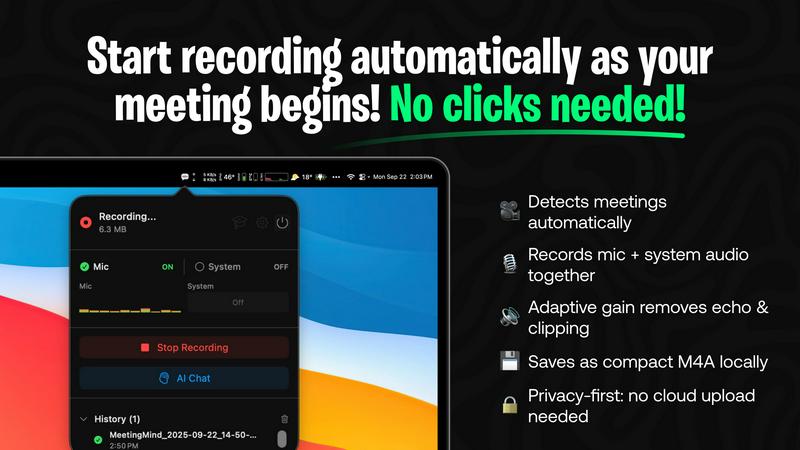
MeetingMind automatically records, transcribes, and summarizes your Zoom meetings into private notes.
Last updated: March 1, 2026

VideoAny
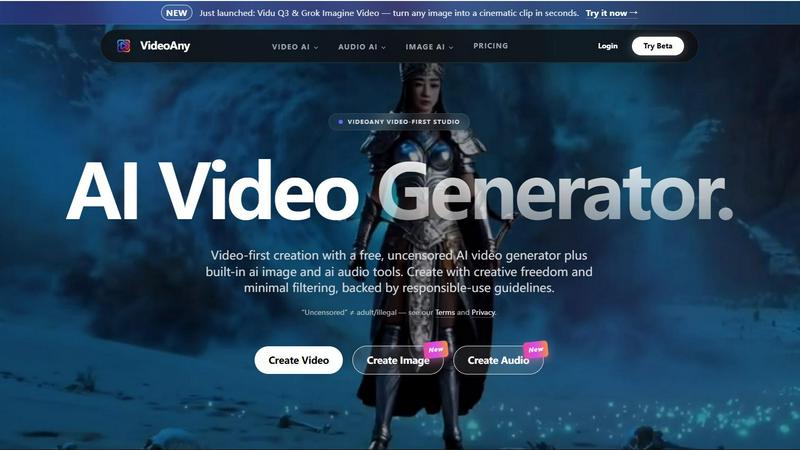
VideoAny is a free, uncensored AI video-first studio that combines video, image, and audio generation in one intelligent platform for creative.
Last updated: April 13, 2026
Visual Comparison
MeetingMind
VideoAny
Feature Comparison
MeetingMind
Automatic Zoom Detection & Recording
MeetingMind eliminates the need for manual start/stop commands by intelligently detecting when you join a Zoom meeting and automatically initiating the recording process. This hands-free operation ensures you never forget to record an important session, allowing you to focus entirely on the discussion. It seamlessly captures the meeting in the background, providing a reliable and effortless recording experience from start to finish.
Dual Audio Capture with Adaptive Gain
The application expertly records both microphone audio (participants' voices) and system audio (sound from your computer, like presentation audio or shared videos) simultaneously. Its adaptive gain technology intelligently balances audio levels to ensure crystal-clear playback, preventing one source from overpowering another. This results in a comprehensive and high-fidelity audio record of the entire meeting environment.
AI-Powered Summaries & Insights
MeetingMind leverages advanced AI to transform raw transcripts into actionable intelligence. Users can choose between a local AI model via Ollama for maximum privacy or a cloud-based option via OpenRouter for enhanced power. The AI automatically generates concise summaries, extracts clear action items, and identifies key discussion points, saving hours of manual note-review and providing immediate clarity on meeting outcomes.
100% Local Processing & Privacy
A cornerstone feature of MeetingMind is its staunch commitment to data security and privacy. All audio processing, transcription, and AI analysis are performed locally on your Mac. Your sensitive meeting conversations, transcripts, and summaries never leave your device or are sent to external servers, giving you complete peace of mind and ensuring compliance with stringent data protection standards.
VideoAny
Unified AI Studio
VideoAny consolidates three critical creative disciplines into one intelligent platform. It features a robust AI Video Generator for turning text or images into fluid video, a high-fidelity AI Image Generator for asset creation and upscaling, and a versatile AI Audio Generator for producing music, sound effects, and cloned voices. This integration allows for seamless workflows where assets from one module can instantly feed into another, dramatically accelerating the content creation process and fostering cohesive, multi-format projects.
Cutting-Edge Model Access
The platform provides direct access to a curated selection of the world's most advanced AI models, acting as a centralized hub for generative power. Users can leverage specific strengths, such as Kling 3.0 for bringing images to life with high-quality motion, Vidu Q3 for cinematic clip generation, or Grok Imagine for rapid visual ideation. This feature ensures creators always have the best tool for the job without needing separate subscriptions or navigating different interfaces.
Expansive AI Effects Library
Beyond core generation, VideoAny offers a suite of over 60 one-click AI video effects to add dynamic, engaging transformations to existing media. Users can easily make photos dance, hug, kiss, or apply character swaps, talking avatars, and stylistic upscales. This library empowers creators to add viral-ready polish and novelty to their content, enhancing storytelling and audience engagement with minimal technical effort.
Creative Freedom Framework
VideoAny operates with a principle of minimal filtering, offering an "uncensored" mode within its proprietary models to reduce creative barriers common in other AI platforms. This is carefully balanced with responsible-use guidelines that prohibit illegal content, providing a space for broader artistic and conceptual exploration for adult-themed, abstract, or edgy content that might otherwise be restricted, while maintaining ethical and legal standards.
Use Cases
MeetingMind
Remote Team Collaboration & Stand-ups
For distributed teams conducting daily stand-ups, project syncs, or brainstorming sessions over Zoom, MeetingMind is indispensable. It automatically records and transcribes every meeting, ensuring remote members have equal access to discussions. The AI-generated summaries and action items provide a single source of truth, improving accountability and ensuring follow-through, which is critical for maintaining project momentum across time zones.
Client Consultations & Professional Services
Consultants, lawyers, therapists, and freelancers can use MeetingMind to meticulously document client meetings. The automatic recording ensures no client requirement, feedback, or agreed-upon action is forgotten. The professional markdown transcripts and summaries serve as accurate records for deliverables, billing, and ongoing strategy, enhancing service quality and protecting both the professional and the client.
Educational Lectures & Student Meetings
Educators and students can leverage MeetingMind to capture online lectures, tutoring sessions, or study group meetings. The tool allows learners to be fully present during the session without frantic note-taking. Later, they can review the searchable transcript, use the AI to highlight key concepts, and export structured notes in markdown for study guides, making knowledge retention and review significantly more efficient.
Executive Briefings & Board Meetings
For executives and administrators, capturing the nuanced details of high-stakes strategy sessions, board meetings, and investor briefings is critical. MeetingMind provides a discreet, automatic record of these conversations. The AI's ability to distill complex discussions into clear summaries and action items supports faster decision-making and provides an invaluable audit trail for strategic decisions and corporate governance.
VideoAny
Social Media Content Creation
Creators and influencers can rapidly produce a high volume of engaging, trend-aligned video clips, memes, and visual posts for platforms like TikTok, Instagram Reels, and YouTube Shorts. The ability to generate videos from text ideas, animate static images, and add catchy AI audio tracks enables the consistent production of viral-ready content that captures audience attention and drives platform growth.
Marketing and Advertising Production
Marketing teams and agencies can use VideoAny to prototype and produce ad creatives, product demos, and branded storytelling content at scale and speed. The platform allows for the quick iteration of video concepts, generation of unique visual assets for campaigns, and creation of custom voiceovers or jingles, significantly reducing production costs and timelines for digital advertising.
Narrative and Cinematic Storytelling
Independent filmmakers, writers, and visual artists can leverage the platform to visualize scenes, create animated storyboards, or produce short cinematic clips from descriptive text. The support for high-definition, fluid video generation with models like Vidu Q3 enables the creation of compelling narrative sequences, concept art, and mood pieces that bring creative visions to life before major production begins.
Educational and Explainer Content
Educators, trainers, and content developers can transform complex information into digestible and engaging video explainers. By converting scripts or key image concepts into dynamic videos with synchronized AI-generated narration or music, they can create high-quality educational materials, tutorials, and corporate training modules that improve knowledge retention and learner engagement.
Overview
About MeetingMind
MeetingMind is a sophisticated, AI-powered meeting assistant designed exclusively for macOS, fundamentally transforming how professionals capture, comprehend, and utilize meeting content. It operates as an intelligent, menu-bar resident application that automatically detects and records Zoom meetings without requiring manual intervention. At its core, MeetingMind captures both microphone and system audio with adaptive gain, converting this audio into real-time, speaker-attributed transcripts. These transcripts are then intelligently processed to generate concise AI summaries, identify key action items, and highlight crucial discussion points, all formatted in clean, usable markdown. The tool is engineered for a broad spectrum of users, including busy executives, remote teams, educators, consultants, and freelancers who depend on efficient collaboration and accurate meeting records. Its paramount value proposition lies in its powerful combination of seamless automation, intelligent analysis, and an uncompromising commitment to user privacy, as all processing occurs locally on the user's device. By ensuring no detail is ever missed and providing immediate, searchable insights, MeetingMind empowers users to fully engage in conversations while it handles the meticulous task of documentation and analysis.
About VideoAny
VideoAny represents a paradigm shift in AI-powered content creation, positioning itself as a comprehensive, video-first AI studio. It is designed for creators, marketers, and storytellers who seek an all-in-one platform that combines immense creative freedom with powerful generative technology. At its core, VideoAny integrates top-tier AI video, image, and audio generators into a single, cohesive workspace, eliminating the need to juggle multiple disparate tools. Its foundational value proposition is built on two key pillars: minimal content filtering for broader creative exploration and the consolidation of the entire creative stack. The platform supports leading-edge models like Kling 3.0, Vidu Q3, and Grok Imagine, enabling users to effortlessly transform text prompts or static images into dynamic, high-definition video clips, stunning visual assets, and custom audio tracks. By championing a "video-first" philosophy, VideoAny empowers users to go viral, streamlining the production of content for social media, advertising, and digital narratives from conception to final asset, all within a responsible-use framework.
Frequently Asked Questions
MeetingMind FAQ
How does MeetingMind ensure meeting privacy?
MeetingMind is built with privacy as its foundational principle. Unlike many cloud-based services, all audio processing, speech-to-text transcription, and AI analysis occur directly on your Mac's hardware. Your meeting data is never uploaded to external servers or third parties. This local-first architecture ensures that sensitive business discussions, personal conversations, and confidential information remain completely secure and under your control.
What is included in the free version?
The free tier of MeetingMind is robust and designed for daily utility. It includes 60 minutes of total recording time per day, which is perfect for short meetings like daily stand-ups. It features automatic Zoom detection, live transcription, AI-powered summaries and insights, and all local processing. This "forever free" plan allows users to fully experience the core functionality of the app before deciding to upgrade.
What are the benefits of the one-time Unlimited purchase?
The Unlimited version is a one-time purchase that removes the daily 60-minute recording limit, granting users unrestricted recording time. It includes all features from the free version—automatic detection, AI summaries, local processing—with no subscriptions or recurring fees. Purchasers also receive lifetime updates, making it a cost-effective, long-term solution for professionals with frequent or lengthy meetings.
Do I need to inform participants I am recording?
Yes, absolutely. MeetingMind is a powerful recording tool, but it is your responsibility to use it ethically and legally. You must always inform all participants that the meeting is being recorded and obtain their consent before starting. Compliance with local, state, and international laws regarding the recording of conversations (which often require two-party or all-party consent) is mandatory. The tool includes a recording disclosure reminder for this purpose.
VideoAny FAQ
What does "uncensored" mean on VideoAny?
On VideoAny, "uncensored" refers to the platform's proprietary AI models operating with minimal content filtering, allowing for a wider range of creative and conceptual exploration, including adult-themed or edgy content that might be blocked elsewhere. It is crucial to understand that this does not mean permission for illegal content. All generation is governed by VideoAny's Terms of Service and responsible-use guidelines, which explicitly prohibit illegal material, hate speech, and other harmful content. Third-party models integrated into the platform, like Kling or Grok, follow their own independent content policies.
Is there a free version of VideoAny?
Yes, VideoAny offers a free tier that provides access to core features of its AI video, image, and audio generators. This allows users to explore the platform's capabilities and create content without an initial financial commitment. Free usage typically comes with certain limitations, such as standard resolution outputs, generation queues, and watermarks, with paid plans unlocking higher quality, faster processing, batch operations, and broader commercial usage rights.
Can I use the content I create for commercial purposes?
Commercial usage rights depend on your specific subscription plan. Generally, content generated by users on paid subscription plans comes with broader licenses that permit commercial use in advertising, merchandise, or client work. Users on the free tier are typically restricted to personal, non-commercial use only. It is essential to review the detailed licensing terms within VideoAny's official policies for the definitive rules applicable to your account and generated assets.
How does VideoAny handle my data and privacy?
VideoAny states that user uploads are encrypted during transit to protect data. The platform's data handling practices are outlined in its Privacy Policy, which details what information is collected and how it is used. Users retain control over their content regarding what is published or shared publicly. For specific concerns about data storage, processing, or deletion, consulting the official Privacy Policy or contacting support directly is recommended for the most accurate and current information.
Alternatives
MeetingMind Alternatives
MeetingMind is an intelligent meeting assistant in the productivity and management category, designed to automatically record, transcribe, and summarize Zoom meetings into private, searchable notes. It represents a powerful solution for professionals seeking to capture every detail of their discussions without manual effort. Users may explore alternatives for various reasons, including budget constraints, specific feature requirements not covered by a single tool, or the need for compatibility with platforms beyond macOS and Zoom. The search for the right tool is often driven by a desire to balance advanced AI capabilities with stringent data privacy, or to find a solution that integrates seamlessly into a unique existing workflow. When evaluating alternatives, key considerations should include the core functionality of automatic recording and transcription, the quality of AI-generated summaries and action items, and the platform's approach to data security and privacy. The ideal tool should not only capture information accurately but also transform it into actionable, easily retrievable knowledge that enhances team collaboration and individual productivity.
VideoAny Alternatives
VideoAny is a comprehensive AI studio that specializes in video and image generation, positioning itself within the broader categories of AI assistants and creative content creation tools. It distinguishes itself by offering a video-first approach with an emphasis on creative freedom, integrating powerful AI models for generating multimedia content from simple text or image prompts. Users often explore alternatives for a variety of practical reasons. These can include seeking different pricing structures or subscription tiers, requiring specific features not available on a single platform, or needing to comply with different content moderation policies and platform guidelines for their projects. The search reflects the diverse and evolving needs of creators in a dynamic digital landscape. When evaluating other platforms, key considerations should include the core AI capabilities for video and image synthesis, the range of supported output formats, the overall user experience and learning curve, and the transparency of the platform's content policies. The ideal tool aligns with both the creator's technical requirements and their long-term creative vision.