
ImaginePro vs TextSharp | Text Image Enhance
Side-by-side comparison to help you choose the right tool.

ImaginePro
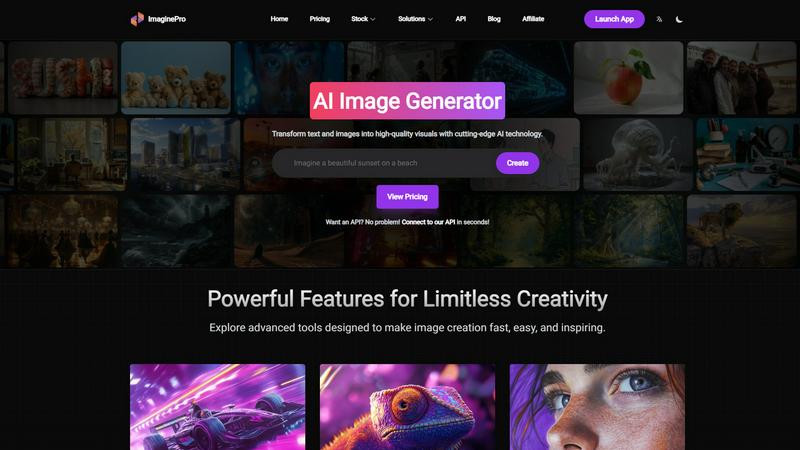
ImaginePro transforms your ideas into stunning, high-quality visuals with advanced AI technology.
Last updated: March 1, 2026

TextSharp | Text Image Enhance
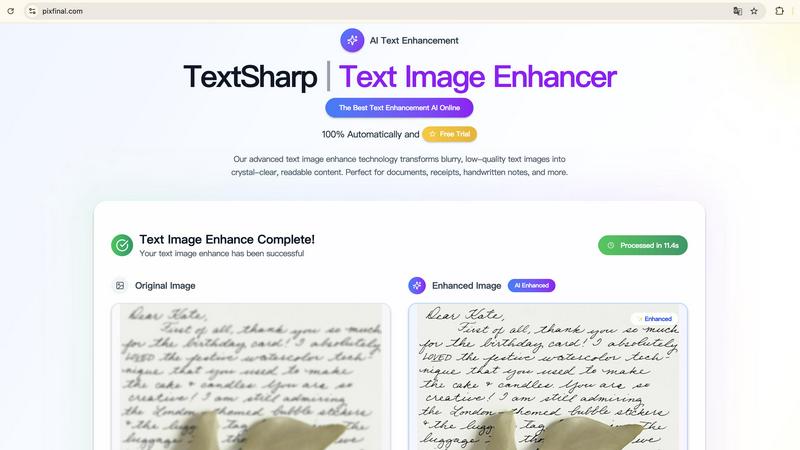
Transform blurry text images into clear, readable content with TextSharp's fast and secure AI enhancement tool.
Visual Comparison
ImaginePro
TextSharp | Text Image Enhance
Feature Comparison
ImaginePro
Advanced AI Image Generation
At the heart of ImaginePro is its state-of-the-art text-to-image engine, which utilizes top-tier AI models to interpret textual prompts and generate photorealistic or stylized images. Users can describe any concept, from a simple object to a complex scene, and receive high-quality, high-resolution visuals in seconds. The system offers fine-tuned control over styles, colors, lighting, and composition through streamlined presets, allowing for precise customization without requiring complex technical knowledge. This feature is the foundation for creating everything from social media graphics to conceptual art.
Intelligent Background Removal
ImaginePro includes an exceptionally accurate background removal tool that instantly isolates subjects from their surroundings. This one-click solution is perfect for creating clean product shots for e-commerce, preparing professional headshots, or isolating elements for graphic design projects. The AI intelligently detects edges and complex details, such as hair or translucent objects, delivering a clean cutout without the manual labor typically associated with photo editing software, thereby streamlining workflows significantly.
Text Behind Image Effect
This innovative feature allows users to create dynamic, magazine-cover-style compositions by placing text behind objects within an image. The AI automatically detects the main subjects in a photo and intelligently layers text in the background for a professional, eye-catching effect. Users have full control to customize the message with various fonts, styles, and positioning options. This tool is ideal for creating compelling promotional materials, blog headers, or any design where text and imagery need to interact seamlessly for maximum visual impact.
Developer API & AI Agent Integration
For advanced applications and automated workflows, ImaginePro provides a powerful API that can be connected in seconds. It also features a dedicated zero-dependency Python skill designed for integration with AI coding agents like Claude Code and Codex. This allows for programmatic image generation, upscaling, and editing, making it perfect for building automated content pipelines, chatbots, and custom developer tools. The API supports multiple models and returns JSON output for easy consumption within automated systems.
TextSharp | Text Image Enhance
Instant Processing
TextSharp offers instant processing for your images, allowing you to enhance text clarity in seconds. The tool is optimized with advanced AI technology, making it incredibly fast and efficient. Users can simply upload their images and receive enhanced text almost immediately, which is perfect for those on tight deadlines or needing quick results.
High-Quality Results
This text image enhancement tool guarantees professional-grade results every time. Unlike basic tools that may produce distorted or misaligned text, TextSharp's proprietary algorithm enhances clarity and readability, ensuring that the restored text is accurate and visually appealing. This feature is essential for users who require high fidelity in their text restoration.
Privacy First
TextSharp prioritizes user privacy by ensuring that all images are processed securely and are never stored. After enhancement, images are automatically deleted, giving users peace of mind regarding their sensitive data. This commitment to privacy makes TextSharp a trustworthy choice for professionals handling confidential information.
Versatile Image Format Support
TextSharp supports multiple image formats, including JPG, PNG, and WEBP, up to 50MB. This versatility allows users to upload various types of text-heavy images, ensuring that they can enhance a wide range of documents, receipts, and handwritten notes. The tool’s adaptability to different formats makes it a comprehensive solution for all text enhancement needs.
Use Cases
ImaginePro
Marketing & Advertising Content Creation
Marketing teams and agencies can leverage ImaginePro to rapidly produce a vast array of visual assets. This includes generating unique ad creatives, social media posts, blog illustrations, and email campaign graphics directly from campaign concepts and copy. The ability to quickly iterate on visuals, apply brand colors, and create polished composites with text accelerates campaign development and allows for highly targeted, visually cohesive marketing materials without relying on stock photography or lengthy design cycles.
E-commerce Product Visualization
Online retailers and sellers can use ImaginePro to create professional product imagery and lifestyle shots. The background removal feature is invaluable for creating clean, white-background product photos required by marketplaces like Amazon and Shopify. Furthermore, sellers can generate contextual "in-use" images or variations of product colors and styles that don't physically exist, enhancing listings and reducing the cost and time associated with traditional product photography.
Graphic Design & Digital Art
Graphic designers and digital artists can utilize ImaginePro as a powerful ideation and asset-creation tool. It can generate base images, textures, and conceptual artwork to jumpstart projects, overcome creative blocks, or explore different artistic styles. The fine-tuning controls and high-resolution output ensure the generated assets are of sufficient quality to be incorporated directly into larger compositions, posters, album art, or digital illustrations, expanding the artist's creative palette exponentially.
Automated Content & Developer Workflows
Developers and product teams can integrate the ImaginePro API to automate visual content generation for applications. Use cases include dynamically creating images for user-generated content platforms, generating personalized visuals for news or data summaries in apps, or powering features within chatbots that provide image-based responses. This programmatic approach enables scalable, on-demand visual content that would be impossible to produce manually.
TextSharp | Text Image Enhance
Professional Document Restoration
Professionals dealing with important documents can use TextSharp to restore scanned contracts and agreements to their original clarity. This ensures that all text is legible and accurately represented, which is crucial for legal and business communications.
Improved Receipt Clarity
Individuals and businesses can enhance faded receipts and expense proofs, making them suitable for accurate OCR export and record-keeping. This use case is especially valuable for accountants and business owners who need reliable documentation for financial purposes.
Enhanced Academic Notes
Students can benefit from TextSharp by clarifying handwritten lecture notes or scanned pages from textbooks. This allows for better readability and easier study sessions, helping students to retain information more effectively.
Clearer Visual Presentations
For creators and educators, TextSharp can enhance screenshots of chat logs, product details, or UI captures, making them suitable for presentations or tutorials. This ensures that all visual content is clear and professional, enhancing the overall quality of the material shared.
Overview
About ImaginePro
ImaginePro represents a paradigm shift in digital visual creation, serving as a comprehensive AI-powered platform that transforms abstract ideas and textual descriptions into stunning, high-resolution imagery. It is engineered for a universal audience, from professional graphic designers and marketing teams to entrepreneurs, content creators, and hobbyists, democratizing access to professional-grade visual assets. The core value proposition lies in its fusion of cutting-edge generative AI models with a suite of powerful, intuitive editing tools, all accessible through a streamlined web interface. This eliminates the traditional barriers of technical skill, expensive software, and time-consuming processes. ImaginePro empowers users to generate lifelike images from text, remove backgrounds with surgical precision, and create sophisticated composite visuals with features like text-behind-image effects. By offering both a user-friendly application and a robust API for developers, it caters to spontaneous creative exploration and scalable, automated content production pipelines. Ultimately, ImaginePro is more than a tool; it is an ecosystem for limitless creativity, enabling anyone to produce polished, commercial-ready visuals that inspire and engage, all within mere seconds.
About TextSharp | Text Image Enhance
TextSharp | Text Image Enhance is an advanced AI tool designed to transform blurry and low-quality text images into crystal-clear, readable content. Whether you are dealing with screenshots, scanned documents, receipts, or handwritten notes, this tool ensures that your text is restored to professional-quality clarity. What distinguishes TextSharp from other generic text enhancement tools is its proprietary AI algorithm, which intelligently sharpens text while preserving the original formatting and context. This makes it an ideal solution for professionals, students, and anyone needing fast and dependable text clarity. The tool is accessible online, eliminating the need for queues or unstable platforms. With TextSharp, users can rely on a durable and intelligent solution that consistently delivers high-quality results, ensuring that all textual content is both visually crisp and true to the original.
Frequently Asked Questions
ImaginePro FAQ
What kind of images can I create with ImaginePro?
You can create a virtually limitless range of images with ImaginePro. The AI is capable of generating photorealistic scenes, artistic illustrations, conceptual designs, product mockups, character portraits, and much more. The key is in the descriptive detail of your text prompt; the more specific you are about subjects, style, colors, lighting, and composition, the more accurately the AI can bring your vision to life. The platform also provides style presets to guide the output.
Is ImaginePro suitable for complete beginners with no design experience?
Absolutely. ImaginePro is built with an intuitive, user-friendly web interface specifically designed to be accessible to everyone. You do not need any prior experience in graphic design or complex software. The process is straightforward: you describe your idea in plain language, select a few simple style options if desired, and click create. Tutorials, templates, and preset controls make it easy for beginners to start producing professional-looking results immediately.
Can I use the images I generate for commercial purposes?
Yes, images generated by ImaginePro are intended for commercial use, allowing you to utilize them in marketing materials, on websites, in products, and in client projects. It is always recommended to review the specific terms of service for your subscription plan for detailed licensing information, but the platform is designed to provide users with polished, commercial-ready visual assets suitable for business and professional applications.
How does the API integration work for developers?
ImaginePro offers a robust and well-documented API that developers can connect to in seconds. It allows for programmatic access to all core features, including image generation, upscaling, and background removal. Additionally, a specialized zero-dependency Python "skill" is available, which is formatted with JSON output specifically for consumption by AI agents and automated workflows. This enables seamless integration into custom applications, scripts, and content pipelines for scalable, automated image creation.
TextSharp | Text Image Enhance FAQ
What is an image text enhancer and how does it work?
An image text enhancer is a specialized tool that transforms blurry, low-quality text images into clear, readable content. TextSharp utilizes advanced AI algorithms that enhance text clarity, reduce noise, and improve OCR accuracy. It is suitable for a variety of image types, including screenshots, scanned documents, and photos.
Which image formats work best with TextSharp?
TextSharp supports several image formats including PNG, JPG, JPEG, and WEBP, with a maximum file size of 50MB. These formats are ideal for text-heavy images, ensuring that users can enhance various types of documents, receipts, and handwritten notes effectively.
Is my image data stored or kept private with TextSharp?
TextSharp places a strong emphasis on user privacy. All images processed through the tool are temporary and are automatically deleted after enhancement. This ensures that users’ data remains confidential and secure throughout the enhancement process.
How quickly can I expect results from TextSharp?
Users can expect results in less than 5 seconds for each image processed. TextSharp's optimized AI technology allows for rapid enhancement, making it an efficient choice for users needing quick turnaround times on their text clarity improvements.