
FilexHost vs Geekflare Connect
Side-by-side comparison to help you choose the right tool.

FilexHost
FilexHost instantly creates shareable web pages from any file you upload.
Last updated: February 28, 2026

Geekflare Connect
Geekflare Connect unifies all your AI models into one collaborative platform to empower teams and cut costs.
Last updated: March 1, 2026
Visual Comparison
FilexHost

Geekflare Connect
Feature Comparison
FilexHost
Universal File Support & Smart Rendering
FilexHost accepts an extensive range of file types including PDFs, images (JPG, PNG, WEBP, HEIC, TIFF), spreadsheets (XLSX, CSV), media (MP4, MP3), code files (JSON, HTML), and archives (ZIP). Its intelligent rendering engine automatically displays each file in the optimal format. HTML files become live, interactive websites; spreadsheets transform into searchable, in-browser tables; documents appear in clean readers; and media files play with lightweight built-in players. This eliminates the need for recipients to have specific software, ensuring the content is experienced exactly as intended.
Instant, Zero-Configuration Hosting
The platform generates instant subdomains (e.g., your-file.filex.host) with absolutely no setup required from the user. There is no command line, no Git, and no DNS configuration needed. This feature is powered by a global Content Delivery Network (CDN), ensuring that every hosted file is delivered with blazing fast speed and low latency to viewers anywhere in the world. Every link is also secured with free, automatic SSL encryption by default, guaranteeing safe and private connections for all file transfers.
Advanced Sharing Controls
Beyond simple links, FilexHost provides granular control over how content is shared and accessed. Users can set passwords to protect sensitive files, configure expiry dates from 24 hours to permanent hosting, and choose between view modes—such as a direct render or a dedicated download page. For archives, the platform even allows for selective file downloads from within a ZIP. These features offer professional-grade management for sharing confidential documents, time-sensitive materials, or curated asset packages.
Simple Drag-and-Drop Interface
The entire user experience is built around unparalleled simplicity. The core workflow involves dragging a file directly into the FilexHost web interface or using the upload button. The system handles all the backend complexity, from processing and optimization to hosting and link generation. This intuitive approach makes powerful file hosting accessible to everyone, regardless of their technical expertise, turning a process that typically requires IT knowledge into a matter of seconds.
Geekflare Connect
Multi-Model Comparison
This cornerstone feature allows users to transcend guesswork by instantly generating and comparing responses from top-tier models like GPT-5.2, Claude 4.5, and Gemini 3 side-by-side within a single interface. By submitting one prompt and receiving multiple outputs simultaneously, teams can objectively evaluate tone, creativity, accuracy, and depth, ensuring they select the best possible result for every specific task, from creative writing to technical analysis, thereby maximizing quality and efficiency.
Live Web Access
Geekflare Connect supercharges static AI models with dynamic, real-time intelligence. Integrated with powerful web search tools like Parallel, Exa, and Firecrawl, this feature allows any connected AI model to pull in current information from the internet directly into the conversation. This is invaluable for tasks requiring the latest news, market data, research findings, or live event details, ensuring that AI-generated content and decisions are grounded in the most up-to-date information available.
Collaborative Workspaces
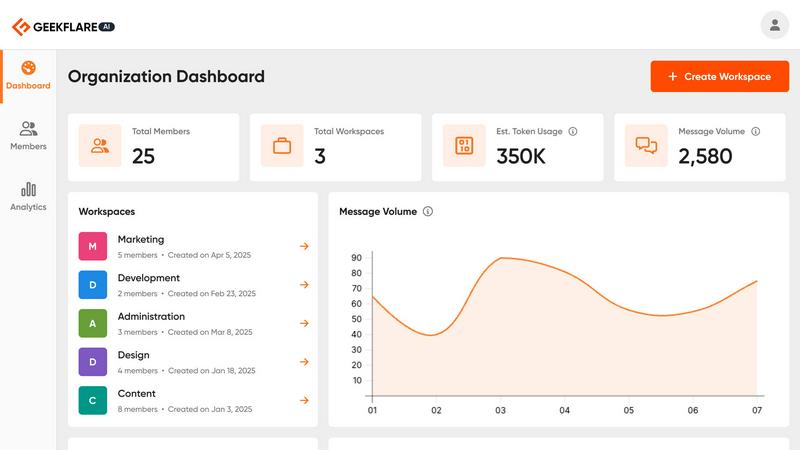
Moving beyond individual usage, the platform is built for team-wide productivity. Users can organize chats into dedicated projects, invite and manage team members with appropriate permissions, and securely share entire conversations or specific outputs. This fosters alignment across departments like marketing, development, and sales, ensuring knowledge is centralized, workflows are streamlined, and everyone operates from a single source of AI truth, eliminating siloed efforts.
Your Private AI Brain
This feature transforms the platform into a secure, contextual knowledge base. Users can securely upload private documents—such as PDFs, spreadsheets, and internal wikis—creating a personalized data repository. The AI models can then query this information to provide answers, summaries, and insights that are deeply contextualized to the organization's own data, enabling highly relevant and confidential analysis without the risk of exposing sensitive information to public models.
Use Cases
FilexHost
Professional Client Reporting & Deliverables
Professionals such as consultants, designers, and marketers can use FilexHost to deliver polished reports, presentations, and project deliverables. Instead of relying on bulky email attachments or confusing cloud storage links that require permissions, they can upload a PDF or PowerPoint file, get a clean link, and send it directly. The client sees a beautifully rendered document in their browser immediately, without any login hurdles, creating a seamless and professional impression.
Developer Prototyping & Demo Hosting
Developers and engineers can instantly host static websites, landing page prototypes, JSON mock APIs, or documentation for testing and client review. By simply uploading an HTML file or a ZIP archive of their project, they receive a live, public URL in seconds. This is ideal for rapid prototyping, sharing progress with stakeholders, or creating demo versions without the overhead of configuring a full web server or domain.
Digital Product Distribution
Creators, educators, and small businesses can distribute digital products like e-books, software, audio files, video courses, or asset packs. FilexHost allows them to set passwords for customer-only access, use expiry links for limited-time offers, or provide permanent download pages. The built-in viewers also let customers preview certain content (like image galleries or document samples) directly before downloading, enhancing the user experience.
Team Collaboration & Asset Sharing
Teams working on projects can use FilexHost as a quick and efficient hub for sharing large media files, design assets, data exports, or presentation decks. The ability to preview images, videos, and spreadsheets directly in the browser streamlines review processes. With features like ZIP preview and selective download, team members can quickly access the specific files they need from a large archive without having to download everything.
Geekflare Connect
Content Creation and Strategy
Marketing teams, writers, and strategists can leverage multi-model comparison to generate and refine content drafts, social media posts, and campaign ideas. By instantly seeing how GPT, Claude, and Gemini approach the same brief, creators can blend the best elements from each output or choose the most suitable style. Live web access further ensures content is timely and factually accurate, while shared workspaces allow for seamless review and collaboration on content calendars and assets.
Technical Development and Support
Developers and site reliability engineers (SREs) use the platform to debug code, generate scripts, and troubleshoot system issues. Comparing explanations and code suggestions from different models leads to more robust solutions. The private AI brain feature is particularly powerful for uploading internal documentation or codebases, allowing developers to ask specific, contextual questions about proprietary systems, thereby accelerating problem-solving and onboarding for new team members.
Business Intelligence and Research
Analysts, product managers, and consultants utilize Geekflare Connect for competitive analysis, market research, and synthesizing complex reports. Live web access pulls in the latest industry news and data, while multi-model comparison helps cross-verify facts and generate comprehensive insights from different analytical perspectives. Consolidated usage analytics also allow managers to track research costs and ROI across the entire team, ensuring budget is allocated effectively.
Cross-Functional Team Collaboration
Organizations aiming for a unified AI strategy deploy Geekflare Connect as a shared platform for departments like sales, support, and HR. Sales teams can use it to craft personalized pitches, support can generate troubleshooting guides, and HR can create policy documents—all within the same secure workspace. This eliminates subscription sprawl, provides leadership with a consolidated view of all AI activity and spending, and builds a common, efficient workflow across the company.
Pricing Comparison
FilexHost
FilexHost operates on a clear freemium model with two main plans. The Free plan is perfect for quick sharing and testing, offering 1,000 hosted files, a 25MB maximum file size, 1GB total storage, 10GB monthly bandwidth, and file expiry up to 7 days. This plan includes ads and a watermark. The Pro plan, priced at $10 per month, is built for business, SEO, and high-traffic usage. It provides 10,000 hosted files, a 1GB maximum file size, 100GB total storage, 100GB monthly bandwidth, and permanent file expiry. The Pro experience is ad-free and includes valuable views and downloads analytics, along with access to advanced features like password protection.
Geekflare Connect
Geekflare Connect operates on a freemium model to accommodate users of all scales. You can Get Started Free with a robust plan that includes access to core features, allowing individuals and small teams to experience the platform's benefits. For advanced capabilities, higher usage limits, and enhanced team management features, paid subscription tiers are available. Detailed pricing for these premium plans, including specific features and seat-based costs, can be found on the official Geekflare Connect website, enabling businesses to select a plan that aligns precisely with their collaborative needs and usage volume.
Overview
About FilexHost
FilexHost is a revolutionary, universal file hosting and sharing platform designed to eliminate the traditional complexities of digital file distribution. It provides a seamless "Drop & Share" workflow that empowers individuals and professionals to instantly publish and share any file type with a global audience. The core value proposition lies in its remarkable simplicity and powerful, built-in rendering capabilities. Users can drag and drop a file—be it a document, spreadsheet, image, video, or even an entire static website—and within seconds receive a secure, shareable URL. Recipients require no logins, no special software, and no technical knowledge; they experience the content beautifully rendered directly in their web browser. FilexHost serves a broad spectrum of users, from professionals sharing client reports and developers hosting project demos to creators distributing digital products and teams collaborating on assets. By removing barriers like attachment limits, "request access" emails, and complex server configurations, FilexHost redefines friction-free file delivery, prioritizing an elegant and immediate viewer experience above all else.
About Geekflare Connect
In the contemporary business environment, the proliferation of artificial intelligence models has created a paradoxical challenge: an abundance of powerful tools leading to operational fragmentation. Teams are often burdened with managing multiple subscriptions, disparate API keys, and isolated interfaces for leading models like GPT, Claude, and Gemini. This scattered approach results in spiraling, opaque costs, significant workflow inefficiencies, and the inability to strategically select the optimal model for each specific task. Geekflare Connect emerges as the definitive solution to this modern dilemma, serving as an intelligent command center for generative AI. It is a sophisticated BYOK (Bring Your Own Key) platform designed for modern organizations—from agile startups to established enterprises—that seek agility, financial control, and enhanced collaborative potential. By centralizing access to the world's premier AI providers, including OpenAI, Anthropic, Google, and Perplexity, into a single, professional interface, it completely eliminates vendor lock-in. The platform empowers entire cross-functional teams to collaborate within shared workspaces, fostering a unified, data-driven approach to AI adoption. With its powerful suite of features for comparison, real-time data access, and deep analytics, Geekflare Connect enables businesses to consolidate spending, optimize performance for every use case, and harness the collective power of generative AI without the associated complexity and waste, ultimately cutting AI expenditures by up to 65%.
Frequently Asked Questions
FilexHost FAQ
What is FilexHost?
FilexHost is a universal file hosting and sharing service that allows you to instantly upload any file type and generate a secure, shareable web link. It stands out by automatically rendering files in an optimal, interactive format within the browser—such as turning HTML into a live website or a spreadsheet into a viewable table—so recipients can view content without needing specific software or logins.
Is it really free?
Yes, FilexHost offers a fully functional free plan designed for quick sharing and testing. This plan includes hosting for up to 1,000 files, with a maximum file size of 25MB and total storage of 1GB. Files expire after 7 days, and the experience includes ads and a watermark. For permanent, high-traffic, and professional use, a Pro plan with enhanced limits and features is available.
What file types are supported?
FilexHost supports a vast array of file types, organized for optimal viewing. This includes documents (PDF, TXT), data files (XLSX, CSV, JSON), images (JPG, PNG, WEBP, HEIC, TIFF), media (MP4, MP3), archives (ZIP), and code/text files (HTML, JSON). The platform's smart rendering engine detects the file type and presents it with an appropriate, built-in viewer for the best possible experience.
How do I update my hosted file or site?
To update a file or static website hosted on FilexHost, you simply need to upload the new version of the file. The platform will generate a new, unique URL for the updated upload. For managing and overwriting existing content seamlessly, especially for projects where the link must remain constant, users typically utilize the Pro plan features or would look forward to future updates like custom domain integration for more direct control.
Geekflare Connect FAQ
What is a BYOK (Bring Your Own Key) AI platform?
A BYOK platform like Geekflare Connect does not sell you access to AI models directly. Instead, you provide your own API keys from providers like OpenAI, Anthropic, or Google. The platform then acts as a unified, intelligent interface to manage and utilize all these models through one dashboard. This gives you complete control over your existing subscriptions, avoids vendor lock-in, and allows you to leverage Geekflare's advanced collaboration and comparison features without switching your underlying model accounts.
How does Geekflare Connect help reduce AI costs by up to 65%?
Cost reduction is achieved through several mechanisms. First, consolidation eliminates redundant subscriptions. Second, the multi-model comparison feature allows you to identify which, often less expensive, model performs best for routine tasks, reserving premium models only for complex jobs. Third, comprehensive usage and cost analytics provide full visibility into spending patterns across all models and team members, enabling data-driven decisions to optimize token usage and eliminate waste, leading to significant overall savings.
Is my data and conversation history private and secure?
Yes, Geekflare Connect is designed with security and privacy as a priority. When you use your own API keys, your conversations with the AI models are typically governed by the privacy policies of the respective providers (OpenAI, Anthropic, etc.). Your uploaded documents for the "Private AI Brain" are stored securely. The platform itself facilitates collaboration within your trusted team in private workspaces, ensuring that sensitive business information and chat histories are not exposed publicly.
Can I use Geekflare Connect with my entire team?
Absolutely. Geekflare Connect is built specifically for team collaboration. You can create multiple workspaces for different projects or departments, invite team members via email, and manage their access roles. Features like shared chat histories, prompt libraries, and centralized usage analytics are designed to enhance team productivity, maintain consistency in AI usage, and provide managers with oversight into how the organization is leveraging AI tools collectively.
Alternatives
FilexHost Alternatives
FilexHost is a streamlined file hosting and sharing service that falls into the productivity and digital management category. It simplifies the process of making files publicly accessible online by allowing users to instantly generate a shareable link through a simple drag-and-drop interface, bypassing the need for complex server setups or recipient logins. Users often explore alternatives to services like FilexHost for a variety of reasons. Common motivations include seeking different pricing structures or free tiers with higher limits, requiring specific advanced features like custom branding or API access, or needing compatibility with particular platforms or existing workflows. The search for a tool that better aligns with individual or business requirements is a natural part of the software selection process. When evaluating an alternative file hosting solution, key considerations should include the supported file types and size limits, the security and privacy controls offered (such as password protection and link expiration), the overall user experience for both the sender and the recipient, and the long-term reliability and cost of the service. The ideal platform balances simplicity with the necessary power for your specific use case.
Geekflare Connect Alternatives
Geekflare Connect is a unified AI collaboration platform in the productivity and management category. It centralizes access to leading large language models like GPT, Claude, and Gemini into a single interface, enabling teams to work together, compare outputs, and optimize their AI spending through a BYOK (Bring Your Own Key) model. Users explore alternatives for various reasons, including specific budget constraints, the need for different feature sets like advanced automation or custom integrations, or a preference for a different platform structure. Some may seek all-in-one solutions that bundle API credits, while others require tools tailored for individual use versus large-scale enterprise collaboration. When evaluating other platforms, key considerations include the range of supported AI models, collaboration tools for teams, cost structure and transparency, and the depth of analytics for usage and performance. The ideal alternative should align with your organization's primary goal, whether that's maximizing cost efficiency, simplifying team workflows, or gaining granular control over AI model selection for different tasks.