
Coursebricks vs FilexHost
Side-by-side comparison to help you choose the right tool.

Coursebricks
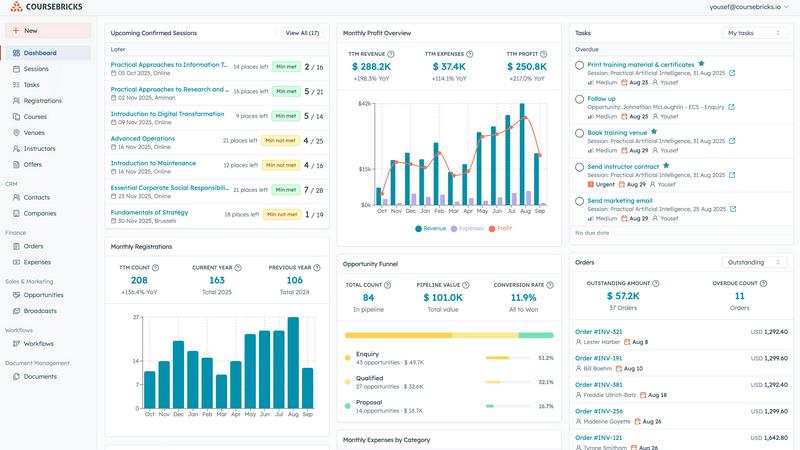
Coursebricks simplifies training management with a unified platform for courses, registrations, payments, and.
Last updated: March 1, 2026

FilexHost
FilexHost instantly creates shareable web pages from any file you upload.
Last updated: February 28, 2026
Visual Comparison
Coursebricks
FilexHost

Feature Comparison
Coursebricks
Course Scheduling
Manage your entire course schedule from a single, unified view. Assign instructors, venues, and necessary training materials to each course effortlessly, while tracking availability and managing conflicts to keep your training team aligned.
Website & Checkout
Display and sell your courses through an integrated professional storefront on your own website. Accept registrations directly and offer multiple payment options, capturing customer information seamlessly into your CRM.
Automations & Workflows
Automate key communications such as confirmation emails, training material distribution, payment reminders, and surveys. With full tracking visibility, you can streamline administrative tasks and enhance engagement with your course participants.
Email Marketing & Broadcasts
Leverage advanced filtering to create targeted email campaigns that boost course enrollment. With automated, segmented broadcasts, you can effectively reach the right audience and generate more leads with minimal effort.
FilexHost
Universal File Support & Smart Rendering
FilexHost accepts an extensive range of file types including PDFs, images (JPG, PNG, WEBP, HEIC, TIFF), spreadsheets (XLSX, CSV), media (MP4, MP3), code files (JSON, HTML), and archives (ZIP). Its intelligent rendering engine automatically displays each file in the optimal format. HTML files become live, interactive websites; spreadsheets transform into searchable, in-browser tables; documents appear in clean readers; and media files play with lightweight built-in players. This eliminates the need for recipients to have specific software, ensuring the content is experienced exactly as intended.
Instant, Zero-Configuration Hosting
The platform generates instant subdomains (e.g., your-file.filex.host) with absolutely no setup required from the user. There is no command line, no Git, and no DNS configuration needed. This feature is powered by a global Content Delivery Network (CDN), ensuring that every hosted file is delivered with blazing fast speed and low latency to viewers anywhere in the world. Every link is also secured with free, automatic SSL encryption by default, guaranteeing safe and private connections for all file transfers.
Advanced Sharing Controls
Beyond simple links, FilexHost provides granular control over how content is shared and accessed. Users can set passwords to protect sensitive files, configure expiry dates from 24 hours to permanent hosting, and choose between view modes—such as a direct render or a dedicated download page. For archives, the platform even allows for selective file downloads from within a ZIP. These features offer professional-grade management for sharing confidential documents, time-sensitive materials, or curated asset packages.
Simple Drag-and-Drop Interface
The entire user experience is built around unparalleled simplicity. The core workflow involves dragging a file directly into the FilexHost web interface or using the upload button. The system handles all the backend complexity, from processing and optimization to hosting and link generation. This intuitive approach makes powerful file hosting accessible to everyone, regardless of their technical expertise, turning a process that typically requires IT knowledge into a matter of seconds.
Use Cases
Coursebricks
Training Providers
Small to large training providers can use Coursebricks to simplify their course management processes. The platform enables them to efficiently schedule classes, manage registrants, and automate communication workflows.
Educational Institutions
Universities and colleges can utilize Coursebricks to manage various training programs, allowing them to coordinate multiple instructors, venues, and course materials while ensuring streamlined student registration.
Corporate Training Departments
Organizations focused on employee development can employ Coursebricks to manage internal training sessions. The software helps track employee progress, manage enrollments, and automate reminders for upcoming training.
Freelance Trainers
Independent trainers can take advantage of Coursebricks to create a professional online presence, manage their courses, and accept payments directly, allowing them to focus on delivering exceptional training experiences.
FilexHost
Professional Client Reporting & Deliverables
Professionals such as consultants, designers, and marketers can use FilexHost to deliver polished reports, presentations, and project deliverables. Instead of relying on bulky email attachments or confusing cloud storage links that require permissions, they can upload a PDF or PowerPoint file, get a clean link, and send it directly. The client sees a beautifully rendered document in their browser immediately, without any login hurdles, creating a seamless and professional impression.
Developer Prototyping & Demo Hosting
Developers and engineers can instantly host static websites, landing page prototypes, JSON mock APIs, or documentation for testing and client review. By simply uploading an HTML file or a ZIP archive of their project, they receive a live, public URL in seconds. This is ideal for rapid prototyping, sharing progress with stakeholders, or creating demo versions without the overhead of configuring a full web server or domain.
Digital Product Distribution
Creators, educators, and small businesses can distribute digital products like e-books, software, audio files, video courses, or asset packs. FilexHost allows them to set passwords for customer-only access, use expiry links for limited-time offers, or provide permanent download pages. The built-in viewers also let customers preview certain content (like image galleries or document samples) directly before downloading, enhancing the user experience.
Team Collaboration & Asset Sharing
Teams working on projects can use FilexHost as a quick and efficient hub for sharing large media files, design assets, data exports, or presentation decks. The ability to preview images, videos, and spreadsheets directly in the browser streamlines review processes. With features like ZIP preview and selective download, team members can quickly access the specific files they need from a large archive without having to download everything.
Overview
About Coursebricks
Coursebricks is a powerful training management software designed to revolutionize how organizations manage their training programs. It serves as an all-in-one platform that simplifies the complexities of scheduling, registering, and overseeing training courses for businesses of all sizes. By integrating critical functionalities such as payment processing, customer relationship management (CRM), reporting, and website management, Coursebricks becomes an indispensable tool for training providers. Whether you are facilitating in-person classroom sessions or live webinars, Coursebricks allows seamless course publication directly on your website, enabling you to accept payments without incurring additional platform fees. The platform automates essential administrative tasks such as confirmations, reminders, and follow-ups, freeing organizations to focus on delivering high-quality training. With comprehensive capabilities to manage instructors, venues, registrants, and training materials in one centralized location, Coursebricks empowers users to enhance operational efficiency, improve course management, and foster organizational growth.
About FilexHost
FilexHost is a revolutionary, universal file hosting and sharing platform designed to eliminate the traditional complexities of digital file distribution. It provides a seamless "Drop & Share" workflow that empowers individuals and professionals to instantly publish and share any file type with a global audience. The core value proposition lies in its remarkable simplicity and powerful, built-in rendering capabilities. Users can drag and drop a file—be it a document, spreadsheet, image, video, or even an entire static website—and within seconds receive a secure, shareable URL. Recipients require no logins, no special software, and no technical knowledge; they experience the content beautifully rendered directly in their web browser. FilexHost serves a broad spectrum of users, from professionals sharing client reports and developers hosting project demos to creators distributing digital products and teams collaborating on assets. By removing barriers like attachment limits, "request access" emails, and complex server configurations, FilexHost redefines friction-free file delivery, prioritizing an elegant and immediate viewer experience above all else.
Frequently Asked Questions
Coursebricks FAQ
What is a training management system?
A training management system is a software solution designed to streamline the administration, tracking, and reporting of training programs. It helps organizations manage course scheduling, registrations, payments, and communication effectively.
Do I need technical knowledge to use Coursebricks?
No, Coursebricks is designed with user-friendliness in mind. It offers an intuitive interface that allows users with minimal technical knowledge to navigate and utilize its features effectively.
Can Coursebricks be customized to fit our processes?
Yes, Coursebricks offers customization options to help organizations tailor the platform to their specific training management needs, including custom fields, forms, and templates.
Can I showcase my courses directly on my own website?
Absolutely! Coursebricks allows you to display and sell your courses through your own website, providing a seamless experience for your customers while automatically syncing data to your CRM.
FilexHost FAQ
What is FilexHost?
FilexHost is a universal file hosting and sharing service that allows you to instantly upload any file type and generate a secure, shareable web link. It stands out by automatically rendering files in an optimal, interactive format within the browser—such as turning HTML into a live website or a spreadsheet into a viewable table—so recipients can view content without needing specific software or logins.
Is it really free?
Yes, FilexHost offers a fully functional free plan designed for quick sharing and testing. This plan includes hosting for up to 1,000 files, with a maximum file size of 25MB and total storage of 1GB. Files expire after 7 days, and the experience includes ads and a watermark. For permanent, high-traffic, and professional use, a Pro plan with enhanced limits and features is available.
What file types are supported?
FilexHost supports a vast array of file types, organized for optimal viewing. This includes documents (PDF, TXT), data files (XLSX, CSV, JSON), images (JPG, PNG, WEBP, HEIC, TIFF), media (MP4, MP3), archives (ZIP), and code/text files (HTML, JSON). The platform's smart rendering engine detects the file type and presents it with an appropriate, built-in viewer for the best possible experience.
How do I update my hosted file or site?
To update a file or static website hosted on FilexHost, you simply need to upload the new version of the file. The platform will generate a new, unique URL for the updated upload. For managing and overwriting existing content seamlessly, especially for projects where the link must remain constant, users typically utilize the Pro plan features or would look forward to future updates like custom domain integration for more direct control.
Alternatives
Coursebricks Alternatives
Coursebricks is a comprehensive training management software that falls within the productivity and management category. It serves organizations by simplifying the scheduling, registration, and management of training courses, all while integrating essential features like payment processing and CRM. As users navigate their training management needs, they often seek alternatives due to various factors such as pricing, desired features, and specific platform requirements that may not be fully met by Coursebricks. When choosing an alternative, it is important to assess functionality, ease of use, scalability, and the level of customer support offered. Additionally, consider the specific needs of your organization, whether that involves managing a large number of courses, accommodating diverse payment options, or integrating with existing systems to enhance overall operational efficiency.
FilexHost Alternatives
FilexHost is a streamlined file hosting and sharing service that falls into the productivity and digital management category. It simplifies the process of making files publicly accessible online by allowing users to instantly generate a shareable link through a simple drag-and-drop interface, bypassing the need for complex server setups or recipient logins. Users often explore alternatives to services like FilexHost for a variety of reasons. Common motivations include seeking different pricing structures or free tiers with higher limits, requiring specific advanced features like custom branding or API access, or needing compatibility with particular platforms or existing workflows. The search for a tool that better aligns with individual or business requirements is a natural part of the software selection process. When evaluating an alternative file hosting solution, key considerations should include the supported file types and size limits, the security and privacy controls offered (such as password protection and link expiration), the overall user experience for both the sender and the recipient, and the long-term reliability and cost of the service. The ideal platform balances simplicity with the necessary power for your specific use case.