
Image3D AI vs vaethat
Side-by-side comparison to help you choose the right tool.

Image3D AI
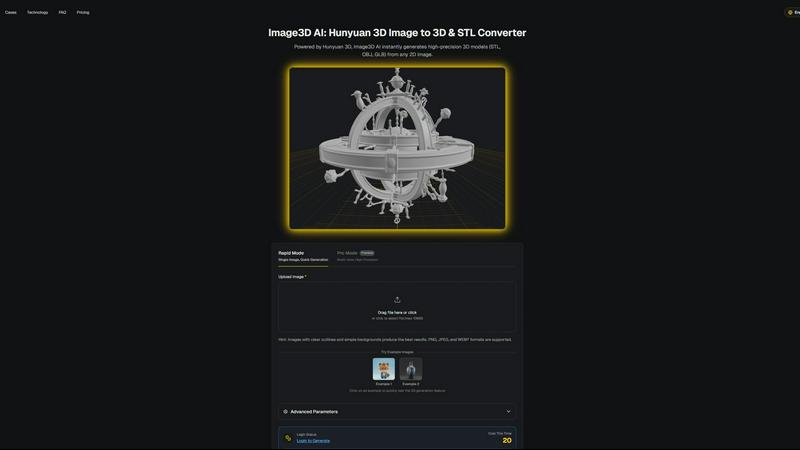
Image3D AI instantly transforms any 2D image into a high-quality 3D model for printing and game development.
Last updated: March 1, 2026

vaethat
Vaethat is the specialized AI that upscales and enhances architectural renders with precision and ease.
Last updated: February 28, 2026
Visual Comparison
Image3D AI
vaethat

Feature Comparison
Image3D AI
Powered by Hunyuan 3D Engine
Image3D AI is built upon the robust foundation of Tencent's Hunyuan 3D engine, a state-of-the-art AI technology specifically designed for 3D reconstruction. This engine enables the platform to perform advanced inference from a single 2D image, generating high-precision geometry and textures that rival manually crafted models. The integration of this professional technology into an accessible web interface is what sets the tool apart, delivering studio-quality results without requiring studio-level expertise or computational resources from the end-user.
Dual Generation Modes for Flexibility
The platform offers two distinct operational modes to cater to different project needs and quality requirements. Rapid Mode is optimized for speed and simplicity, generating a 3D model from a single uploaded image in approximately 60 seconds. For scenarios demanding the highest accuracy, such as product replication or detailed asset creation, Pro Mode utilizes multi-view images to perform a physically accurate 3D reconstruction, ensuring dimensional precision and superior detail from every angle.
Multi-Format Export for Any Workflow
Understanding that creators work across diverse software ecosystems, Image3D AI provides exports in all major industry-standard 3D file formats. Users can download their generated models as STL files for immediate 3D printing, OBJ files for editing in traditional 3D software like Blender or Maya, or GLB files for direct use in web applications, AR experiences, and modern game engines like Unity and Unreal Engine, complete with PBR material support.
Intuitive Interface with Guided Best Practices
The tool is designed for immediate usability, featuring a clean, drag-and-drop interface and offering free example images for instant testing without login. Beyond simplicity, it educates users through a comprehensive Best Practices Guide. This resource provides actionable tips on selecting optimal source images, understanding the strengths of each generation mode, and choosing the correct export format, significantly boosting the success rate and quality of conversions for both novices and professionals.
vaethat
Specialized Archviz AI Engine
Unlike generic AI enhancers, vaethat's core technology is trained exclusively on a vast dataset of architectural visualization imagery. This allows it to recognize and optimally enhance architectural elements—from brickwork and glass to foliage and furniture—with an innate understanding of design intent. It preserves structural lines, avoids distorting geometric forms, and applies enhancements that are contextually appropriate for built environments, resulting in superior, more believable outcomes compared to standard models.
Multi-Image Project Workspace
Vaethat streamlines workflow for entire projects through its Multi-Image Workspace. Professionals can upload entire folders of renders from a single architectural visualization project simultaneously. This feature allows for batch processing, consistent application of enhancement presets across multiple views, and the ability to save sessions. It ensures a cohesive look and feel across all project imagery, dramatically saving time compared to enhancing each image individually.
One-Click Enhancement Presets
Eliminating complexity, vaethat operates on a simple upload-and-export principle without the need for textual prompts or intricate slider adjustments. Users select from predefined enhancement presets tailored for archviz, and the AI automatically applies a sophisticated suite of improvements. This includes intelligent upscaling for sharpness, detail refinement for textures and edges, and balanced lighting enhancement, making professional-grade post-production accessible in seconds.
Intelligent Artifact & Noise Cleanup
A critical feature for high-quality output, vaethat's AI is adept at identifying and removing common rendering artifacts such as noise, grain, fireflies, and banding. It cleans up these imperfections while meticulously preserving and even enhancing the intended detail of the scene. This results in impeccably clean, presentation-ready images that meet the highest industry standards without requiring manual cleanup in other software.
Use Cases
Image3D AI
Game Development and Digital Content Creation
Game developers, animators, and VR/AR creators can rapidly prototype and produce game-ready 3D assets directly from concept art, sketches, or reference images. This accelerates the pre-production and asset creation pipeline, allowing small teams or indie developers to generate a wide variety of characters, props, and environmental assets with consistent quality, ready for texturing and import into engines like Unity or Unreal.
3D Printing and Prototyping
Hobbyists, engineers, and product designers can instantly convert sketches, diagrams, or photos of objects into printable STL files. This use case is invaluable for rapid prototyping, creating custom figurines, producing spare parts, or visualizing inventions in tangible form. The Geometry-focused generation mode ensures clean, manifold meshes that are optimized for reliable 3D printing without complex manual cleanup.
E-commerce and Product Visualization
Online retailers and marketers can transform flat product photographs into interactive 3D models and AR-ready assets. This enhances online shopping experiences by allowing customers to view products from every angle, inspect details, and even visualize items in their own space through augmented reality, leading to increased engagement, reduced return rates, and higher conversion rates.
Architecture, Design, and Education
Architects and interior designers can quickly generate basic 3D massing models from sketches or site photos for client presentations and early-stage design studies. Educators and students can also use the tool to create visual aids and models for STEM education, making abstract concepts tangible and fostering a hands-on understanding of spatial design and geometry without needing specialized 3D modeling skills.
vaethat
Final Presentation Polish for Client Deliverables
Architectural firms and visualization studios use vaethat to apply the final layer of polish to renders before delivering to clients or stakeholders. The tool's ability to enhance sharpness, material definition, and overall realism ensures that every presentation image communicates the design with maximum impact and professionalism, helping to secure approvals and impress during critical reviews.
Portfolio Enhancement for Artists and Studios
3D artists and archviz specialists utilize vaethat to elevate the quality of work in their professional portfolios. By upscaling resolution and refining details, older renders can be revitalized, and current projects can be showcased at their absolute best. The consistent, high-quality output helps artists stand out in a competitive market, attracting potential clients and employers.
Batch Processing for Real Estate and Development Marketing
For large-scale real estate developments or marketing campaigns requiring dozens of render views, vaethat's Multi-Image Workspace is invaluable. Marketing teams can process entire sets of interior and exterior visuals efficiently, ensuring uniform enhancement quality across all assets used in brochures, websites, and advertisements, thereby maintaining a cohesive and premium brand image.
Pre-Print Enhancement for Large-Format Outputs
When architectural renders are destined for large-format printing, such as exhibition boards, banners, or billboards, resolution and detail are critical. Vaethat's AI upscaling and detail refinement capabilities prepare images for print at any scale, intelligently adding perceptible detail and clarity to ensure the final physical output is sharp, detailed, and free of pixelation or artifacts.
Overview
About Image3D AI
Image3D AI represents a paradigm shift in the field of digital creation, democratizing the complex process of 3D modeling through the power of artificial intelligence. At its core, it is a sophisticated online platform that transforms ordinary 2D images into fully-realized, high-fidelity 3D models in a matter of seconds. This is made possible by leveraging Tencent's cutting-edge Hunyuan 3D engine, a professional-grade technology that interprets visual data to construct accurate volumetric representations. The tool is designed for a universal audience, eliminating the steep learning curve and significant time investment traditionally associated with 3D software. Whether you are a game developer needing rapid asset creation, a 3D printing enthusiast turning sketches into tangible objects, an e-commerce professional seeking interactive product displays, or an architect visualizing concepts, Image3D AI serves as your instant conduit from imagination to three-dimensional reality. Its primary value proposition is profound workflow acceleration and creative empowerment, allowing users to bypass technical barriers and focus purely on bringing their innovative ideas to life across various industries and applications.
About vaethat
Vaethat represents a paradigm shift in the post-production workflow for architectural visualization, standing as a specialized AI-powered render enhancer meticulously crafted for the unique demands of archviz professionals. In an industry where visual fidelity, realism, and presentation quality are paramount, vaethat addresses the critical gap between raw 3D render output and client-ready imagery. It transcends the limitations of general-purpose AI image tools by leveraging a model trained exclusively on architectural visualization data. This deep specialization ensures it understands the intricacies of architectural geometry, material properties, lighting scenarios, and compositional intent. The core value proposition of vaethat lies in its ability to intelligently upscale resolution, refine minute details, enhance material realism, and eliminate rendering artifacts—all through an exceptionally streamlined, no-prompt-required interface. It empowers architects, 3D artists, and visualization studios to elevate their work efficiently, transforming good renders into exceptional, hyper-realistic presentations for portfolios, client approvals, and marketing materials without the time-intensive burden of manual digital painting or software hopping.
Frequently Asked Questions
Image3D AI FAQ
What types of images work best with Image3D AI?
For optimal results, use high-contrast images with clear, well-defined outlines and a simple, uncluttered background. The subject should be in focus with good lighting. Images with blur, complex backgrounds, or objects that are partially obscured will yield less accurate 3D reconstructions. For converting real-world objects, providing multiple views (front, side, top) in Pro Mode is highly recommended for the most physically accurate model.
What is the difference between Rapid Mode and Pro Mode?
Rapid Mode uses AI inference to generate a 3D model from a single image quickly, typically within about 60 seconds. It's ideal for logos, sketches, and concepts where speed is prioritized. Pro Mode is designed for high-precision outcomes; it requires uploading multiple images of an object from different angles (multi-view). This allows the AI to perform a more accurate, dimensionally faithful reconstruction, making it the preferred choice for product photography, engineering parts, or any application where geometric accuracy is critical.
Which file format should I download for my project?
The choice depends on your intended use. Download the .STL format if your goal is 3D printing, as it is the universal standard for slicer software. Choose the .OBJ format if you plan to further edit the model in 3D modeling software like Blender, 3ds Max, or ZBrush. Select the .GLB format for web applications, augmented reality (AR), or modern game engines, as it is a compact, single-file format that contains the model, textures, and materials.
Is there a free trial or any way to test the tool?
Yes, Image3D AI offers a completely free way to test its core functionality. The website provides several "Example Images" that users can click on to instantly trigger the 3D generation process without any login, account creation, or credit cost. This allows anyone to experience the conversion speed and quality firsthand before committing to uploading their own images or purchasing credits.
vaethat FAQ
How does the AI render enhancer calculate credits?
Vaethat operates on a credit-based system where one credit is typically consumed per image enhancement process. The exact number of credits required may depend on the image's resolution or the specific enhancement preset applied. Uploading an image and applying the AI enhancement counts as a single credit use, allowing you to download the final result.
Can I use the archviz AI upscaler with V-Ray, Lumion, Enscape, 3ds Max, and SketchUp?
Absolutely. Vaethat is a post-production tool that works independently of your 3D modeling or rendering software. You simply export your final renders from any application—including V-Ray, Lumion, Enscape, 3ds Max, SketchUp, Twinmotion, and others—in a standard image format (like JPG or PNG) and upload it to vaethat for enhancement.
What makes this AI post-production tool different from manual editing?
Vaethat automates and standardizes complex post-production tasks that would otherwise require significant manual skill and time in software like Photoshop. It applies a sophisticated, consistent set of enhancements—upscaling, denoising, detail recovery, lighting balance—in seconds based on archviz-specific intelligence, achieving results that are often more uniform and faster than manual methods.
Does Vaethat use my architectural renders to train AI models?
No. According to the provided information, user privacy and data security are priorities. Your uploaded architectural renders are processed solely for the purpose of providing the enhancement service and are not used to train or improve vaethat's AI models. You retain full ownership of your original and enhanced images.
Alternatives
Image3D AI Alternatives
Image3D AI is a specialized design tool that transforms 2D images into detailed 3D models, leveraging advanced AI to simplify a traditionally complex process. It caters to creators who need rapid asset generation for 3D printing, game development, and other digital projects, making professional-grade 3D modeling accessible to a wider audience. Users often explore alternatives for various practical reasons. These can include budget constraints, as pricing models differ significantly across the market. Others may seek specific technical features not offered, require integration with a particular software ecosystem, or need a solution that runs on a different platform or operating system. The search for the right tool is a natural part of finding the perfect fit for one's unique workflow and project demands. When evaluating alternatives, it's crucial to consider several key factors. Assess the core technology and the quality of the 3D output it produces. Examine the supported file formats for export to ensure compatibility with your intended use, whether for printing or digital rendering. Also, consider the user experience, the availability of different processing modes for speed versus detail, and the overall value proposition relative to the cost. The goal is to find a tool that aligns with your skill level, project requirements, and creative vision.
vaethat Alternatives
Vaethat is an AI-powered tool in the design software category, specifically built for architectural visualization professionals. Its core function is to intelligently upscale and enhance 3D renders, refining details and improving overall image clarity to produce presentation-ready results. Users often explore alternatives for various practical reasons. These can include budget considerations, the need for different or more extensive feature sets, compatibility with specific operating systems or workflows, and preferences for different user interfaces or subscription models. The search for the right tool is a common step in optimizing a professional's toolkit. When evaluating an alternative, key factors to consider are the quality of AI upscaling and detail enhancement, the tool's ability to preserve the original design intent, the efficiency of the workflow, and the output's suitability for professional portfolios and client presentations. The ideal solution should seamlessly integrate into an existing archviz pipeline.