
Hush Touch | Voice-to-Text for MacOS vs URL to Any
Side-by-side comparison to help you choose the right tool.

Hush Touch | Voice-to-Text for MacOS
Hush Touch is an offline voice-to-text app for macOS that learns your vocabulary and improves accuracy with every use.
Last updated: February 28, 2026

URL to Any
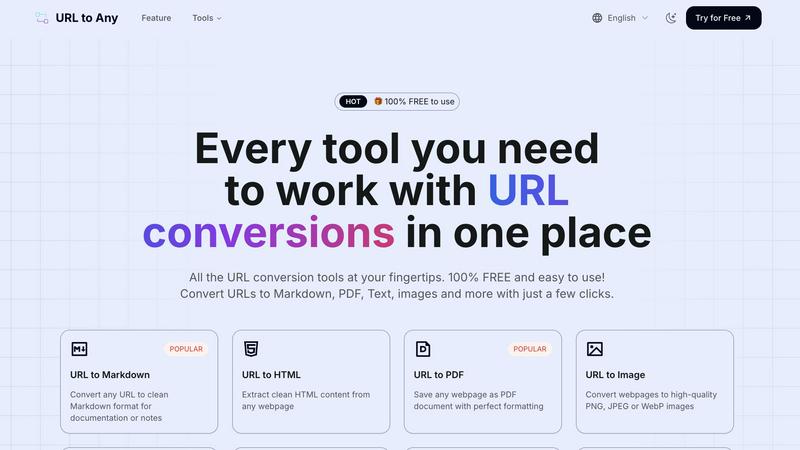
URL to Any is your all-in-one free toolkit to instantly convert any URL into Markdown, PDF, images, and dozens of other.
Last updated: February 28, 2026
Visual Comparison
Hush Touch | Voice-to-Text for MacOS

URL to Any
Feature Comparison
Hush Touch | Voice-to-Text for MacOS
Dual-Engine Recognition
Hush Touch employs a dual-engine recognition system that combines the strengths of DictationTranscriber and SFSpeechRecognizer. This innovative approach ensures that natural speech flow and accurate punctuation are maintained while also accommodating a custom vocabulary tailored to the user’s specific needs. The final touch of Apple Intelligence further refines the output, delivering superior transcription results.
Custom Vocabulary
The app features a robust custom vocabulary capability that allows users to add up to 500 specific terms tailored to their unique needs. This includes technical jargon, brand names, and other specialized language. Hush Touch learns and adapts to corrections made by the user, ensuring that it becomes increasingly accurate in recognizing and transcribing the user's preferred vocabulary over time.
Smart Text Processing
Hush Touch offers smart text processing features that significantly enhance the dictation experience. It automatically removes filler words, corrects common mistakes, and formats text with ease, including numbered lists and voice snippets for frequently used phrases. This real-time processing occurs entirely on-device, allowing for a streamlined and efficient dictation experience without the need for internet connectivity.
Context Modes & Hands-Free Dictation
The app includes multiple context modes, such as General, Email, Code, and Notes, which adapt the dictation experience to suit different writing scenarios. Users can initiate hands-free dictation by simply saying "Hey Siri, start touch," allowing for an uninterrupted workflow. Automatic text insertion occurs after two seconds of silence, and users can even send messages by voice using customizable commands, enhancing overall convenience.
URL to Any
Multi-Format Conversion Engine
At the heart of URL to Any is its robust conversion engine, capable of processing a URL into a wide selection of practical formats. This includes clean Markdown for documentation, perfectly formatted PDFs for archiving, high-quality PNG/JPEG images for visual capture, and structured data formats like JSON and XML for developers. The platform also supports extraction to plain text, generation of QR codes, and even conversion to MP3 audio, providing a truly comprehensive solution for any content repurposing need, all achievable with just a few clicks.
Advanced Content Extraction Tools
Beyond basic conversion, URL to Any offers specialized tools for deep web content analysis and data mining. The AI Summarizer leverages advanced artificial intelligence to distill lengthy articles into concise summaries. The URL Meta Tags and Heading Extractors allow for detailed SEO and structural analysis of webpages, with export capabilities to CSV. Furthermore, the URL Extractor tool can crawl a site and compile a complete list of all URLs into organized TXT or CSV files, invaluable for audits and digital projects.
Integrated Encoding & Decoding Suite
This feature provides a powerful utility belt for developers and technical users by supporting encoding and decoding across eight-plus formats within a single interface. Users can seamlessly convert text to and from URL encoding, Base64, HTML entities, JWT tokens, Hex, Unicode, Binary, and ROT13. This eliminates the need to visit multiple specialized websites, consolidating essential web development and data manipulation tasks into one efficient, easy-to-use platform.
Secure, Cloud-Based Processing
URL to Any operates entirely in the cloud, requiring no software installation, downloads, or user registration. This ensures global access from any device with a browser. The processing is lightning-fast, delivering results in seconds. Critically, the service is built with privacy in mind; user data and the submitted URLs are processed securely and are never stored on the servers, ensuring that conversions are both quick and completely confidential.
Use Cases
Hush Touch | Voice-to-Text for MacOS
Professional Communication
Professionals can leverage Hush Touch to draft and send emails or messages quickly, enhancing productivity and allowing for a more fluid communication style. The ability to dictate accurately without relying on cloud services ensures that sensitive information remains private.
Academic Note-Taking
Students can benefit significantly from Hush Touch while attending lectures or studying. Dictating notes allows for a hands-free approach, enabling students to focus fully on the material being presented. The custom vocabulary feature is particularly advantageous for those studying specialized subjects.
Content Creation
Writers and content creators can utilize Hush Touch to brainstorm ideas, draft blog posts, or create outlines. The app’s ability to process text with minimal interruptions allows for a more natural flow of creativity, reducing the friction often associated with typing.
Medical Documentation
Healthcare professionals, such as physicians and nurses, can depend on Hush Touch to efficiently document patient notes and medical terminology. The app’s adaptive learning capabilities ensure that it accurately captures medical jargon, streamlining the documentation process while improving accuracy.
URL to Any
Academic Research and Study
Students and researchers can efficiently gather and organize information from online journals, articles, and reference sites. Converting key webpages to well-formatted PDFs creates a permanent, offline archive. Extracting clean text or Markdown allows for easy quoting and integration into notes or papers without carrying over web page clutter, advertisements, or distracting elements, leading to more focused and organized study sessions.
Content Creation and Documentation
Bloggers, technical writers, and content creators can use the tool to capture inspiration, draft posts, or create reference guides. Converting a source webpage to Markdown provides a perfect starting point for a new blog post or documentation page, preserving links and basic formatting. Saving competitor analyses or design inspirations as images (PNG/JPEG) helps in creating visual mood boards or presentation materials quickly.
Web Development and SEO Analysis
Developers can extract clean HTML from live sites for debugging or learning purposes. The conversion to JSON or XML is invaluable for prototyping APIs or data feeds. SEO specialists and digital marketers can utilize the Meta Tags and Heading Extractor to audit the on-page SEO of their own site or competitors', exporting the data to CSV for further analysis and reporting in a structured manner.
Professional Reporting and Sharing
Professionals who need to share web-based information in meetings or reports can instantly generate a high-fidelity PDF snapshot of a dashboard, article, or data visualization, ensuring the recipient sees exactly the intended content. Similarly, generating a QR code for a lengthy URL simplifies sharing on printed materials or presentations, making links more accessible and engaging for audiences.
Overview
About Hush Touch | Voice-to-Text for MacOS
Hush Touch is an innovative voice-to-text application designed specifically for macOS, enabling users to dictate text effortlessly and privately. By utilizing advanced on-device processing, Hush Touch operates without requiring an internet connection, ensuring user data remains secure and confidential. The app combines two powerful Apple transcription engines along with an Apple Intelligence final pass to enhance transcription accuracy and clarity. This makes it ideal for individuals across various fields, including professionals, students, and writers, who seek a reliable and efficient dictation tool. With its lightweight 5.5 MB footprint, Hush Touch integrates seamlessly into everyday writing workflows, allowing users to draft emails, notes, documents, and more, all while maintaining a natural speaking rhythm. The app's unique features, like customizable command phrases and adaptive learning capabilities, make dictation not only easier but also smarter over time. For just $20, users can access a lifetime license, eliminating the need for recurring subscription fees.
About URL to Any
In the modern digital landscape, information is abundant but often trapped within the confines of a web browser. URL to Any emerges as a definitive solution, a comprehensive and powerful web content conversion platform designed to liberate and repurpose online information with unprecedented ease. It is an all-in-one toolkit that transforms any webpage into a versatile array of formats, effectively bridging the gap between dynamic web content and static, usable assets. The tool is engineered for a universal audience, from content creators and developers needing clean code for projects, to researchers archiving sources, students compiling notes, marketers sharing reports, and professionals seeking to eliminate distractions from reference material. Its core value proposition is a powerful trifecta: absolute simplicity through an intuitive, registration-free interface; remarkable versatility with support for over ten distinct output formats; and a commitment to accessibility, being entirely free to use. By placing a suite of advanced conversion capabilities into a straightforward, cloud-based tool, URL to Any empowers users to streamline their workflow, enhance productivity, and manage web content on their own terms, making it an indispensable utility for anyone who regularly interacts with the vast information repository of the internet.
Frequently Asked Questions
Hush Touch | Voice-to-Text for MacOS FAQ
Is Hush Touch available for Windows or other operating systems?
Currently, Hush Touch is designed exclusively for macOS, ensuring optimal performance and integration with Apple’s operating system.
How does Hush Touch ensure user privacy?
Hush Touch processes all voice data entirely on-device, meaning that no audio or transcription is sent to the cloud. This approach guarantees that user data remains private and secure.
Can I try Hush Touch before purchasing?
Yes, Hush Touch offers a 7-day free trial without the need for a credit card, allowing users to experience the app’s capabilities firsthand before committing to a purchase.
What happens if I need to update my vocabulary?
Hush Touch allows users to add up to 500 custom terms to its vocabulary. Additionally, the app learns from corrections made during dictation, automatically updating its vocabulary to improve future accuracy.
URL to Any FAQ
Is URL to Any really free to use?
Yes, URL to Any is completely free to use. There are no hidden fees, subscription plans, or premium tiers. Every tool and conversion format listed on the platform is available at no cost and does not require user registration or account creation, making it immediately accessible to everyone.
What formats can I convert a URL to?
URL to Any supports a wide array of output formats to suit various needs. Popular formats include Markdown, PDF, HTML, and high-quality images (PNG, JPEG, WebP). You can also convert to plain Text, structured data formats like JSON and XML, audio (MP3), and generate QR codes. Additionally, the platform offers specialized tools for encoding/decoding and URL extraction.
How does URL to Any handle privacy and data security?
Privacy is a fundamental principle of URL to Any. The service processes all conversion requests securely in the cloud. Crucially, the submitted URLs and any extracted content are never stored on our servers after the conversion is complete and delivered to you. Your data is not tracked, sold, or retained, ensuring a private and secure conversion experience.
Do I need to install any software or browser extension?
No software installation is required to use the core tools on the URL to Any website; everything runs directly in your web browser. However, for added convenience, the platform offers an optional browser extension. Installing this extension can provide quicker access to the conversion tools directly from your browser's toolbar, streamlining your workflow even further.
Alternatives
Hush Touch | Voice-to-Text for MacOS Alternatives
Hush Touch | Voice-to-Text for MacOS is a specialized application designed to convert spoken language into written text, functioning entirely offline. As a tool in the AI Assistants category, it utilizes advanced on-device processing to ensure privacy and efficiency while catering to users who prefer dictation without relying on cloud services. Many users seek alternatives to Hush Touch due to varying needs such as pricing, desired features, or compatibility with different platforms. When exploring alternatives, it is essential to consider aspects like usability, transcription accuracy, language support, and the ability to integrate seamlessly into existing workflows, ensuring that the chosen solution meets individual requirements effectively.
URL to Any Alternatives
URL to Any is a versatile web content conversion tool that falls under the broader category of AI Assistants and productivity utilities. It simplifies the process of transforming any webpage into various formats like PDF, Markdown, HTML, and images, all from a single, free platform. Its core appeal lies in its straightforward, no-registration-required approach to a common digital task. Users often explore alternatives to such tools for a variety of reasons. While some may seek advanced features like batch processing, API access, or deeper customization options, others might prioritize platform-specific needs, such as a dedicated browser extension or a desktop application for offline use. The desire for different pricing models, including premium tiers with enhanced support, or concerns about data privacy and security can also drive the search for other solutions. When evaluating potential alternatives, it is crucial to consider your specific workflow requirements. Key factors include the range of output formats supported, the ease of use and integration into your existing processes, the tool's reliability and conversion accuracy, and its policies regarding data handling and cost. The ideal alternative should not only match the core functionality but also align with your broader operational and security needs.