
ExpenseManager vs Tradepal
Side-by-side comparison to help you choose the right tool.

ExpenseManager
Easily track expenses, split bills, scan receipts, and forecast cash flow with ExpenseManager for individuals and.
Last updated: February 28, 2026

Tradepal
Tradepal is your AI trading co-pilot that analyzes any stock chart to deliver real-time forecasts and clear insights.
Last updated: February 28, 2026
Visual Comparison
ExpenseManager

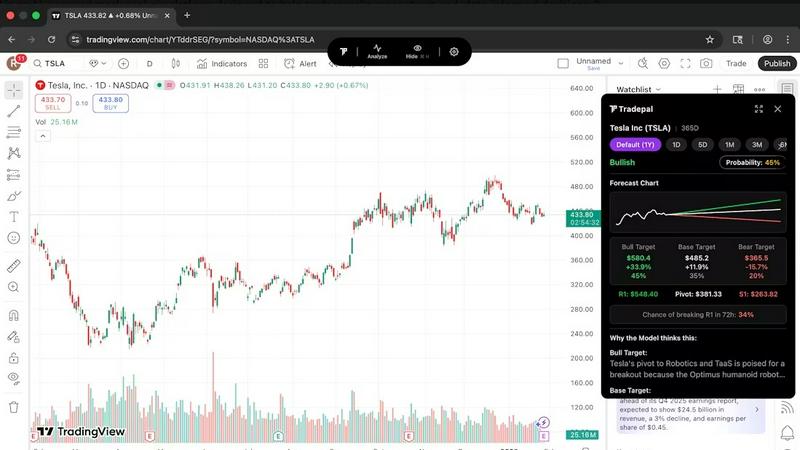
Tradepal
Feature Comparison
ExpenseManager
AI-Powered Receipt Scanning
ExpenseManager allows users to take a photo of their receipts, leveraging advanced AI-powered OCR technology to automatically extract the amount, category, and merchant details. This feature saves time and minimizes manual entry, ensuring that your expenses are recorded accurately and efficiently.
Budget Alerts
The app provides users with the ability to set personalized budgets and receive alerts when spending reaches predefined thresholds of 50%, 75%, and 90%. This proactive feature helps users stay informed about their financial limits, preventing overspending and promoting better financial habits.
Expense Splitting
With ExpenseManager, users can easily split costs among friends, partners, or roommates using equal, percentage, or custom splits. This functionality simplifies group expenses, ensuring that everyone knows what they owe and facilitating automatic debt settlement for smoother transactions.
Multi-Currency Support
ExpenseManager supports over 30 different currencies, making it an ideal tool for travelers and expatriates. Users can manage expenses in multiple currencies effortlessly, allowing for accurate tracking of expenses regardless of the location, ensuring that financial management remains seamless even while abroad.
Tradepal
Universal Chart Analysis
Tradepal breaks down platform barriers by offering instant analysis of any U.S.-listed stock chart from any source. Whether you are using TradingView, Thinkorswim, or any other charting software, you can simply have the chart on your screen and click 'Analyze' or upload a screenshot via the web. The AI reads the chart in seconds, delivering forecasts, sentiment, and price targets without requiring you to change your primary trading environment, making it a truly flexible and integrated assistant.
AI-Powered Forecasts & Price Cones
Go beyond static analysis with dynamic, intraday forecasts built from a blended AI ensemble that updates in real-time. Tradepal provides projections for price ranges, potential reversals, and volatility, allowing you to see risk before it materializes in the price action. This is visually complemented by forward price cone projections directly on your chart, which can be personalized to your trading style and saved for future sessions, offering a clear probabilistic roadmap for the asset's trajectory.
Real-Time News and Sentiment Analysis
Stay ahead of market-moving narratives by tracking professional trader sentiment and financial news in a unified, streamlined feed. This feature aggregates and analyzes market mood across key sources, enabling you to detect when crowd conviction is building for a particular stock before that sentiment catalyzes a significant price move. It transforms scattered information into a coherent signal, providing context to the price action on your charts.
Smart Watchlists & Breakout Signals
Maintain strategic awareness without screen fatigue. Create customized watchlists where Tradepal provides smart alerts for unusual activity, risk stress events, and optimal position sizing. Furthermore, the system scans live sentiment streams and order flow hints to pick up early signals of strength or failure, giving you a potential edge in identifying breakout or breakdown scenarios across the names you care about most.
Use Cases
ExpenseManager
Couples Managing Household Expenses
ExpenseManager is perfect for couples who want to share household costs without misunderstandings. By tracking individual payments and splitting bills fairly, it enhances transparency and reduces potential conflicts regarding finances.
Individuals Tracking Personal Expenses
For individuals seeking to take charge of their finances, ExpenseManager offers the tools needed to monitor spending habits. Users can categorize expenses, set budgets, and receive insights into their spending patterns, empowering them to save more effectively.
Group Travel Expense Management
Travelers can utilize ExpenseManager to manage shared expenses during trips. The app's expense-splitting feature allows groups to track costs incurred, ensuring that all participants understand their financial contributions and minimizing disputes over payments.
Roommates Sharing Rent and Bills
Roommates can benefit from ExpenseManager by easily splitting rent and bills. The app allows them to keep track of what each person owes, making it simple to manage shared financial responsibilities and reducing the stress associated with household budgeting.
Tradepal
Validating Trading Ideas and Reducing Bias
A trader develops a hypothesis based on their own technical analysis but seeks an objective, data-driven second opinion before committing capital. By running the chart through Tradepal, they receive an unbiased analysis outlining bull, base, and bear scenarios with confidence scores. This process helps validate their original thesis, challenge assumptions, and significantly reduce the impact of emotional or confirmation bias, leading to more disciplined and informed entry and exit decisions.
Conducting Rapid Technical Analysis Across Platforms
An investor who monitors multiple assets across different brokerages and charting platforms needs a consistent analytical framework. Instead of learning each platform's unique tools, they use Tradepal as a universal overlay. Regardless of where the chart is displayed, a single click generates a comprehensive breakdown of patterns, support/resistance, and momentum, streamlining their research process and saving valuable time during fast-moving market sessions.
Scanning for New Opportunities and Early Signals
A systematic trader wants to efficiently monitor a broad universe of stocks for potential setups. They use Tradepal’s watchlist functionality with smart alerts configured for specific criteria like unusual sentiment shifts or early breakout signals. This allows them to be notified of promising activity without manually scanning hundreds of charts, enabling them to focus their deep analysis only on the highest-probability opportunities identified by the AI.
Enhancing Research with Sentiment Context
A discretionary trader understands that price action doesn't occur in a vacuum. Before executing a trade based on a chart pattern, they consult Tradepal’s integrated news and sentiment analysis stream. This provides crucial context, revealing whether the professional trading crowd is aligning with or contradicting the technical setup, helping them gauge the strength of the potential move and avoid traps set by misleading technical signals alone.
Overview
About ExpenseManager
ExpenseManager is an innovative financial management application designed to streamline personal budgeting and shared expense tracking in a single, user-friendly platform. It caters to a diverse audience, including couples managing household expenses, roommates splitting rent and bills, travelers navigating multi-currency costs, and individuals who seek clarity on their spending habits. The app's standout feature is its AI-powered Optical Character Recognition (OCR) technology, which allows users to simply snap a photo of their receipts. The app instantly extracts critical details such as the amount spent, category, and merchant information. This seamless integration of budgeting tools, expense tracking, and bill-splitting functionalities empowers users to take control of their financial lives, avoiding overspending with budget alerts at 50%, 75%, and 90%. With ExpenseManager, users can experience enhanced transparency in their finances and improved relationships as they navigate shared expenses effortlessly.
About Tradepal
Tradepal represents a paradigm shift in the modern trader's toolkit, evolving beyond a simple tool into an indispensable AI co-pilot. It is meticulously engineered for active traders and investors who demand speed, objectivity, and depth in their market analysis, seamlessly integrating into their existing workflow without disruption. At its core, Tradepal is an AI-powered trading assistant that delivers fast, objective chart analysis, eliminating the manual guesswork and emotional bias that often cloud judgment. It serves as a sophisticated second set of eyes, designed not to execute trades but to empower traders with clarity and confidence.
The platform's genius lies in its universal compatibility and intuitive operation. Users can analyze any U.S.-listed stock chart instantly, either by clicking 'Analyze' while the chart is on their screen via the desktop application or by uploading a screenshot through the web app. Tradepal's advanced AI models then conduct a comprehensive dissection of the chart, detecting key technical patterns, pinpointing critical support and resistance levels, assessing trend strength, and measuring momentum. From this analysis, it generates clear, scenario-based insights—outlining bull, base, and bear cases—each accompanied by confidence scores and actionable price targets. Built by traders for traders, Tradepal is the definitive solution for those seeking an analytical edge, offering real-time sentiment streaming, price trajectory forecasting, and in-depth research to help users move faster with less noise and trade with unwavering conviction.
Frequently Asked Questions
ExpenseManager FAQ
What is the Founding Member offer?
The Founding Member offer provides the first 100 users with lifetime access to all premium features of ExpenseManager free of charge. This limited-time offer is designed to reward early adopters and encourage them to explore the app's full capabilities.
What happens if I don't stay active?
If a user does not remain active on the platform, their account may be subject to change. It is advisable to check the app's terms for specific details regarding account inactivity and any potential implications to ensure continued access to the app's features.
Is my financial data secure?
ExpenseManager prioritizes user security, employing AES-256 bank-grade encryption to protect sensitive financial information. Users can feel confident that their data is safe and secure while using the app.
What platforms are supported?
ExpenseManager is designed to work seamlessly across various platforms, ensuring that users can access their financial management tools whether they are on mobile or desktop devices. This flexibility enhances user experience and convenience.
Tradepal FAQ
How do I use Tradepal?
After signing up for an account, you have two flexible options. You can download the dedicated Tradepal application for macOS or Windows, which runs conveniently on your desktop and stays accessible for one-click analysis of any chart on your screen. Alternatively, if you prefer not to download software, you can use the full-featured web platform. There, you can upload a screenshot of any U.S.-listed stock chart from any platform and receive the same instant, AI-powered analysis directly within your browser.
Is Tradepal financial advice?
No, Tradepal is not a registered financial advisor and does not provide financial advice. It is an advanced analytical tool designed to assist traders by providing data-driven insights, pattern recognition, and sentiment analysis. All output from Tradepal, including scenarios and price targets, should be considered informational and educational only. Users are solely responsible for their own trading decisions and should consult with a qualified financial professional for personalized advice.
What charts are compatible with Tradepal?
Tradepal is compatible with charts of any U.S.-listed stock, including those on major exchanges like the NYSE and NASDAQ. The platform works universally with any charting software or brokerage platform (e.g., TradingView, Thinkorswim, Webull, etc.). The analysis is triggered either by having the chart visible on your screen with the desktop app or by uploading a screenshot of the chart through the web app, making it incredibly versatile.
Does Tradepal work on all timeframes?
Yes, Tradepal's AI is engineered to analyze charts across various timeframes, from short-term intraday charts like 1-minute or 5-minute intervals to longer-term daily, weekly, or monthly charts. The insights generated, such as key levels, trend strength, and scenarios, will be contextualized to the selected timeframe, providing relevant analysis whether you are a day trader, swing trader, or long-term investor.
Alternatives
ExpenseManager Alternatives
ExpenseManager is an all-in-one app designed to streamline expense tracking, bill splitting, receipt scanning, and cash flow forecasting for individuals, couples, and groups. As a product in the Business & Finance category, it uniquely combines personal budgeting with shared expense management, catering to diverse financial needs. Users often seek alternatives to ExpenseManager due to factors such as pricing, specific feature requirements, and compatibility with various platforms. When exploring alternatives, it is essential to consider user-friendliness, the range of features offered, and how well the app integrates with other financial tools or services. When selecting an alternative, prioritize options that provide robust expense tracking capabilities, intuitive interfaces, and effective collaboration features for managing shared finances. Additionally, assessing customer support, security measures, and potential for future updates can help ensure that the chosen app will meet long-term financial management needs.
Tradepal Alternatives
Tradepal is an AI-powered trading assistant that specializes in analyzing stock chart screenshots to deliver objective technical insights. It belongs to the growing category of analytical tools designed to augment, not replace, a trader's decision-making process by identifying patterns, trends, and potential price targets with clear confidence scores. Users often explore alternatives for various reasons, including specific budget constraints, a need for deeper fundamental analysis, integration with their primary brokerage platform, or access to more advanced backtesting and automated trading features. The search for the right tool is highly personal, dictated by one's trading style, experience level, and workflow requirements. When evaluating alternatives, key considerations should include the core analytical methodology, the breadth of markets covered, the transparency of the AI's reasoning, the quality of user support, and overall value for money. The ideal solution seamlessly complements your existing routine, providing trustworthy analysis that enhances confidence without introducing unnecessary complexity.