
Skippership vs StatPecker
Side-by-side comparison to help you choose the right tool.

Skippership
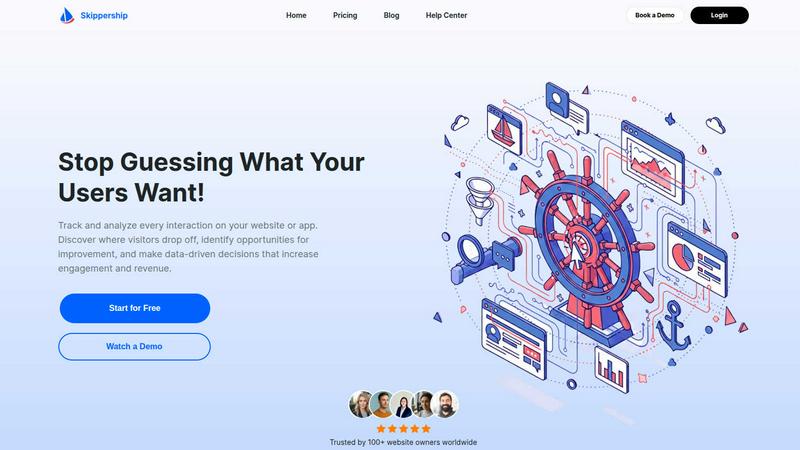
Skippership uses AI to analyze user behavior, revealing where they get stuck so you can fix it and boost engagement.
Last updated: March 1, 2026

StatPecker
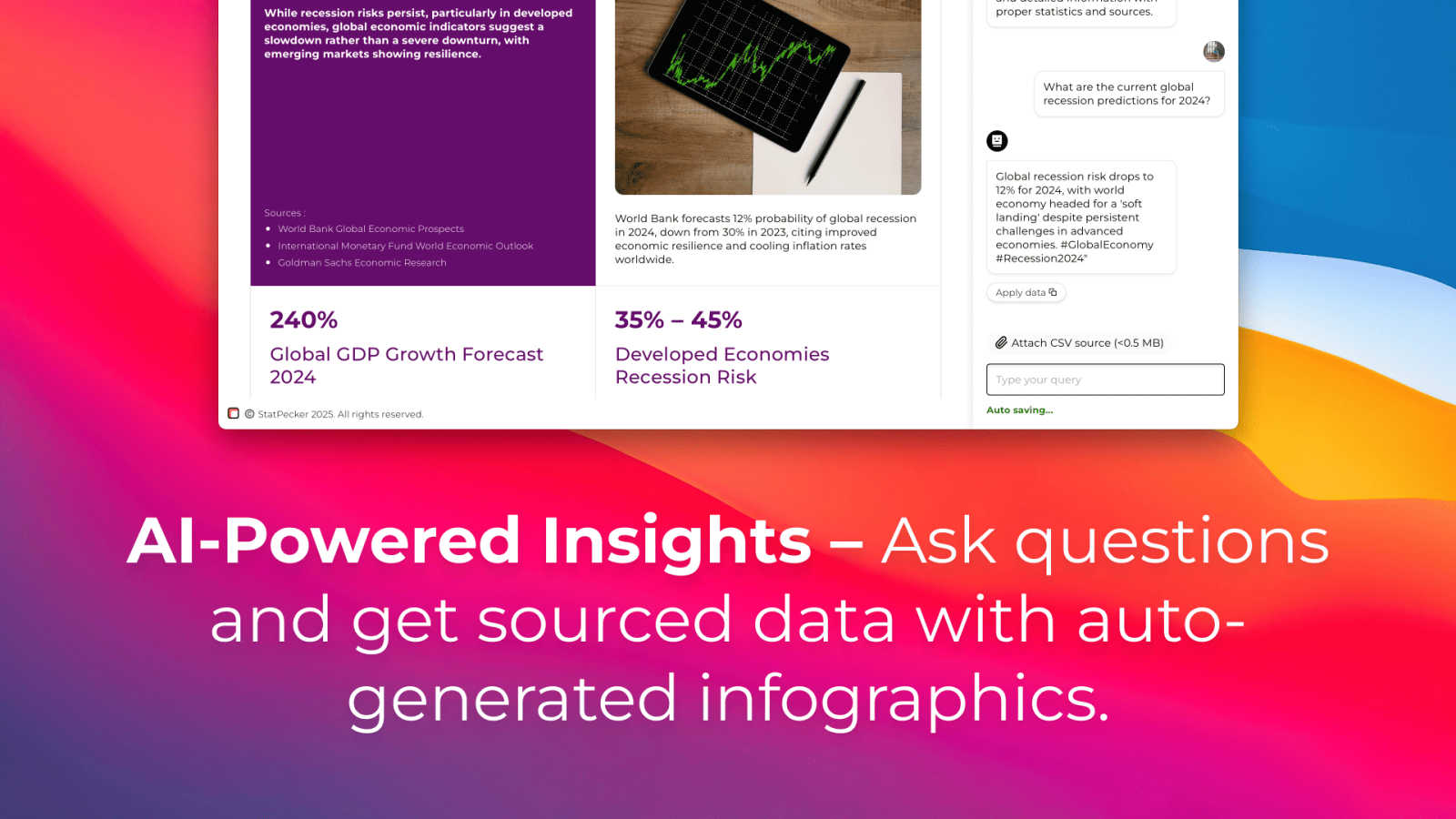
StatPecker transforms your data into secure, stunning visuals for instant business insights and content.
Last updated: March 1, 2026
Visual Comparison
Skippership
StatPecker
Feature Comparison
Skippership
Session Replays
Watch exactly how your users experience your site with real user session recordings. This feature allows you to uncover hidden friction points, usability issues, and conversion blockers by observing the entire customer journey firsthand. It provides a clear, visual context that goes beyond graphs and numbers, enabling teams to take confident, data-driven actions to streamline the user experience and resolve problems that static analytics might miss.
AI-Powered Heatmaps
Gain immediate visual insight into user attention and interaction with comprehensive heatmaps. Skippership's heatmaps show precisely where users click, scroll, and spend the most time on your pages. By highlighting which areas are engaged with and which are consistently ignored, you can make informed decisions to optimize content placement, call-to-action buttons, and page layout to significantly boost engagement and drive higher conversion rates.
Goal and Event Tracking
Measure what truly matters by effortlessly tracking key user actions and business objectives. This feature allows you to set up and monitor goals such as signups, purchases, downloads, and specific clicks. Skippership helps you measure performance in real-time, uncover behavioral patterns leading to conversions, and gain actionable insights into the specific elements and user paths that drive results for your business.
AI Analytics Engine
Turn vast amounts of behavioral data into clear, actionable insights with the power of artificial intelligence. This core engine automatically reviews sessions, identifies critical patterns, detects points of user struggle like rage clicks or unexpected drop-offs, and suggests data-backed solutions. It empowers teams to move faster, making smarter decisions that enhance user engagement, strengthen customer retention, and improve overall business outcomes without manual data sifting.
StatPecker
AI-Powered Query Insights
Simply ask a question in plain language, and StatPecker's AI engine will generate instant insights by pulling from validated data sources. This feature removes the complexity of traditional data analysis tools, allowing users to get credible answers and visualizations without needing to write code or navigate complicated software interfaces. It's designed for speed and simplicity, turning curiosity into clear, publishable visuals.
Local SQL Agent for Private CSV Analysis
This groundbreaking feature ensures complete data privacy and security. Users can upload CSV files up to 50 MB, and StatPecker's local agent processes everything directly on their device. It enables deep, private exploration of proprietary data through natural language questions, generating SQL queries and insights locally. The results are then presented as ready-to-share charts, all without the data ever leaving the user's computer.
Publish & Embed Interactive Visuals
StatPecker doesn't just create static images; it produces interactive infographics that can be seamlessly integrated into any digital content. Users can embed these dynamic visuals directly into blogs, articles, websites, or internal wikis. This feature enhances reader engagement by allowing audiences to interact with the data, and it maintains a professional, cohesive look across all publishing platforms.
Download & Export for Universal Use
For offline reports, presentations, or printed materials, StatPecker provides robust export capabilities. Users can download their created infographics as high-quality image files (like PNG or JPG) for use in slide decks, reports, social media, or marketing collateral. This ensures that the powerful visuals created within the platform can be utilized anywhere, maintaining flexibility across all communication mediums.
Use Cases
Skippership
Optimizing E-commerce Checkout Funnels
E-commerce teams can utilize Skippership to drastically reduce cart abandonment rates. By analyzing session replays and heatmaps on checkout pages, they can visually identify where users hesitate, encounter errors, or abandon their carts. The AI can flag specific friction points, such as a confusing form field or a broken payment step, allowing for rapid, targeted optimizations that directly recover lost sales and improve the purchase journey.
Improving Website Content and UX Design
UX designers and content managers can leverage heatmaps and session recordings to validate design decisions and content strategy. They can see if key messages are being seen, if navigation is intuitive, and how users interact with new page layouts. This evidence-based approach removes subjectivity, enabling teams to iteratively design and place content that aligns with actual user behavior, leading to higher engagement and lower bounce rates.
Validating New Feature Launches
Product managers can employ Skippership to gauge the adoption and usability of newly released features. By tracking goal completions related to the feature and watching session replays of user interactions, they can quickly understand if the feature is intuitive, identify any unexpected usage patterns or blockers, and gather qualitative feedback to inform immediate iterations or future development roadmaps.
Enhancing Marketing Campaign Landing Pages
Marketing teams can use the platform to maximize the conversion potential of campaign-specific landing pages. By setting up goals for form submissions or clicks and analyzing heatmaps, they can determine which page elements are capturing attention and which are being ignored. Insights from session replays can reveal why visitors may not be converting, allowing for swift A/B testing and optimization to improve campaign ROI and lead quality.
StatPecker
Content Creation & Blogging
Bloggers, journalists, and digital content creators use StatPecker to quickly find and visualize data that supports their narratives. Instead of using generic or outdated charts, they can generate unique, interactive infographics that boost SEO, increase reader engagement, and establish authority by backing up claims with compelling, easy-to-understand visual evidence directly within their articles.
Business Intelligence & Reporting
Analysts and managers leverage the Local SQL Agent to analyze internal sales, marketing, or operational data stored in CSVs. They can ask specific questions like "Which regions drove the most revenue last quarter?" and instantly receive a professional chart for stakeholder presentations or internal reports, streamlining the weekly or monthly reporting cycle without compromising data security.
Marketing & Social Media Campaigns
Marketing teams utilize StatPecker to create eye-catching visuals for campaign reports, social media posts, and client dashboards. The ability to transform campaign metrics (engagement rates, conversion data) into stunning infographics helps in telling a success story more effectively, making performance reviews impactful and shareable across teams and with clients.
Education & Academic Instruction
Educators and trainers employ StatPecker to explain complex statistical concepts, historical trends, or scientific data to students. By transforming abstract numbers into interactive visual stories, it enhances comprehension and retention. Students can also use the tool to visualize their research data for projects and theses, making their findings more accessible and persuasive.
Overview
About Skippership
Skippership represents a paradigm shift in the realm of digital analytics, moving beyond the limitations of traditional, siloed data tools. It is an all-in-one, AI-powered user experience analytics platform engineered to transform how businesses of all sizes understand and optimize their digital customer journeys. By unifying qualitative and quantitative data into a single, intuitive dashboard, Skippership delivers not just raw metrics but actionable intelligence, empowering teams to replace guesswork with confident, data-driven decisions. The platform is meticulously designed for product managers, UX designers, marketers, and business owners who are tasked with improving user engagement, reducing friction, and ultimately increasing revenue. At its core, Skippership's revolutionary value lies in its sophisticated AI engine. This technology automatically analyzes user session recordings, interprets complex behavioral patterns, pinpoints critical points of struggle—such as checkout errors leading to cart abandonment—and proactively suggests practical solutions. With a foundational commitment to simplicity, security, and seamless integration, Skippership democratizes advanced behavioral analytics, offering maximum clarity with zero complexity. It enables organizations to swiftly identify opportunities, understand the underlying 'why' behind user actions, and implement fixes that have a direct, measurable impact on conversion rates and overall customer satisfaction.
About StatPecker
StatPecker is a transformative AI-powered platform that fundamentally redefines the art and science of data visualization. It serves as a bridge between raw, complex data and compelling, actionable insights, automating the entire process of data storytelling. The tool is engineered to convert numerical information into stunning, interactive infographics and charts within seconds, eliminating the traditional barriers of technical expertise, expensive design software, and significant time investment. Its core value proposition lies in democratizing data communication, making it accessible and effective for a vast spectrum of users. From content creators seeking to enrich their blogs, to marketers crafting campaign reports, analysts presenting findings, and educators explaining complex trends, StatPecker empowers all to convey their message with clarity and impact. By handling the heavy lifting of design and analysis, it allows professionals to focus on strategic interpretation and creative narrative, thereby enhancing decision-making and engagement across any field. With its commitment to both powerful functionality and user-friendly operation, StatPecker stands as the ultimate solution for anyone aiming to make their data not just seen, but understood and remembered.
Frequently Asked Questions
Skippership FAQ
How does Skippership ensure user privacy and data security?
Skippership is built with a privacy-first architecture. It uses SSL/TLS encryption for all data in transit and is hosted on secure, reliable cloud infrastructure. The platform is designed to comply with major regulations like GDPR and CCPA by intentionally avoiding the collection of personal or sensitive user information. We process only the behavioral data necessary for analytics, ensuring both your business and your users' data remain protected.
Is Skippership difficult to set up and integrate?
Not at all. Skippership is designed for a no-code, fast setup that can be completed in just minutes. Simply add a small snippet of code to your website or app. Furthermore, it offers seamless integrations with over 50 popular platforms including WordPress, Shopify, Wix, Google Analytics, and Jira, allowing you to unify your tech stack and incorporate insights directly into your existing workflows without disruption.
What makes Skippership different from traditional analytics tools like Google Analytics?
While traditional tools excel at providing quantitative data (the "what"), Skippership specializes in delivering the qualitative "why" behind that data. It combines quantitative metrics with visual, qualitative tools like session replays and heatmaps, all supercharged by an AI engine that automatically finds patterns and suggests fixes. This unified approach offers actionable clarity that purely numerical dashboards often lack.
Will installing Skippership slow down my website?
Skippership is engineered to have a minimal performance impact. The tracking script is lightweight and optimized to run efficiently without interfering with your site's loading speed or core functionality. You can gain deep insights into user behavior while maintaining a fast, responsive experience for your visitors, ensuring that the analytics tool itself does not become a point of friction.
StatPecker FAQ
How does StatPecker ensure the privacy of my uploaded CSV data?
StatPecker prioritizes data privacy through its Local SQL Agent feature. When you upload a CSV file, the entire analysis process—from data preparation and query generation to insight calculation—occurs locally on your own device. Your raw data never leaves your computer to be sent to external servers, ensuring that sensitive business or personal information remains completely private and secure by default.
What is included in the Free Tier?
The Free Tier offers a robust starting point with unlimited projects and the ability to create unlimited embeds (with manual edits). It includes 25 AI queries to ask questions and generate insights from public data, and allows for 10 CSV uploads to analyze private data using the Local SQL Agent. This plan is designed to let users fully explore the platform's core capabilities at no cost.
What does "Lifetime Access" mean for the paid plan?
The Lifetime Access plan is a one-time payment of $150 (often offered at a discount) that grants permanent access to StatPecker's full suite of features. This includes unlimited AI queries, unlimited CSV uploads, unlimited projects and embeds, and priority support for feature requests. It is not a subscription, so there are no recurring fees, and it comes with a 10-day money-back guarantee.
Can I edit the infographics after StatPecker generates them?
Yes, StatPecker provides flexibility for customization. While the AI generates the initial visual based on your query or data, the platform allows for manual edits on the embeds. You can adjust elements like colors, labels, and titles to better align with your brand guidelines or specific presentation needs before publishing or downloading the final graphic.
Alternatives
Skippership Alternatives
Skippership is an AI-powered user experience analytics platform that helps businesses understand and optimize digital customer journeys. It belongs to the broader category of behavior analytics and session replay tools, which are essential for diagnosing friction and improving engagement on websites and applications. Users often explore alternatives for various practical reasons. These can include budget constraints, the need for specific integrations with their existing tech stack, or a requirement for more granular control over certain features like data governance or reporting depth. The search for a different tool is a natural part of finding the perfect fit for a team's unique workflow and strategic objectives. When evaluating alternatives, it's crucial to consider several key factors. Look for a solution that balances powerful analytics with actionable insights, ensuring data translates into clear improvement steps. Prioritize platforms that respect user privacy with robust security measures and offer the right mix of quantitative data and qualitative context to fully understand the user experience.
StatPecker Alternatives
StatPecker is a powerful AI-driven analytics and data visualization platform designed to transform complex datasets into compelling, interactive infographics with remarkable speed. It belongs to the modern category of tools that prioritize accessibility, allowing users from various backgrounds to generate insights and tell stories with data without needing deep technical expertise. Users often explore alternatives to a single solution for a variety of reasons. These can include specific budget constraints, the need for integrations with other business platforms, or requirements for more advanced or specialized analytical features not covered by a generalist tool. The search for the right fit is a natural part of selecting technology that aligns perfectly with an organization's evolving workflow and strategic goals. When evaluating alternatives in the data visualization and analytics space, key considerations should include the tool's ease of use, the depth of its analytical capabilities, collaboration features, and the flexibility of output formats. Security protocols for handling sensitive data and the overall value proposition relative to cost are also paramount. The ideal platform should not only visualize data but also integrate seamlessly into your existing ecosystem to empower informed decision-making.