
Img Editor vs Seedream 4.0
Side-by-side comparison to help you choose the right tool.

Img Editor
Img Editor transforms your ideas into breathtaking AI-generated images in seconds, unlocking your creative potential.
Last updated: February 28, 2026

Seedream 4.0
Seedream 4.0 effortlessly combines AI image generation and editing for stunning visuals with unmatched speed and.
Last updated: March 1, 2026
Visual Comparison
Img Editor

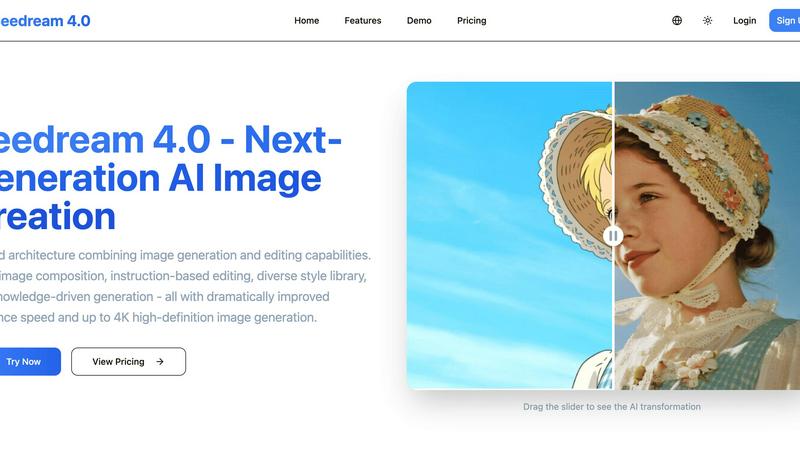
Seedream 4.0
Feature Comparison
Img Editor
AI-Powered Image Generation
Img Editor harnesses the power of cutting-edge AI technology to generate stunning visuals in seconds. Users can input descriptive natural language prompts, and the platform's advanced algorithms will create images that match the specifications, making professional-quality visuals accessible to all.
Comprehensive Image Editing Tools
Beyond generating images, Img Editor provides a robust suite of editing features that allow users to modify and enhance their creations. Users can adjust colors, apply filters, and make precise edits to ensure their images reflect their vision accurately.
Community-Driven Rewards System
To promote creativity and user engagement, Img Editor incorporates a unique rewards system. Users can submit their generated images to the gallery for review, earning additional generations and capabilities once their submissions are approved, fostering a vibrant creative community.
Flexible Resolution Options
Img Editor offers a range of image quality settings, including Standard (1K), High Quality (2K), and Ultra Quality (4K) options. This flexibility allows users to choose the resolution that best suits their needs, whether for social media sharing, professional presentations, or personal projects.
Seedream 4.0
Multi-Image Composition
With the multi-image composition feature, users can input multiple images and create complex compositions using a simple sentence. This capability is perfect for enhancing visual storytelling and streamlining brand asset creation, allowing for batch outputs that increase efficiency in creative workflows.
Instruction-Based Editing
Seedream 4.0 takes user input to a new level with its instruction-based editing functionality. Users can generate high-quality images or achieve precise edits simply by describing their desired outcomes in one sentence, making the process intuitive and user-friendly.
Diverse Style Library
Access a vast library of professional styles at your fingertips with Seedream 4.0. Whether users want to generate stylized images or apply unique aesthetics to their own photographs, the platform provides options ranging from watercolor to cyberpunk, enabling the creation of a distinct visual language.
Knowledge-Driven Generation
Harness the power of enhanced knowledge and reasoning capabilities with Seedream 4.0. This feature allows for the creation of beautiful and accurate educational illustrations, charts, and professional images, ensuring that content is not only visually appealing but also rich in information and precision.
Use Cases
Img Editor
Digital Art Creation
Digital artists can leverage Img Editor to quickly generate concepts for their artwork. By using detailed prompts, artists can explore various styles and themes, significantly speeding up their creative process and enhancing their artistic endeavors.
Marketing and Social Media Management
Content marketers and social media managers benefit from Img Editor by generating eye-catching visuals for campaigns and posts. The ability to create custom images tailored to specific themes or messages helps enhance brand identity and engagement across platforms.
Educational Projects and Presentations
Educators and students can utilize Img Editor for their projects and presentations. By generating relevant and high-quality images, they can visually communicate ideas, making learning more engaging and effective.
Personal Projects and Hobbies
Hobbyists and casual users can explore their creativity through Img Editor. Whether creating personalized greeting cards, invitations, or simply experimenting with digital art, the platform provides the tools necessary to bring imaginative concepts to life.
Seedream 4.0
Creative Storytelling
Seedream 4.0 excels in creative storytelling by enabling users to craft intricate visual narratives. With its multi-image composition and diverse style options, creators can weave together images that convey complex messages and emotions, making storytelling more engaging.
Educational Content Creation
Educators and content creators can utilize Seedream 4.0 to produce high-quality educational illustrations and infographics. The knowledge-driven generation feature ensures that the visuals are not only attractive but also informative, enhancing the learning experience for students.
Photography Enhancement
Photographers can take advantage of Seedream 4.0's instruction-based editing to enhance their images effortlessly. By simply describing desired changes, users can apply sophisticated edits without needing extensive technical skills, thus streamlining their editing process.
Branding and Marketing
For businesses, Seedream 4.0 provides a powerful tool for branding and marketing efforts. With its ability to create high-quality images and unique styles, teams can develop cohesive visual assets that resonate with their target audience, making their branding efforts more effective.
Overview
About Img Editor
Img Editor is a revolutionary AI-powered platform that transforms the landscape of digital creativity, offering completely free access to advanced image generation and editing tools. Designed to cater to a diverse array of users—including digital artists, graphic designers, content marketers, social media managers, educators, students, and creative hobbyists—Img Editor breaks down financial barriers to empower everyone to unleash their imagination. Its core value proposition lies in its intuitive AI capabilities that understand nuanced natural language prompts, allowing users to create professional-grade visuals quickly and effortlessly. Unlike many competitors that impose restrictive credit systems or subscription fees, Img Editor stands out by providing foundational daily image generations at no cost. Additionally, it features a community-driven rewards system that enables users to earn extra capabilities. By eliminating cost as an obstacle, Img Editor is not merely a tool; it is an essential creative partner for anyone eager to explore the realms of AI-generated art and visual content.
About Seedream 4.0
Seedream 4.0 is an advanced AI image generator and editor that transforms the creative landscape for users of all skill levels. Designed with a unified architecture, it seamlessly integrates image generation and editing capabilities, making it an invaluable tool for casual users and professional creators alike. This product offers a powerful suite of intuitive tools that empower creativity, allowing users to produce high-quality images quickly and efficiently. Whether you are crafting detailed visual narratives, developing educational illustrations, or enhancing photographs, Seedream 4.0 supports a diverse range of creative endeavors. Its standout features include multi-image composition, instruction-based editing, and access to a rich style library, all enhanced by support for high-definition image generation up to 4K and significantly improved inference speeds. Seedream 4.0 not only simplifies the process of creating stunning visuals but also enriches the user's creative experience, making it a leading choice in the realm of digital content creation.
Frequently Asked Questions
Img Editor FAQ
Is Img Editor really free to use?
Yes, Img Editor is completely free. Users can generate a set number of images daily without any financial commitment. Additional capabilities can be earned through participation in the community.
What types of images can I create with Img Editor?
Img Editor allows users to create a wide variety of images, including digital art, photorealistic scenes, abstract designs, and more. The platform's AI can interpret detailed prompts to generate diverse visual outputs.
Can I edit images after generating them?
Absolutely! Img Editor provides a comprehensive set of image editing tools. Users can refine their generated images by adjusting colors, applying filters, and making various modifications to achieve their desired look.
How does the community rewards system work?
The community rewards system enables users to submit their generated images to the gallery for review. Once approved, users earn additional image generations, encouraging collaboration and sharing within the Img Editor community.
Seedream 4.0 FAQ
Can I try it for free?
Yes, Seedream 4.0 offers a trial period allowing users to explore its features and capabilities before committing to a subscription plan.
How does Seedream 4.0 work?
Seedream 4.0 operates through a unified architecture that combines image generation and editing. Users input text descriptions, and the AI processes these instructions to create or modify images accordingly.
What makes Seedream 4.0 different?
Seedream 4.0 stands out due to its intuitive instruction-based editing, multi-image composition capabilities, and a diverse library of styles, all supported by high-definition image generation and rapid inference speeds.
What image formats are supported?
Seedream 4.0 supports multiple image formats including JPG, PNG, and WebP, ensuring that users can easily download and use their creations in various applications.
Alternatives
Img Editor Alternatives
Img Editor is an innovative platform that revolutionizes digital creativity by leveraging advanced artificial intelligence to generate and edit images. As a completely free service, it belongs to the image and photo category, catering to a wide audience that includes artists, designers, marketers, and educators. Users often seek alternatives to Img Editor for various reasons, such as exploring different pricing models, accessing unique features, or finding platforms that better suit their specific needs and preferences. When choosing an alternative, it's essential to consider factors such as ease of use, versatility of tools, quality of output, and the overall cost structure to ensure a suitable match for one's creative aspirations. --- [{"question": "What is Img Editor?", "answer": "Img Editor is a free AI-powered platform that enables users to create and edit images quickly and professionally."}, {"question": "Who is Img Editor for?", "answer": "Img Editor is designed for a diverse range of users, including digital artists, graphic designers, content marketers, and hobbyists."}, {"question": "Is Img Editor free?", "answer": "Yes, Img Editor operates on a completely free model, allowing users to generate and edit images without financial barriers."}, {"question": "What are the main features of Img Editor?", "answer": "Img Editor features a dual-mode AI generation engine for text-to-image creation and image editing, along with advanced prompt understanding capabilities."}]
Seedream 4.0 Alternatives
Seedream 4.0 is an advanced AI image generator and editor that combines powerful functionalities for creating and modifying stunning visuals. It caters to a diverse audience, including casual users and professional creators, by providing intuitive tools that enhance the image creation process. As users seek alternatives to Seedream 4.0, they often consider factors such as pricing, feature sets, and compatibility with different platforms. When exploring options, it is essential to look for alternatives that offer comparable functionalities, ease of use, and flexibility to meet individual creative needs. Consideration of user support, community engagement, and integration capabilities will also play a key role in making an informed choice that aligns with one’s artistic vision and workflow.