
RocketShare vs securememo.app
Side-by-side comparison to help you choose the right tool.

RocketShare
RocketShare provides truly private file sharing with end-to-end encryption that even we cannot access.
Last updated: March 4, 2026
securememo.app
Securememo.app offers a privacy-focused memo service with client-side encryption, ensuring your notes remain truly se...
Visual Comparison
RocketShare

securememo.app
Feature Comparison
RocketShare
Zero-Knowledge End-to-End Encryption
This is the cornerstone of RocketShare's security promise. Every file undergoes robust encryption locally on your computer or device using a unique key before upload. Since RocketShare's servers never receive the encryption key, they have zero knowledge of and zero access to your file contents. This model ensures privacy is not just a policy but a technical impossibility to breach, providing unparalleled protection against data leaks, insider threats, and unauthorized surveillance.
Dual Sharing Modes: Cloud and Local (P2P)
RocketShare offers flexible transfer methods to suit different needs and sensitivities. The Cloud Share option provides the convenience of uploading encrypted files to RocketShare's secure EU-based servers for asynchronous sharing and download. The Local Share (peer-to-peer) mode establishes a direct, encrypted connection between sender and recipient's devices, transferring files without them ever being stored on a central server, ideal for the most sensitive data or when internet latency is a concern.
Secure EU Data Residency
All data uploaded via the cloud sharing method is stored on servers located within the European Union. This geographic specificity ensures that data is protected under the EU's stringent General Data Protection Regulation (GDPR) framework, which mandates high standards for data privacy, security, and user rights. For global users, this provides an additional layer of legal and regulatory assurance regarding how their information is handled and stored.
Privacy-First User Experience
RocketShare eliminates common privacy hurdles with a streamlined, self-serve process. Users can start sharing files immediately without providing a credit card or extensive personal information. The interface is intuitively designed around the act of sharing, with clear visual cues—like the "Drop files to upload" prompt—that reinforce security by showing encryption happens instantly upon file selection, making robust privacy accessible to users of all technical skill levels.
securememo.app
Client-Side Encryption
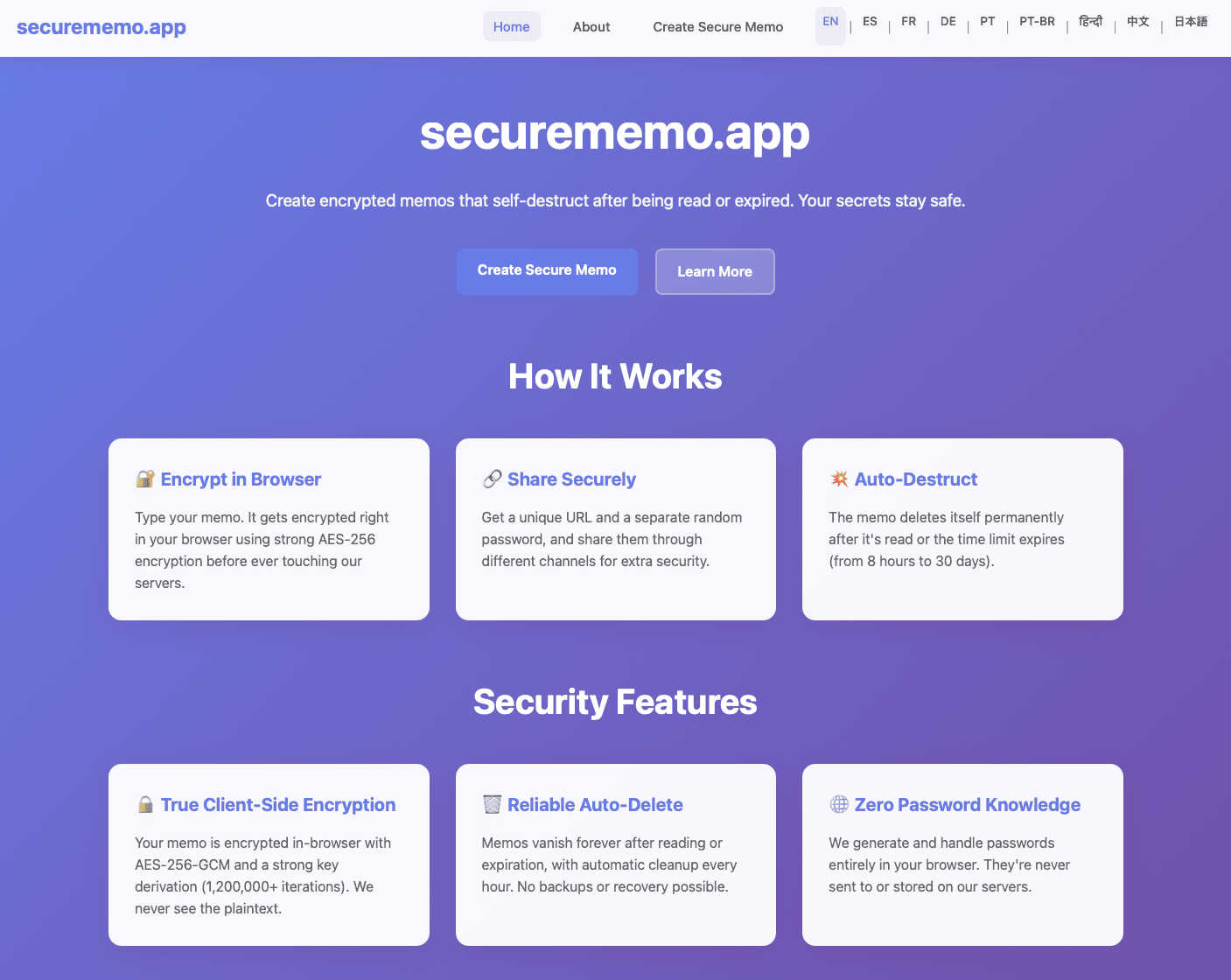
Securememo.app utilizes client-side encryption to protect your notes before they leave your browser. This means that only you can access your data, as it is encrypted on your device, ensuring that even the service provider cannot read your content.
Self-Destructing Notes
The self-destructing notes feature allows users to create memos that automatically delete themselves after being viewed. This ensures that sensitive information does not linger longer than necessary, minimizing the risk of unauthorized access.
Unique Link and Password Generation
When sharing a memo, users can generate a unique link paired with a strong, randomly created password. This adds an extra layer of security, as the password is generated on your device and never transmitted to Securememo.app, maintaining complete confidentiality.
No Account Required
Securememo.app does not require users to create an account, prioritizing user anonymity and simplifying the process. This feature makes it incredibly easy for anyone to start using the service without the burden of remembering login credentials.
Use Cases
RocketShare
Legal Document Exchange
Law firms and legal professionals routinely handle highly confidential case files, client communications, and evidentiary materials. RocketShare enables the secure transmission of these sensitive documents with the guarantee that attorney-client privilege is technically upheld. The zero-knowledge model ensures that only the intended sender and recipient can ever access the content, providing a secure channel that mitigates risk in a heavily regulated industry.
Healthcare Data and Patient Record Sharing
Healthcare providers, researchers, and insurers need to share patient records, lab results, and medical imaging while strictly complying with regulations like HIPAA. RocketShare's encryption and EU data residency offer a secure framework for transferring Protected Health Information (PHI). The local P2P sharing option is particularly valuable for sending large diagnostic files directly between trusted parties without intermediary storage.
Creative Media Delivery
Photographers, videographers, and graphic designers can deliver high-resolution galleries, video edits, and design assets to clients with confidence that their intellectual property is protected from piracy or unauthorized viewing. The platform supports files of any size, making it perfect for large raw photo sets or 4K video files, while ensuring the creative work remains private and controlled until officially delivered to the paying client.
Confidential Corporate Collaboration
Teams working on confidential projects—such as merger and acquisition details, unreleased financial reports, proprietary research, or upcoming product designs—require a secure collaboration channel. RocketShare allows team members across departments or external partners to share drafts, feedback, and final versions securely, ensuring that critical business intelligence and trade secrets do not leak through the file-sharing process itself.
securememo.app
Sharing Sensitive Information
Individuals can use Securememo.app to share sensitive information, such as financial records or personal details, without the fear of interception. The self-destructing feature ensures that shared data is only accessible for a limited time.
Business Communication
Businesses can utilize Securememo.app to communicate confidential strategies or proprietary information among team members. The secure sharing of notes helps protect intellectual property from potential leaks.
Temporary Note Storage
For users who need a temporary storage solution for notes, Securememo.app provides a way to jot down ideas or reminders that are not meant to be stored long-term. This is especially useful for brainstorming sessions or project planning.
Secure Password Sharing
Users can securely share passwords and login information with colleagues or friends. By utilizing the unique link and password generation feature, they can ensure that access is tightly controlled and monitored.
Overview
About RocketShare
RocketShare is a paradigm-shifting secure file-sharing platform built upon an uncompromising foundation of user privacy. It transcends the limitations of conventional cloud storage by ensuring that the confidentiality of your data is absolute and mathematically guaranteed. The platform's core innovation lies in its implementation of a true zero-knowledge encryption model. This means that every file is encrypted directly on the user's device before any data is transmitted. The encryption keys remain solely in the possession of the user, often embedded within the shareable link itself. Consequently, RocketShare's servers only ever process and store unintelligible, encrypted data, making it technically impossible for the company, its employees, or any third-party interceptors to access the original file content. This enterprise-grade security architecture is delivered through an elegantly simple, self-serve interface, democratizing top-tier data protection for a global audience. RocketShare caters to a diverse spectrum of users, from individual professionals like photographers and lawyers to entire organizations in healthcare, finance, and creative industries, all of whom require a seamless method to exchange sensitive information without compromising control. With versatile sharing options including cloud-based transfers and direct local peer-to-peer connections, coupled with secure data residency within the European Union, RocketShare represents the definitive solution for anyone who prioritizes effortless usability alongside world-class, private-by-design security.
About securememo.app
Securememo.app is a cutting-edge memo service designed with a strong emphasis on privacy and security for individuals and organizations seeking to protect their sensitive information. By enabling users to create and share encrypted, self-destructing notes directly from any web browser, Securememo.app prioritizes confidentiality in an increasingly digital world. The platform employs client-side encryption, ensuring that all data is encrypted within the user's browser before it ever reaches the servers, making it completely inaccessible to unauthorized parties. Ideal for anyone needing to share private information—such as passwords, personal notes, or confidential work-related data—Securememo.app offers a seamless experience without the need for user accounts, enhancing anonymity and ease of use. With support for over 20 languages, it caters to a diverse global audience, allowing users to communicate securely in their preferred language. This combination of advanced security features and user-friendly design establishes Securememo.app as a vital tool for anyone concerned about data privacy.
Frequently Asked Questions
RocketShare FAQ
How does zero-knowledge encryption work on RocketShare?
Zero-knowledge encryption means your files are encrypted on your own device using a unique key before they are uploaded. This key is never sent to RocketShare's servers; it stays with you, often as part of the share link. Therefore, the data stored on our servers is encrypted and unreadable to anyone, including RocketShare employees. Only someone with the exact link (which contains the key) can decrypt and download the original file, ensuring total privacy.
What is the difference between Cloud Share and Local Share?
Cloud Share involves uploading your encrypted file to RocketShare's secure servers in the EU. The recipient can then download it anytime via a link. Local Share (peer-to-peer) creates a direct, encrypted connection between your device and the recipient's device for the transfer. The file never passes through or is stored on our servers, which can be faster for large files and offers an even higher degree of privacy, though it requires both parties to be online simultaneously.
Where are my files stored, and what laws protect them?
Files shared via the Cloud Share option are stored on secure servers located within the European Union. This means the storage and processing of your data fall under the jurisdiction of the EU's robust data protection laws, primarily the General Data Protection Regulation (GDPR). These laws provide strong rights for individuals and impose strict obligations on data processors regarding security, transparency, and lawful handling of information.
Is there a file size limit, and do I need an account?
A core principle of RocketShare is simplicity and accessibility. You can start sharing files immediately without creating an account or providing a credit card. The platform is designed to handle files of any size, removing the frustrating limitations imposed by many other email or free file-sharing services. This makes it equally suitable for a small document or a massive video project archive.
securememo.app FAQ
How does Securememo.app ensure the privacy of my notes?
Securememo.app ensures privacy through client-side encryption, meaning your notes are encrypted on your device before they reach the servers, making them inaccessible to anyone but you.
Can I recover my notes after they self-destruct?
No, once a note self-destructs, it cannot be recovered. This feature is designed to enhance security by ensuring that sensitive information does not remain available after it has been viewed.
Is there a limit to how many notes I can create?
Securememo.app does not impose specific limits on the number of notes you can create. Users can generate as many notes as necessary, provided they adhere to the service's privacy and security guidelines.
Can I share notes with multiple users?
Yes, you can share notes with multiple users by generating unique links and passwords for each recipient. This feature allows you to control who has access to your sensitive information.