
Perkoon vs securememo.app
Side-by-side comparison to help you choose the right tool.

Perkoon enables free, unlimited peer-to-peer file transfers without signup, ensuring your files stay private and secure.
Last updated: March 4, 2026
securememo.app
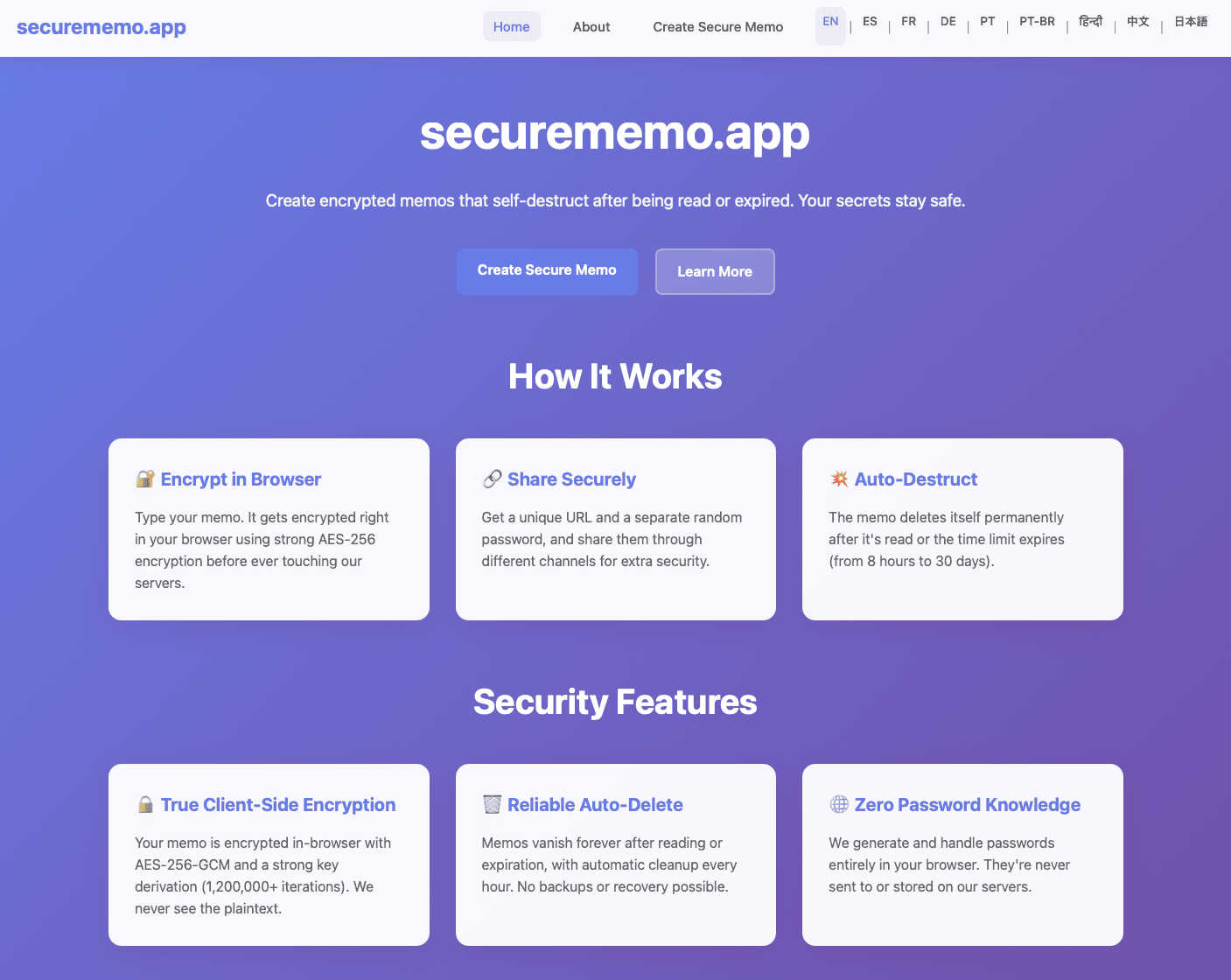
Securememo.app offers a privacy-focused memo service with client-side encryption, ensuring your notes remain truly se...
Visual Comparison
Perkoon

securememo.app
Feature Comparison
Perkoon
Peer-to-Peer (P2P) File Transfer
The P2P file transfer feature allows users to send files directly between browsers without any intermediary servers. This means that there are no size limits, no accounts needed, and the process is entirely free. It leverages a decentralized network that ensures privacy, as data transmitted never touches Perkoon’s servers.
Encrypted Cloud Storage
For users needing to send files to recipients who are offline, Perkoon offers a secure cloud storage solution. This feature encrypts files while they are held on the servers, ensuring that only the intended recipient can access them. The paid service for cloud storage is transparent, as it solely covers the operational costs associated with maintaining the servers.
AI Integration
Perkoon stands out with its native design for AI interaction, allowing AI agents to communicate directly with the service without needing to scrape the interface. This innovative feature makes it easier for machines to utilize Perkoon for automated file transfers, enhancing productivity for users who leverage AI in their workflows.
Referral Program
Perkoon incentivizes its users through a referral program that rewards both the referrer and the new user with additional storage benefits. By sharing a unique link, users can invite friends to join, and once the new user engages with the platform, both parties receive bonuses, fostering a community-driven approach to file sharing.
securememo.app
Client-Side Encryption
Securememo.app utilizes client-side encryption to protect your notes before they leave your browser. This means that only you can access your data, as it is encrypted on your device, ensuring that even the service provider cannot read your content.
Self-Destructing Notes
The self-destructing notes feature allows users to create memos that automatically delete themselves after being viewed. This ensures that sensitive information does not linger longer than necessary, minimizing the risk of unauthorized access.
Unique Link and Password Generation
When sharing a memo, users can generate a unique link paired with a strong, randomly created password. This adds an extra layer of security, as the password is generated on your device and never transmitted to Securememo.app, maintaining complete confidentiality.
No Account Required
Securememo.app does not require users to create an account, prioritizing user anonymity and simplifying the process. This feature makes it incredibly easy for anyone to start using the service without the burden of remembering login credentials.
Use Cases
Perkoon
Personal File Sharing
Individuals can utilize Perkoon to share large files with friends or family without the hassle of email size restrictions or complicated sign-up processes. Whether sharing vacation photos or important documents, Perkoon makes personal file sharing seamless and efficient.
Business Collaboration
In a professional setting, teams can use Perkoon to exchange large presentations, reports, or design files. The P2P transfer ensures that collaboration is quick and secure, making it an ideal tool for businesses that prioritize efficiency and privacy.
Creative Projects
Artists and creators can benefit from Perkoon by sharing large multimedia files, such as video footage or high-resolution images, with collaborators. The ability to send files without limitations allows for fluid creative workflows and real-time collaboration.
Automated File Transfers
For users employing AI in their operations, Perkoon’s integration allows for automated file transfers directly from AI agents. This application can streamline processes in various industries where files need to be shared frequently and efficiently, such as in data analysis or machine learning projects.
securememo.app
Sharing Sensitive Information
Individuals can use Securememo.app to share sensitive information, such as financial records or personal details, without the fear of interception. The self-destructing feature ensures that shared data is only accessible for a limited time.
Business Communication
Businesses can utilize Securememo.app to communicate confidential strategies or proprietary information among team members. The secure sharing of notes helps protect intellectual property from potential leaks.
Temporary Note Storage
For users who need a temporary storage solution for notes, Securememo.app provides a way to jot down ideas or reminders that are not meant to be stored long-term. This is especially useful for brainstorming sessions or project planning.
Secure Password Sharing
Users can securely share passwords and login information with colleagues or friends. By utilizing the unique link and password generation feature, they can ensure that access is tightly controlled and monitored.
Overview
About Perkoon
Perkoon is a revolutionary file transfer service designed for individuals and businesses seeking a straightforward, efficient, and hassle-free way to share files. It prioritizes user privacy and simplicity, allowing users to move files from one point to another without the burdens of artificial limits, sign-ups, or data exploitation. At its core, Perkoon offers two primary methods for file transfer. The first is its flagship free peer-to-peer (P2P) service, which facilitates direct file exchanges between browsers when both parties are online. This unique approach eliminates size restrictions and maintains user privacy, as files never pass through a central server. For instances where recipients are offline, Perkoon provides a paid cloud storage solution that ensures encrypted file holding, covering the operational costs of server maintenance. What distinguishes Perkoon is its native design for the AI age, equipped with built-in automation tools and a simple command-line interface (CLI) for seamless interaction with AI agents. Perkoon is not just a tool; it is a commitment to user-centric file transfers, ensuring that your data remains yours, always.
About securememo.app
Securememo.app is a cutting-edge memo service designed with a strong emphasis on privacy and security for individuals and organizations seeking to protect their sensitive information. By enabling users to create and share encrypted, self-destructing notes directly from any web browser, Securememo.app prioritizes confidentiality in an increasingly digital world. The platform employs client-side encryption, ensuring that all data is encrypted within the user's browser before it ever reaches the servers, making it completely inaccessible to unauthorized parties. Ideal for anyone needing to share private information—such as passwords, personal notes, or confidential work-related data—Securememo.app offers a seamless experience without the need for user accounts, enhancing anonymity and ease of use. With support for over 20 languages, it caters to a diverse global audience, allowing users to communicate securely in their preferred language. This combination of advanced security features and user-friendly design establishes Securememo.app as a vital tool for anyone concerned about data privacy.
Frequently Asked Questions
Perkoon FAQ
Is Perkoon really free?
Yes, Perkoon offers a free peer-to-peer file transfer service that incurs no costs for users. This is possible because the P2P technology does not require central server resources, ensuring that the service remains free forever.
How does cloud storage work?
For users sending files to offline recipients, Perkoon holds the files in encrypted cloud storage. This feature is paid, as it covers the costs associated with server maintenance, providing a secure way to store files until the recipient is available.
Can I use Perkoon on any browser?
Perkoon works seamlessly on Chrome, Edge, and Brave browsers without limitations. However, users on Firefox and Safari may experience certain restrictions due to browser-specific constraints.
How does the referral program function?
When you share your unique referral link and someone joins Perkoon through it, both you and the new user receive additional storage. Furthermore, if the new user transfers 1GB of files within the first week, both parties unlock even more storage, creating a rewarding cycle of sharing and benefits.
securememo.app FAQ
How does Securememo.app ensure the privacy of my notes?
Securememo.app ensures privacy through client-side encryption, meaning your notes are encrypted on your device before they reach the servers, making them inaccessible to anyone but you.
Can I recover my notes after they self-destruct?
No, once a note self-destructs, it cannot be recovered. This feature is designed to enhance security by ensuring that sensitive information does not remain available after it has been viewed.
Is there a limit to how many notes I can create?
Securememo.app does not impose specific limits on the number of notes you can create. Users can generate as many notes as necessary, provided they adhere to the service's privacy and security guidelines.
Can I share notes with multiple users?
Yes, you can share notes with multiple users by generating unique links and passwords for each recipient. This feature allows you to control who has access to your sensitive information.