
NB2 Hub vs Shrinkpad
Side-by-side comparison to help you choose the right tool.

NB2 Hub
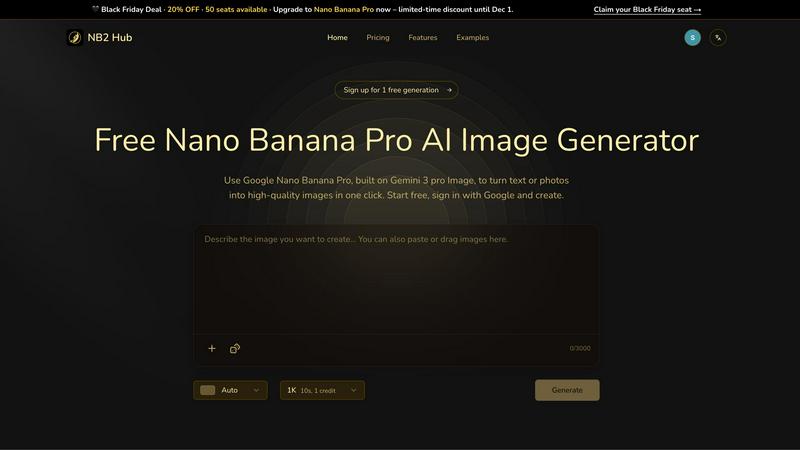
Effortlessly transform text and photos into stunning 4K images with the Nano Banana Pro AI Image Generator.
Last updated: March 1, 2026

Shrinkpad
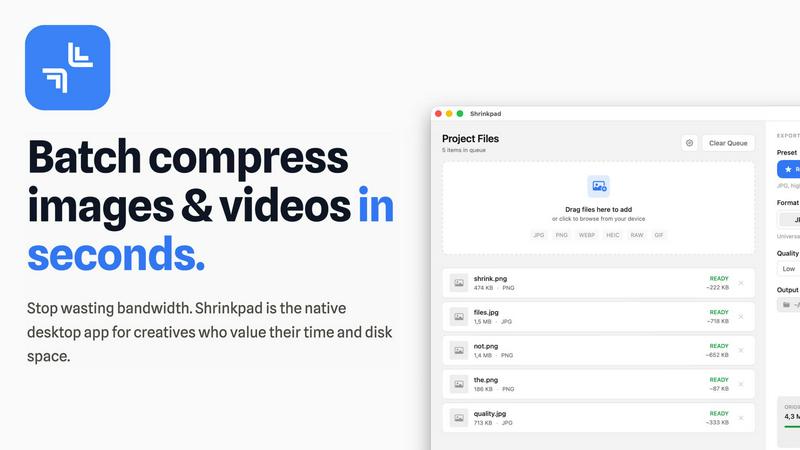
Effortlessly batch compress images and videos on Mac, optimizing your creative assets in seconds with Shrinkpad.
Last updated: February 28, 2026
Visual Comparison
NB2 Hub
Shrinkpad
Feature Comparison
NB2 Hub
Faithful text + image remix
NB2 Hub's faithful text and image remix feature allows users to upload reference images alongside a brief prompt. The system intelligently preserves the layout and lighting characteristics of the original image while enhancing details and textures. This capability is ideal for refining UI designs, creating product shots, and crafting intricate comic panels, ensuring that the visual output meets high standards of quality.
Crisp text inside images
One of the standout features of NB2 Hub is its ability to generate clear and legible text within images. Users can create everything from headlines to detailed paragraphs, accommodating multilingual typography without any blurriness or halo effects. This feature is particularly useful for creating visually appealing posters, advertisements, and social media covers, where text clarity is crucial for engagement.
Grounded to real-world facts
NB2 Hub excels in visualizing accurate data and real-world elements by leveraging extensive world knowledge and retrieval grounding. This feature allows users to generate images that are not only visually captivating but also truthful and informative. It is particularly beneficial for crafting educational infographics and other content that requires a reliable representation of facts and styles.
Multi-reference fusion & identity consistency
With the multi-reference fusion feature, NB2 Hub enables users to combine various input elements while maintaining consistency in characters, products, and branding across multiple shots. This is especially advantageous for storyboarding and creating multi-angle product sets, as it ensures that each visual remains coherent and aligned with the overall narrative or branding strategy.
Shrinkpad
Intelligent Compression
Shrinkpad features an intelligent compression algorithm that analyzes the visual complexity of each file, applying the optimal compression ratio without introducing artifacts. This ensures that users do not have to sacrifice quality for file size reduction.
Unlimited Batching
With Shrinkpad, users can process thousands of media files simultaneously without experiencing crashes. This feature is particularly beneficial for those working with large projects, as it allows for efficient handling of extensive queues, unlike many web-based tools.
One-Drop Import
The one-drop import feature simplifies the workflow by allowing users to drag and drop entire folders containing images and videos. Shrinkpad automatically detects all supported files within the folder, streamlining the compression process and saving valuable time.
Privacy-First Approach
Shrinkpad prioritizes user privacy by ensuring that all processing occurs locally on the user's Mac. This means that no files are uploaded to the cloud, giving users peace of mind that their sensitive assets are never exposed to external servers.
Use Cases
NB2 Hub
Branding campaigns
NB2 Hub is an invaluable tool for marketers running branding campaigns. Its ability to generate high-quality visuals with consistent branding elements helps create a cohesive marketing message across various platforms. Users can produce visually striking ads and promotional materials that resonate with their target audience.
Educational infographics
Educators and content creators can utilize NB2 Hub to design educational infographics that effectively communicate complex information. The platform's grounding in real-world facts ensures that the visuals are not only engaging but also accurate, making it easier for learners to grasp essential concepts.
Product mockups
Designers can leverage NB2 Hub to create realistic product mockups that showcase their designs in a visually appealing manner. By applying logos and branding elements to 3D objects, users can quickly produce promotional materials that highlight their products in an attractive context.
Artistic projects
Artists can use NB2 Hub to explore creative ideas and visualize their concepts. The platform's high-resolution image generation capabilities allow for intricate artistic imagery, making it a perfect companion for those looking to push the boundaries of their creative expression.
Shrinkpad
Streamlined Creative Projects
Photographers and designers can leverage Shrinkpad to quickly compress large batches of images and videos, allowing them to focus more on the creative aspects of their projects instead of wasting time on file management.
Enhanced Website Performance
Web developers can use Shrinkpad to reduce the size of images and videos before uploading them to their websites. This optimization leads to faster load times and improved user experience, which can significantly impact SEO rankings and user retention.
Efficient Media Management
Content creators dealing with extensive collections of media files benefit from Shrinkpad's ability to batch process and compress multiple file types. This feature helps in organizing and managing assets more effectively, ensuring that they are always ready for use.
Simplified Asset Exports
Artists and designers using software like Figma or Photoshop can save time by exporting all assets at once. Shrinkpad automatically takes care of compression and renaming, making it easier to manage multiple output files without manual intervention.
Overview
About NB2 Hub
NB2 Hub is an innovative online platform designed to revolutionize the way creative professionals, marketers, and content creators generate high-quality visuals. Utilizing the advanced capabilities of the Google Nano Banana Pro, built on the cutting-edge Gemini 3 pro Image framework, NB2 Hub allows users to seamlessly transform text and images into stunning visuals with just one click. This user-friendly tool is perfect for anyone needing efficient image generation, offering a simple sign-in process via Google that gets users started quickly. The platform is particularly valuable for projects that demand high fidelity and character consistency, such as user interface design, advertising campaigns, and content creation efforts. With its capability to produce images in breathtaking 4K resolution, NB2 Hub enhances creative workflows, bridging the gap between imaginative concepts and visual execution. Whether you are developing educational infographics, crafting branding materials, or exploring artistic imagery, NB2 Hub is your essential partner for modern content creation.
About Shrinkpad
Shrinkpad is a cutting-edge batch compression tool specifically designed for macOS users who require efficient handling of large media files. This powerful native desktop application caters to creatives such as photographers, designers, and content creators by allowing them to compress images and videos swiftly while maintaining their quality and privacy. Shrinkpad operates locally on the user's device, eliminating the need for cloud uploads or external servers, which means that sensitive media files remain secure. Users can achieve a remarkable reduction in file sizes by up to 90%, optimizing storage space and improving workflow. With seamless support for over 50 file formats and customizable settings, Shrinkpad is an essential tool for professionals seeking to streamline their creative processes and eliminate the hassle of managing oversized media files.
Frequently Asked Questions
NB2 Hub FAQ
What types of images can I generate with NB2 Hub?
NB2 Hub allows users to generate a wide variety of images, including high-quality visuals for branding campaigns, educational infographics, product mockups, and artistic projects. The platform's advanced features enable detailed customization to fit diverse creative needs.
Is NB2 Hub easy to use for beginners?
Absolutely! NB2 Hub is designed with user-friendliness in mind. With a simple Google sign-in process and intuitive interface, even beginners can quickly learn how to generate stunning visuals with minimal effort.
What is the maximum resolution for images generated by NB2 Hub?
NB2 Hub supports image generation in stunning 4K resolution. This high-quality output ensures that your visuals are sharp and vibrant, making them suitable for both digital and print applications.
Can I use NB2 Hub for commercial purposes?
Yes, NB2 Hub can be used for commercial purposes, including marketing campaigns and product branding. Users should review the terms of service for any specific licensing information and to ensure compliance with usage guidelines.
Shrinkpad FAQ
Can I use Shrinkpad for free?
Yes, Shrinkpad offers a free starter version with essential tools for casual use, including standard compression for common formats.
What file formats does Shrinkpad support?
Shrinkpad supports over 50 file formats, including JPG, PNG, WEBP, AVIF, MP4, and MOV, making it versatile for various media types.
Does Shrinkpad support video compression?
Absolutely, Shrinkpad includes strong video compression capabilities, allowing users to reduce the size of video files efficiently.
How many files can I process at once?
With Shrinkpad, users can process an unlimited number of files in a single batch, making it highly efficient for large-scale projects and workflows.
Alternatives
NB2 Hub Alternatives
NB2 Hub is an innovative online tool that belongs to the image and photo generation category, utilizing the advanced capabilities of the Google Nano Banana Pro AI Image Generator. It empowers users to effortlessly transform text and images into stunning visuals, primarily catering to creative professionals and marketers who seek high-quality image generation for various projects. Users often seek alternatives to NB2 Hub due to factors such as pricing, specific feature sets, and compatibility with different platforms or workflows. When exploring alternatives, it's essential to consider aspects like user experience, image quality, and the range of creative tools available. Identifying solutions that align with your unique creative needs will help ensure a seamless transition and continued productivity in your visual projects.
Shrinkpad Alternatives
Shrinkpad is a batch compression tool designed specifically for macOS users, enabling efficient compression of images and videos while maintaining privacy and quality. As a native desktop application, it stands out in its category by allowing users to manage large media files without the overhead of cloud services, ensuring that all data remains securely on their devices. Users often seek alternatives to Shrinkpad for various reasons, including pricing, feature sets that better meet their needs, or compatibility with different operating systems. When choosing an alternative, it is essential to consider factors such as ease of use, the range of supported file formats, the balance between compression level and quality, and whether the tool operates locally to ensure data security.