
Nano AI vs Shrinkpad
Side-by-side comparison to help you choose the right tool.

Nano AI
Nano AI is your all-in-one creative platform for ultra-fast AI image generation, editing, and transformation.
Last updated: February 28, 2026

Shrinkpad
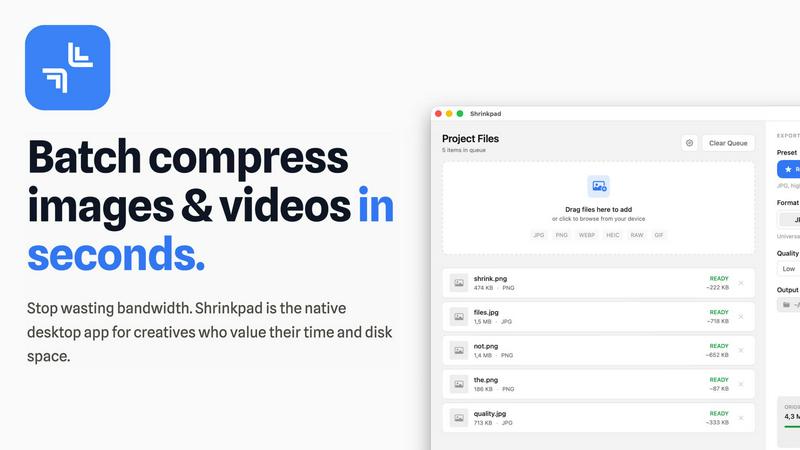
Effortlessly batch compress images and videos on Mac, optimizing your creative assets in seconds with Shrinkpad.
Last updated: February 28, 2026
Visual Comparison
Nano AI

Shrinkpad
Feature Comparison
Nano AI
The Nano Banana AI Engine
The proprietary Nano Banana model is the powerhouse behind Nano AI, delivering flash-speed inference and high-fidelity results. This advanced AI engine is designed to honor layered instructions and complex stylistic cues without requiring extensive prompt engineering. It interprets casual descriptions accurately, allowing users to generate precisely tailored visuals in under ten seconds, maintaining creative momentum and enabling rapid experimentation and refinement from a simple, single-tap interface.
All-in-One Creative Workspace
Nano AI consolidates the entire creative pipeline into one intuitive environment. It seamlessly integrates core functionalities like text-to-image generation, image-to-image transformation, and a suite of utility tools such as background removal and image conversion. This unified approach eliminates app-switching fatigue, ensuring that every step from the initial prompt to final export happens in a continuous, efficient flow, keeping projects organized and momentum high.
Deep Style Tuning & Magic Edit
Move beyond generic presets with granular creative control. Deep Style Tuning allows users to dictate specific lighting, texture, and composition simply by describing the desired vibe, which the Nano Banana model faithfully executes. Complementing this is the Magic Edit feature, which lets users inpaint, outpaint, and reimagine specific regions of an image using natural language commands, enabling precise edits like changing object colors or expanding backgrounds without complex software.
Upcoming Professional Tools (4K Upscaling, Prompt Labs)
Nano AI is built for the future with professional-grade features on the horizon. The announced 4K Neural Upscaler goes beyond simple sharpening, intelligently hallucinating believable details like skin pores and fabric textures to transform drafts into billboard-ready assets. Furthermore, upcoming Prompt Labs, Galleries, and Editors are designed to keep every experiment, review, and version in one shared, collaborative space, streamlining team-based workflows.
Shrinkpad
Intelligent Compression
Shrinkpad features an intelligent compression algorithm that analyzes the visual complexity of each file, applying the optimal compression ratio without introducing artifacts. This ensures that users do not have to sacrifice quality for file size reduction.
Unlimited Batching
With Shrinkpad, users can process thousands of media files simultaneously without experiencing crashes. This feature is particularly beneficial for those working with large projects, as it allows for efficient handling of extensive queues, unlike many web-based tools.
One-Drop Import
The one-drop import feature simplifies the workflow by allowing users to drag and drop entire folders containing images and videos. Shrinkpad automatically detects all supported files within the folder, streamlining the compression process and saving valuable time.
Privacy-First Approach
Shrinkpad prioritizes user privacy by ensuring that all processing occurs locally on the user's Mac. This means that no files are uploaded to the cloud, giving users peace of mind that their sensitive assets are never exposed to external servers.
Use Cases
Nano AI
Rapid Social Media & Marketing Content Creation
Marketing teams and social media managers can leverage Nano AI to produce a high volume of engaging, on-brand visuals at unprecedented speed. From generating concept imagery for a new campaign to creating multiple asset variations for A/B testing, the platform's fast iteration cycle allows for quick adaptation to trends and feedback, ensuring a consistent and timely content pipeline across all digital channels.
Conceptual Design & Mockup Prototyping
Designers and product developers can use Nano AI to quickly visualize concepts and create mockups. Whether translating a text brief into a visual mood board, iterating on product design aesthetics, or generating scene concepts for games and films, the platform accelerates the early creative stages, allowing teams to explore more ideas and arrive at compelling visual directions faster without manual illustration.
Creative Exploration & Personal Art Projects
Individual artists and hobbyists can utilize Nano AI as a boundless sandbox for creativity. It empowers users to experiment with different artistic styles, bring imaginative scenes to life from text descriptions, and transform personal photos into watercolors, sketches, or manga art. The low barrier to entry and fast results make it an ideal tool for learning, inspiration, and personal artistic expression.
Team-Based Collaborative Campaign Production
For agencies and in-house creative teams, Nano AI provides a shared ecosystem for campaign production. Team members can generate assets, store them in shared galleries, use advanced editing tools to refine details, and prepare final exports—all within a unified platform. This collaborative pipeline reduces version control issues and communication overhead, streamlining the entire process from client brief to final delivery.
Shrinkpad
Streamlined Creative Projects
Photographers and designers can leverage Shrinkpad to quickly compress large batches of images and videos, allowing them to focus more on the creative aspects of their projects instead of wasting time on file management.
Enhanced Website Performance
Web developers can use Shrinkpad to reduce the size of images and videos before uploading them to their websites. This optimization leads to faster load times and improved user experience, which can significantly impact SEO rankings and user retention.
Efficient Media Management
Content creators dealing with extensive collections of media files benefit from Shrinkpad's ability to batch process and compress multiple file types. This feature helps in organizing and managing assets more effectively, ensuring that they are always ready for use.
Simplified Asset Exports
Artists and designers using software like Figma or Photoshop can save time by exporting all assets at once. Shrinkpad automatically takes care of compression and renaming, making it easier to manage multiple output files without manual intervention.
Overview
About Nano AI
Nano AI is a revolutionary, all-in-one creative platform engineered to unify the entire visual content workflow from conception to completion. It serves as a single, streamlined workspace where creators, marketers, designers, and teams can draft, edit, refine, and share stunning visuals without the friction of switching between disparate, specialized tools. At the heart of the platform is the proprietary Nano Banana model, a powerful AI engine designed for remarkably fast and high-fidelity results. The core value proposition is dramatic acceleration: users can move from a fleeting idea to a production-ready asset in minutes, not hours. With sub-10-second generation times for both text-to-image and image-to-image tasks, Nano AI keeps you immersed in the creative flow, enabling rapid iteration and slashing time-to-market. It caters to a broad spectrum of users, from individual creators seeking to bring personal visions to life to professional teams requiring a collaborative, efficient pipeline for generating commercial-grade visuals. The platform promises a cohesive experience with shared galleries, advanced editing tools, and upcoming professional features like 4K neural upscaling, making it a comprehensive solution for modern visual content creation.
About Shrinkpad
Shrinkpad is a cutting-edge batch compression tool specifically designed for macOS users who require efficient handling of large media files. This powerful native desktop application caters to creatives such as photographers, designers, and content creators by allowing them to compress images and videos swiftly while maintaining their quality and privacy. Shrinkpad operates locally on the user's device, eliminating the need for cloud uploads or external servers, which means that sensitive media files remain secure. Users can achieve a remarkable reduction in file sizes by up to 90%, optimizing storage space and improving workflow. With seamless support for over 50 file formats and customizable settings, Shrinkpad is an essential tool for professionals seeking to streamline their creative processes and eliminate the hassle of managing oversized media files.
Frequently Asked Questions
Nano AI FAQ
What makes Nano AI different from other AI image generators?
Nano AI distinguishes itself as an all-in-one creative platform, not just a standalone image generator. While its core Nano Banana engine delivers exceptionally fast and high-quality generations, its true value is in unifying the entire workflow—from generation and style tuning to editing, organizing, and sharing—within a single, seamless workspace. This integration eliminates the need to juggle multiple apps, dramatically improving efficiency for both individuals and teams.
How fast is the image generation with Nano Banana?
The Nano Banana AI engine is engineered for speed, consistently delivering results for both text-to-image and image-to-image tasks in under ten seconds. This "flash generation" capability is central to the platform's design, as it allows users to stay in the creative flow, iterate rapidly on ideas, and produce visuals almost as fast as they can conceptualize them, significantly accelerating project timelines.
Do I need technical expertise or prompt engineering skills to use Nano AI?
No, Nano AI is designed to be accessible. The Nano Banana model is particularly adept at understanding casual, layered descriptions without requiring technical prompt engineering. The interface is built around a simple, guided experience that removes complex manual setup. This allows anyone, from beginners to professionals, to create high-quality visuals quickly by focusing on their creative intent rather than technical parameters.
What are the upcoming features like 4K Neural Upscaling?
The upcoming 4K Neural Upscaler is a professional-grade tool designed to transform lower-resolution AI-generated images into high-resolution production assets. Unlike simple scalers, it intelligently adds believable, detailed textures—such as fine skin details or fabric weave—making images suitable for large-format printing or high-definition displays. This, along with promised Prompt Labs and enhanced Editors, will further solidify Nano AI as a complete end-to-end solution.
Shrinkpad FAQ
Can I use Shrinkpad for free?
Yes, Shrinkpad offers a free starter version with essential tools for casual use, including standard compression for common formats.
What file formats does Shrinkpad support?
Shrinkpad supports over 50 file formats, including JPG, PNG, WEBP, AVIF, MP4, and MOV, making it versatile for various media types.
Does Shrinkpad support video compression?
Absolutely, Shrinkpad includes strong video compression capabilities, allowing users to reduce the size of video files efficiently.
How many files can I process at once?
With Shrinkpad, users can process an unlimited number of files in a single batch, making it highly efficient for large-scale projects and workflows.
Alternatives
Nano AI Alternatives
Nano AI is a comprehensive creative platform specializing in ultra-fast AI image generation and editing. It falls within the rapidly evolving category of all-in-one visual content creation tools, designed to streamline the entire workflow from initial concept to final asset. Users often explore alternatives for various reasons, including budget constraints, specific feature requirements not yet offered, or a need for integration with different software ecosystems and collaborative environments. When evaluating other platforms, it's crucial to consider your primary creative needs. Key factors include the speed and quality of AI image generation, the depth of editing and control features like inpainting, the platform's suitability for individual versus team use, and the overall cost structure. The ideal alternative should align with your workflow, whether you prioritize rapid prototyping, granular artistic control, or seamless collaboration. --- FAQ_SEPARATOR--- [
{"question": "What is Nano AI?", "answer": "Nano AI is an all-in-one creative platform that provides ultra-fast AI image generation, editing, and transformation within a single, streamlined workspace."},
{"question": "Who is Nano AI for?", "answer": "It is designed for creators, marketers, designers, and teams who need to quickly produce and refine commercial-grade visuals without switching between multiple tools."},
{"question": "What are the main features of Nano AI?", "answer": "Its core features include flash-speed AI generation in under ten seconds, granular style control, and a Magic Edit suite for advanced inpainting and outpainting capabilities."},
{"question": "Why choose Nano AI?", "answer": "Nano AI eliminates workflow friction by unifying the entire visual content process, enabling rapid iteration from idea to production-ready asset in minutes."}
]
Shrinkpad Alternatives
Shrinkpad is a batch compression tool designed specifically for macOS users, enabling efficient compression of images and videos while maintaining privacy and quality. As a native desktop application, it stands out in its category by allowing users to manage large media files without the overhead of cloud services, ensuring that all data remains securely on their devices. Users often seek alternatives to Shrinkpad for various reasons, including pricing, feature sets that better meet their needs, or compatibility with different operating systems. When choosing an alternative, it is essential to consider factors such as ease of use, the range of supported file formats, the balance between compression level and quality, and whether the tool operates locally to ensure data security.