
Hush Touch | Voice-to-Text for MacOS vs Marauder Bot
Side-by-side comparison to help you choose the right tool.

Hush Touch | Voice-to-Text for MacOS
Hush Touch is an offline voice-to-text app for macOS that learns your vocabulary and improves accuracy with every use.
Last updated: February 28, 2026
Marauder Bot
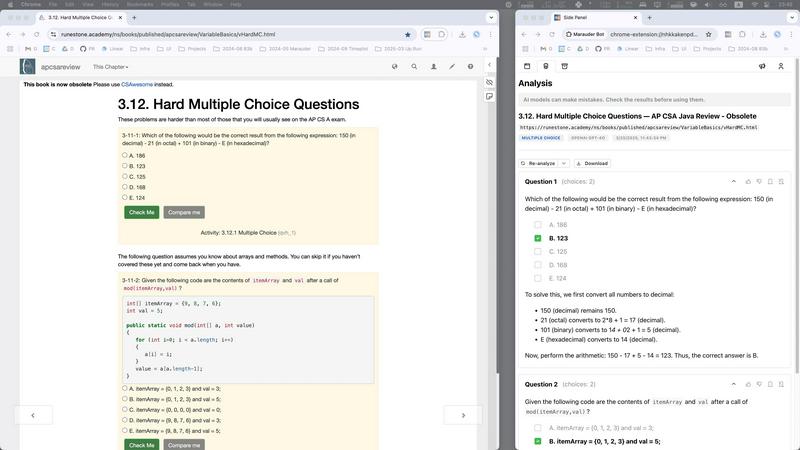
Marauder Bot is a stealth Chrome extension that instantly solves online technical interview questions to save you time.
Last updated: March 1, 2026
Visual Comparison
Hush Touch | Voice-to-Text for MacOS

Marauder Bot
Feature Comparison
Hush Touch | Voice-to-Text for MacOS
Dual-Engine Recognition
Hush Touch employs a dual-engine recognition system that combines the strengths of DictationTranscriber and SFSpeechRecognizer. This innovative approach ensures that natural speech flow and accurate punctuation are maintained while also accommodating a custom vocabulary tailored to the user’s specific needs. The final touch of Apple Intelligence further refines the output, delivering superior transcription results.
Custom Vocabulary
The app features a robust custom vocabulary capability that allows users to add up to 500 specific terms tailored to their unique needs. This includes technical jargon, brand names, and other specialized language. Hush Touch learns and adapts to corrections made by the user, ensuring that it becomes increasingly accurate in recognizing and transcribing the user's preferred vocabulary over time.
Smart Text Processing
Hush Touch offers smart text processing features that significantly enhance the dictation experience. It automatically removes filler words, corrects common mistakes, and formats text with ease, including numbered lists and voice snippets for frequently used phrases. This real-time processing occurs entirely on-device, allowing for a streamlined and efficient dictation experience without the need for internet connectivity.
Context Modes & Hands-Free Dictation
The app includes multiple context modes, such as General, Email, Code, and Notes, which adapt the dictation experience to suit different writing scenarios. Users can initiate hands-free dictation by simply saying "Hey Siri, start touch," allowing for an uninterrupted workflow. Automatic text insertion occurs after two seconds of silence, and users can even send messages by voice using customizable commands, enhancing overall convenience.
Marauder Bot
Multi-Model AI Analysis
Marauder Bot is powered by a suite of the most advanced AI models, including OpenAI GPT-5.2, Claude Sonnet 4.5, and Gemini 3 Pro. This multi-model approach ensures robust, accurate, and nuanced analysis of technical content. The system intelligently leverages the strengths of each model to provide optimal solutions, comprehensive test cases, detailed complexity analysis for algorithms, and well-reasoned explanations for multiple-choice questions, guaranteeing high-quality assistance across a wide spectrum of technical challenges.
Advanced Stealth Mode
Engineered for discretion, the Stealth Mode allows users to operate Marauder Bot in a separate, undetectable window. This critical feature ensures that AI assistance remains completely invisible even during screen-sharing sessions, such as live coding interviews or proctored assessments. It provides users with a powerful, confidential aid while maintaining the integrity of their interaction environment, offering peace of mind and strategic advantage.
Comprehensive Analysis Dashboard
Marauder Bot provides organized tracking of your analytical history. Depending on your plan, you can review your five most recent analyses directly in Chrome or access a full dashboard tracking all previous interactions. This feature enables users to revisit solutions, study explanations, and monitor their learning progress over time, transforming the tool from a simple answer provider into a persistent knowledge repository and study companion.
Cross-Format Content Handling
The extension is adept at processing technical questions in various formats. It seamlessly handles standard text-based algorithmic problems and multiple-choice questions. Furthermore, it includes Image-to-Text OCR (Optical Character Recognition) capabilities, allowing it to comprehend and analyze questions presented as screenshots or within images. This ensures that virtually any technical challenge encountered online can be parsed and solved, removing format-based barriers to assistance.
Use Cases
Hush Touch | Voice-to-Text for MacOS
Professional Communication
Professionals can leverage Hush Touch to draft and send emails or messages quickly, enhancing productivity and allowing for a more fluid communication style. The ability to dictate accurately without relying on cloud services ensures that sensitive information remains private.
Academic Note-Taking
Students can benefit significantly from Hush Touch while attending lectures or studying. Dictating notes allows for a hands-free approach, enabling students to focus fully on the material being presented. The custom vocabulary feature is particularly advantageous for those studying specialized subjects.
Content Creation
Writers and content creators can utilize Hush Touch to brainstorm ideas, draft blog posts, or create outlines. The app’s ability to process text with minimal interruptions allows for a more natural flow of creativity, reducing the friction often associated with typing.
Medical Documentation
Healthcare professionals, such as physicians and nurses, can depend on Hush Touch to efficiently document patient notes and medical terminology. The app’s adaptive learning capabilities ensure that it accurately captures medical jargon, streamlining the documentation process while improving accuracy.
Marauder Bot
Intensive Interview Preparation
Software engineers and students preparing for technical interviews can use Marauder Bot to rapidly work through vast libraries of practice problems on platforms like LeetCode or HackerRank. By receiving instant, optimal solutions with step-by-step explanations and complexity breakdowns, users can efficiently identify knowledge gaps, learn new algorithmic patterns, and reinforce their understanding, dramatically accelerating their study efficiency and depth of preparation.
Navigating Timed Online Assessments
During take-home coding challenges or timed online assessments used by employers, candidates can utilize Marauder Bot to overcome blockers quickly. When stuck on a particularly difficult problem, the tool can provide a nudge in the right direction with a detailed solution explanation, helping users save precious time, maintain momentum, and improve their overall performance on the evaluation without compromising their learning.
Academic Learning and Homework Assistance
Computer science students grappling with complex homework assignments, lab exercises, or practice exams can employ Marauder Bot as an interactive tutor. Instead of just copying answers, they can use the comprehensive explanations to deconstruct problems, understand core computer science principles, and verify their own solution approaches, thereby enhancing their academic comprehension and practical coding skills.
Competitive Programming Practice
Individuals engaged in competitive programming can leverage Marauder Bot to analyze problems after contests or during practice sessions. By instantly generating efficient solutions and comparing them with their own implementations, programmers can learn advanced optimization techniques, explore alternative algorithmic approaches, and deepen their strategic thinking, which is crucial for success in competitive environments.
Overview
About Hush Touch | Voice-to-Text for MacOS
Hush Touch is an innovative voice-to-text application designed specifically for macOS, enabling users to dictate text effortlessly and privately. By utilizing advanced on-device processing, Hush Touch operates without requiring an internet connection, ensuring user data remains secure and confidential. The app combines two powerful Apple transcription engines along with an Apple Intelligence final pass to enhance transcription accuracy and clarity. This makes it ideal for individuals across various fields, including professionals, students, and writers, who seek a reliable and efficient dictation tool. With its lightweight 5.5 MB footprint, Hush Touch integrates seamlessly into everyday writing workflows, allowing users to draft emails, notes, documents, and more, all while maintaining a natural speaking rhythm. The app's unique features, like customizable command phrases and adaptive learning capabilities, make dictation not only easier but also smarter over time. For just $20, users can access a lifetime license, eliminating the need for recurring subscription fees.
About Marauder Bot
Marauder Bot represents a fundamental evolution in the landscape of technical skill development and assessment navigation. It is a sophisticated, AI-powered Chrome extension meticulously engineered to provide immediate, intelligent assistance for solving technical questions encountered across the web. Designed as an indispensable tool for software engineers, developers, and computer science students, its core mission is to transform the often arduous and anxiety-inducing process of tackling coding challenges and technical quizzes into a streamlined, efficient, and profoundly educational journey. The extension functions as a convenient yet powerful side panel, intelligently detecting all open web pages across Chrome windows and presenting them for easy selection. With a single click, users can command Marauder Bot to analyze a selected page. The integrated AI then meticulously parses the content, identifies technical questions—whether they are complex algorithmic problems, nuanced multiple-choice queries, or SQL challenges—and delivers comprehensive analyses, optimal solutions, and detailed, principle-based explanations. This empowers users to not only arrive at correct answers but to deeply understand the underlying logic, optimize their problem-solving methodologies, and ultimately approach technical interviews and online assessments with unprecedented confidence and strategic preparedness.
Frequently Asked Questions
Hush Touch | Voice-to-Text for MacOS FAQ
Is Hush Touch available for Windows or other operating systems?
Currently, Hush Touch is designed exclusively for macOS, ensuring optimal performance and integration with Apple’s operating system.
How does Hush Touch ensure user privacy?
Hush Touch processes all voice data entirely on-device, meaning that no audio or transcription is sent to the cloud. This approach guarantees that user data remains private and secure.
Can I try Hush Touch before purchasing?
Yes, Hush Touch offers a 7-day free trial without the need for a credit card, allowing users to experience the app’s capabilities firsthand before committing to a purchase.
What happens if I need to update my vocabulary?
Hush Touch allows users to add up to 500 custom terms to its vocabulary. Additionally, the app learns from corrections made during dictation, automatically updating its vocabulary to improve future accuracy.
Marauder Bot FAQ
What type of questions can Marauder Bot answer?
Marauder Bot is specifically engineered to handle a wide array of technical questions. This includes complex algorithmic and data structure problems, coding challenges, multiple-choice questions on computer science fundamentals (like system design, databases, or language-specific trivia), and SQL queries. It is optimized for popular programming languages including JavaScript, TypeScript, Python, Java, SQL, and C++.
How is Marauder Bot different from using a general AI chatbot like ChatGPT?
Unlike general-purpose chatbots, Marauder Bot is a specialized tool integrated directly into your browser. It automatically detects and parses technical questions from any open webpage with one click, eliminating the need for manual copying and pasting. It is powered by a curated suite of top AI models and is fine-tuned to provide structured, optimal outputs like code solutions with test cases and complexity analysis, all within a discreet interface designed for interview and assessment contexts.
What is Stealth Mode and how does it work?
Stealth Mode is a privacy-focused feature that allows Marauder Bot to operate in a separate browser window that is not visible during screen sharing. When activated, your interactions with the AI—such as submitting a page for analysis or viewing solutions—occur in this isolated window, making the assistance completely undetectable to anyone viewing your primary screen. This is designed for use during live interviews or proctored tests where screen sharing is required.
Can Marauder Bot analyze any website? Are there any limitations?
Marauder Bot can analyze most websites that contain technical questions in text or image format. However, performance may vary on extremely long, dynamically loaded, or highly complex pages. The Pro plan is optimized to handle longer and more complicated pages effectively. The tool is designed for educational and preparatory use, and users are responsible for complying with the terms of service of the platforms they use it on.
Alternatives
Hush Touch | Voice-to-Text for MacOS Alternatives
Hush Touch | Voice-to-Text for MacOS is a specialized application designed to convert spoken language into written text, functioning entirely offline. As a tool in the AI Assistants category, it utilizes advanced on-device processing to ensure privacy and efficiency while catering to users who prefer dictation without relying on cloud services. Many users seek alternatives to Hush Touch due to varying needs such as pricing, desired features, or compatibility with different platforms. When exploring alternatives, it is essential to consider aspects like usability, transcription accuracy, language support, and the ability to integrate seamlessly into existing workflows, ensuring that the chosen solution meets individual requirements effectively.
Marauder Bot Alternatives
Marauder Bot is a sophisticated AI-powered Chrome extension designed to revolutionize technical interview preparation. It belongs to the category of specialized AI assistants, operating as a stealth tool that instantly analyzes and solves coding challenges and technical quizzes encountered on any webpage, providing users with immediate solutions and deep educational insights. Users often explore alternatives for various practical reasons. These can include budget constraints, as premium AI tools may have subscription costs, or a need for different feature sets, such as support for platforms beyond Chrome or integration with specific coding environments. Some may seek tools with a different focus, like collaborative features or a broader scope beyond technical interview questions. When evaluating an alternative, key considerations should include the tool's core functionality and accuracy in solving technical problems, its compatibility with your workflow and preferred platforms, and the overall value proposition regarding cost, privacy, and the depth of educational explanation provided. The ideal choice effectively balances immediate assistance with genuine skill development.