
Looktara vs poseup
Side-by-side comparison to help you choose the right tool.

Looktara
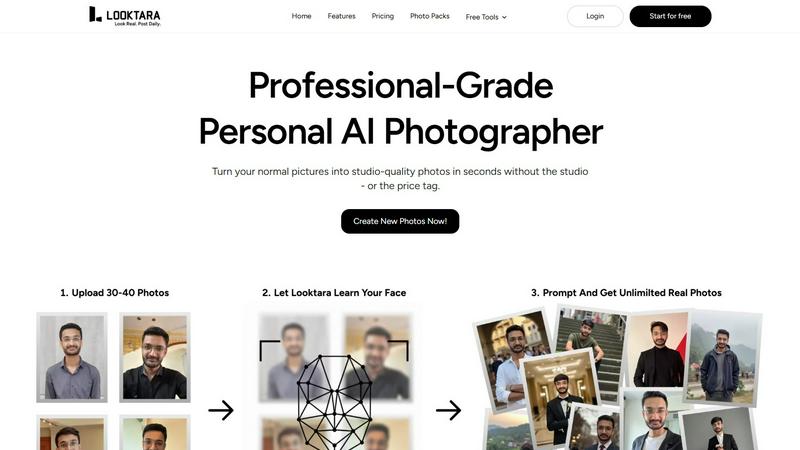
Looktara is your personal AI photographer that creates authentic, professional photos tailored to your unique style.
Last updated: February 28, 2026

poseup
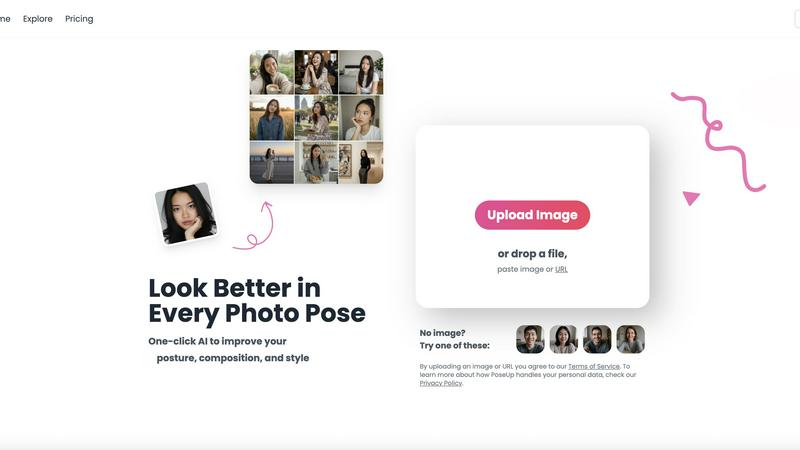
PoseUp enhances your photos with AI, optimizing posture and composition for stunning results in just one click.
Last updated: March 1, 2026
Visual Comparison
Looktara
poseup
Feature Comparison
Looktara
Private & Encrypted Personal AI Model
Looktara's foundational technology is a secure, private AI model trained exclusively on your uploaded photos. Unlike public AI models that generate generic faces, Looktara creates a unique digital representation of you. This model is encrypted for privacy, ensuring your biometric data remains confidential. The training process is swift, taking approximately 10 minutes, after which you have a permanent, reusable asset for generating an unlimited variety of your own likeness in any context, guaranteeing that every output is unmistakably and authentically you.
Studio-Grade Photo Quality with Authentic Expression
The platform is specifically engineered to overcome the "uncanny valley" of AI imagery. Looktara prioritizes capturing natural expressions, authentic skin texture, and realistic body language. It avoids the over-smoothed, plastic-like appearance common in AI filters, delivering results that rival those from a professional photoshoot. This commitment to authenticity ensures your photos project confidence, approachability, and professionalism, making them suitable for even the most formal corporate or branding purposes.
Context-Based Styling for Any Platform
Looktara provides intelligent, context-aware styling to match the specific vibe and requirements of different platforms and situations. With simple prompts, you can generate images styled perfectly for a professional LinkedIn profile, a creative Instagram post, a casual Twitter avatar, or a friendly dating app picture. This feature ensures your personal brand remains consistent yet appropriately adapted, giving you the right visual tone for every audience and purpose without needing multiple photoshoots.
Comprehensive Suite of Free Image Tools
Beyond its core AI photography service, Looktara offers a valuable suite of free, standalone image editing tools. This includes utilities for removing backgrounds, blurring faces, cropping, resizing, compressing, converting formats, adding text behind images, and even creating match-cut videos. This ecosystem positions Looktara as a holistic visual content hub, allowing users to not only create perfect base images but also edit and optimize them for any use case, all within one connected platform.
poseup
One-Click Photo Enhancement
PoseUp's one-click enhancement feature empowers users to transform their photos instantly. By analyzing the uploaded images, the tool automatically adjusts posture, composition, and overall visual appeal, making it easy for anyone to achieve professional-level results without any prior photography skills.
Advanced AI Analysis
The core of PoseUp's functionality is its advanced AI analysis. This technology evaluates each photo for posture and composition, suggesting intelligent improvements that enhance the overall aesthetic. Users benefit from automatic corrections, which help produce images that stand out on social media and in personal collections.
Support for Multiple Formats
PoseUp supports a variety of image formats, including JPG, PNG, WEBP, and HEIC, catering to diverse user needs. With a file size limit of 5MB per image, users can upload high-quality photos without worrying about compatibility issues, ensuring a seamless experience for everyone.
Free AI Pose Enhancer
One of the standout features of PoseUp is its free AI pose enhancer, which allows users to experiment with different poses and styles. This feature encourages creativity and exploration, making it perfect for those who want to refine their photography skills or simply have fun with their images.
Use Cases
Looktara
Professional Networking & LinkedIn Profiles
Professionals across all industries can leverage Looktara to create authoritative, trustworthy, and polished headshots that make a powerful first impression on LinkedIn and other business networks. Instead of using an outdated or casual photo, users can generate a studio-quality portrait that conveys competence and credibility, tailored to their specific industry, from finance to tech to creative fields, ensuring their profile stands out to recruiters and clients.
Personal Branding & Content Creation
Entrepreneurs, coaches, speakers, and social media influencers require a steady stream of high-quality, on-brand imagery. Looktara enables the creation of a cohesive visual library featuring the user in various settings and outfits—from formal speaking engagements to casual "day-in-the-life" content. This supports consistent storytelling across websites, newsletters, and social media channels, building a stronger, more recognizable personal brand without the recurring cost of a photographer.
Marketing & Client-Facing Materials
Businesses and freelancers can use Looktara to generate authentic photos of themselves or team members for websites, client proposals, case studies, and "About Us" pages. The ability to produce warm, approachable, or authoritative shots on demand ensures marketing materials feel personal and genuine, fostering better client relationships and trust. It eliminates the need for awkward stock photos that don't truly represent the team.
Dating & Social App Profiles
For dating apps like Tinder or social platforms, presenting an authentic and appealing version of oneself is crucial. Looktara allows users to create a variety of natural, flattering, and context-appropriate photos—from friendly close-ups to full-body shots in interesting settings. This helps build a more engaging and trustworthy profile, moving beyond the limitations of selfies or poorly lit photos to better attract meaningful connections.
poseup
Enhancing Selfies
PoseUp is ideal for individuals looking to improve their selfies. With its one-click enhancements, users can correct their posture and achieve flattering angles that make their selfies look polished and professional, perfect for sharing on social media.
Family Portraits
Families can benefit from PoseUp when capturing special moments together. The tool helps adjust poses and compositions to ensure that everyone looks their best, creating cherished memories that are beautifully presented.
Professional Headshots
For professionals in need of a standout headshot, PoseUp can significantly improve the quality of their images. By optimizing posture and composition, users can create impressive portraits that convey confidence and professionalism, essential for networking and career advancement.
Creative Photography Projects
Amateur photographers working on creative projects can utilize PoseUp to enhance their images. The free AI pose enhancer allows them to experiment with various poses and styles, fostering creativity and enabling them to produce visually striking results.
Overview
About Looktara
Looktara represents a paradigm shift in personal and professional imaging, positioning itself not merely as another AI photo generator but as your dedicated, on-demand personal AI photographer. At its core, Looktara is engineered to solve a critical modern dilemma: the need for high-quality, authentic, and versatile personal photos that genuinely reflect one's unique persona and brand, without the logistical and financial hurdles of traditional photoshoots. The process is elegantly simple yet powerfully effective. Users begin by uploading a small set of approximately 30 personal photos. Looktara then uses this data to train a private, fully encrypted AI model that learns and encapsulates your distinct facial features, expressions, and essence. Remarkably, this personalized model is ready in about 10 minutes, unlocking the ability to generate studio-grade, customized solo photos tailored to any scenario. Whether you need a commanding headshot for LinkedIn, a warm and engaging portrait for a company website, or a casual behind-the-scenes shot for social media, Looktara delivers with an emphasis on natural authenticity, avoiding the plastic, generic look that plagues many AI alternatives. It is the ideal solution for professionals, entrepreneurs, creators, and anyone seeking to maintain a consistent and compelling visual identity across all platforms with ease and confidence.
About poseup
PoseUp is an innovative AI-powered photo enhancement tool tailored to elevate the quality of photographs effortlessly. With a simple click, it enhances photo poses, corrects posture, and optimizes composition, making it an essential asset for a broad audience, including social media influencers, amateur photographers, and anyone eager to improve their photo quality without the need for professional training. The main value proposition of PoseUp lies in its ability to transform ordinary images into visually stunning photographs, correcting unflattering poses and optimizing compositions. Whether users are capturing selfies, family portraits, or professional headshots, PoseUp ensures they appear their best in every shot. By harnessing advanced AI technology, it intelligently analyzes images for posture and composition, providing enhancements that can elevate even the simplest photos to a professional standard. Additionally, PoseUp offers a free AI pose enhancer, allowing users to explore and experiment with their photography style, making high-quality visual content accessible to all.
Frequently Asked Questions
Looktara FAQ
How does Looktara ensure my photos and data are private?
Looktara takes privacy and security with the utmost seriousness. The AI model trained on your photos is private and encrypted, meaning it is unique to you and not used for or accessible by any other user. Your uploaded images and the generated model are stored securely. Looktara's policy emphasizes that your data is not shared or used to train general public AI models, ensuring your personal biometric information remains confidential and under your control.
What kind of photos should I upload for the best results?
For optimal model training, upload around 30 clear, high-quality photos of yourself with a variety of angles, expressions, and lighting conditions. Include close-up shots, medium shots, photos with different facial expressions (smiling, neutral), and varied hairstyles or outfits if possible. Ensure your face is clearly visible and well-lit in each photo. This diversity helps the AI learn a comprehensive and accurate representation of you, leading to more versatile and natural-looking generated images.
Can I control the style and background of the generated photos?
Yes, Looktara provides significant control over the final output. During the generation process, you can use text prompts or select style options to guide the AI. You can specify the desired vibe (e.g., "professional," "casual," "authoritative"), setting (e.g., "studio backdrop," "coffee shop," "office"), and even clothing suggestions. This context-based styling is a core feature, allowing you to tailor each photo for its specific platform or purpose.
How is Looktara different from other AI avatar generators?
Looktara distinguishes itself through its focus on authenticity, privacy, and professional-grade utility. While many AI generators produce generic, cartoonish, or overly filtered avatars, Looktara's technology is fine-tuned for hyper-realistic, natural human expression. Furthermore, it builds a private model just for you, rather than applying a one-size-fits-all filter. It also offers platform-specific styling and a suite of professional editing tools, making it a comprehensive solution for serious personal and professional branding needs, not just novelty avatars.
poseup FAQ
How does PoseUp improve my photos?
PoseUp uses advanced AI technology to analyze your photos for posture, composition, and lighting. It then automatically suggests and applies enhancements to help you achieve a more professional look in your images.
Is PoseUp easy to use?
Yes, PoseUp is designed for users of all skill levels. Its one-click enhancement feature allows anyone to improve their photos without needing extensive knowledge of photography techniques, making it accessible for everyone.
What image formats does PoseUp support?
PoseUp supports several image formats, including JPG, PNG, WEBP, and HEIC. This ensures that users can upload their preferred images without compatibility issues, simplifying the enhancement process.
Can I try PoseUp for free?
Yes, PoseUp offers a free AI pose enhancer that allows users to experiment with their photography styles. This feature encourages creativity and lets users explore various poses without any cost before committing to the full service.
Alternatives
Looktara Alternatives
Looktara is a pioneering application in the generative art category, specifically designed as a personal AI photographer. It specializes in creating authentic, studio-quality images that capture an individual's unique style and natural expressions, moving beyond generic AI outputs to offer a truly personalized visual tool. Users often explore alternatives for a variety of reasons. These can include budget considerations, a need for different feature sets such as specific artistic styles or multi-person generation, or simply a desire to compare options within this innovative and rapidly evolving market. The search for the right tool is a natural part of finding the perfect fit for one's personal or professional branding needs. When evaluating other services, key considerations should include the quality and authenticity of the generated images, the level of personalization and data privacy offered, the speed and ease of the generation process, and the versatility of outputs for different platforms and contexts. The ideal solution should not only create a likeness but should also understand and replicate your unique personal brand and expression.
poseup Alternatives
PoseUp is an AI-powered photo enhancement tool designed to optimize posture, composition, and overall style in images with a simple click. As a part of the image and photo category, it caters to a range of users, from social media influencers to amateur photographers, aiming to elevate their photography without the need for extensive professional training. Users often seek alternatives to PoseUp for various reasons, including pricing, specific feature sets, or compatibility with different platforms. When choosing an alternative, it's essential to consider factors like usability, the quality of enhancements, supported file formats, and community engagement features that can enrich the user experience. A well-rounded alternative should provide similar functionality and ease of use while catering to individual user needs.