
Hush Touch | Voice-to-Text for MacOS vs TrafficClaw
Side-by-side comparison to help you choose the right tool.

Hush Touch | Voice-to-Text for MacOS
Hush Touch is an offline voice-to-text app for macOS that learns your vocabulary and improves accuracy with every use.
Last updated: February 28, 2026

TrafficClaw
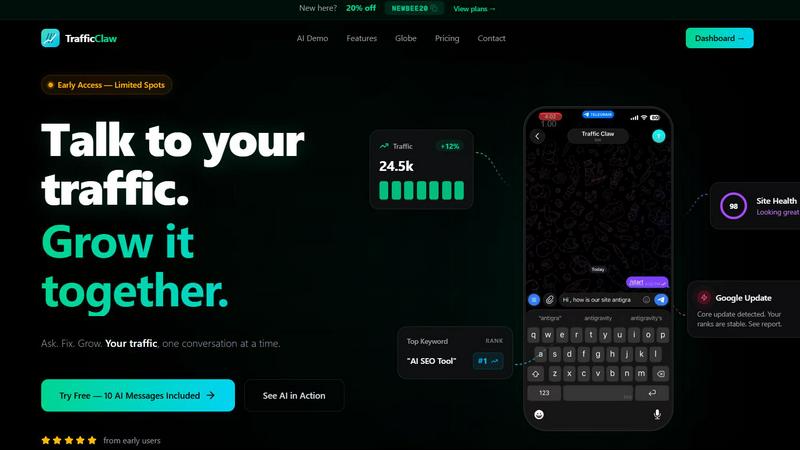
TrafficClaw transforms your SEO and analytics data into actionable insights through intuitive conversations, empowering you to grow your traffic.
Last updated: April 13, 2026
Visual Comparison
Hush Touch | Voice-to-Text for MacOS

TrafficClaw
Feature Comparison
Hush Touch | Voice-to-Text for MacOS
Dual-Engine Recognition
Hush Touch employs a dual-engine recognition system that combines the strengths of DictationTranscriber and SFSpeechRecognizer. This innovative approach ensures that natural speech flow and accurate punctuation are maintained while also accommodating a custom vocabulary tailored to the user’s specific needs. The final touch of Apple Intelligence further refines the output, delivering superior transcription results.
Custom Vocabulary
The app features a robust custom vocabulary capability that allows users to add up to 500 specific terms tailored to their unique needs. This includes technical jargon, brand names, and other specialized language. Hush Touch learns and adapts to corrections made by the user, ensuring that it becomes increasingly accurate in recognizing and transcribing the user's preferred vocabulary over time.
Smart Text Processing
Hush Touch offers smart text processing features that significantly enhance the dictation experience. It automatically removes filler words, corrects common mistakes, and formats text with ease, including numbered lists and voice snippets for frequently used phrases. This real-time processing occurs entirely on-device, allowing for a streamlined and efficient dictation experience without the need for internet connectivity.
Context Modes & Hands-Free Dictation
The app includes multiple context modes, such as General, Email, Code, and Notes, which adapt the dictation experience to suit different writing scenarios. Users can initiate hands-free dictation by simply saying "Hey Siri, start touch," allowing for an uninterrupted workflow. Automatic text insertion occurs after two seconds of silence, and users can even send messages by voice using customizable commands, enhancing overall convenience.
TrafficClaw
AI Chat
The AI Chat feature allows users to interact with their analytics through natural language queries. Users can ask specific questions about their traffic and receive instant, data-driven answers along with visual charts and actionable insights. This eliminates the need for time-consuming data interpretation and empowers users to make informed decisions quickly.
SEO Intelligence
TrafficClaw's SEO Intelligence feature analyzes a website's performance to uncover keyword gaps, content decay alerts, and issues of keyword cannibalization. Additionally, it includes an Advanced SEO Optimization (AEO) engine that helps users optimize their content for AI-driven search engines, ensuring that they stay ahead in the competitive landscape of online visibility.
Analytics Dashboard
The Analytics Dashboard serves as a comprehensive overview of real-time visitors, traffic trends, bounce rates, and conversion funnels. This centralized view allows users to monitor their website's performance at a glance, making it easier to identify patterns, track progress, and implement strategies for improvement without juggling multiple tools.
Site Audit
TrafficClaw offers a detailed Site Audit feature that conducts in-depth page-level examinations of a website's health. It provides performance scores based on Core Web Vitals and automatically suggests fixes for any identified issues. This proactive approach to site health allows users to maintain optimal performance and enhance user experience.
Use Cases
Hush Touch | Voice-to-Text for MacOS
Professional Communication
Professionals can leverage Hush Touch to draft and send emails or messages quickly, enhancing productivity and allowing for a more fluid communication style. The ability to dictate accurately without relying on cloud services ensures that sensitive information remains private.
Academic Note-Taking
Students can benefit significantly from Hush Touch while attending lectures or studying. Dictating notes allows for a hands-free approach, enabling students to focus fully on the material being presented. The custom vocabulary feature is particularly advantageous for those studying specialized subjects.
Content Creation
Writers and content creators can utilize Hush Touch to brainstorm ideas, draft blog posts, or create outlines. The app’s ability to process text with minimal interruptions allows for a more natural flow of creativity, reducing the friction often associated with typing.
Medical Documentation
Healthcare professionals, such as physicians and nurses, can depend on Hush Touch to efficiently document patient notes and medical terminology. The app’s adaptive learning capabilities ensure that it accurately captures medical jargon, streamlining the documentation process while improving accuracy.
TrafficClaw
Identifying Traffic Drops
Users experiencing unexpected drops in website traffic can leverage TrafficClaw to quickly diagnose the issue. By asking the AI directly, they receive targeted insights that could point to technical issues, content problems, or changes in search engine algorithms, allowing for swift corrective action.
Optimizing SEO Strategies
Digital marketers can utilize TrafficClaw's SEO Intelligence to refine their content strategies. By revealing keyword gaps and content performance issues, users can create targeted content that fills these gaps and improves their rankings, ultimately driving more organic traffic to their site.
Monitoring Website Health
Website owners can regularly use the Site Audit feature to ensure their site remains in top condition. By receiving automated performance scores and suggestions for improvement, they can proactively address issues before they affect user experience or search rankings.
Enhancing Content Creation
Content creators can harness the power of TrafficClaw’s content tools to generate SEO-optimized blog posts, create schema markup, and refine internal linking strategies. This feature simplifies the content creation process while ensuring that the output is aligned with best SEO practices, helping to attract more visitors.
Overview
About Hush Touch | Voice-to-Text for MacOS
Hush Touch is an innovative voice-to-text application designed specifically for macOS, enabling users to dictate text effortlessly and privately. By utilizing advanced on-device processing, Hush Touch operates without requiring an internet connection, ensuring user data remains secure and confidential. The app combines two powerful Apple transcription engines along with an Apple Intelligence final pass to enhance transcription accuracy and clarity. This makes it ideal for individuals across various fields, including professionals, students, and writers, who seek a reliable and efficient dictation tool. With its lightweight 5.5 MB footprint, Hush Touch integrates seamlessly into everyday writing workflows, allowing users to draft emails, notes, documents, and more, all while maintaining a natural speaking rhythm. The app's unique features, like customizable command phrases and adaptive learning capabilities, make dictation not only easier but also smarter over time. For just $20, users can access a lifetime license, eliminating the need for recurring subscription fees.
About TrafficClaw
TrafficClaw is an innovative AI-driven tool designed specifically for website owners, digital marketers, and SEO professionals who are frustrated by sudden drops in website traffic. In a landscape where data analysis often leads to confusion rather than clarity, TrafficClaw stands out by transforming complex analytics into straightforward answers. By seamlessly integrating with Google Analytics 4 (GA4) and Search Console, it allows users to engage in natural conversations about their traffic performance. Instead of sifting through generic advice found in blog posts, users can directly ask questions like "Why did my traffic drop?" and receive data-backed insights that illuminate the underlying issues. TrafficClaw not only identifies problems but also provides actionable solutions, enabling users to implement fixes and grow their traffic effectively. With its intuitive interface and real-time analytics, TrafficClaw democratizes data insights, making it accessible to anyone looking to improve their online presence and traffic metrics.
Frequently Asked Questions
Hush Touch | Voice-to-Text for MacOS FAQ
Is Hush Touch available for Windows or other operating systems?
Currently, Hush Touch is designed exclusively for macOS, ensuring optimal performance and integration with Apple’s operating system.
How does Hush Touch ensure user privacy?
Hush Touch processes all voice data entirely on-device, meaning that no audio or transcription is sent to the cloud. This approach guarantees that user data remains private and secure.
Can I try Hush Touch before purchasing?
Yes, Hush Touch offers a 7-day free trial without the need for a credit card, allowing users to experience the app’s capabilities firsthand before committing to a purchase.
What happens if I need to update my vocabulary?
Hush Touch allows users to add up to 500 custom terms to its vocabulary. Additionally, the app learns from corrections made during dictation, automatically updating its vocabulary to improve future accuracy.
TrafficClaw FAQ
How does TrafficClaw analyze my data?
TrafficClaw connects directly to your Google Analytics 4 and Search Console accounts, automatically loading your data. The AI then analyzes this data in real time, allowing for immediate insights and recommendations based on your specific traffic patterns.
Is my data secure with TrafficClaw?
Yes, your data is completely secure. TrafficClaw uses Google OAuth for authentication, ensuring that your information remains private and accessible only to you. Additionally, the platform does not store your data beyond its analysis.
How quickly can I set up TrafficClaw?
Setting up TrafficClaw is incredibly quick and user-friendly. With a simple sign-in using your Google account, the auto-detection feature recognizes your GA4 properties and Search Console sites, making the setup process typically take less than 30 seconds.
Can I use TrafficClaw for multiple websites?
Absolutely. TrafficClaw allows users to connect multiple Google Analytics and Search Console accounts, making it ideal for agencies or individuals managing several websites. You can easily switch between accounts to monitor performance and gain insights across all your projects.
Alternatives
Hush Touch | Voice-to-Text for MacOS Alternatives
Hush Touch | Voice-to-Text for MacOS is a specialized application designed to convert spoken language into written text, functioning entirely offline. As a tool in the AI Assistants category, it utilizes advanced on-device processing to ensure privacy and efficiency while catering to users who prefer dictation without relying on cloud services. Many users seek alternatives to Hush Touch due to varying needs such as pricing, desired features, or compatibility with different platforms. When exploring alternatives, it is essential to consider aspects like usability, transcription accuracy, language support, and the ability to integrate seamlessly into existing workflows, ensuring that the chosen solution meets individual requirements effectively.
TrafficClaw Alternatives
TrafficClaw is an innovative tool designed to bridge the gap between users and their SEO and analytics data, allowing for intuitive interaction with complex datasets. As a part of the AI Assistants and Analytics & Data categories, TrafficClaw enables users to ask straightforward questions regarding their web traffic, such as the reasons behind fluctuations, and receive actionable insights. This conversational approach transforms the often overwhelming world of SEO into a more accessible experience. Users often seek alternatives to TrafficClaw for a variety of reasons, including pricing concerns, specific feature requirements, or compatibility with particular platforms. The pursuit of alternatives can stem from the need for enhanced functionality, more robust integrations, or simply a desire to explore different user experiences. When considering an alternative, it is essential to evaluate factors such as ease of use, the breadth of features, customer support, and the ability to adapt to evolving analytics needs.