
Hush Touch | Voice-to-Text for MacOS vs QuickImg
Side-by-side comparison to help you choose the right tool.

Hush Touch | Voice-to-Text for MacOS
Hush Touch is an offline voice-to-text app for macOS that learns your vocabulary and improves accuracy with every use.
Last updated: February 28, 2026

QuickImg
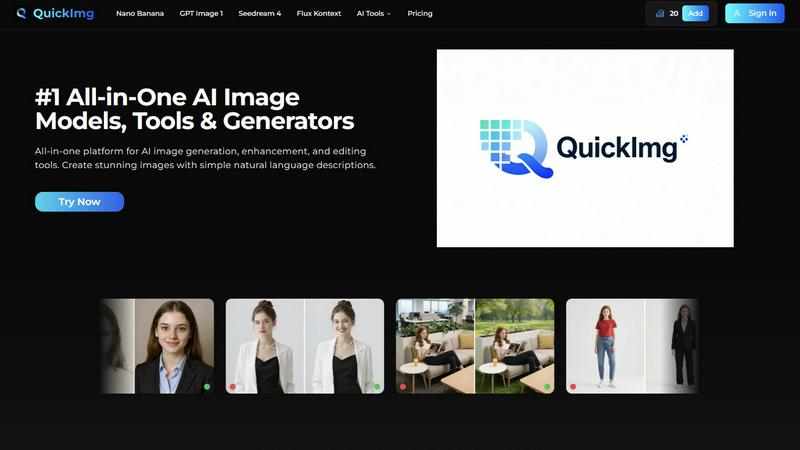
QuickImg is your all-in-one AI platform for generating, enhancing, and editing stunning images effortlessly.
Last updated: February 28, 2026
Visual Comparison
Hush Touch | Voice-to-Text for MacOS

QuickImg
Feature Comparison
Hush Touch | Voice-to-Text for MacOS
Dual-Engine Recognition
Hush Touch employs a dual-engine recognition system that combines the strengths of DictationTranscriber and SFSpeechRecognizer. This innovative approach ensures that natural speech flow and accurate punctuation are maintained while also accommodating a custom vocabulary tailored to the user’s specific needs. The final touch of Apple Intelligence further refines the output, delivering superior transcription results.
Custom Vocabulary
The app features a robust custom vocabulary capability that allows users to add up to 500 specific terms tailored to their unique needs. This includes technical jargon, brand names, and other specialized language. Hush Touch learns and adapts to corrections made by the user, ensuring that it becomes increasingly accurate in recognizing and transcribing the user's preferred vocabulary over time.
Smart Text Processing
Hush Touch offers smart text processing features that significantly enhance the dictation experience. It automatically removes filler words, corrects common mistakes, and formats text with ease, including numbered lists and voice snippets for frequently used phrases. This real-time processing occurs entirely on-device, allowing for a streamlined and efficient dictation experience without the need for internet connectivity.
Context Modes & Hands-Free Dictation
The app includes multiple context modes, such as General, Email, Code, and Notes, which adapt the dictation experience to suit different writing scenarios. Users can initiate hands-free dictation by simply saying "Hey Siri, start touch," allowing for an uninterrupted workflow. Automatic text insertion occurs after two seconds of silence, and users can even send messages by voice using customizable commands, enhancing overall convenience.
QuickImg
AI-Powered Image Generation
QuickImg utilizes multiple advanced AI models, including Nano Banana Pro and GPT Image 1, to generate images based on simple natural language descriptions. This feature eliminates the need for complex prompts, making image creation accessible to users of all skill levels.
One-Click Editing Tools
The platform boasts a comprehensive suite of one-click editing tools that streamline various tasks, such as background removal, image upscaling, and watermark removal. These tools are designed to save time and enhance user productivity while maintaining high-quality output.
Ready-to-Use Templates
QuickImg provides a wide array of professionally designed templates tailored for common scenarios. Users can quickly access these templates for product photos, social media posts, and more, allowing for instant creativity and efficient project execution.
Multi-Model Flexibility
With QuickImg, users have the flexibility to choose from several AI models optimized for different tasks. This multi-model approach ensures that users can select the best tool for their specific needs, maximizing the quality and relevance of their image outputs.
Use Cases
Hush Touch | Voice-to-Text for MacOS
Professional Communication
Professionals can leverage Hush Touch to draft and send emails or messages quickly, enhancing productivity and allowing for a more fluid communication style. The ability to dictate accurately without relying on cloud services ensures that sensitive information remains private.
Academic Note-Taking
Students can benefit significantly from Hush Touch while attending lectures or studying. Dictating notes allows for a hands-free approach, enabling students to focus fully on the material being presented. The custom vocabulary feature is particularly advantageous for those studying specialized subjects.
Content Creation
Writers and content creators can utilize Hush Touch to brainstorm ideas, draft blog posts, or create outlines. The app’s ability to process text with minimal interruptions allows for a more natural flow of creativity, reducing the friction often associated with typing.
Medical Documentation
Healthcare professionals, such as physicians and nurses, can depend on Hush Touch to efficiently document patient notes and medical terminology. The app’s adaptive learning capabilities ensure that it accurately captures medical jargon, streamlining the documentation process while improving accuracy.
QuickImg
Marketing Campaigns
Marketing professionals can leverage QuickImg to create visually appealing graphics for campaigns without the need for extensive design skills. By generating images from descriptions, they can focus on strategic aspects while QuickImg handles the visuals.
Social Media Content Creation
Content creators can use QuickImg to produce eye-catching images for their social media platforms. The one-click editing tools and ready-to-use templates allow for rapid content creation, ensuring a consistent and engaging online presence.
E-Commerce Product Photography
Entrepreneurs running e-commerce businesses can enhance their product images using QuickImg’s editing features. By removing backgrounds or adding stylistic elements, they can present their products more attractively to potential customers.
Personal Projects and Hobbies
Hobbyists interested in photography or digital art can utilize QuickImg to explore their creativity. The easy-to-use interface and powerful AI capabilities enable them to transform their ideas into stunning visuals, regardless of their skill level.
Overview
About Hush Touch | Voice-to-Text for MacOS
Hush Touch is an innovative voice-to-text application designed specifically for macOS, enabling users to dictate text effortlessly and privately. By utilizing advanced on-device processing, Hush Touch operates without requiring an internet connection, ensuring user data remains secure and confidential. The app combines two powerful Apple transcription engines along with an Apple Intelligence final pass to enhance transcription accuracy and clarity. This makes it ideal for individuals across various fields, including professionals, students, and writers, who seek a reliable and efficient dictation tool. With its lightweight 5.5 MB footprint, Hush Touch integrates seamlessly into everyday writing workflows, allowing users to draft emails, notes, documents, and more, all while maintaining a natural speaking rhythm. The app's unique features, like customizable command phrases and adaptive learning capabilities, make dictation not only easier but also smarter over time. For just $20, users can access a lifetime license, eliminating the need for recurring subscription fees.
About QuickImg
QuickImg is a revolutionary platform that reshapes the landscape of digital imagery by consolidating cutting-edge AI-powered visual creation into one user-friendly interface. This all-in-one solution caters to a diverse audience, from beginners who are just stepping into the world of image creation to experienced professionals looking for efficient workflows. With QuickImg, users can effortlessly generate, enhance, and edit images using advanced AI models, including Nano Banana Pro, GPT Image 1, Seedream 4, and Flux Kontext. The platform’s primary value proposition lies in its ability to simplify the image production process, allowing users to create stunning visuals from straightforward natural language descriptions without the complexities of traditional prompt engineering. Additionally, QuickImg offers a robust array of one-click editing tools for tasks such as background removal, upscaling, watermark removal, and style transformation. By democratizing high-quality image production, QuickImg empowers marketers, content creators, designers, entrepreneurs, and hobbyists to produce compelling visual content efficiently and affordably, all while maintaining a seamless user experience.
Frequently Asked Questions
Hush Touch | Voice-to-Text for MacOS FAQ
Is Hush Touch available for Windows or other operating systems?
Currently, Hush Touch is designed exclusively for macOS, ensuring optimal performance and integration with Apple’s operating system.
How does Hush Touch ensure user privacy?
Hush Touch processes all voice data entirely on-device, meaning that no audio or transcription is sent to the cloud. This approach guarantees that user data remains private and secure.
Can I try Hush Touch before purchasing?
Yes, Hush Touch offers a 7-day free trial without the need for a credit card, allowing users to experience the app’s capabilities firsthand before committing to a purchase.
What happens if I need to update my vocabulary?
Hush Touch allows users to add up to 500 custom terms to its vocabulary. Additionally, the app learns from corrections made during dictation, automatically updating its vocabulary to improve future accuracy.
QuickImg FAQ
How does QuickImg simplify image creation?
QuickImg simplifies image creation by allowing users to generate images from natural language descriptions, eliminating the need for complex prompts and making the process accessible to everyone.
What types of editing tools does QuickImg offer?
QuickImg offers a variety of one-click editing tools, including background removal, image upscaling, watermark removal, and more, all designed to streamline the editing process for users.
Can I use QuickImg for commercial purposes?
Yes, QuickImg is suitable for commercial use, making it an ideal tool for marketers, entrepreneurs, and businesses looking to create high-quality visual content efficiently.
Is QuickImg beginner-friendly?
Absolutely! QuickImg is designed with a user-friendly interface that caters to beginners and professionals alike. Users can easily navigate the platform and utilize its features without prior experience.
Alternatives
Hush Touch | Voice-to-Text for MacOS Alternatives
Hush Touch | Voice-to-Text for MacOS is a specialized application designed to convert spoken language into written text, functioning entirely offline. As a tool in the AI Assistants category, it utilizes advanced on-device processing to ensure privacy and efficiency while catering to users who prefer dictation without relying on cloud services. Many users seek alternatives to Hush Touch due to varying needs such as pricing, desired features, or compatibility with different platforms. When exploring alternatives, it is essential to consider aspects like usability, transcription accuracy, language support, and the ability to integrate seamlessly into existing workflows, ensuring that the chosen solution meets individual requirements effectively.
QuickImg Alternatives
QuickImg is a cutting-edge platform that belongs to the category of AI-powered image generation and editing tools. It serves as an all-in-one solution for a wide range of users, from novices to professionals, looking to create, enhance, and edit images seamlessly. Despite its robust features, users often seek alternatives due to factors such as pricing, specific feature sets, or compatibility with their existing workflows. Additionally, some may look for platforms that cater more closely to niche needs or personal preferences. When searching for an alternative to QuickImg, it's essential to consider several factors, including the range of features offered, the ease of use, and the pricing structure. Users should also evaluate the platform's ability to integrate with other tools they may be using, the quality of AI models available, and the overall user experience. A solid alternative should provide a balance of functionality and accessibility to ensure that users can achieve professional results without unnecessary complexity.