
Hush Touch | Voice-to-Text for MacOS vs QuickData.ai
Side-by-side comparison to help you choose the right tool.

Hush Touch | Voice-to-Text for MacOS
Hush Touch is an offline voice-to-text app for macOS that learns your vocabulary and improves accuracy with every use.
Last updated: February 28, 2026

QuickData.ai
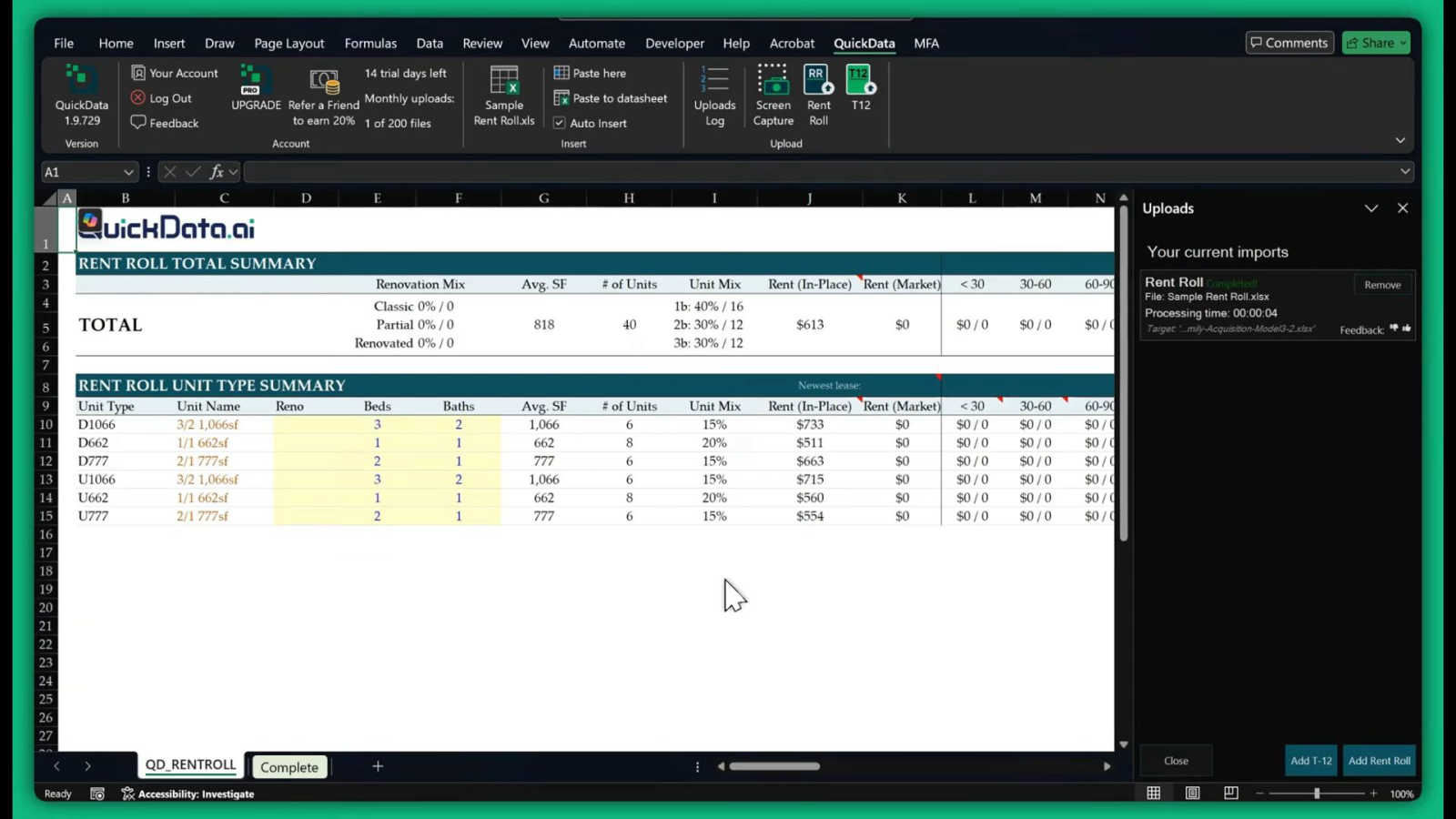
QuickData.ai automates multifamily underwriting by instantly extracting rent roll and T12 data into Excel.
Last updated: March 1, 2026
Visual Comparison
Hush Touch | Voice-to-Text for MacOS

QuickData.ai
Feature Comparison
Hush Touch | Voice-to-Text for MacOS
Dual-Engine Recognition
Hush Touch employs a dual-engine recognition system that combines the strengths of DictationTranscriber and SFSpeechRecognizer. This innovative approach ensures that natural speech flow and accurate punctuation are maintained while also accommodating a custom vocabulary tailored to the user’s specific needs. The final touch of Apple Intelligence further refines the output, delivering superior transcription results.
Custom Vocabulary
The app features a robust custom vocabulary capability that allows users to add up to 500 specific terms tailored to their unique needs. This includes technical jargon, brand names, and other specialized language. Hush Touch learns and adapts to corrections made by the user, ensuring that it becomes increasingly accurate in recognizing and transcribing the user's preferred vocabulary over time.
Smart Text Processing
Hush Touch offers smart text processing features that significantly enhance the dictation experience. It automatically removes filler words, corrects common mistakes, and formats text with ease, including numbered lists and voice snippets for frequently used phrases. This real-time processing occurs entirely on-device, allowing for a streamlined and efficient dictation experience without the need for internet connectivity.
Context Modes & Hands-Free Dictation
The app includes multiple context modes, such as General, Email, Code, and Notes, which adapt the dictation experience to suit different writing scenarios. Users can initiate hands-free dictation by simply saying "Hey Siri, start touch," allowing for an uninterrupted workflow. Automatic text insertion occurs after two seconds of silence, and users can even send messages by voice using customizable commands, enhancing overall convenience.
QuickData.ai
AI-Powered Document Data Extraction
This core feature utilizes advanced artificial intelligence to automatically read, interpret, and extract critical data points from unstructured PDF and document formats. It intelligently identifies and pulls information from Rent Rolls, T12s, and OMs—such as unit mixes, rental income, occupancy rates, and operating expenses—converting them into clean, organized data ready for Excel. The AI is trained specifically on multifamily real estate documents, ensuring high accuracy and context-aware parsing that generic OCR tools cannot match.
Seamless Excel Model Integration
QuickData.ai operates natively within Microsoft Excel as an add-in, requiring no complex data exports or intermediary software. Extracted data flows directly into your pre-formatted underwriting models, preserving all existing formulas, calculations, and structural integrity. This feature ensures a frictionless workflow where professionals can continue using their trusted, customized Excel templates while supercharging the initial data population phase, maintaining continuity and user familiarity.
Multifamily-Specific Financial Calculators & Insights
Beyond simple data entry, the tool provides built-in calculators and analytical insights tailored for multifamily assets. It can automatically compute key metrics like Net Operating Income (NOI), Capitalization Rates, and Debt Service Coverage Ratios (DSCR) from the extracted data. These pre-configured analyses offer immediate, actionable insights, helping users quickly assess deal viability and performance without building calculations from scratch.
Centralized Deal & Document Management
The platform offers a unified dashboard to manage all deal-related documents and extracted data in one secure location. Users can upload, organize, and process multiple documents for a single property or across a portfolio. This centralized hub streamlines collaboration, ensures version control, and creates a searchable audit trail of all data sources and extractions, enhancing organizational efficiency and due diligence rigor.
Use Cases
Hush Touch | Voice-to-Text for MacOS
Professional Communication
Professionals can leverage Hush Touch to draft and send emails or messages quickly, enhancing productivity and allowing for a more fluid communication style. The ability to dictate accurately without relying on cloud services ensures that sensitive information remains private.
Academic Note-Taking
Students can benefit significantly from Hush Touch while attending lectures or studying. Dictating notes allows for a hands-free approach, enabling students to focus fully on the material being presented. The custom vocabulary feature is particularly advantageous for those studying specialized subjects.
Content Creation
Writers and content creators can utilize Hush Touch to brainstorm ideas, draft blog posts, or create outlines. The app’s ability to process text with minimal interruptions allows for a more natural flow of creativity, reducing the friction often associated with typing.
Medical Documentation
Healthcare professionals, such as physicians and nurses, can depend on Hush Touch to efficiently document patient notes and medical terminology. The app’s adaptive learning capabilities ensure that it accurately captures medical jargon, streamlining the documentation process while improving accuracy.
QuickData.ai
Accelerated Acquisitions Underwriting
Acquisitions teams can underwrite potential multifamily property purchases 10x faster. Instead of spending hours manually inputting hundreds of rent roll lines and T12 expenses into a model, QuickData.ai populates the entire dataset in minutes. This rapid turnaround allows analysts to evaluate more deals, run deeper sensitivity analyses, and submit competitive offers with greater speed and confidence, directly impacting deal flow and success rates.
Enhanced Due Diligence for Lenders & Banks
Financial institutions and lenders can streamline their multifamily loan underwriting and due diligence processes. QuickData.ai enables quick, accurate verification of property financials presented in borrower submissions. By automating data extraction from provided OMs and statements, credit analysts can efficiently cross-check figures, assess property performance trends, and identify discrepancies, leading to more informed lending decisions and reduced risk.
Broker Deal Package Preparation
Commercial real estate brokers preparing marketing packages for multifamily listings can use QuickData.ai to rapidly create accurate and comprehensive financial models. By quickly processing existing property data into a professional underwriting template, brokers can provide potential buyers with detailed, reliable analyses upfront, adding significant value to their service, building trust, and facilitating faster, more transparent transactions.
Portfolio Performance Analysis for Owners & Operators
Property owners and asset management firms can leverage the tool for ongoing portfolio monitoring. By regularly processing updated rent rolls and operating statements for multiple assets, managers can quickly consolidate performance data. This automation supports timely reviews of occupancy, rental income trends, and expense ratios across the portfolio, enabling proactive management and strategic operational adjustments.
Overview
About Hush Touch | Voice-to-Text for MacOS
Hush Touch is an innovative voice-to-text application designed specifically for macOS, enabling users to dictate text effortlessly and privately. By utilizing advanced on-device processing, Hush Touch operates without requiring an internet connection, ensuring user data remains secure and confidential. The app combines two powerful Apple transcription engines along with an Apple Intelligence final pass to enhance transcription accuracy and clarity. This makes it ideal for individuals across various fields, including professionals, students, and writers, who seek a reliable and efficient dictation tool. With its lightweight 5.5 MB footprint, Hush Touch integrates seamlessly into everyday writing workflows, allowing users to draft emails, notes, documents, and more, all while maintaining a natural speaking rhythm. The app's unique features, like customizable command phrases and adaptive learning capabilities, make dictation not only easier but also smarter over time. For just $20, users can access a lifetime license, eliminating the need for recurring subscription fees.
About QuickData.ai
QuickData.ai is a transformative AI-powered Excel add-in engineered specifically for the multifamily real estate industry. It addresses a critical bottleneck in the investment underwriting process: the manual, error-prone, and time-consuming task of extracting data from key property documents. The platform automates the ingestion of vital financial information from Rent Rolls, T12 (Trailing 12-Month) statements, and Offering Memorandums (OMs), seamlessly populating existing Excel underwriting models with structured, accurate data. This tool is indispensable for a wide range of professionals including acquisitions specialists, commercial real estate brokers, lenders, and accounting firms who are involved in evaluating and closing multifamily deals. Its core value proposition is profound efficiency, saving users an average of 15 hours per month by accelerating data entry by a factor of ten. By eliminating manual transcription, QuickData.ai not only speeds up analysis but also enhances data integrity, reduces operational risk, and allows teams to reallocate precious time from tedious administrative work to high-value strategic analysis and decision-making. It represents a fundamental shift towards intelligent automation, empowering the real estate sector to work smarter and gain a decisive competitive edge in a fast-paced market.
Frequently Asked Questions
Hush Touch | Voice-to-Text for MacOS FAQ
Is Hush Touch available for Windows or other operating systems?
Currently, Hush Touch is designed exclusively for macOS, ensuring optimal performance and integration with Apple’s operating system.
How does Hush Touch ensure user privacy?
Hush Touch processes all voice data entirely on-device, meaning that no audio or transcription is sent to the cloud. This approach guarantees that user data remains private and secure.
Can I try Hush Touch before purchasing?
Yes, Hush Touch offers a 7-day free trial without the need for a credit card, allowing users to experience the app’s capabilities firsthand before committing to a purchase.
What happens if I need to update my vocabulary?
Hush Touch allows users to add up to 500 custom terms to its vocabulary. Additionally, the app learns from corrections made during dictation, automatically updating its vocabulary to improve future accuracy.
QuickData.ai FAQ
What types of documents does QuickData.ai work with?
QuickData.ai is specifically engineered to process the most common documents in multifamily real estate transactions. This includes Rent Rolls (in various formats), Trailing 12-Month (T12) operating statements, and Offering Memorandums (OMs). The AI is trained to recognize the structure and data points unique to these document types, ensuring reliable extraction directly from PDFs and other standard file formats.
Do I need to change my existing Excel underwriting model?
No, one of the primary advantages of QuickData.ai is its seamless integration with your existing workflow. The tool is designed as an Excel add-in that populates data directly into your current, customized underwriting models. You do not need to adopt a proprietary template; it works with your own spreadsheets, preserving all your formulas, formatting, and calculation logic.
How accurate is the AI data extraction?
The AI extraction engine is highly accurate, having been trained on a vast dataset of multifamily-specific documents to understand context and typical formatting. While accuracy is exceptionally high, the tool is built for professional use where verification is standard practice. It drastically reduces manual entry but is designed to integrate into a workflow where users can quickly review and validate the imported data against the source document, ensuring total confidence.
Is there a commitment or long-term contract required?
QuickData.ai offers flexible access to suit different needs. You can start with a full-featured 14-day free trial to experience the productivity gains firsthand. Following the trial, subscription options are designed to be straightforward, with the ability to cancel anytime, providing flexibility for firms of all sizes without imposing long-term contractual obligations.
Alternatives
Hush Touch | Voice-to-Text for MacOS Alternatives
Hush Touch | Voice-to-Text for MacOS is a specialized application designed to convert spoken language into written text, functioning entirely offline. As a tool in the AI Assistants category, it utilizes advanced on-device processing to ensure privacy and efficiency while catering to users who prefer dictation without relying on cloud services. Many users seek alternatives to Hush Touch due to varying needs such as pricing, desired features, or compatibility with different platforms. When exploring alternatives, it is essential to consider aspects like usability, transcription accuracy, language support, and the ability to integrate seamlessly into existing workflows, ensuring that the chosen solution meets individual requirements effectively.
QuickData.ai Alternatives
QuickData.ai is an AI-powered Excel add-in that automates data extraction for multifamily real estate underwriting, specifically targeting rent roll and T12 statement parsing. It falls within the categories of AI assistants and business finance tools, designed to save analysts and investors significant manual effort. Users may explore alternatives for various reasons, including budget constraints, specific feature requirements not met by the core offering, or a need for a platform-agnostic solution that operates outside of the Excel ecosystem. The search often stems from a desire to compare value, integration capabilities, or overall workflow fit. When evaluating alternatives, key considerations should include the accuracy and scope of automated data extraction, compatibility with existing software and processes, the total cost of ownership, and the level of customer support provided. The goal is to find a tool that not only automates tasks but also enhances analytical depth and decision-making speed.