
Gomotion vs Image3D AI
Side-by-side comparison to help you choose the right tool.

Gomotion
Gomotion enables creators to easily craft stunning AI motion graphics and animations from simple text prompts.
Last updated: February 28, 2026

Image3D AI
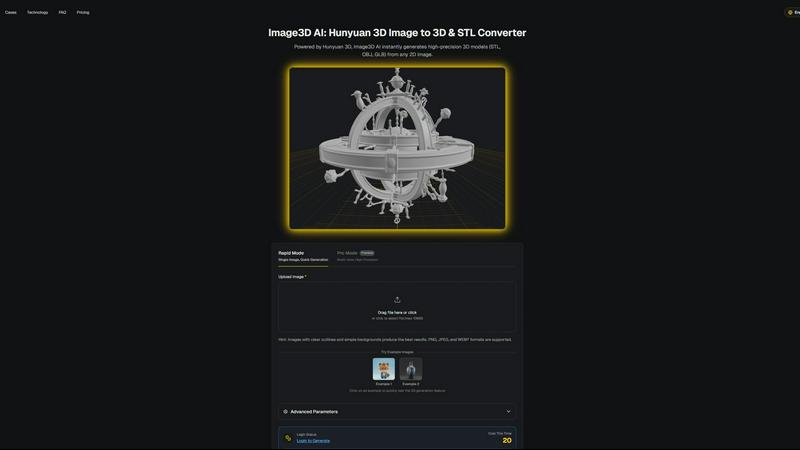
Image3D AI instantly transforms any 2D image into a high-quality 3D model for printing and game development.
Last updated: March 1, 2026
Visual Comparison
Gomotion

Image3D AI
Feature Comparison
Gomotion
Transform Words Into Motion
Gomotion allows users to animate text from simple prompts, eliminating the complexity of traditional keyframing. This feature is ideal for creating titles, captions, and logos that require cinematic flair, making it perfect for product demos and creators who desire professional results with minimal effort.
Discover the Narrative Mode
With Gomotion's Narrative Mode, users can turn scripts into fully animated stories. This feature synchronizes images and videos, enabling the creation of polished ads or short videos in just minutes, streamlining the process of content creation for marketers and storytellers alike.
Design for Any Screen
Gomotion is designed to cater to various screen sizes—from mobile devices to desktop displays. Users can create animations tailored for different platforms, ensuring that their content is visually appealing whether it's for social media, a website, or any other medium.
Complex Animations Made Simple
The platform empowers users to generate complex animations, such as animated charts and simulations, from any data set. This feature is particularly useful for creating impactful presentations or explainer videos, allowing users to convey information effectively through engaging visuals.
Image3D AI
Powered by Hunyuan 3D Engine
Image3D AI is built upon the robust foundation of Tencent's Hunyuan 3D engine, a state-of-the-art AI technology specifically designed for 3D reconstruction. This engine enables the platform to perform advanced inference from a single 2D image, generating high-precision geometry and textures that rival manually crafted models. The integration of this professional technology into an accessible web interface is what sets the tool apart, delivering studio-quality results without requiring studio-level expertise or computational resources from the end-user.
Dual Generation Modes for Flexibility
The platform offers two distinct operational modes to cater to different project needs and quality requirements. Rapid Mode is optimized for speed and simplicity, generating a 3D model from a single uploaded image in approximately 60 seconds. For scenarios demanding the highest accuracy, such as product replication or detailed asset creation, Pro Mode utilizes multi-view images to perform a physically accurate 3D reconstruction, ensuring dimensional precision and superior detail from every angle.
Multi-Format Export for Any Workflow
Understanding that creators work across diverse software ecosystems, Image3D AI provides exports in all major industry-standard 3D file formats. Users can download their generated models as STL files for immediate 3D printing, OBJ files for editing in traditional 3D software like Blender or Maya, or GLB files for direct use in web applications, AR experiences, and modern game engines like Unity and Unreal Engine, complete with PBR material support.
Intuitive Interface with Guided Best Practices
The tool is designed for immediate usability, featuring a clean, drag-and-drop interface and offering free example images for instant testing without login. Beyond simplicity, it educates users through a comprehensive Best Practices Guide. This resource provides actionable tips on selecting optimal source images, understanding the strengths of each generation mode, and choosing the correct export format, significantly boosting the success rate and quality of conversions for both novices and professionals.
Use Cases
Gomotion
Marketing Campaigns
Gomotion is an essential tool for marketers looking to create eye-catching advertisements that engage their target audience. By leveraging the platform's animation capabilities, marketers can produce compelling content that captures attention and drives conversions.
Social Media Content Creation
Content creators can utilize Gomotion to generate dynamic animations for their social media posts. Whether it's an Instagram story or a TikTok video, the platform allows users to create visually stunning content that stands out in crowded feeds.
Educational Videos
Educators and trainers can use Gomotion to develop animated videos that explain complex topics in an easily digestible format. The ability to create animated charts and visuals helps enhance learning experiences and keeps audiences engaged.
Brand Storytelling
Businesses can harness Gomotion to tell their brand stories through animations that resonate with their audience. By incorporating their brand elements into dynamic visuals, companies can strengthen their brand identity and communicate their values effectively.
Image3D AI
Game Development and Digital Content Creation
Game developers, animators, and VR/AR creators can rapidly prototype and produce game-ready 3D assets directly from concept art, sketches, or reference images. This accelerates the pre-production and asset creation pipeline, allowing small teams or indie developers to generate a wide variety of characters, props, and environmental assets with consistent quality, ready for texturing and import into engines like Unity or Unreal.
3D Printing and Prototyping
Hobbyists, engineers, and product designers can instantly convert sketches, diagrams, or photos of objects into printable STL files. This use case is invaluable for rapid prototyping, creating custom figurines, producing spare parts, or visualizing inventions in tangible form. The Geometry-focused generation mode ensures clean, manifold meshes that are optimized for reliable 3D printing without complex manual cleanup.
E-commerce and Product Visualization
Online retailers and marketers can transform flat product photographs into interactive 3D models and AR-ready assets. This enhances online shopping experiences by allowing customers to view products from every angle, inspect details, and even visualize items in their own space through augmented reality, leading to increased engagement, reduced return rates, and higher conversion rates.
Architecture, Design, and Education
Architects and interior designers can quickly generate basic 3D massing models from sketches or site photos for client presentations and early-stage design studies. Educators and students can also use the tool to create visual aids and models for STEM education, making abstract concepts tangible and fostering a hands-on understanding of spatial design and geometry without needing specialized 3D modeling skills.
Overview
About Gomotion
Gomotion is an innovative platform that is transforming the landscape of animation through its advanced AI-powered motion design capabilities. Designed to cater to a broad spectrum of users, from professional designers to novice creators, Gomotion simplifies the animation process by allowing users to produce high-quality, visually stunning animations effortlessly. By drawing inspiration from established industry standards like After Effects, Gomotion combines a user-friendly interface with powerful features that empower marketers, content creators, and businesses to enhance their visual storytelling. The platform’s main value proposition is its ability to generate animations quickly and efficiently—users can simply input text or image prompts and watch as their creative ideas come to life in a matter of minutes. This makes Gomotion an indispensable tool for anyone looking to captivate their audience with engaging and dynamic visuals across various platforms and mediums.
About Image3D AI
Image3D AI represents a paradigm shift in the field of digital creation, democratizing the complex process of 3D modeling through the power of artificial intelligence. At its core, it is a sophisticated online platform that transforms ordinary 2D images into fully-realized, high-fidelity 3D models in a matter of seconds. This is made possible by leveraging Tencent's cutting-edge Hunyuan 3D engine, a professional-grade technology that interprets visual data to construct accurate volumetric representations. The tool is designed for a universal audience, eliminating the steep learning curve and significant time investment traditionally associated with 3D software. Whether you are a game developer needing rapid asset creation, a 3D printing enthusiast turning sketches into tangible objects, an e-commerce professional seeking interactive product displays, or an architect visualizing concepts, Image3D AI serves as your instant conduit from imagination to three-dimensional reality. Its primary value proposition is profound workflow acceleration and creative empowerment, allowing users to bypass technical barriers and focus purely on bringing their innovative ideas to life across various industries and applications.
Frequently Asked Questions
Gomotion FAQ
What is Gomotion?
Gomotion is an AI-powered platform that allows users to create high-quality animations effortlessly. It is designed for a wide range of users, including marketers, content creators, and designers.
How does Gomotion simplify the animation process?
Gomotion simplifies the animation process by allowing users to animate text and visuals from simple prompts, eliminating the need for traditional keyframing and complex software interfaces.
Can I use Gomotion for different screen sizes?
Yes, Gomotion is designed to create animations that are optimized for various screen sizes, including smartphones, tablets, and desktop displays, ensuring your content looks great everywhere.
What types of animations can I create with Gomotion?
Users can create a variety of animations with Gomotion, including text animations, narrative story animations, complex charts, and social media content, making it a versatile tool for many applications.
Image3D AI FAQ
What types of images work best with Image3D AI?
For optimal results, use high-contrast images with clear, well-defined outlines and a simple, uncluttered background. The subject should be in focus with good lighting. Images with blur, complex backgrounds, or objects that are partially obscured will yield less accurate 3D reconstructions. For converting real-world objects, providing multiple views (front, side, top) in Pro Mode is highly recommended for the most physically accurate model.
What is the difference between Rapid Mode and Pro Mode?
Rapid Mode uses AI inference to generate a 3D model from a single image quickly, typically within about 60 seconds. It's ideal for logos, sketches, and concepts where speed is prioritized. Pro Mode is designed for high-precision outcomes; it requires uploading multiple images of an object from different angles (multi-view). This allows the AI to perform a more accurate, dimensionally faithful reconstruction, making it the preferred choice for product photography, engineering parts, or any application where geometric accuracy is critical.
Which file format should I download for my project?
The choice depends on your intended use. Download the .STL format if your goal is 3D printing, as it is the universal standard for slicer software. Choose the .OBJ format if you plan to further edit the model in 3D modeling software like Blender, 3ds Max, or ZBrush. Select the .GLB format for web applications, augmented reality (AR), or modern game engines, as it is a compact, single-file format that contains the model, textures, and materials.
Is there a free trial or any way to test the tool?
Yes, Image3D AI offers a completely free way to test its core functionality. The website provides several "Example Images" that users can click on to instantly trigger the 3D generation process without any login, account creation, or credit cost. This allows anyone to experience the conversion speed and quality firsthand before committing to uploading their own images or purchasing credits.
Alternatives
Gomotion Alternatives
Gomotion is a cutting-edge tool in the realm of design, specifically categorized under motion graphics software. It harnesses the power of artificial intelligence to simplify the animation process, making it accessible to both creators and marketers who wish to enhance their visual storytelling. Despite its robust features, users often seek alternatives due to various reasons such as pricing, specific feature sets, or compatibility with different platforms. When searching for a suitable alternative, users should consider aspects like ease of use, customization options, and the ability to produce high-quality outputs in a timely manner. In addition to these considerations, it's essential to assess the level of support and resources available for users of the alternative software. This can include templates, tutorials, and community engagement, which can significantly impact the overall user experience. As the demand for engaging visual content grows, finding a tool that aligns with individual or organizational needs is crucial for effective communication and branding.
Image3D AI Alternatives
Image3D AI is a specialized design tool that transforms 2D images into detailed 3D models, leveraging advanced AI to simplify a traditionally complex process. It caters to creators who need rapid asset generation for 3D printing, game development, and other digital projects, making professional-grade 3D modeling accessible to a wider audience. Users often explore alternatives for various practical reasons. These can include budget constraints, as pricing models differ significantly across the market. Others may seek specific technical features not offered, require integration with a particular software ecosystem, or need a solution that runs on a different platform or operating system. The search for the right tool is a natural part of finding the perfect fit for one's unique workflow and project demands. When evaluating alternatives, it's crucial to consider several key factors. Assess the core technology and the quality of the 3D output it produces. Examine the supported file formats for export to ensure compatibility with your intended use, whether for printing or digital rendering. Also, consider the user experience, the availability of different processing modes for speed versus detail, and the overall value proposition relative to the cost. The goal is to find a tool that aligns with your skill level, project requirements, and creative vision.