
Genstory vs Proofapp
Side-by-side comparison to help you choose the right tool.

Genstory
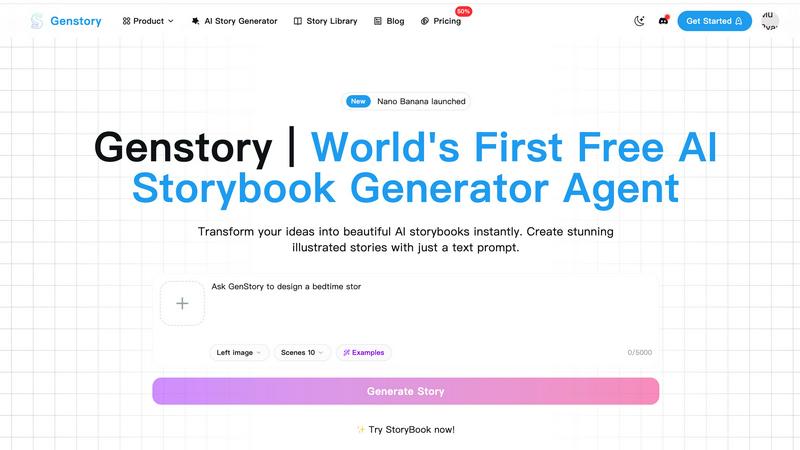
Transform your ideas into captivating novels, comics, and videos effortlessly with Genstory's powerful AI storytelling.
Last updated: February 27, 2026

Proofapp
Proofapp lets teams and clients leave visual feedback directly on any webpage to streamline reviews.
Last updated: March 4, 2026
Visual Comparison
Genstory
Proofapp

Feature Comparison
Genstory
Lightning-Fast Generation
GenStory is designed for speed, enabling users to complete the creation process—from text generation to illustration—in just seconds. This rapid turnaround allows for spontaneous storytelling, making it easy to capture fleeting ideas and moments of inspiration.
Simple and Intuitive Interface
With GenStory, there is no need for users to master complex commands or coding. Its user-friendly interface allows for natural conversation input, guiding the AI's storytelling process seamlessly. This ensures that anyone, regardless of technical skill, can create engaging stories effortlessly.
Multi-Dimensional Output
GenStory supports various formats for your creations, including PDF downloads and interactive web stories. This flexibility makes it easy to share your story with others, whether for personal enjoyment or educational purposes, and ensures that your creations can be printed or published as needed.
Beautiful Illustrations
Every story generated by GenStory comes with AI-crafted artwork that enhances the narrative. These vibrant illustrations not only bring the text to life but also engage readers visually, making the storytelling experience more immersive and enjoyable.
Proofapp
Visual Commenting
Proofapp's foundational feature allows users to click on any pixel of a captured website screenshot to leave a contextual comment. This eliminates the frustrating and ambiguous language often found in emails, such as "move the button to the top left, under the navigation." Feedback is pinned directly to the exact element in question, providing crystal-clear direction for designers and developers. The system supports threaded replies, enabling detailed discussion around each point until it is resolved, keeping all context intact within a single, organized dashboard.
Multi-Breakpoint Testing
Understanding that modern websites must be perfect across all devices, Proofapp automatically captures and presents screenshots of any submitted URL at both desktop and mobile viewports. This allows teams and clients to review the design, layout, and functionality across critical breakpoints simultaneously. Feedback can be left on either version, ensuring issues specific to mobile responsiveness or desktop presentation are caught and addressed visually, preventing costly post-launch fixes and ensuring a consistent user experience.
Secure, Account-Free Sharing
Proofapp facilitates seamless client collaboration by allowing project owners to generate secure, shareable links. These links can be sent directly to clients or stakeholders, who can then view the screenshots and provide comprehensive feedback without the friction of creating a user account. The links can also be set to expire for added security. This feature dramatically lowers the barrier to entry for collecting external feedback, making the review process as simple as sending a URL while maintaining professional control over the project.
Real-Time Collaboration & Integrations
The platform fosters a dynamic collaborative environment where team members can see comments and replies as they happen, eliminating the need for manual refresh and keeping everyone in sync. Coupled with real-time notifications, this ensures no feedback is missed. Furthermore, Proofapp integrates directly with tools like Slack, pushing updates and comments into team channels. This creates a connected workflow where visual feedback from Proofapp becomes a natural part of the existing communication ecosystem, further reducing context-switching and streamlining project management.
Use Cases
Genstory
Personalized Bedtime Stories
Parents can use GenStory to create unique bedtime adventures that feature their child as the main character. By incorporating their child's favorite animals or magical settings, parents can ensure that each story is a special bonding experience that keeps children excited for storytime.
Educational Storytelling
Educators can leverage GenStory to craft visual narratives that explain complex concepts or inspire creativity in the classroom. The tool is particularly beneficial for ESL teachers, special education instructors, and those looking for creative writing prompts to motivate students.
Creative Writing Prompts
Aspiring authors and creatives can use GenStory as a source of inspiration. By inputting ideas or themes, writers can generate story outlines and narratives that spark further creativity, helping to overcome writer's block and enhancing their storytelling skills.
Collaborative Story Creation
GenStory allows for collaborative storytelling experiences, where multiple users can contribute to a single story. This feature is perfect for group activities, classrooms, or family storytelling sessions, fostering teamwork and shared creativity.
Proofapp
Freelancer Client Approvals
Freelancers can use Proofapp to present website designs or developments to clients in a professional, organized manner. Instead of exchanging dozens of emails with attached, annotated images, the freelancer shares a single Proofapp link. The client clicks directly on the design to leave precise feedback, which the freelancer can then address and mark as resolved. This process saves hours per project, reduces revision rounds by an average of 60%, and presents a polished, modern workflow that enhances client trust and satisfaction.
Agency Design Team Workflows
Within a design agency, internal teams and external clients are often involved in the review process. Proofapp serves as a central hub for all visual feedback. Designers can upload multiple page URLs for a full website review. Project managers, developers, and clients can all leave comments in one place. The ability to tag team members, attach reference files, and track the resolution status of each item transforms a chaotic process into a manageable, trackable workflow, ensuring nothing falls through the cracks before launch.
Marketing Campaign Landing Page Reviews
Marketing teams frequently need to review and approve high-stakes landing pages for campaigns with input from copywriters, designers, brand managers, and legal. Using Proofapp, the team can collect all visual and copy feedback directly on the live page mockup. This prevents miscommunication about which headline or image needs changing and accelerates the approval cycle. The visual context ensures that feedback on tone, placement, and compliance is accurate and actionable, helping campaigns launch faster and more effectively.
Development Bug Reporting & QA
Developers and QA testers can utilize Proofapp as a superior bug reporting tool. Instead of writing lengthy descriptions to explain a visual glitch or layout issue, testers can capture the page in Proofapp and pin a comment exactly where the problem occurs. They can attach console logs or other files to the comment. This provides developers with immediate, unambiguous context for every issue, drastically reducing the time spent deciphering bug reports and speeding up the resolution process.
Overview
About Genstory
GenStory is an innovative AI story generator that harnesses advanced AI technology to turn your creative ideas into beautifully illustrated digital picture books. This versatile tool caters to a wide range of users, including parents, educators, and aspiring storytellers, making storytelling accessible and enjoyable for everyone. By simply inputting a natural language prompt, users can generate complete storybooks that feature compelling narratives and stunning illustrations in mere seconds. GenStory's main value proposition lies in its ability to transform ordinary moments into extraordinary tales, fostering creativity and bonding experiences. With features that support both personal and educational storytelling, GenStory opens up a world of imaginative possibilities, allowing users to create unique bedtime stories, educational materials, and interactive narratives that can be shared and cherished.
About Proofapp
Proofapp is a transformative visual feedback and website review platform engineered to streamline the collaborative process between designers, developers, and their clients. At its core, Proofapp solves the pervasive and costly problem of miscommunication in digital project workflows by replacing endless email chains and vague text instructions with precise, visual commentary. The platform operates with remarkable simplicity: users input any website URL, and Proofapp automatically generates comprehensive screenshots at both desktop and mobile breakpoints. Stakeholders can then click directly on these screenshots to pin comments, initiate threaded discussions, attach files, and mark feedback as resolved, all without requiring reviewers to create an account. This approach ensures feedback is inherently contextual, organized, and actionable. Designed for a broad spectrum of users, from solo freelancers and small development teams to larger marketing agencies, Proofapp offers a powerful suite of features including real-time notifications, Slack integration, and multi-page support, all accessible through a generous free tier and straightforward pricing. By centralizing communication visually, Proofapp dramatically reduces revision cycles, eliminates confusion, and empowers teams to ship higher-quality work faster, making it an indispensable tool for anyone involved in creating or approving digital experiences.
Frequently Asked Questions
Genstory FAQ
How does GenStory work?
GenStory operates using advanced AI technology that processes natural language prompts. Users describe their story ideas, and the AI generates a complete digital storybook with text and illustrations in seconds.
Can I customize the stories generated by GenStory?
Yes, after the AI generates a story, users can review it and make adjustments to the text or illustrations as desired. This allows for personalization and tailoring to specific preferences or audiences.
What formats can I export my created stories in?
GenStory supports multiple output formats, including downloadable PDFs for printing and interactive web stories for sharing online. This versatility makes it easy to distribute your creations in various ways.
Is GenStory suitable for all ages?
Absolutely! GenStory is designed for users of all ages, including children, parents, educators, and aspiring authors. Its intuitive interface and diverse storytelling capabilities cater to a wide audience, making storytelling accessible and fun for everyone.
Proofapp FAQ
How do reviewers leave feedback without an account?
Reviewers do not need to create a Proofapp account to participate. The project owner simply generates a secure, shareable link within the Proofapp dashboard and sends it to clients or team members. When recipients click the link, they are taken directly to the captured screenshots where they can immediately start clicking to leave comments, reply to threads, and attach files. All this functionality is available in a guest mode, making the feedback process incredibly simple and frictionless for all parties involved.
What happens after I submit a website URL?
When you paste a URL into Proofapp, the platform's systems automatically navigate to that webpage and capture high-fidelity screenshots. By default, it captures both a standard desktop view and a mobile-responsive view to ensure comprehensive coverage. These screenshots are then uploaded to your dedicated project workspace within seconds. You can immediately begin commenting on them yourself or share the project link with others to start collecting visual feedback, all without any manual screenshotting or uploading.
Can I use Proofapp for private or local development sites?
Yes, Proofapp supports the review of private websites, including those behind logins or on local development environments (localhost). This is typically achieved by using the provided Proofapp browser extension. The extension allows you to capture screenshots directly from your browser as you view the private or local site, then upload them seamlessly to your Proofapp project. This ensures your internal staging sites and in-progress work can be reviewed securely without being exposed on the public internet.
Is there a limit to the number of projects or comments?
Proofapp offers a generous free tier designed to accommodate small projects and individual users. Specific limits on the number of active projects, captured pages, and comments are detailed within the pricing plans. The platform is built to scale with your needs, offering paid plans that provide increased limits, additional features like team roles and advanced security, and priority support to accommodate growing teams and larger, more complex client portfolios.
Alternatives
Genstory Alternatives
Genstory is an innovative AI-driven platform that allows users to create novels, comics, and cinematic videos with ease. Positioned within the realm of design tools, it transforms creative prompts into illustrated digital picture books, catering to a diverse audience that includes parents, educators, and aspiring storytellers. Users often seek alternatives to Genstory for various reasons, including pricing concerns, the need for additional features, or specific platform compatibility requirements. When evaluating alternatives, it is crucial to consider factors such as ease of use, the quality of output, customization options, and the overall support provided by the platform to ensure it meets individual creative needs.
Proofapp Alternatives
Proofapp is a visual feedback and website review platform that falls under the category of design collaboration tools. It streamlines the process of collecting and managing feedback on digital designs by allowing users to pin comments directly onto screenshots, facilitating clearer communication between designers, developers, and clients. Users often explore alternatives to Proofapp for a variety of reasons. These can include budget constraints, the need for specific integrations with other project management software, or requirements for more advanced features like video feedback or user testing capabilities. Some teams may also seek platforms that offer different pricing structures or more granular permission controls for larger organizations. When evaluating an alternative, it's crucial to consider your team's specific workflow and collaboration style. Key factors include the ease of use for both internal teams and external clients, the depth of annotation tools available, the quality of real-time notification systems, and the platform's ability to scale with your project volume. The ideal solution should centralize feedback to eliminate confusion and turn subjective notes into actionable tasks efficiently.