
Dokta vs Fieldtics
Side-by-side comparison to help you choose the right tool.

Dokta automates document management for SMBs and freelancers, simplifying invoicing, cash flow, and payment tracking in one powerful tool.
Last updated: April 4, 2026

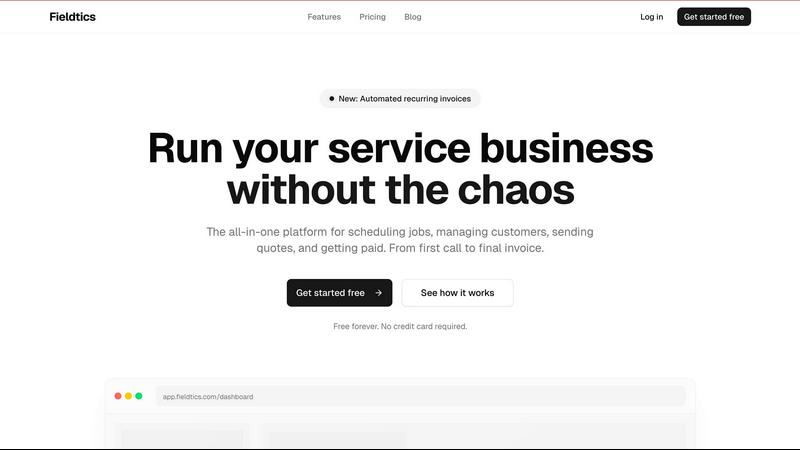
Fieldtics is a seamless all-in-one platform for service businesses to manage scheduling, customer interactions, and.
Last updated: February 28, 2026
Visual Comparison
Dokta

Fieldtics
Feature Comparison
Dokta
Automated Invoice Management
Dokta simplifies invoice management through an automated process that allows users to upload documents in various formats such as photos, scans, or PDFs. The platform's AI swiftly analyzes the document, extracting critical details like amounts, deadlines, and client information in under a minute. This efficiency reduces administrative burdens and enhances productivity.
Professional Invoicing and Contract Creation
With Dokta, users can create professional invoices and quotes with just a few clicks. The platform also supports the generation of contracts with monthly billing options, making it easier for freelancers and entrepreneurs to maintain a steady cash flow while ensuring their documentation meets professional standards.
Real-Time Financial Tracking
Dokta provides users with a real-time overview of their financial health, showcasing billed and collected revenue, outstanding amounts, and VAT information. The intuitive dashboard allows users to visualize their financial situation over the past 12 months, enabling better decision-making and financial planning.
Enhanced Client and Supplier Management
The platform enriches client and supplier information automatically, including SIRET number validation and payment scoring. This feature helps users maintain a complete historical record for each entity, ensuring they are well-informed about client relationships and payment behaviors.
Fieldtics
Smart Job Scheduling
Fieldtics offers an intelligent job scheduling feature that allows businesses to assign tasks efficiently, ensuring optimal resource allocation and timely service delivery. This feature helps avoid scheduling conflicts and maximizes productivity.
Customer Relationship Management (CRM)
The integrated CRM system enables businesses to manage customer interactions and relationships effortlessly. It centralizes customer data, communication history, and feedback to foster stronger relationships and improve service quality.
Effortless Invoicing
With Fieldtics, generating and sending invoices becomes a straightforward process. Users can create customized invoices that reflect their brand, track payments, and manage outstanding balances, ensuring a smooth billing cycle.
Quick Payment Processing
Fieldtics simplifies payment processing by offering multiple payment options for clients. This feature accelerates cash flow and minimizes delays, allowing businesses to receive payments quickly and efficiently.
Use Cases
Dokta
Freelance IT and Consulting
For freelance IT professionals and consultants, Dokta streamlines contract management and invoicing by automating the billing process. Users can set up contracts with automatic monthly invoicing, allowing them to focus on their projects while Dokta handles the administrative tasks.
Creative Freelancers
Creative freelancers can utilize Dokta to manage their projects seamlessly from the first quote to the final payment. With the ability to send quotes with acceptance links and convert quotes into invoices in one click, the platform simplifies the workflow for creatives and ensures timely payments.
Auto-Entrepreneurs
For auto-entrepreneurs, Dokta offers a straightforward solution for generating compliant invoices and tracking payments. Users receive alerts for important URSSAF deadlines, allowing them to stay organized and compliant without unnecessary stress.
Small to Medium-Sized Businesses
SMBs can leverage Dokta to centralize their document management and financial tracking. The platform's capabilities in automating reminders for unpaid invoices and providing real-time financial insights help businesses maintain a healthy cash flow and improve overall efficiency.
Fieldtics
Service Appointment Management
Fieldtics is ideal for businesses that require effective management of service appointments. From scheduling to tracking job progress, it ensures that service providers are organized and clients are satisfied with timely responses.
Customer Follow-Up and Retention
Businesses can utilize Fieldtics to enhance customer follow-up strategies. The platform's CRM capabilities enable teams to stay in touch with clients post-service, improving retention rates and encouraging repeat business.
Financial Tracking and Reporting
Fieldtics assists in tracking expenses and income, making it easier for service businesses to manage their finances. Users can generate reports that provide insights into financial health, aiding in informed decision-making.
Team Collaboration in the Field
Fieldtics promotes collaboration among team members, whether they are in the office or out in the field. Real-time updates and communication tools ensure that everyone stays informed, leading to improved teamwork and efficiency.
Overview
About Dokta
Dokta is a revolutionary AI-powered document management platform designed specifically for freelancers, solo entrepreneurs, auto-entrepreneurs, and small to medium-sized businesses (SMBs). This user-friendly tool streamlines the management of various document types, including invoices, quotes, and contracts, by utilizing advanced AI technology to read, classify, and extract essential data in less than 60 seconds. Dokta supports the complete document lifecycle, allowing users to create professional invoices and quotes effortlessly, track payments, automate reminders for unpaid invoices, manage contracts and deadlines, and even generate tasks directly from their documents. By centralizing document management, Dokta eliminates the hassle of lost files and missed deadlines, giving users more time to focus on their core business activities. With features that build a comprehensive client database and track cash flow in real time, Dokta makes financial management simple and effective. Whether you are a freelance developer, a consultant, a trades contractor, or a growing SMB, Dokta places your documents at the center of your operations, all managed by intelligent AI technology.
About Fieldtics
Fieldtics is an innovative all-in-one platform designed specifically for service businesses looking to streamline their operations and enhance overall efficiency. By integrating essential tools into a single, intuitive solution, Fieldtics empowers teams to manage various aspects of their workflows seamlessly. Whether it's scheduling jobs, managing customer relationships, sending quotes, or processing payments, Fieldtics ensures that every crucial component is readily accessible and easy to use. This platform is tailored for teams that operate both in the office and in the field, offering web and mobile applications that keep everyone connected and informed in real-time. The customizable dashboard, branding, and menus allow businesses to align the platform with their unique identity. Furthermore, Fieldtics integrates smoothly with existing tools, automating workflows and centralizing data for a truly connected experience. This comprehensive approach not only helps organizations manage leads and customers but also assists in tracking projects, time, and expenses, enabling effective growth and a clear path to success.
Frequently Asked Questions
Dokta FAQ
What types of documents can I upload to Dokta?
Dokta supports a variety of document formats, including photos, scans, and PDFs. Users can upload invoices, quotes, contracts, and more, allowing for comprehensive document management.
How quickly can Dokta analyze a document?
Dokta's advanced AI engine can read and analyze documents in less than 60 seconds, extracting critical data such as amounts, deadlines, and client details efficiently.
Is Dokta compliant with data protection regulations?
Yes, Dokta is fully compliant with GDPR regulations, ensuring that all user data is securely managed and hosted in Europe (AWS).
What is the cost to use Dokta?
Dokta offers a free tier that allows users to manage up to 15 documents per month. Paid plans start at €9 per month, providing additional features and higher document limits tailored to freelancers and SMBs.
Fieldtics FAQ
What types of businesses can benefit from Fieldtics?
Fieldtics is designed primarily for service-based businesses across various industries, including cleaning, landscaping, electrical, and plumbing services. Its features cater to the unique operational needs of these sectors.
Is Fieldtics easy to integrate with other tools?
Yes, Fieldtics integrates seamlessly with many popular tools and applications. This allows businesses to synchronize data and automate workflows, making it easier to manage operations without disruption.
Can I customize my Fieldtics dashboard?
Absolutely! Fieldtics offers extensive customization options for your dashboard, including branding, layout, and menu configurations. This flexibility ensures that the platform aligns with your business's identity and operational preferences.
Is there a free trial available for Fieldtics?
Fieldtics provides a free plan that allows users to get started without any credit card requirements. This enables potential customers to explore the platform and its features before committing to a paid plan.
Alternatives
Dokta Alternatives
Dokta is an AI-powered document management platform tailored for freelancers, solo entrepreneurs, auto-entrepreneurs, and small to medium-sized businesses (SMBs). It streamlines the management of various documents such as invoices, quotes, and contracts by automatically reading, classifying, and extracting crucial data in under a minute. As users become increasingly reliant on technology for efficiency, they often seek alternatives to Dokta for reasons such as pricing, specific feature sets, or integration with other platforms that better suit their business needs. When searching for alternatives to Dokta, users should consider factors such as the platform's pricing structure, the range of features offered, ease of use, and compatibility with existing systems. Additionally, it is essential to evaluate the level of customer support provided, as well as any potential for customization that aligns with individual business workflows. A suitable alternative should not only meet immediate document management needs but also support future growth and operational efficiency.
Fieldtics Alternatives
Fieldtics is an all-in-one platform designed for service businesses, offering tools for scheduling, customer management, invoicing, and payment processing. It aims to streamline operations, making it easier for teams to manage their workflows whether in the office or in the field. Despite its comprehensive features, users often seek alternatives due to factors such as pricing, specific functionality needs, or the desire for a platform that better integrates with existing tools. When searching for an alternative to Fieldtics, it's essential to consider the specific features that matter most to your business. Look for platforms that offer flexibility in customization, robust customer relationship management tools, and seamless integration capabilities. Evaluating the user experience and scalability of potential alternatives can also help ensure that the chosen solution aligns well with your operational goals and can grow alongside your business.