
Changeflow vs Cosy
Side-by-side comparison to help you choose the right tool.

Changeflow
Changeflow uses AI to track and summarize only the critical website changes that matter to your business.
Last updated: March 4, 2026

Cosy automates Slack community onboarding, member connections, and content management to save time.
Last updated: February 28, 2026
Visual Comparison
Changeflow

Cosy
Feature Comparison
Changeflow
AI-Powered Contextual Intelligence
Changeflow's core AI engine does not just detect textual differences; it understands the semantic meaning and context of changes on a page. It filters out irrelevant updates like ad rotations, timestamp refreshes, or minor formatting shifts, focusing only on substantive alterations that align with your described interests. This results in precise, actionable alerts that save you from wasting time deciphering screenshots or reading entire pages to find what truly changed.
Natural Language Setup & Smart Link Following
Setting up monitoring requires no technical expertise, RSS feeds, or complex configuration. You simply describe what you want to track in plain English and provide a starting URL. Changeflow's AI agent can then intelligently follow links from that page, read the target content, determine its relevance based on your instructions, and build a comprehensive, dynamic feed of updates from an entire network of pages, all automated from a single, simple description.
Enterprise-Grade Page Unblocking & Reliability
Built on over a decade of experience, Changeflow features sophisticated anti-blocking technology that reliably accesses content behind login walls, JavaScript-heavy applications, and other complex structures. With a 99.9% success rate on pages where competitors fail, it ensures continuous, uninterrupted monitoring for mission-critical sources like regulatory portals, court dockets, and competitor sites, providing peace of mind for compliance and business intelligence teams.
Collaborative Workspaces & Forensic Change Analysis
The platform is built for team collaboration with shared workspaces that keep everyone synchronized. Coupled with powerful forensic tools like Site Version Control, teams can navigate timestamped archives of any monitored page to see a complete historical record. The interactive change viewer highlights exact modifications, allowing for deep-dive analysis and audit trails, which is essential for legal, compliance, and competitive intelligence documentation.
Cosy
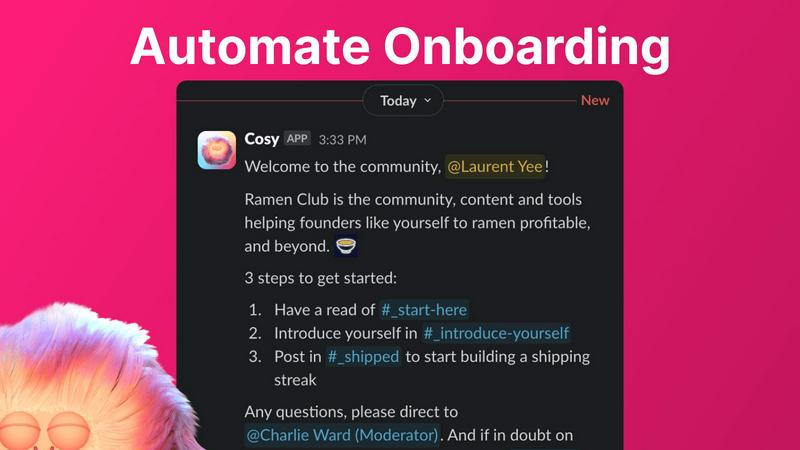
Automated Onboarding Sequences
Cosy allows community managers to create and automate up to ten distinct welcome DM sequences for new members, eliminating the need for manual greetings. These sequences can be triggered immediately upon joining or on a customizable delay, and can be sent from the community leader, a team member, or the Cosy bot itself. Messages are fully customizable with member names, links, and emojis, ensuring a personal touch. This feature guarantees that every new member, regardless of when they join, receives a warm welcome and crucial information, saving administrators countless hours while ensuring no one is overlooked.
Automated Member Introductions
To foster deeper connections, Cosy automatically introduces opted-in community members to each other via direct messages on a regular cadence. Administrators can customize the frequency (every 1-4 weeks), the day, and the time. Introductions happen in a three-person DM involving the two members and the Cosy bot, with a customizable intro message template. The system intelligently pairs members randomly to enhance serendipity while avoiding recent matches, mimicking tools like Donut but within Slack, to automatically grow engagement and help members build their networks.
Slack-Native Member Directory
Cosy provides a simple, searchable directory of all community members that operates entirely within Slack. Leaders can create custom profiles with up to ten fields, including text entry and multiple-choice options. Members can be prompted to fill out their profiles via a notification from the Cosy bot, either manually by an admin or automatically 24 hours after joining. Members can then search for keywords and filter profiles using the Cosy app or a /member-directory slash command, making it easy to find and connect with the right people without ever leaving the workspace.
Content Highlights & Moderation Tools
This feature helps surface the most valuable conversations and maintain community health. With simple slash commands, admins can instantly retrieve the top 10 most engaged posts in a specific channel (/most-engaged-messages) or across all public channels (/most-engaged-messages-all). Additionally, the /unreplied-messages command surfaces posts that have not received replies, allowing leaders to spark conversation. Cosy also includes instant moderation tools to flag abusive and spam messages, ensuring a safe and positive environment for all members.
Use Cases
Changeflow
Competitive Intelligence & Pricing Monitoring
Business and marketing teams use Changeflow to automatically track competitor websites for changes in pricing, product specifications, promotional offers, and strategic announcements. The AI filters out noise and delivers summarized alerts, enabling companies to react swiftly to market movements and adjust their strategies proactively, ensuring they never miss a critical update that could impact market share or revenue.
Legal & Regulatory Compliance Tracking
Legal librarians and compliance officers at top-tier firms monitor court dockets, regulatory bodies (like the SEC, FDA, or FTC), and legislation portals. Changeflow reliably accesses these often-complex sites, detects new filings, guidance updates, or case citations, and provides clear summaries. This ensures teams are immediately aware of new obligations, deadlines, or legal precedents, mitigating risk and maintaining rigorous compliance standards.
News & Brand Mention Monitoring
Communications and PR teams leverage Changeflow to follow news sites, industry blogs, and review platforms for mentions of their company, executives, or key products. By turning these pages into an intelligent feed, the platform surfaces relevant articles and discussions in real-time, allowing teams to manage brand reputation, engage with media, and measure the impact of their campaigns effectively.
Market Research & Due Diligence
Investment analysts, consultants, and business development professionals monitor industry reports, company websites, and market data sources for signals of change, such as executive turnover, partnership announcements, or financial updates. Changeflow's ability to follow links and summarize key information from vast networks of pages transforms scattered public data into a structured stream of actionable intelligence for research and decision-making.
Cosy
For Professional Networks & Alumni Groups
Professional networks and alumni associations can use Cosy to automatically welcome new members, instantly making them feel part of the group. The automated introductions feature is perfect for facilitating networking and mentorship connections between members based on shared interests or industries. The searchable member directory allows members to easily find colleagues with specific skills or career backgrounds, turning the Slack community into a powerful professional resource and engagement hub.
For SaaS Customer & User Communities
Companies building customer communities on Slack can leverage Cosy to automate onboarding sequences that guide new users to key resources, support channels, and best practices. The content highlights feature allows community managers to quickly identify and amplify top user-generated content, feature requests, or success stories. Automated introductions can connect users with similar use cases or challenges, fostering peer-to-peer support and reducing the support team's burden.
For Online Course & Cohort-Based Communities
Educators and course creators running cohort-based programs can use Cosy to ensure every student receives a structured, timed welcome sequence as they join the dedicated Slack workspace. The member directory helps students and facilitators learn about each other's backgrounds and goals. Automated weekly introductions between cohort members encourage collaboration and peer learning, significantly enhancing the sense of community and improving course completion rates.
For Non-Profit & Volunteer Organizations
Non-profits can utilize Cosy to manage their volunteer communities efficiently. Automated onboarding can deliver essential information, guidelines, and upcoming event details to new volunteers. The member directory helps coordinators and volunteers find individuals with specific skills or availability. The ability to highlight engaging posts ensures important announcements and success stories gain visibility, while moderation tools help maintain a respectful and focused communication environment.
Pricing Comparison
Changeflow
Changeflow offers straightforward, team-focused pricing plans designed to scale with business needs. All plans include core features like AI-powered change detection, natural language setup, and expert support.
Plus Plan ($19/month): Ideal for getting started, this plan allows monitoring of 20 pages. It includes email and chat support, onboarding assistance, hourly/daily/weekly check frequencies, storage for 10 historical versions per page, 2 notification email addresses, and centralized user administration.
Business Plan ($149/month): Designed for teams requiring broader monitoring, this plan covers 500 pages. It includes all Plus features, enhanced expert support, storage for 20 versions per page, 5 notification addresses, bulk import capabilities from CSV/Excel and site crawls, and access to the premium page unblocker for maximum reliability on challenging sites. A 30-day free trial is available for both plans.
Cosy
Cosy offers a free plan that supports communities with up to 250 members, providing access to its core features. For larger communities requiring unlimited members, Cosy provides paid plans. Prospective users can start with a full-featured 30-day free trial for the unlimited members plan to evaluate the tool's complete capabilities within their Slack workspace before committing. Specific pricing tiers and detailed costs for the paid plans are available on the Cosy website.
Overview
About Changeflow
Changeflow is an advanced web monitoring and change detection platform engineered to transform the overwhelming task of tracking online information into a manageable, intelligent, and actionable process. It moves far beyond simple page-watching tools that merely alert you "something changed." Instead, Changeflow employs sophisticated AI to read, comprehend, and contextualize web page content, delivering concise summaries of only the meaningful updates that matter to your specific objectives. The platform is designed for professionals and teams who rely on timely, accurate information from the web to make critical business decisions, ensure compliance, and maintain competitive advantage. Its core value proposition lies in eliminating manual checks, reducing informational noise, and providing reliable, AI-filtered intelligence from even the most complex and challenging websites, all through an intuitive, natural language interface. Trusted by Fortune 500 and Am Law 200 firms, Changeflow combines enterprise-grade reliability with powerful, user-centric features to save thousands of customer hours and monitor over a billion pages with a remarkable 99.9% success rate at accessing content other tools cannot reach.
About Cosy
Cosy is an innovative, Slack-native platform engineered to transform standard Slack workspaces into vibrant, self-sustaining communities. It addresses the core challenges of modern community management by automating time-intensive tasks, fostering meaningful connections, and providing powerful tools for engagement and safety—all without requiring members or administrators to leave the familiar Slack environment. Designed for community leaders, managers, and organizations of all sizes, Cosy's primary value proposition lies in its ability to save significant manual effort—hours every week—while simultaneously elevating the quality of member interaction and community culture. By seamlessly integrating into existing Slack workflows, Cosy empowers leaders to automate personalized onboarding sequences, facilitate serendipitous member introductions, maintain a searchable member directory, and highlight valuable community content. This comprehensive approach ensures that communities are not just groups of people in a channel but are thriving ecosystems where members feel welcomed, connected, and engaged, ultimately driving higher retention and value for all participants.
Frequently Asked Questions
Changeflow FAQ
How does Changeflow differ from traditional website monitoring tools?
Traditional tools typically take screenshots or detect raw HTML changes, flooding you with alerts for every minor update, including irrelevant ones. Changeflow uses AI to understand the content and context of a page. It reads the page like a human would, identifies what the substantive changes are based on your instructions, and provides a concise summary of only the important updates, dramatically reducing noise and saving you significant time.
Can Changeflow monitor websites that require a login or are built with complex JavaScript?
Yes, this is a key strength of the platform. Changeflow employs advanced, enterprise-grade anti-blocking and rendering technology developed over a decade. It can navigate login walls, execute JavaScript, and handle dynamic content with a 99.9% success rate, reliably monitoring pages that are inaccessible to many other simpler monitoring tools, which is crucial for tracking secure portals, web applications, and modern interactive sites.
How do I set up a monitoring task, and is it technically complex?
Setup is intentionally simple and requires no technical skills. You describe what you care about in plain English (e.g., "Monitor this competitor's homepage for price changes on their flagship product") and provide the starting URL. Changeflow's AI agent interprets your request, handles the configuration, and begins intelligent tracking. You can also use the chatbot to add multiple pages rapidly or import large lists via CSV for bulk operations.
How are notifications delivered, and can they be integrated into other workflows?
Notifications are delivered to your centralized Changeflow dashboard feed and can be sent via email to multiple addresses. For advanced workflow integration, the platform offers API access and compatibility with Zapier, allowing you to push alerts and summaries into thousands of other business applications like Slack, Microsoft Teams, CRM systems, or internal databases, ensuring critical information reaches the right place at the right time.
Cosy FAQ
How does Cosy handle data privacy and security?
Cosy is built as a native Slack app, operating within Slack's robust security and infrastructure. It only accesses data and performs actions based on the permissions granted during installation. Cosy adheres to Slack's API guidelines and best practices for data handling. User data for features like the member directory is stored securely and is only accessible within the confines of your specific Slack workspace as configured by the administrator.
Can I customize the messages sent for onboarding and introductions?
Absolutely. Cosy offers full customization for all automated messages. For onboarding sequences, you can write unique messages for each step, include the member's name using placeholders, add links to important resources, and use emojis. The introduction messages between members also use a customizable template that you can edit to match your community's tone and provide context for the connection.
What happens if a member does not want to be part of automated introductions?
Member participation in automated introductions is entirely opt-in. Community leaders can configure the feature, but individual members have control. The system only introduces members who have consented to participate. This ensures respect for member preferences and prevents unwanted DMs, maintaining a positive community experience.
Is there a limit to the number of members for the free plan?
Yes, the free plan of Cosy supports communities with up to 250 members. This allows smaller communities or those just starting out to benefit from core features without cost. For communities needing to support more than 250 members, paid plans with unlimited members are available, typically starting with a 30-day free trial.
Alternatives
Changeflow Alternatives
Changeflow is an AI-driven market and competitor insights platform, specializing in intelligent web monitoring and change detection. It belongs to the broader category of business intelligence and productivity tools designed to automate competitive analysis and regulatory tracking. Users may explore alternatives for various reasons, such as budget constraints, specific feature requirements not covered by their current plan, or a need for deeper integration with existing enterprise platforms like CRM or project management software. Others might seek simpler tools for basic website diffs or more specialized solutions for niche use cases like social media listening. When evaluating alternatives, key considerations include the depth of AI analysis, the ability to handle complex, JavaScript-heavy sites and login-protected content, the flexibility of alerting and reporting features, and the overall value in terms of time saved versus cost. The ideal solution should not only detect changes but also contextualize them, turning raw data into actionable business intelligence.
Cosy Alternatives
Cosy is a productivity and community management tool designed to transform Slack into a more vibrant and connected platform. It automates essential tasks like member onboarding and introductions, helping leaders cultivate engagement without constant manual effort. Users often explore alternatives for various reasons, including budget constraints, the need for different feature sets, or a requirement to manage communities on platforms other than Slack. The search for the right tool is driven by the unique needs and scale of each community. When evaluating alternatives, consider the core automation capabilities for onboarding and engagement, the depth of member directory and discovery features, and the overall ease of use. The goal is to find a solution that not only saves time but also genuinely fosters the meaningful connections that define a thriving community.